
1. Introduktion
The VONETS VM300-L is a compact and versatile WiFi module designed for various networking applications. It functions as a WiFi bridge, wireless repeater, mini router, and WiFi extender, providing stable 2.4GHz wireless connectivity with a transmission rate of up to 300Mbps. This module is ideal for integrating wireless capabilities into DIY projects and professional network devices.
2. Pakkens indhold
Bekræft at alle varer er til stede i din pakke:
- 1 x VM300-L WiFi Module
- 1 x USB and Ethernet Cable (30CM)
- 1 x engelsk brugervejledning
- 1 x pakkeboks
3. Produktet er slutview
The VM300-L module features a compact circuit board design, integrating essential components for wireless networking. It includes an Ethernet port for wired connections and a USB port for power.
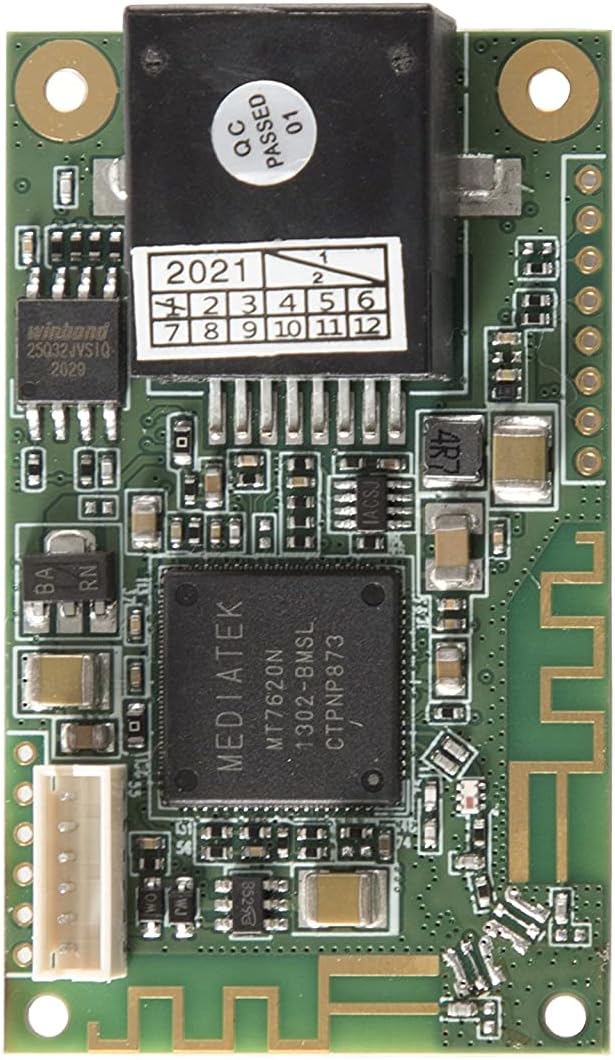
Billede 3.1: Nærbillede view of the VM300-L WiFi Module circuit board, showing its components.

Image 3.2: The VM300-L module connected to its USB power cable and an Ethernet cable, illustrating its compact size and connectivity options.
4. Specifikationer
| Feature | Beskrivelse |
|---|---|
| Trådløs Standard | 802.11b/g/n |
| Frekvensbånd | 2.4 GHz |
| Dataoverførselshastighed | Op til 300 Mbps |
| RF udgangseffekt | 14.5 dBm - 16 dBm |
| Strømforsyning | DC 5V/1A or DC 5V-15V |
| Driftstemperatur | -25℃ til 55℃ |
| Dimensioner | 1.89 x 1.18 x 0.47 tommer |
| Vægt | 2.89 ounce |
5. Strømforsyningsmetoder
The VM300-L module supports two power supply methods:
- USB 5V/1A Power Supply: Use a standard USB power source with an output of at least 5W.
- DC 5V-15V Power Supply: Connect a wide voltage DC power supply within the specified range.

Image 5.1: Illustration of the two supported power supply methods: USB 5V/1A and DC 5V-15V.
6. Driftstilstande
The VM300-L offers flexible operating modes to suit various networking needs:
- Repeater/Bridge Mode: Expands existing WiFi networks and converts WiFi signals to wired connections via the RJ45 port. This mode is suitable for devices like cash registers, surveillance systems, and industrial equipment.
- AP (Adgangspunkt) Tilstand: Provides wireless access functionality, allowing devices to connect to the internet when the module is connected to a network cable.
- Routertilstand: Enables wireless access for dial-up internet connections and cross-network segment applications.

Image 6.1: Visual representation of the Repeater/Bridge, AP, and Router application modes for the VM300-L module.
7. Nøglefunktioner
The VM300-L incorporates several advanced features:
- Intelligent Transparent Bridge Mode: Supports both AP Client and AP Station functionalities.
- Independent Hardware Data Processing: Operates without consuming host system resources or requiring driver installation.
- WEB Configuration Services: Allows module parameters to be configured easily via a web interface.
- VDNS Technology: Facilitates configuration in bridge mode through a domain login page.
- Temperature Compensated Auto Frequency Control (TAFC): Ensures stable WiFi signal transmission.
- IP/MAC-lag Transparent transmission: Compatible with various applications requiring transparent data transmission, such as GoPro cameras and Hikvision surveillance systems.
- WiFi Motion Detection: Suitable for dynamic access in intelligent robots.
- Justerbar sendeeffekt: Two levels of WiFi RF output power can be selected.
- Automatic Overvoltage Beskyttelse: Protects the device if the input voltage overstiger 15.5V.
- Timingfunktioner: Supports timing WiFi on/off and device reboot.

Image 7.1: A summary of key features including TAFC, IP/MAC transparent transmission, signal detection, WiFi motion detection, transmit power options, factory reset, overvoltage protection, and timing functions.

Image 7.2: Diagram illustrating MAC layer transparent transmission, showing compatibility with various devices like GoPro cameras, IP cameras, and drones.
8. Opsætningsvejledning
To set up your VONETS VM300-L WiFi Module:
- Tilslut strøm: Connect the module to a suitable power source using either the USB cable (5V/1A) or a DC 5V-15V adapter.
- Tilslut Ethernet (valgfrit): If using Repeater/Bridge or AP mode, connect an Ethernet cable to the module's RJ45 port.
- Adgang Web Konfiguration: Once powered on, the module will broadcast a WiFi signal. Connect to this WiFi network from your computer or mobile device.
- Konfigurer indstillinger: Åbn a web browser and navigate to the module's default IP address (refer to the included user manual for the specific IP address). Use the web interface to configure the desired operating mode (Repeater/Bridge, AP, or Router) and network settings.
- Anvend indstillinger: Save your configurations and reboot the module if prompted.
9. Ansøgninger
The VM300-L module is suitable for a wide range of applications, including:
- Elevator and hotel WiFi solutions
- Electronic monitoring systems
- IP camera connectivity
- Network printers
- Digital industrial scales
- Robots and robotic arms
- Doll machines and other vending equipment
- Medicinske instrumenter
- Video transmission systems
- DIY professional network devices

Billede 9.1: Eks.amples of various applications where the VM300-L module can be used, such as robots, electronic scales, printers, and surveillance cameras.
10. Vedligeholdelse
To ensure optimal performance and longevity of your VM300-L module:
- Keep the module in a clean, dry environment, away from excessive dust and moisture.
- Sørg for korrekt ventilation for at forhindre overophedning.
- Use only the specified power supply (DC 5V/1A or DC 5V-15V).
- Undgå fysisk stød eller at tabe enheden.
- Tjek regelmæssigt for firmwareopdateringer på producentens website for improved performance and security.
11. Fejlfinding
If you encounter issues with your VM300-L module, consider the following:
- Ingen strøm: Ensure the power cable is securely connected and the power source is functioning correctly. Verify the power supply meets the 5V/1A or 5V-15V DC requirements.
- Intet WiFi-signal: Check if the module is powered on. If configured as a repeater, ensure it is within range of the main WiFi network.
- Kan ikke få adgang Web Interface: Confirm your device is connected to the module's WiFi network. Try clearing your browser's cache or using a different browser. Verify the correct IP address for the web konfiguration.
- Dårlig ydeevne: Ensure the module is placed in an optimal location, free from obstructions and interference. Check for other devices operating on the same 2.4GHz frequency.
- Gendan fabriksindstillinger: If issues persist, a factory reset can restore the module to its default settings. Refer to the detailed user manual for instructions on performing a factory reset.
12. Garanti og support
The VONETS VM300-L WiFi Module is manufactured by Shenzhen Houtian Network Communication Technology Co.,Ltd. For specific warranty information, technical support, or service inquiries, please refer to the official documentation included with your product or visit the manufacturer's official webwebsted.