
1. Introduktion
Thank you for choosing the AIYIMA A05 TPA3221 Power Amplifier. This compact 2.0 channel stereo amplifier is designed to deliver high-fidelity audio to passive speakers, featuring both Bluetooth and RCA input options. This manual provides detailed instructions for setup, operation, and maintenance to ensure optimal performance and longevity of your device.
2. Sikkerhedsinstruktioner
- Strømforsyning: Use only the specified power adapter (DC 12-32V) to prevent damage. Ensure the power outlet voltage er kompatibel.
- Ventilation: Placer amplifier in a well-ventilated area. Do not block ventilation openings. Avoid placing it on soft surfaces that may obstruct airflow.
- Fugtighed: Keep the device away from water, humidity, and liquids. Do not operate with wet hands.
- Varme: Avoid direct sunlight, heat sources, or extreme temperatures.
- Rensning: Afbryd strømmen før rengøring. Brug en blød, tør klud. Brug ikke flydende rengøringsmidler eller aerosolrengøringsmidler.
- Service: Do not attempt to repair or disassemble the unit yourself. Refer all servicing to qualified personnel.
- Børn: Opbevares utilgængeligt for børn.
3. Pakkens indhold
Tjek venligst pakken for følgende varer:
- AIYIMA A05 Bluetooth 5.0 Amplifier x 1
- Bluetooth-antenne x 1
- Brugervejledning x 1
- Garantikort x 1
- DC 32V strømadapter x 1

Billede 3.1: Contents of the AIYIMA A05 ampLifier-pakken, inklusive amplifier unit, Bluetooth antenna, user manual, warranty card, and power adapter.
4. Produktet er slutview
4.1 Betjeningselementer på frontpanelet
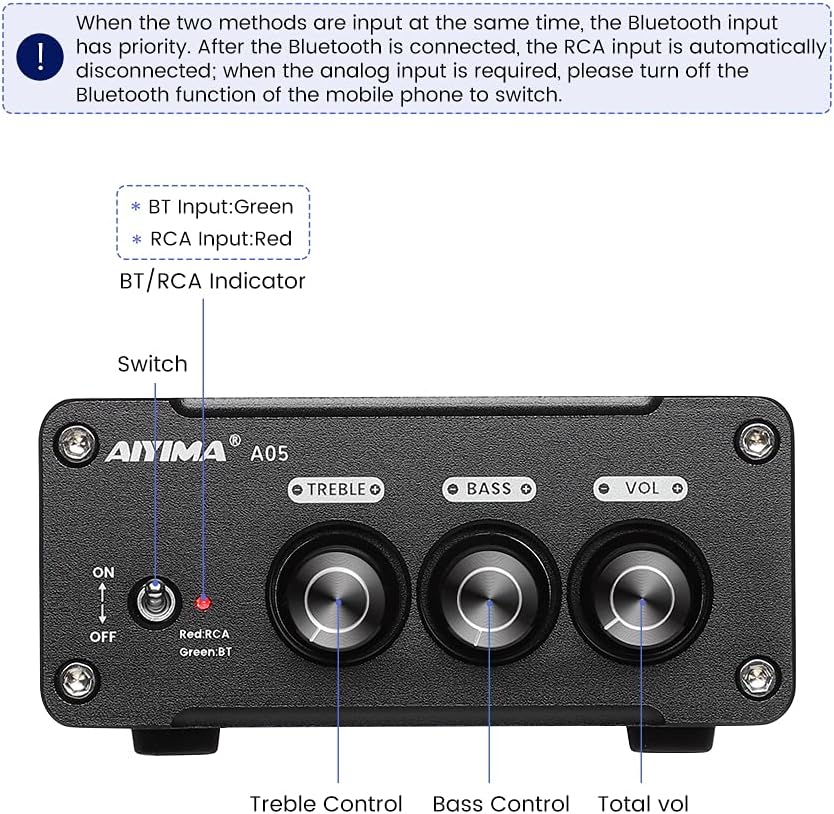
Billede 4.1: Front panel of the AIYIMA A05 amplifier, showing the power switch, input indicator, treble, bass, and volume controls.
- Tænd/sluk-knap (tænd/sluk): Skifter mellem amplifier effekt.
- BT/RCA Indicator: Displays the active input source. Green indicates Bluetooth (BT) input, Red indicates RCA input.
- Diskantkontrol: Justerer højfrekvent lydudgang.
- Baskontrol: Justerer lavfrekvent lydudgang.
- Lydstyrkekontrol: Justerer det samlede lydudgangsniveau.

Billede 4.2: Nærbillede view of the power switch and the BT/RCA input indicator on the front panel.

Billede 4.3: Nærbillede view of the Treble, Bass, and Volume control knobs.
4.2 Bagpaneltilslutninger

Billede 4.4: Rear panel of the AIYIMA A05 amplifier, showing the Bluetooth antenna port, RCA audio input, speaker outputs, and DC power input.
- ANT (Bluetooth Antenna Port): Connect the included Bluetooth antenna here for wireless audio reception.
- AUDIO IN (RCA Input): Connect audio sources (e.g., CD player, TV, DAC) using RCA cables.
- SPEAKER (Audio Output): Connect passive speakers using speaker wires. Ensure correct polarity (+ to + and - to -).
- DC 24-32V (Power Input): Connect the provided DC power adapter.
5. Opsætningsvejledning
Follow these steps to set up your AIYIMA A05 amplivligere:
- Tilslut Bluetooth-antenne: Screw the included Bluetooth antenna into the ANT port on the rear panel.
- Tilslut højttalere: Connect your passive speakers to the SPEAKER output terminals on the rear panel. Ensure the positive (+) terminal of the amplifier connects to the positive (+) terminal of the speaker, and the negative (-) terminal connects to the negative (-).
- Connect Audio Source (RCA): If using a wired audio source, connect it to the AUDIO IN (RCA) ports on the rear panel using appropriate RCA cables.
- Tilslut strøm: Connect the DC power adapter to the DC 24-32V input port on the rear panel, then plug the adapter into a wall outlet.
- Tænd: Flip the power switch on the front panel to the "ON" position. The input indicator will light up.

Billede 5.1: Bagpanelet på amplifier with Bluetooth antenna, RCA cables, speaker wires, and power adapter connected.
6. Betjeningsvejledning
6.1 Tænd/sluk
For at tænde for amplifier, flip the front panel switch to the "ON" position. To power off, flip the switch to the "OFF" position.
6.2 Bluetooth-forbindelse
- Sørg for amplifier is powered on and the BT/RCA indicator is green, indicating Bluetooth mode. If it's red, ensure no RCA cable is connected or disconnect it.
- Aktiver Bluetooth på din mobilenhed (telefon, tablet osv.) og søg efter tilgængelige enheder.
- Select "AIYIMA A05" from the list of devices to pair.
- Once paired, the indicator light will remain green, and you can play audio from your device through the amplivligere.
6.3 RCA Input Usage
- Connect your audio source to the RCA input ports on the rear panel.
- Sørg for amplifier is powered on. The BT/RCA indicator should be red, indicating RCA input mode.
- If the indicator is green (Bluetooth mode), ensure Bluetooth is disconnected on any paired device, or turn off Bluetooth on your mobile device to switch to RCA input.
6.4 Justering af lyd
- Bind: Rotate the "VOL" knob clockwise to increase volume and counter-clockwise to decrease.
- Diskant: Rotate the "TREBLE" knob to adjust high-frequency sounds to your preference.
- Bas: Rotate the "BASS" knob to adjust low-frequency sounds to your preference.
7. Vedligeholdelse
- Rensning: Disconnect the power adapter before cleaning. Use a soft, dry, lint-free cloth to wipe the surface of the amplifier. Do not use harsh chemicals or abrasive materials.
- Opbevaring: If not in use for an extended period, store the ampOpbevar apparatet på et køligt, tørt sted, væk fra direkte sollys og ekstreme temperaturer.
- Forbindelser: Kontrollér regelmæssigt alle kabelforbindelser for at sikre, at de er fastgjorte og fri for korrosion.
8. Fejlfinding
If you encounter issues with your AIYIMA A05 ampLifier, se venligst følgende almindelige problemer og løsninger:
| Problem | Mulig årsag | Løsning |
|---|---|---|
| Ingen lydudgang |
|
|
| Distorted or buzzing sound |
|
|
| Bluetooth forbinder ikke |
|
|
| Loud noise/ticking on startup |
|
|
If the problem persists after trying these solutions, please contact AIYIMA customer support for further assistance.
9. Specifikationer

Billede 9.1: Dimensions of the AIYIMA A05 amplifier: 107mm (4.2in) width, 87mm (3.4in) depth, 36mm (1.4in) height.
| Feature | Specifikation |
|---|---|
| Model | A05 |
| Udgangseffekt | 105 Watts (at 4 Ω) |
| Antal kanaler | 2.0 (stereo) |
| Bluetooth version | QCC3034 APTX Bluetooth 5.0 |
| Chipsæt | TPA3221 |
| Minimumsforsyning Voltage | 12 volt (DC) |
| Maksimal forsyning Voltage | 32 volt (DC) |
| Varens vægt | 500 gram |
| Dimensioner (ca.) | 107 mm (B) x 87 mm (D) x 36 mm (H) |
10. Garanti og support
AIYIMA A05 amplifier comes with a warranty. Please refer to the included Warranty Card for specific terms and conditions. For technical support, troubleshooting assistance, or warranty claims, please contact AIYIMA customer service through the retailer where the product was purchased or visit the official AIYIMA webwebsted.
Online ressourcer: For additional information and support, you may visit the AIYIMA store page: AIYIMA Official Store