
Indledning
Tak for købetasing the Vanzon Climber-Z Portable Bluetooth Speaker. This manual provides detailed instructions on how to set up, operate, and maintain your speaker. Please read this manual carefully before use to ensure optimal performance and longevity of your device. Keep this manual for future reference.
Produkt overview
The Vanzon Climber-Z is a versatile and robust portable Bluetooth speaker designed for various environments, from home use to outdoor adventures. It features IPX7 waterproofing, powerful 30W audio output, and multiple playback modes.
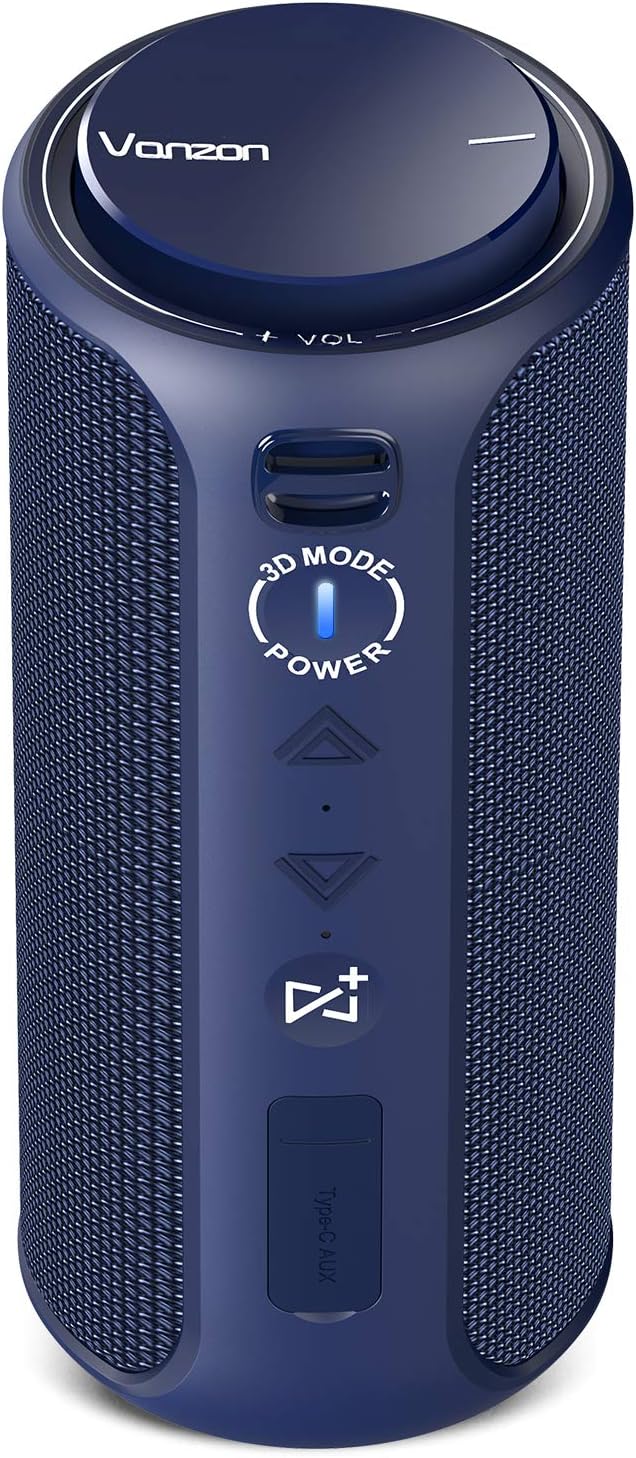
Figur 1: Front view of the Vanzon Climber-Z speaker, highlighting the main control panel including volume knob, 3D mode button, power button, track controls, and Party-Buddy button.
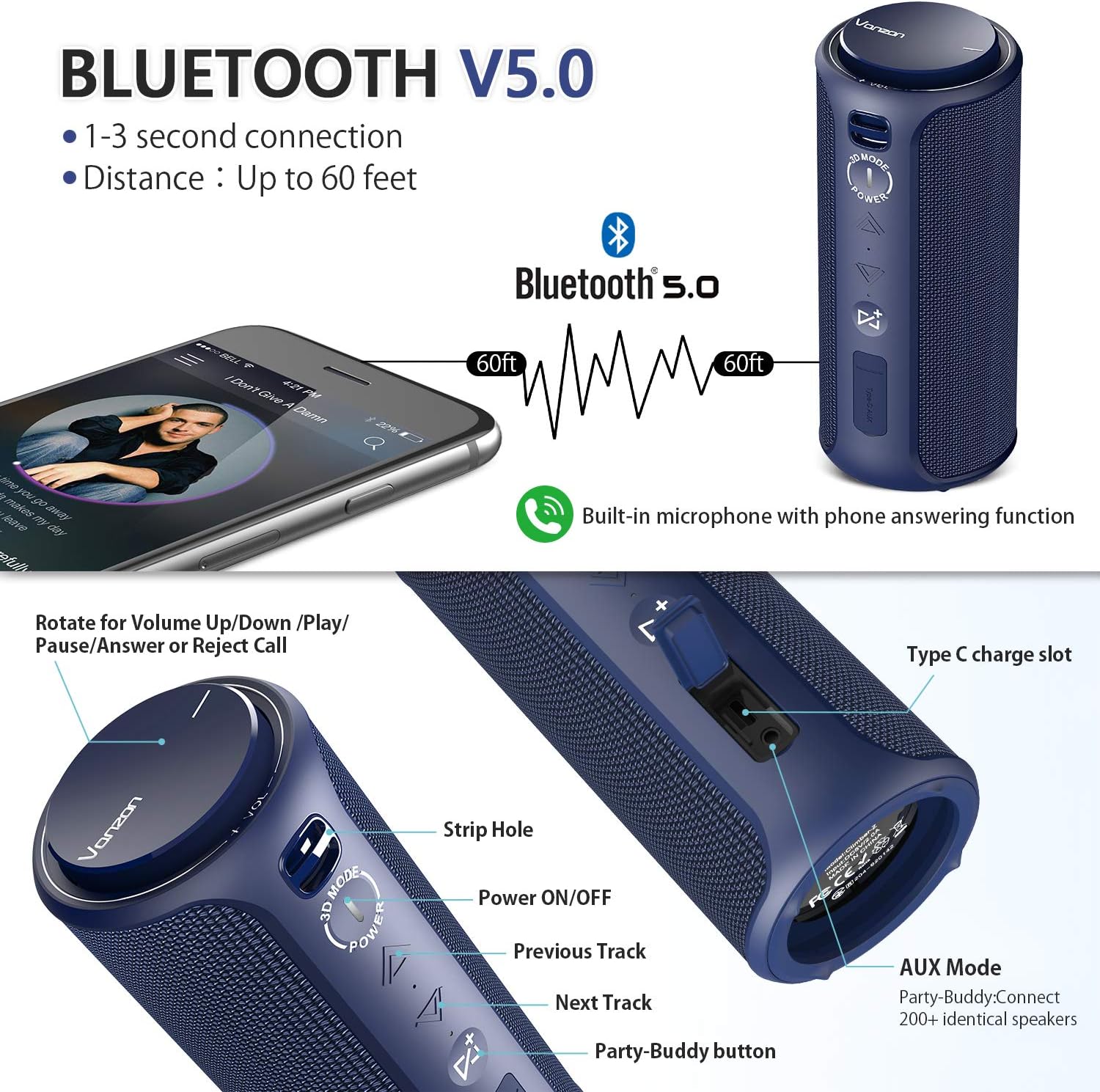
Figur 2: Detailed diagram of the Vanzon Climber-Z speaker's controls and ports. This includes the volume/play/pause/answer/reject call knob, strip hole, power ON/OFF, previous track, next track, Party-Buddy button, Type-C charge slot, and AUX input port.
Pakkeindhold:
- Vanzon Climber-Z Bluetooth Speaker
- USB-C ladekabel
- 3.5 mm AUX lydkabel
- Brugermanual
- Karabinhage
Funktioner
- IPX7 Structure Waterproof: Provides strong waterproof protection, making it suitable for various environments.
- Compact & Practical Design: Small size, lightweight, and includes a carabiner for easy portability.
- Shocking Sound: 30W HD superior 360° sound with powerful bass and 3D audio mode.
- True Wireless Stereo (TWS) teknologi: Allows pairing two Climber-Z speakers for enhanced stereo sound.
- Udvidet trådløs rækkevidde: Bluetooth V5.0 connectivity with a range of up to 66 feet (20 meters).
- Indbygget mikrofon: Supports hands-free calls with clear sound quality.
- Flere afspilningstilstande: Supports Bluetooth connection, 3.5mm AUX input, and TF card (WAV/FLAC/APE/MP3 format).
- Lang batterilevetid: High-efficiency 3600mAh lithium-ion battery for extended playback.
Opsætning
1. Opladning af højttaleren
Before first use, fully charge the speaker. Connect the provided USB-C charging cable to the speaker's Type-C port and the other end to a USB power adapter (not included) or a computer's USB port. The charging indicator light will show charging status (refer to LED indicator section for details). A full charge typically takes 3-4 hours.
2. Tænd/sluk
- For at tænde: Tryk og hold på MAGT button for 2-3 seconds until you hear an audible prompt and the LED indicator lights up.
- For at slukke: Tryk og hold på MAGT button for 2-3 seconds until you hear an audible prompt and the LED indicator turns off.
Betjeningsvejledning
1. Bluetooth-forbindelse
- Ensure the speaker is powered on and in Bluetooth pairing mode (the LED indicator will flash blue rapidly).
- Aktiver Bluetooth på din enhed (smartphone, tablet osv.) og søg efter tilgængelige enheder.
- Select "Vanzon Climber-Z" from the list of devices.
- Når der er forbindelse, lyser LED-indikatoren konstant blåt, og du vil høre en bekræftelseslyd.
- Højttaleren genopretter automatisk forbindelsen til den sidst parrede enhed, når den tændes, hvis enheden er inden for rækkevidde, og Bluetooth er aktiveret.
Figur 3: Illustration of Bluetooth V5.0 connectivity, showing a smartphone connected to the Vanzon Climber-Z speaker with a range of up to 60 feet.
2. AUX-tilstand
Connect one end of the 3.5mm AUX audio cable to the speaker's AUX input port and the other end to the audio output jack of your device. The speaker will automatically switch to AUX mode. Use your device to control playback and volume.
3. Afspilning med TF-kort
Indsæt et TF-kort (MicroSD) med understøttet lyd files (WAV, FLAC, APE, MP3) into the TF card slot. The speaker will automatically detect the card and begin playing music. Use the speaker's controls to manage playback.
4. Styringer
- Lydstyrke op/ned: Rotate the top knob clockwise to increase volume, counter-clockwise to decrease.
- Afspil/pause: Press the top knob once to play or pause music.
- Næste nummer: Tryk på Næste spor button (triangle pointing right).
- Forrige nummer: Tryk på Forrige spor button (triangle pointing left).
- Besvar/afslut opkald: Press the top knob once during an incoming call to answer, press again to end.
- Afvis opkald: Press and hold the top knob for 2 seconds during an incoming call to reject.
- 3D-tilstand: Tryk på 3D MODE button to toggle 3D audio effect on/off.
5. Party-Buddy (TWS) Function
The True Wireless Stereo (TWS) function allows you to pair two Vanzon Climber-Z speakers together for a true stereo sound experience. This feature is ideal for larger spaces or immersive listening.
- Sørg for, at begge højttalere er tændt og ikke er forbundet til nogen Bluetooth-enhed.
- På én højttaler (dette vil være den primære højttaler) skal du trykke på Party-Buddy button (the button with the square and plus sign). You will hear a prompt indicating it's searching.
- On the second speaker (this will be the secondary speaker), press the Party-Buddy knap.
- The two speakers will automatically connect to each other. You will hear a confirmation sound when they are successfully paired.
- Once paired, connect your device to the primary speaker via Bluetooth as described in the "Bluetooth Connection" section. Both speakers will now play audio in stereo.
- For at afbryde TWS skal du trykke på Party-Buddy knap på begge højttalere.

Figur 4: Visual representation of multiple Vanzon Climber-Z speakers connected using the Party-Buddy feature, enabling synchronized audio playback for a larger sound experience.
Opretholdelse
- Rensning: Tør højttaleren af med en blød, damp klæde. Brug ikke slibende rengøringsmidler eller opløsningsmidler.
- Opbevaring: Opbevar højttaleren et køligt, tørt sted væk fra direkte sollys og ekstreme temperaturer.
- Vandtæthed: While the speaker is IPX7 waterproof, ensure the port cover is securely closed before exposing it to water. Do not submerge the speaker for extended periods or beyond the specified depth (1 meter for 30 minutes). After exposure to water, dry the speaker thoroughly before charging.
- Batteripleje: For at forlænge batteriets levetid skal du oplade højttaleren regelmæssigt, selvom den ikke er i brug i længere perioder. Undgå at aflade batteriet helt ofte.
Fejlfinding
| Problem | Mulig årsag | Løsning |
|---|---|---|
| Højttaleren tænder ikke. | Lavt batteri. | Oplad højttaleren helt. |
| Kan ikke parre med Bluetooth-enhed. | Højttaler ikke i parringstilstand; enhed for langt væk; interferens | Sørg for, at højttaleren blinker blåt; flyt enheden tættere på; sluk andre Bluetooth-enheder. |
| Ingen lyd. | Volume too low; incorrect mode; cable not connected. | Increase volume on speaker and device; check mode (Bluetooth/AUX/TF); ensure cables are secure. |
| Lydforvrængning. | Volume too high; low battery; poor signal. | Reduce volume; charge speaker; move device closer to speaker. |
| Party-Buddy (TWS) not connecting. | Speakers already paired to a device; too far apart. | Disconnect speakers from any Bluetooth devices; ensure they are close to each other. |
Specifikationer
| Feature | Detalje |
|---|---|
| Modelnavn | Climber-Z |
| Mærke | Vanzon |
| Højttaler type | Udendørs |
| Forbindelsesteknologi | Bluetooth V5.0, Auxiliary |
| Højttaler Maksimal udgangseffekt | 30 watt |
| Vandtæt vurdering | IPX7 |
| Batterikapacitet | 3600mAh Lithium Ion |
| Afspilningstilstande | Bluetooth, AUX, TF-kort |
| Understøttede TF-kortformater | WAV / FLAC / APE / MP3 |
| Wireless Range | Op til 66 fod (20 meter) |
| Indbygget mikrofon | Ja |
| Strømkilde | Batteridrevet |
Garanti og support
Vanzon products come with a standard manufacturer's warranty. For detailed warranty information, please refer to the warranty card included in your product packaging or visit the official Vanzon website. If you encounter any issues or have questions regarding your Climber-Z speaker, please contact Vanzon customer support through the contact information provided on the official webwebsted eller din købsplatform.
Kundesupport: Please refer to your purchase documentation or the Vanzon official webwebsted for kontaktoplysninger.