
1. Introduktion
Tak for købetasing the Soundsation MIOMIX 404FXM 6-Channel Mixer. This versatile mixer is designed for a wide range of audio applications, including home recording, live performances, and podcasting. It combines professional audio quality with portability, featuring low-noise preamplifiers, digital effects, a USB media player/recorder, and Bluetooth connectivity. This manual provides essential information for safe operation, setup, and optimal use of your MIOMIX 404FXM mixer.
2. Sikkerhedsinstruktioner
ADVARSEL: For at mindske risikoen for brand eller elektrisk stød, må dette udstyr ikke udsættes for regn eller fugt.
- Læs disse instruktioner omhyggeligt, før du betjener enheden.
- Gem denne vejledning til fremtidig reference.
- Overhold alle advarsler og følg alle instruktioner.
- Brug ikke dette apparat i nærheden af vand.
- Rengør kun med en tør klud.
- Bloker ikke ventilationsåbninger. Installer i overensstemmelse med producentens anvisninger.
- Må ikke installeres i nærheden af varmekilder såsom radiatorer, varmeapparater, komfurer eller andre apparater (inklusive ampløftere), der producerer varme.
- Undgå at omgå sikkerhedsformålet med det polariserede stik eller stik med jordforbindelse. Et polariseret stik har to knive, hvor den ene er bredere end den anden. Et stik med jordforbindelse har to knive og et tredje jordstik. Det brede blad eller det tredje ben er tilvejebragt for din sikkerhed. Hvis det medfølgende stik ikke passer i din stikkontakt, skal du kontakte en elektriker for at få udskiftet den forældede stikkontakt.
- Beskyt netledningen mod at blive trådt på eller klemt, især ved stik, stikkontakter og det sted, hvor de kommer ud af apparatet.
- Brug kun tilbehør/tilbehør specificeret af producenten.
- Træk stikket ud af dette apparat under tordenvejr, eller når det ikke skal bruges i længere perioder.
- Overlad al service til kvalificeret servicepersonale. Service er påkrævet, når apparatet er blevet beskadiget på nogen måde, såsom strømforsyningsledning eller stik er beskadiget, væske er blevet spildt, eller genstande er faldet ind i apparatet, apparatet har været udsat for regn eller fugt, ikke fungerer normalt , eller er blevet droppet.
3. Pakkens indhold
Please check that all items listed below are included in the package:
- Soundsation MIOMIX 404FXM Mixer
- Strømadapter
- Brugermanual
4. Produktfunktioner
- 6-channel mixer with digital multi-effect processor.
- Integrated USB player/recorder supporting WAV, MP3, WMA, and FLAC formats.
- Wireless Bluetooth audio streaming.
- 4 Mic/Line channels with low-noise preamps and Combo connectors.
- Selectable Hi-Z inputs for guitars and other high-impedance instruments.
- +48V Phantom Power for condenser microphones.
- Peak indicators on input channels.
- 1 stereo line channel with 6.3mm jacks and +4/-10 dB pad adapter.
- 2-band EQ on channels 1-4.
- 24-bit/48 kHz digital effects processor with 16 presets (Reverb, Delay, Echo, Chorus, etc.) and TAP-Tempo function.
- USB player level control.
- Hovedtelefonudgang med niveaukontrol.
- XLR main outputs with volume control.
- Stereo VU Meter with 2 x 6 LED bars.
5. Betjeningselementer og funktioner
5.1 Frontpanel overview

Image: Front panel of the Soundsation MIOMIX 404FXM mixer, showing all input channels, EQ controls, effect section, USB/Bluetooth media player, and main output controls.
Input Channels (MIC/INST 1-4)
- MIC/INST Input (Combo Jack): Connect XLR microphones or 1/4" instrument/line cables.
- +48V Phantom Power: Activates phantom power for condenser microphones. Use with caution.
- Hi-Z-switch: Engages high impedance input for direct connection of guitars or basses.
- GAIN knap: Justerer indgangsfølsomheden for den tilsluttede mikrofon eller det tilsluttede instrument.
- HIGH Knob: Adjusts the high-frequency equalization (treble).
- LOW Knob: Adjusts the low-frequency equalization (bass).
- FX-knap: Controls the amount of signal sent to the internal digital effects processor.
- PAN-knap: Adjusts the stereo position (left/right) of the channel.
- VOL knap: Justerer udgangslydstyrken for den enkelte kanal.
- PK (Peak) LED: Lyser, når indgangssignalet er for højt, hvilket indikerer potentiel afskæring.
Stereo Line Input (CH 5-6)
- L/Mono, R Inputs (1/4" Jacks): Connect stereo line-level devices (keyboards, CD players, DJ consoles, etc.). The L/Mono input can be used alone for a mono signal.
- +4/-10dB Switch: Adjusts input sensitivity for different line-level devices.
- PAN-knap: Justerer kanalens stereoposition.
- VOL knap: Adjusts the output volume of the stereo channel.
- PK (Peak) LED: Lyser, når indgangssignalet er for højt.
USB & Bluetooth Media Player
- USB-port: Connect a USB drive for playing audio files or recording.
- Skærm: Viser den aktuelle tilstand, sporoplysninger og indstillinger.
- Up/Rewind Button: Navigates up in menus or rewinds current track.
- Down/Forward Button: Navigates down in menus or fast-forwards current track.
- Play/Pause/Enter Button: Plays/pauses audio or confirms menu selections.
- MENU knap: Accesses media player menu options (BT streaming, music player, audio recorder, selection).
- MP3 PLAYER LVL Knob: Controls the output level of the USB/Bluetooth media player.
Digital Effects Processor (24-bit/48 kHz)
- Effektvisning: Shows the selected effect number and parameter values.
- PROGRAM-knap: Rotates to select one of the 16 built-in digital effects. Press to confirm selection.
- TAP TEMPO knap: Tap multiple times to set the tempo for time-based effects (e.g., Delay).
- LEVEL knap: Adjusts the overall wet/dry mix of the effects.
Output & Monitoring Section
- PHONES Jack (1/4"): Tilslut hovedtelefoner til overvågning.
- PHONES LVL Knob: Justerer lydstyrken på hovedtelefonudgangen.
- MAIN OUT L/R (XLR): Balanced XLR outputs for connecting to powered speakers, ampløftere eller optageenheder.
- MAIN OUT Knob: Controls the overall output volume of the main mix.
- VU Meter (LED): Displays the stereo output level of the main mix.
5.2 Bagpanel overview
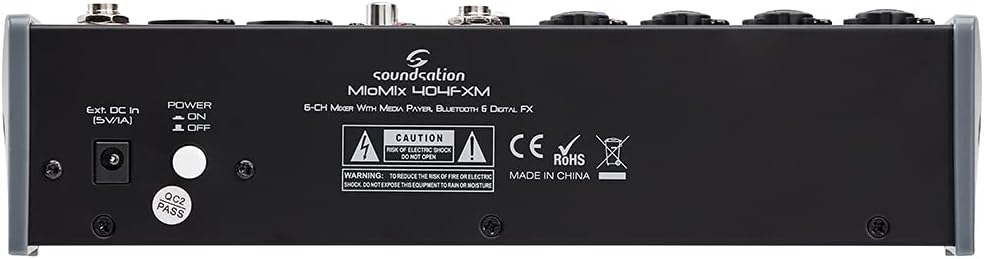
Image: Rear panel of the Soundsation MIOMIX 404FXM mixer, showing the power input, power switch, and main output connections.
- Ext. DC In (5V/1A): Power input for connecting the provided external power adapter.
- Tænd/sluk-knap: Turns the mixer's power on or off.
- REC OUT L/R (RCA): Unbalanced RCA outputs for connecting to recording devices.
6. Opsætning
- Pak mixeren ud: Carefully remove the MIOMIX 404FXM from its packaging.
- Placering: Placer mixeren på en stabil, plan overflade, og sørg for tilstrækkelig ventilation omkring enheden.
- Strømtilslutning: Ensure the mixer's POWER switch is in the OFF position. Connect the provided power adapter to the "Ext. DC In (5V/1A)" port on the rear panel, then plug the adapter into a suitable power outlet.
- Første gang tændt: Flip the POWER switch to the ON position. The mixer's indicators should light up, and the display should activate.
- Tilslut udgange: Connect the MAIN OUT XLR outputs to your powered speakers, amplifier, or audio interface. Connect headphones to the PHONES jack for monitoring.
- Tilslut indgange: Connect your microphones, instruments, and line-level devices to the appropriate input channels.
7. Betjeningsvejledning
7.1 Tilslutning af lydkilder
- Mikrofoner: Connect dynamic microphones via XLR cables to the MIC/INST Combo jacks. For condenser microphones, connect via XLR and activate the +48V Phantom Power switch for the respective channel.
- Instruments (Guitars/Basses): Connect directly using a 1/4" TS cable to the MIC/INST Combo jack and engage the Hi-Z switch for that channel.
- Line-Level Devices (Keyboards, CD Players): Connect using 1/4" TS cables to the MIC/INST Combo jacks (for mono) or to the CH 5-6 L/Mono and R inputs (for stereo). Adjust the +4/-10dB switch on CH 5-6 as needed.
7.2 Adjusting Channel Levels and EQ
- Set all GAIN, VOL, and MAIN OUT knobs to their minimum positions before starting.
- Speak into the microphone or play your instrument. Slowly increase the GAIN knob for the respective channel until the PK LED flashes only occasionally during the loudest parts.
- Adjust the HIGH and LOW EQ knobs to shape the tone of your sound.
- Use the PAN knob to position the sound in the stereo field.
- Slowly increase the channel's VOL knob to blend it into the overall mix.
7.3 Using the USB Media Player/Recorder
- Afspilning: Insert a USB drive containing WAV, MP3, WMA, or FLAC files into the USB port. The display will show the file list. Use the Up/Down buttons to navigate and Play/Pause/Enter to select and play. Adjust the MP3 PLAYER LVL knob to control its volume in the mix.
- Indspilning: In the media player menu (accessed via MENU button), select the 'Audio Recorder' function. Ensure your USB drive has enough free space. Press Play/Pause/Enter to start and stop recording. The mixer records the main stereo mix.
7.4 Bluetooth-forbindelse
- Press the MENU button on the media player and select 'BT Streaming'. The display will show 'Bluetooth' and indicate it's searching.
- On your smartphone or Bluetooth device, search for available devices and select 'MIOMIX 404FXM'.
- Once paired, you can stream audio from your device to the mixer. Control the volume using your device and the MP3 PLAYER LVL knob on the mixer.
7.5 Applying Digital Effects
- Turn the FX knob on the desired input channel to send signal to the effects processor.
- Rotate the PROGRAM knob to browse through the 16 available effects. Press the PROGRAM knob to select an effect.
- Adjust the LEVEL knob in the FX section to control the overall amount of effect applied to the mix.
- For time-based effects, use the TAP TEMPO button to synchronize the effect to your music.
7.6 Monitoring and Main Output
- Hovedtelefoner: Connect headphones to the PHONES jack and adjust the PHONES LVL knob for comfortable monitoring.
- Hovedoutput: Slowly increase the MAIN OUT knob to send the mixed audio to your connected speakers or amplifier. Monitor the VU Meter to ensure levels are not clipping (avoiding red LEDs).
8. Vedligeholdelse
- Rensning: Brug en blød, tør klud til at rengøre mixerens overflade. Brug ikke flydende rengøringsmidler eller opløsningsmidler.
- Opbevaring: Når mixeren ikke er i brug i længere perioder, skal den opbevares køligt og tørt, væk fra direkte sollys og ekstreme temperaturer.
- Ventilation: Sørg for, at ventilationsåbningerne ikke er blokeret for at forhindre overophedning.
9. Fejlfinding
- Ingen lydoutput:
- Kontroller alle strømtilslutninger, og sørg for, at mixeren er tændt.
- Verify that all channel VOL knobs, MAIN OUT knob, and PHONES LVL knob are turned up.
- Ensure your speakers/ampstrømforsyningen er tændt og tilsluttet korrekt.
- Check input source connections and ensure GAIN knobs are set appropriately.
- Forvrænget lyd:
- Reduce the GAIN knob for the input channel.
- Check if the PK LED is constantly lit; if so, reduce the input level.
- Lower the MAIN OUT volume if the VU Meter is consistently in the red.
- Phantom Power virker ikke:
- Ensure the +48V switch is engaged for the specific channel.
- Verify that you are using an XLR cable, as phantom power is only supplied via XLR.
- Bluetooth forbinder ikke:
- Ensure the mixer's media player is in 'BT Streaming' mode.
- Make sure your device's Bluetooth is enabled and it's searching for devices.
- Prøv at ophæve parringen og parre enheden igen.
- USB Playback/Recording Issues:
- Ensure the USB drive is formatted correctly (FAT32 is generally recommended).
- Kontroller, at lyden files are in a supported format (WAV, MP3, WMA, FLAC).
- For recording, ensure the USB drive has sufficient free space.
10. Specifikationer
| Feature | Specifikation |
|---|---|
| Fabrikant | Soundsation |
| Modelnummer | E923E |
| Antal kanaler | 6 |
| Varens vægt | 1900 gram |
| Forbindelsesteknologi | USB, Bluetooth |
| Strømkilde | El-kabel |
| Udgangsstiktype | XLR |
| Lydindgang | XLR, 1/4" Jack |
| Voltage | 48 volt (fantomstrøm) |
| Digitale effekter | 16 Presets, 24-bit/48 kHz |
| Supported USB Audio Formats | WAV, MP3, WMA, FLAC |
11. Garanti og support
Soundsation products are designed and manufactured to the highest quality standards. For information regarding warranty coverage, service, or technical support, please refer to the warranty card included with your product or visit the official Soundsation webwebsted. Gem din købskvittering som købsbevis i tilfælde af garantikrav.