
1. Introduktion
Thank you for choosing the MEDION X64060 Party Speaker. This manual provides essential information for the safe and efficient use of your device. Please read it thoroughly before operating the speaker and keep it for future reference.
The MEDION X64060 is a versatile party speaker designed for various entertainment needs, featuring powerful audio output, integrated DJ and karaoke functions, and dynamic light effects.
2. Sikkerhedsinstruktioner
- Læs alle instruktioner omhyggeligt før brug.
- Hold højttaleren væk fra vand, fugt og ekstreme temperaturer.
- Bloker ikke ventilationsåbninger.
- Use only the power cord supplied with the device.
- Forsøg ikke at reparere enheden selv. Overlad al service til kvalificeret personale.
- Sørg for, at højttaleren er placeret på en stabil, plan overflade for at forhindre, at den vælter.
- Undgå langvarig eksponering for høje lydstyrker for at forhindre høreskader.
3. Pakkens indhold
Tjek venligst pakken for følgende varer:
- MEDION X64060 Party Speaker
- 1 x mikrofon
- Strømledning
- Brugervejledning (dette dokument)
4. Produktet er slutview
Familiarize yourself with the main components and controls of your MEDION X64060 Party Speaker.

Image: Control Panel Overview
This image displays a close-up of the speaker's top control panel, showing various knobs and buttons for audio adjustments, DJ functions, and input selections.

Image: Speaker Dimensions and Connections
This image illustrates the overall dimensions of the speaker (980mm height, 350mm width, 340mm depth) and highlights the available connection ports: 1x USB, 2x Microphone (6.3 mm), 1x Guitar (6.3 mm), 1x Audio Input (3.5 mm), and 1x Audio Input (RCA).
4.1 Frontpanel
- Højttalere: Two main speakers with integrated LED lighting.
- Lyseffekter: Dynamic LED lights that synchronize with music.
4.2 Øverste kontrolpanel
- Power knap: For at tænde/slukke højttaleren.
- Lydstyrkekontrol: Main volume, microphone volume (MIC1 VOL, MIC2 VOL), guitar volume (GUITAR VOL), and echo volume (ECHO VOL).
- Equalizer (EQ): 5-band equalizer for sound adjustment.
- Inputvælgere: Buttons for Bluetooth, USB, AUX.
- DJ Functions: Cross-fader, scratch wheel, drum pads (HI-HAT, SNARE, BASS DRUM, CYMBAL, TOM1, TOM2), and record function.
- USB-port: Til USB-afspilning.
- Mikrofonindgange: Two 6.3 mm jack inputs.
- Guitar input: One 6.3 mm jack input.
- AUX-indgang: 3.5 mm jack input.
4.3 Bagpanel
- Strømindgang: Til tilslutning af strømkablet.
- RCA-lydindgang: Additional audio input.
4.4 Mobility Features
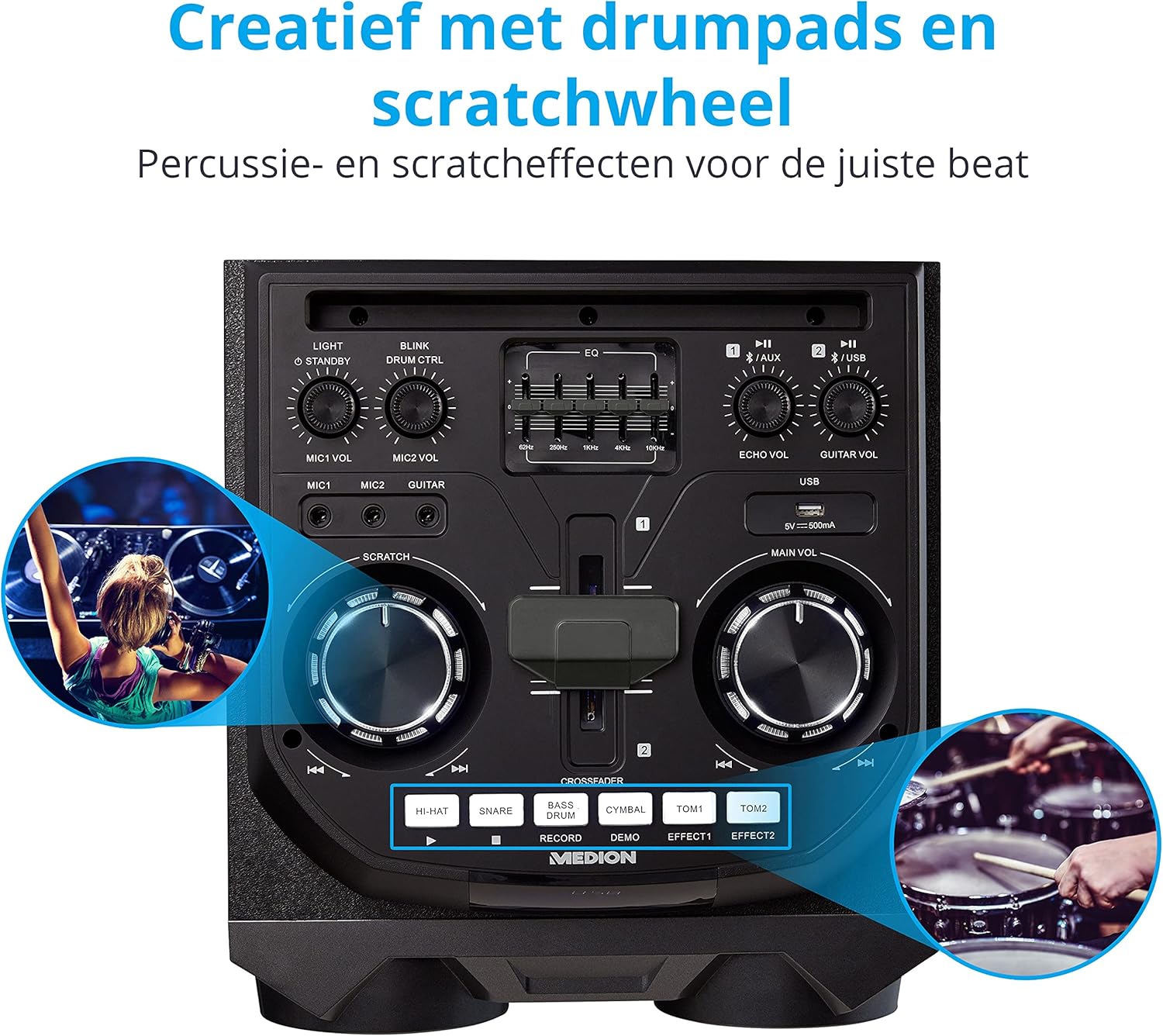
Image: Integrated Wheels for Portability
This image shows the back of the speaker, highlighting the integrated wheels at the bottom, designed for easy transport.
- Integrerede hjul: For easy transportation of the speaker.
- Håndtag: Ergonomic handles for lifting and moving.
5. Opsætning
5.1 Indledende placering
Placer højttaleren på en stabil, plan overflade. Sørg for tilstrækkelig ventilation omkring enheden. Undgå at placere den i nærheden af varmekilder eller i direkte sollys.
5.2 Strømtilslutning
- Tilslut det medfølgende netkabel til strømindgangen på bagsiden af højttaleren.
- Sæt den anden ende af netledningen i en passende stikkontakt.
- Press the power button on the top control panel to turn on the speaker. The LED lights will illuminate.
5.3 Connecting a Microphone or Guitar
For karaoke or live instrument performance:
- Plug your microphone(s) into the MIC1 or MIC2 6.3 mm jack inputs on the top panel.
- Plug your guitar into the GUITAR 6.3 mm jack input on the top panel.
- Adjust the respective volume knobs (MIC1 VOL, MIC2 VOL, GUITAR VOL) and ECHO VOL to your preference.
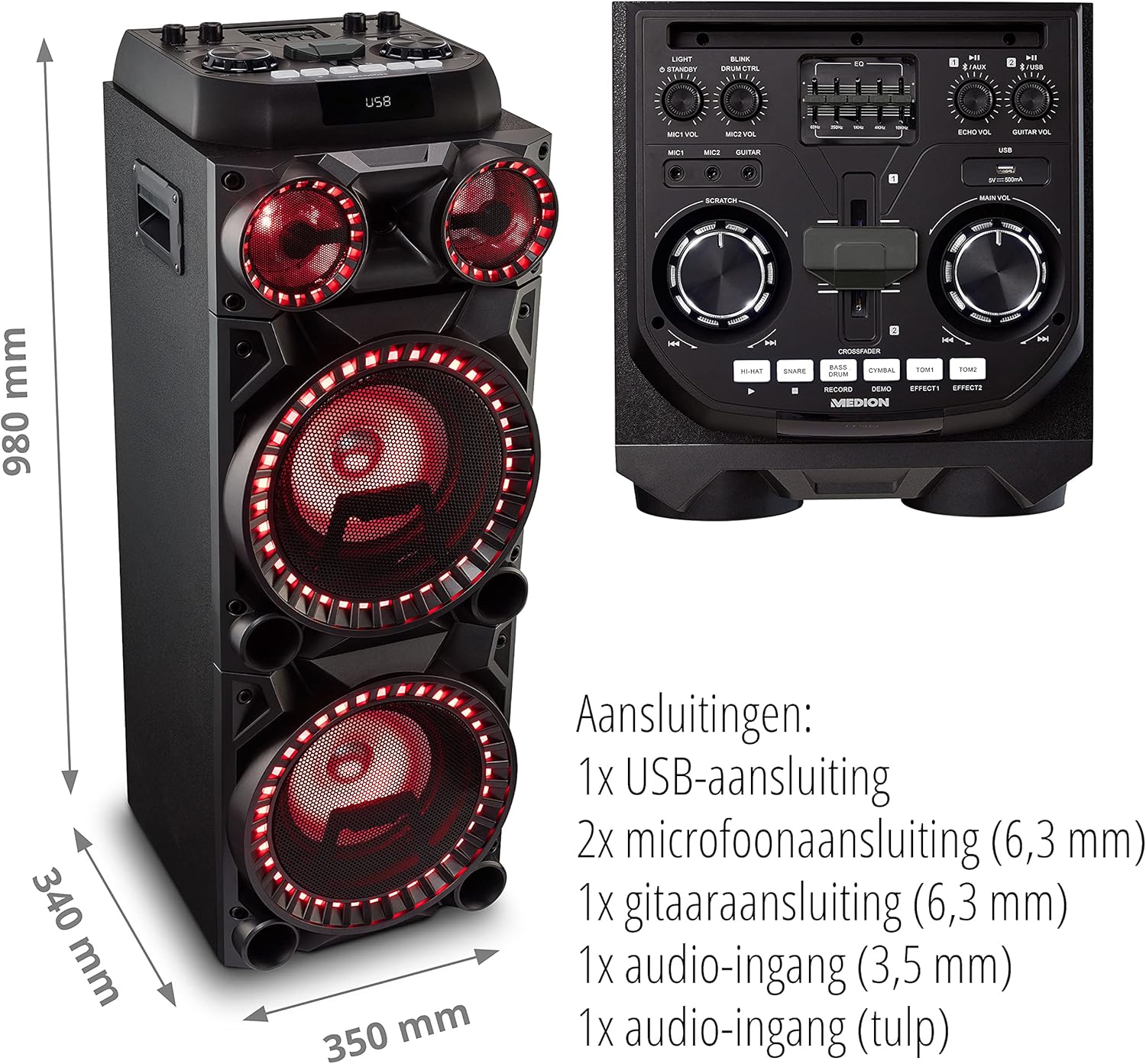
Image: Microphone and Guitar Connection for Karaoke
This image shows individuals enjoying karaoke, demonstrating the use of a microphone connected to the speaker for singing.
6. Betjeningsvejledning
6.1 Bluetooth-forbindelse
- Tryk på Bluetooth button on the control panel. The Bluetooth indicator will blink.
- Aktiver Bluetooth på din smartphone, tablet eller anden lydenhed.
- Søg efter "MEDION X64060" in your device's Bluetooth settings and select it to pair.
- Once connected, the Bluetooth indicator will stop blinking and remain solid. You can now play music wirelessly.

Image: Bluetooth Music Playback
This image shows a smartphone displaying a music application, indicating a wireless Bluetooth connection to the speaker for audio streaming.
6.2 USB-afspilning
- Indsæt et USB-flashdrev med lyd files into the USB port on the top panel.
- Tryk på USB knappen for at vælge USB-tilstand.
- The speaker will automatically detect and begin playing audio files from the USB drive. Use the playback controls (play/pause, skip track) on the control panel.
6.3 AUX-indgang
- Connect an external audio device (e.g., MP3 player, laptop) to the 3.5 mm AUX input or the RCA audio input on the rear panel using an appropriate audio cable (not included).
- Tryk på AUX -knappen for at vælge AUX-tilstand.
- Play audio from your connected device. The speaker will output the sound.
6.4 DJ Functions
The MEDION X64060 includes various DJ features for creative sound mixing.

Image: DJ Function Controls
Dette billede giver en detaljeret view of the DJ control section, including the cross-fader, scratch wheel, and various drum pads.
- Cross-fader: Use the cross-fader to smoothly transition between different audio sources or effects.
- Scratch Wheel: Manipulate the scratch wheel for classic DJ scratch effects.
- Trommepuder: Tryk på HI-HAT, SNARE, STOR TROMME, CYMBAL, TOM1, og TOM2 pads to add drum sound effects to your music.
- Optagefunktion: Brug OPTAGE button to record your drum pad sequences.
6.5 Karaoke-funktion
Connect a microphone as described in section 5.3. Play your chosen karaoke track via Bluetooth, USB, or AUX. Adjust the microphone and echo volumes for the desired effect.
6.6 lyseffekter
The speaker features dynamic LED light effects that respond to the music. These lights automatically activate when the speaker is on. There may be a dedicated button (e.g., "LIGHT" or "BLINK") to control or cycle through different light modes, refer to the control panel for specific options.

Image: Dynamic Blue Light Effects
This image showcases the speaker with its blue LED lights illuminated, demonstrating the atmospheric light effects.

Image: Dynamic Red Light Effects
This image shows the speaker with its red LED lights illuminated, highlighting another color option for the atmospheric light effects.
7. Vedligeholdelse
7.1 Rengøring
- Tag altid stikket ud af stikkontakten før rengøring.
- Brug en blød, tør klud til at tørre de udvendige overflader af.
- Brug ikke flydende rengøringsmidler, aerosoler eller slibende materialer, da disse kan beskadige overfladen eller de indvendige komponenter.
7.2 Opbevaring
When not in use for extended periods, store the speaker in a cool, dry place, away from direct sunlight and extreme temperatures. Cover the unit to protect it from dust.
8. Fejlfinding
| Problem | Mulig årsag | Løsning |
|---|---|---|
| Ingen strøm | Power cord not connected properly; Power outlet not working. | Ensure the power cord is securely plugged into both the speaker and a working wall outlet. Test the outlet with another device. |
| Ingen lyd | Volume too low; Incorrect input selected; Device not paired (Bluetooth); Cable not connected (AUX/Guitar/Mic). | Increase the main volume and individual input volumes. Select the correct input source (Bluetooth, USB, AUX). Re-pair Bluetooth device. Check all cable connections. |
| Bluetooth-forbindelse mislykkes | Højttaler ikke i parringstilstand; Enhed for langt væk; Interferens. | Ensure the speaker is in Bluetooth pairing mode (blinking indicator). Move your device closer to the speaker. Avoid obstacles and other wireless devices. |
| Mikrofon/guitar virker ikke | Volume too low; Cable faulty; Incorrect input. | Increase MIC/GUITAR VOL. Check microphone/guitar cable. Ensure the instrument is properly connected. |
9. Specifikationer
| Mærke | MEDION |
| Modelnummer | X64060 | MD44060 |
| Udgangseffekt | 2 x 100 W RMS (2 x 1000 W max. music output power) |
| Forbindelsesteknologi | Bluetooth 5.0, USB, AUX (3.5mm, RCA) |
| Lydindgange | 2 x Microphone (6.3 mm), 1 x Guitar (6.3 mm), 1 x AUX (3.5 mm), 1 x RCA |
| Equalizer | 5-bånd |
| Farve | Sort |
| Materiale | Plast |
| Produktmål (L x B x H) | 38.8 x 35 x 101 cm |
| Varens vægt | 15 kg |
| Monteringstype | Floor Standing |
| Strømkilde | Elektrisk med ledning |
| Kompatible enheder | Laptop, smartphone |
10. Garanti og support
For warranty information and technical support, please refer to the warranty card included with your product or visit the official MEDION webwebsted. Gem din købsbevis i tilfælde af garantikrav.
MEDION Kundeservice: For assistance, please contact MEDION customer support through their official channels. Contact details can typically be found on the MEDION webwebsted eller i produktemballagen.