
Indledning
Thank you for choosing the Renkforce RF-SBS-500 2D Wired Barcode Scanner. This device is designed for efficient and reliable scanning of both 1D and 2D barcodes from various surfaces, including paper and smartphone screens. Its omnidirectional scanning capability and hands-free operation make it suitable for a wide range of applications. This manual provides essential information for the proper setup, operation, and maintenance of your scanner.
Sikkerhedsinstruktioner
- Udsæt ikke scanneren for ekstreme temperaturer, fugtighed eller direkte sollys.
- Undgå at tabe scanneren eller udsætte den for kraftige stød.
- Forsøg ikke at skille scanneren ad eller ændre den. Dette vil ugyldiggøre garantien.
- Keep the scanning window clean to ensure optimal performance. Use a soft, dry cloth.
- Ensure the USB cable is connected securely to prevent accidental disconnection.
Pakkens indhold
- Renkforce RF-SBS-500 2D Wired Barcode Scanner
- Integrated USB-A Cable
- Brugervejledning (dette dokument)
Opsætning
Follow these steps to set up your Renkforce RF-SBS-500 barcode scanner:
- Pak scanneren ud: Tag forsigtigt scanneren ud af emballagen.
- Tilslut til en computer: Plug the integrated USB-A cable from the scanner into an available USB port on your desktop or laptop computer.
- Driver installation: The scanner is typically plug-and-play. Your operating system (Windows, macOS, Linux) should automatically detect and install the necessary drivers. Wait for the installation to complete.
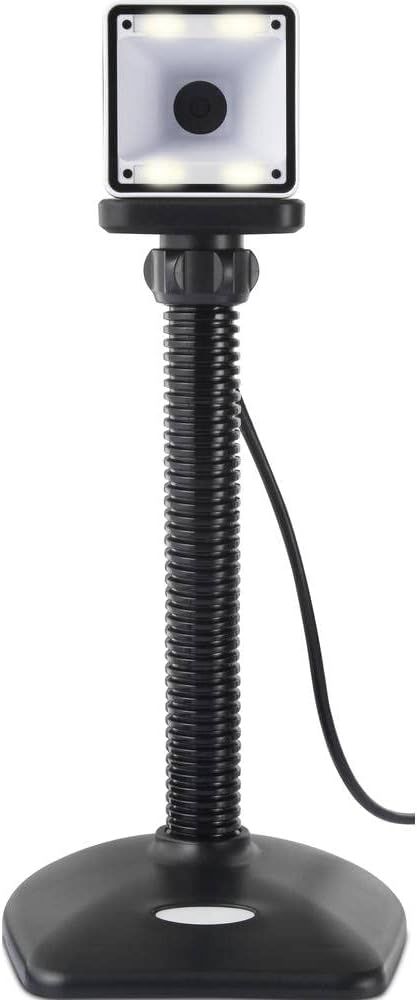
- Placering: Place the scanner on a stable, flat surface. The flexible neck allows for adjustment of the scanning head angle for optimal positioning.

Betjening af scanneren
The Renkforce RF-SBS-500 is designed for ease of use with its omnidirectional and hands-free capabilities.
- Tænd: Once connected via USB, the scanner will power on automatically. The LED indicators on the scanner head may illuminate briefly.
- Scanning a Barcode: Position the barcode within the scanning area of the scanner head. The scanner will automatically detect and read the barcode.
- Visuel og hørbar feedback: Upon successful scanning, the integrated buzzer will emit a short beep, and the LED display on the scanner will flash or change color, indicating a successful read.
- Omnidirectional Reading: The scanner can read barcodes regardless of their orientation, eliminating the need to align the barcode precisely.
- Hands-Free Mode (Presentation Mode): The scanner operates continuously in a presentation mode, allowing you to simply pass items with barcodes in front of the scanning window without pressing any buttons. This saves time and improves workflow efficiency.
- Understøttede stregkoder: The scanner supports both 1D (e.g., EAN, UPC, Code 39) and 2D (e.g., QR Code, Data Matrix, PDF417) barcode types.
Opretholdelse
Korrekt vedligeholdelse sikrer scannerens levetid og optimale ydeevne.
- Rengøring af scanningsvinduet: Rengør regelmæssigt scanningsvinduet med en blød, fnugfri klud. Tør genstridigt snavs let af.ampRengør kluden med vand eller et mildt, ikke-slibende rengøringsmiddel. Sprøjt ikke rengøringsmidlet direkte på scanneren.
- Generel rengøring: Tør scannerens yderside af med en tør eller let fugtig klud.amp klæde. Undgå at bruge skrappe kemikalier eller slibende materialer.
- Opbevaring: Når scanneren ikke er i brug, skal den opbevares et rent og tørt sted, væk fra direkte sollys og ekstreme temperaturer.
Fejlfinding
Hvis du støder på problemer med din scanner, kan du se følgende almindelige problemer og løsninger:
| Problem | Mulig årsag | Løsning |
|---|---|---|
| Scanneren tænder ikke. | USB cable not connected properly or faulty USB port. | Ensure the USB cable is firmly connected to both the scanner and the computer. Try a different USB port. |
| Scanneren læser ikke stregkoder. | Barcode damaged, scanning window dirty, or incorrect barcode type. | Check the barcode for damage. Clean the scanning window. Ensure the barcode type is supported (1D/2D). Adjust the distance and angle of the barcode to the scanner. |
| Ingen biplyd eller LED-feedback efter scanning. | Barcode not read successfully. | Refer to the "Scanner does not read barcodes" solution. If the issue persists, contact support. |
| Scannede data vises forkert. | Keyboard layout mismatch or software issue. | Ensure your computer's keyboard layout matches the expected output. Test with a simple text editor. |
If the problem persists after trying these solutions, please contact Renkforce customer support.
Specifikationer
| Feature | Specifikation |
|---|---|
| Modelnummer | RF-4679568 |
| Scanningsevne | 1D and 2D Barcodes |
| Forbindelsesteknologi | USB-A (kablet) |
| Scanningshastighed | 60 billeder pr. Sekund |
| Scanningstilstand | Omnidirectional, Hands-free (Presentation Mode) |
| Feedback | Integrated Buzzer, LED Display |
| Kompatible enheder | Desktop Computer, Laptop, Smartphone (via appropriate adapter if needed) |
| Dimensioner (L x B x H) | 150 x 5.2 x 5.2 cm |
| Varens vægt | 102 gram |
| Strømkilde | USB-drevet |
| Oprindelsesland | Tyskland |
Garanti og support
Renkforce products are manufactured to high-quality standards and come with a standard warranty. Please refer to your purchase documentation or the Renkforce official webwebstedet for specifikke garantivilkår og -betingelser, der gælder for din region.
For technical support, troubleshooting assistance, or warranty claims, please contact Renkforce customer service. Contact details can typically be found on the Renkforce webwebstedet eller på din produktemballage.