
1. Produktet er slutview
This document provides comprehensive instructions for the Temank WiFi Module, designed to enable remote monitoring and control of compatible POW-SunSmart and POW-LVM series solar inverters. The module facilitates data upload to a cloud platform, accessible via a mobile application, allowing users to track inverter performance and status.

Figure 1: Temank Solar Inverter WiFi Module. This image displays the compact black WiFi module with a QR code label and three indicator lights labeled NET, COM, and READY at the bottom.
The WiFi module is specifically compatible with the following inverter models: POW-SunSmart SP5K, POW-SunSmart 10K, POW-SunSmart 10KP, POW-LVM3K-24V, POW-LVM3K-24V-H, POW-LVM5K-48V-N, POW-LVM5K-48V-H, POW-LVM3.2K-24V, and POW-SunSmart 6.5KP Solar Inverters.

Figure 2: Compatible Solar Inverter Models and Applications. This image illustrates the range of compatible POW-SunSmart and POW-LVM solar inverters, along with examples of typical application environments such as homes, sheds, construction sites, tool rooms, and farms.
This module is an essential accessory for users seeking to remotely monitor their solar power system's performance and ensure optimal operation.
2. Nøglefunktioner
- Bred kompatibilitet: Designed exclusively for specific POW-SunSmart and POW-LVM series solar inverters.
- Fjernovervågning: Uploads cloud data for remote monitoring via a mobile application.
- Nem installation: Features an external plug-type design for simple and quick plug-and-play installation without disassembling the inverter.
- Datasynkronisering: Provides access to inverter data, though with a five-minute update interval.
- App-baseret kontrol: Allows for monitoring and potentially some control via dedicated mobile applications (SmartESS or SmartValue).
3. Opsætning og installation
3.1 Fysisk installation
The WiFi module is designed for simple plug-and-play installation. Locate the designated communication port on your compatible solar inverter and securely plug in the WiFi module. No disassembly of the inverter is required.
3.2 Opsætning af mobilapplikation
To monitor your inverter, you will need to download and set up the appropriate mobile application. The application required depends on the PN code of your WiFi module:
- If your WiFi module's PN code starts with Q00, QA520, QA521, etc., brug SmartESS anvendelse.
- If your WiFi module's PN code starts with E6, brug SmartValue anvendelse.
Ensure you download the correct application to avoid functionality issues. Both applications are typically available on major app stores.

Figure 3: SmartESS App Interface for Monitoring. This image shows a mobile phone screen displaying the SmartESS application, illustrating the monitoring capabilities for solar inverter data, including energy flow, PV power generation, battery charge, and load consumption.
After installing the app, register a new account and follow the in-app instructions to connect your WiFi module. Note that the WiFi module only supports 2.4GHz Wi-Fi networks. Your mobile device should be connected to the same 2.4GHz network during the initial setup process.
3.3 Addressing "Device Already Exists" Error
If you encounter an error message stating "you can't install it, as it says it already exists and will not appear in my application" during setup, this indicates the WiFi module's PN code is still registered to a previous account or installation. To resolve this, you must provide the WiFi module's PN code to the supplier (Temank support) to have them cancel the existing registration information. Once the registration is cleared, you can then rebind the module to your account.
4. Operating the WiFi Module and App
Once successfully connected, the WiFi module will begin uploading data from your inverter to the cloud. This data is then accessible through the SmartESS or SmartValue mobile application.
4.1 Dataovervågning
The application provides various data points related to your solar inverter's operation, including PV power generation, load consumption, battery status, and cumulative energy data. It's important to note that the WiFi module uploads cloud data approximately every five minutes. Therefore, the data displayed on the mobile app may not be in real-time and might differ slightly from the data shown directly on the inverter's display.
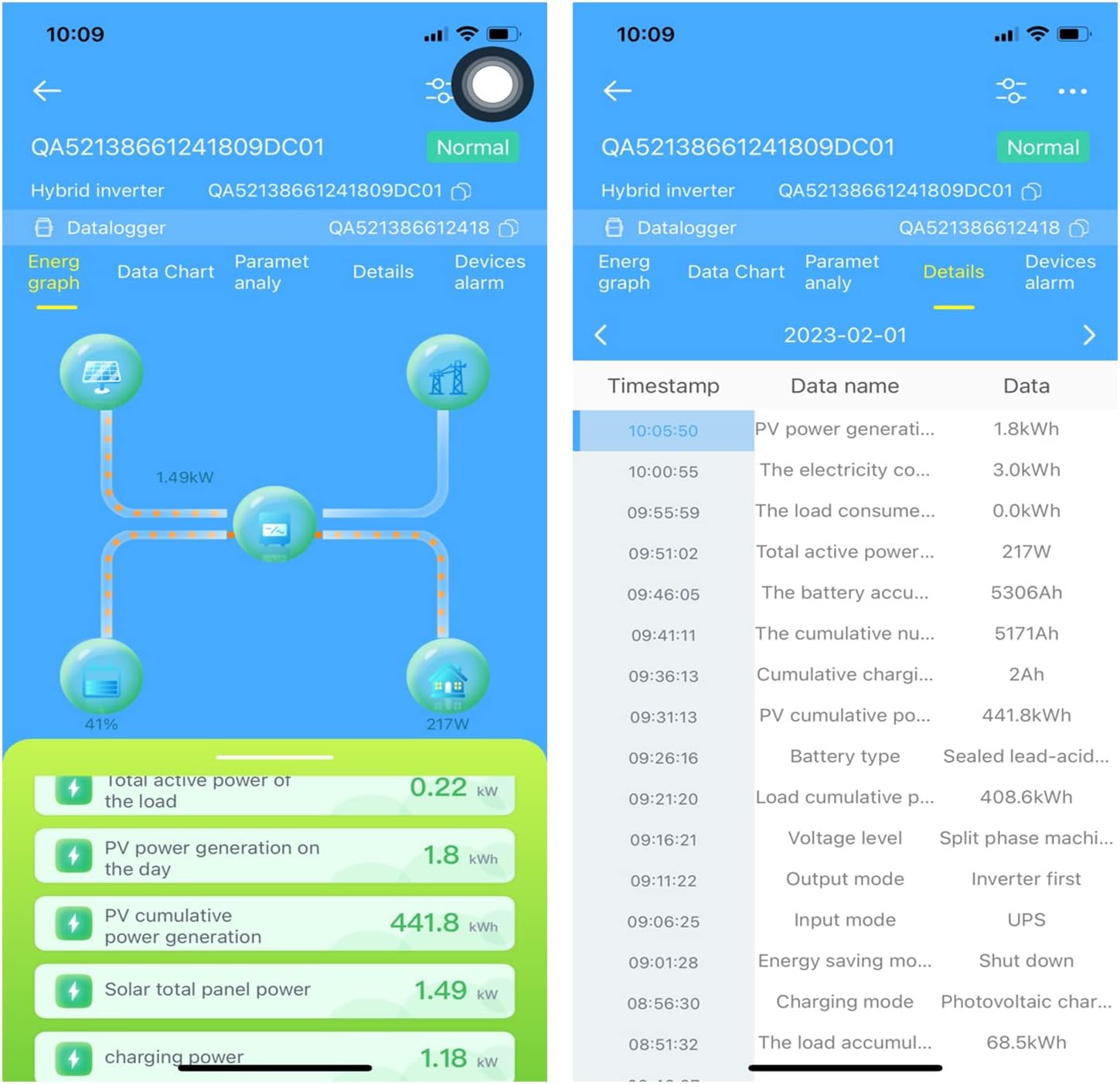
Figure 4: SmartESS App Data Display. This image shows two mobile phone screens. The left screen displays a graphical representation of energy flow within the solar system, including PV generation, battery, and load. The right screen shows a detailed list of data points with timestamps, such as PV power generation, electricity consumption, load consumption, and battery accumulation.
4.2 App Settings and Configuration
The mobile application also allows access to various settings and configurations related to the inverter and the WiFi module. These settings may include user password values, alarm clearing, charging current adjustments, and viewing fault codes. Refer to the specific app's interface for a complete list of available options.

Figure 5: SmartESS App Settings. This image shows two mobile phone screens displaying various settings within the SmartESS application. Options include user password settings, alarm clearing, charging current, input voltage, charging limit voltage, and more, allowing for detailed configuration and monitoring of the inverter's parameters.
5. Vedligeholdelse
The Temank WiFi Module requires minimal maintenance. Ensure the module is kept clean and free from dust or debris. Periodically check the physical connection to the inverter to ensure it remains secure. For optimal performance, ensure your Wi-Fi network is stable and provides a strong signal to the module.
6. Fejlfinding
- Module Shows "Offline" in App: If the device frequently shows as "Offline" in the app, even after successful initial connection, try power cycling your inverter. If the issue persists, it may indicate a hardware problem with the module or an unstable Wi-Fi connection. Ensure your Wi-Fi signal is strong and consistent at the module's location.
- "Device Already Exists" Error During Setup: As mentioned in Section 3.3, this error requires contacting Temank support with your WiFi module's PN code to unregister it from any previous binding.
- Data Discrepancy (App vs. Inverter Display): The app data updates every five minutes, not in real-time. Minor differences between the app's displayed data and the inverter's direct display are normal due to this update interval.
- Incorrect App Usage (SmartESS vs. SmartValue): Ensure you are using the correct application (SmartESS or SmartValue) based on your WiFi module's PN code (Q00/QA52x for SmartESS, E6 for SmartValue). Using the wrong app will prevent the module from functioning properly.
- Connection Issues (2.4GHz Wi-Fi): The WiFi module only supports 2.4GHz Wi-Fi networks. If you have a dual-band router, ensure your phone is connected to the 2.4GHz band during setup and that the module is within range of a 2.4GHz signal.
- Slow Data Identification: In some cases, it may take time for the app to identify the inverter after initial connection. Ensure all connections are secure and allow sufficient time for the system to synchronize.
7. Specifikationer
| Attribut | Værdi |
|---|---|
| Mærke | Temank |
| Modelnummer | POW-SunSmart SP5K (Note: Compatible with various models as listed in Section 1) |
| Forbindelse | Wireless (Wi-Fi, 2.4GHz only) |
| Varens vægt | 2.39 ounce |
| Pakkedimensioner | 4.61 x 3.58 x 1.57 tommer |
| Hvad er der i æsken | WiFi-modul |
| Anbefalede anvendelser | Home, Recreational Vehicle |
| Strømkilde | Solar Powered (via inverter connection) |
8. Garanti og support
8.1 Beskyttelsesplaner
Extended protection plans may be available for your product. These plans typically offer coverage beyond the standard manufacturer's warranty. For details on available plans, such as 2-Year or 3-Year Protection Plans, please refer to your purchase documentation or the retailer's webwebsted.
8.2 Teknisk support
For technical assistance, troubleshooting beyond this manual, or inquiries regarding warranty claims, please contact Temank customer support. Refer to the contact information provided with your product packaging or visit the official Temank webwebsted for supportressourcer.
Du kan også besøge Temank Store on Amazon for yderligere produktinformation og support.