
1. Introduktion
This manual provides essential information for the installation, operation, and maintenance of your Apevia ATX-GX850W Galaxy 850W 80+ Gold Certified Semi-Modular Gaming Power Supply. Please read this manual thoroughly before installation and retain it for future reference.

Figure 1: Apevia ATX-GX850W Galaxy 850W Power Supply
The Apevia Galaxy 850W Power Supply is designed to deliver reliable and efficient power to your computer system. It features an 80+ Gold certification for high efficiency, a semi-modular cable design for improved cable management, and various protection mechanisms to safeguard your components.
2. Sikkerhedsoplysninger
- Tag altid netledningen ud af stikkontakten, før du installerer, fjerner eller rengør strømforsyningen.
- Denne strømforsyning er kun beregnet til brug i personlige computere. Brug den ikke til andre formål.
- Åbn ikke strømforsyningsenheden. Høj lydstyrketagder findes indeni, og åbning af enheden vil ugyldiggøre garantien.
- Sørg for korrekt jording for at forhindre elektrisk stød.
- Keep the power supply away from moisture, extreme temperatures, and direct sunlight.
- Installer strømforsyningen i et godt ventileret område for at forhindre overophedning.
3. Pakkens indhold
Bekræft at alle varer er til stede i pakken:
- Apevia ATX-GX850W Galaxy 850W Power Supply Unit
- AC strømledning
- Modular Cable Set (including 20/24pin Main Power, P8(4+4P) ESP 12V, 8(6+2)pin PCI-E, SATA, Peripheral, Floppy connectors)
- Monteringsskruer
- Brugervejledning (dette dokument)
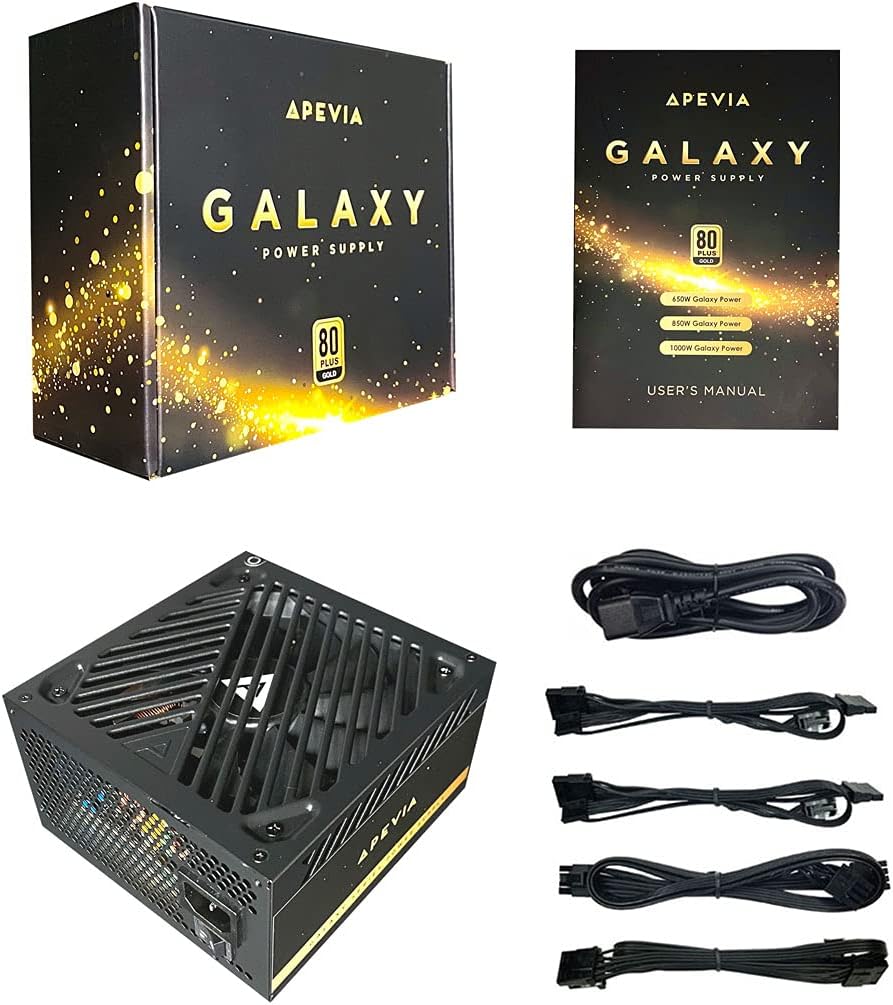
Figure 2: Power Supply Unit, Box, and Included Cables
4. Produktfunktioner
- 850W 80+ Gold Certified: Ensures high power efficiency (90%+ efficiency) at 20-100% load levels, reducing heat generation and electricity consumption.
- Aktiv PFC: Power Factor Correction of 99% for stable power delivery.
- Semi-modulært design: Allows connection of only necessary cables, improving airflow and cable management within the PC case.
- Auto-Thermally Controlled 135mm Fan: Features a quiet black fan that adjusts its speed based on the power supply's temperature, ensuring optimal cooling and reduced noise.
- Heavy Duty Protections: Includes Short-Circuit Protection (SCP), Over-Voltage Protection (OVP), Over-Power Protection (OPP), and Under-Voltage Protection (UVP) to safeguard your system components.
- Double Forward Converter Design: Enhances stability and efficiency.
- Bred kompatibilitet: Supports ATX 12V 2.3 Version, Dual/Quad Core CPUs, SLI/Crossfire configurations, and Haswell processors.
- Large Japanese Capacitor: Provides enhanced reliability and performance.
- Single +12V Output: Delivers strong, stable power for high-performance components.
- Automatisk voltage Skift: Automatically switches between 110V and 230V depending on the power grid.
5. Installationsvejledning
5.1 Tjekliste før installation
- Sørg for, at dit computerkabinet er kompatibelt med ATX-strømforsyninger.
- Gather necessary tools: screwdriver, zip ties or cable management straps.
- Unplug your computer from the wall outlet and discharge any residual power by pressing the power button a few times.
5.2 Fysisk installation
- Åbn din computerkasse.
- Locate the power supply mounting bay, typically at the top or bottom rear of the case.
- Carefully slide the Apevia ATX-GX850W into the bay, ensuring the fan is oriented correctly (usually facing downwards or inwards, depending on case design).
- Fastgør strømforsyningen til kabinettet med de medfølgende monteringsskruer.
5.3 Kabelforbindelser
The Apevia ATX-GX850W is a semi-modular power supply. Connect only the cables required for your system components. Refer to your motherboard and component manuals for specific connection points.
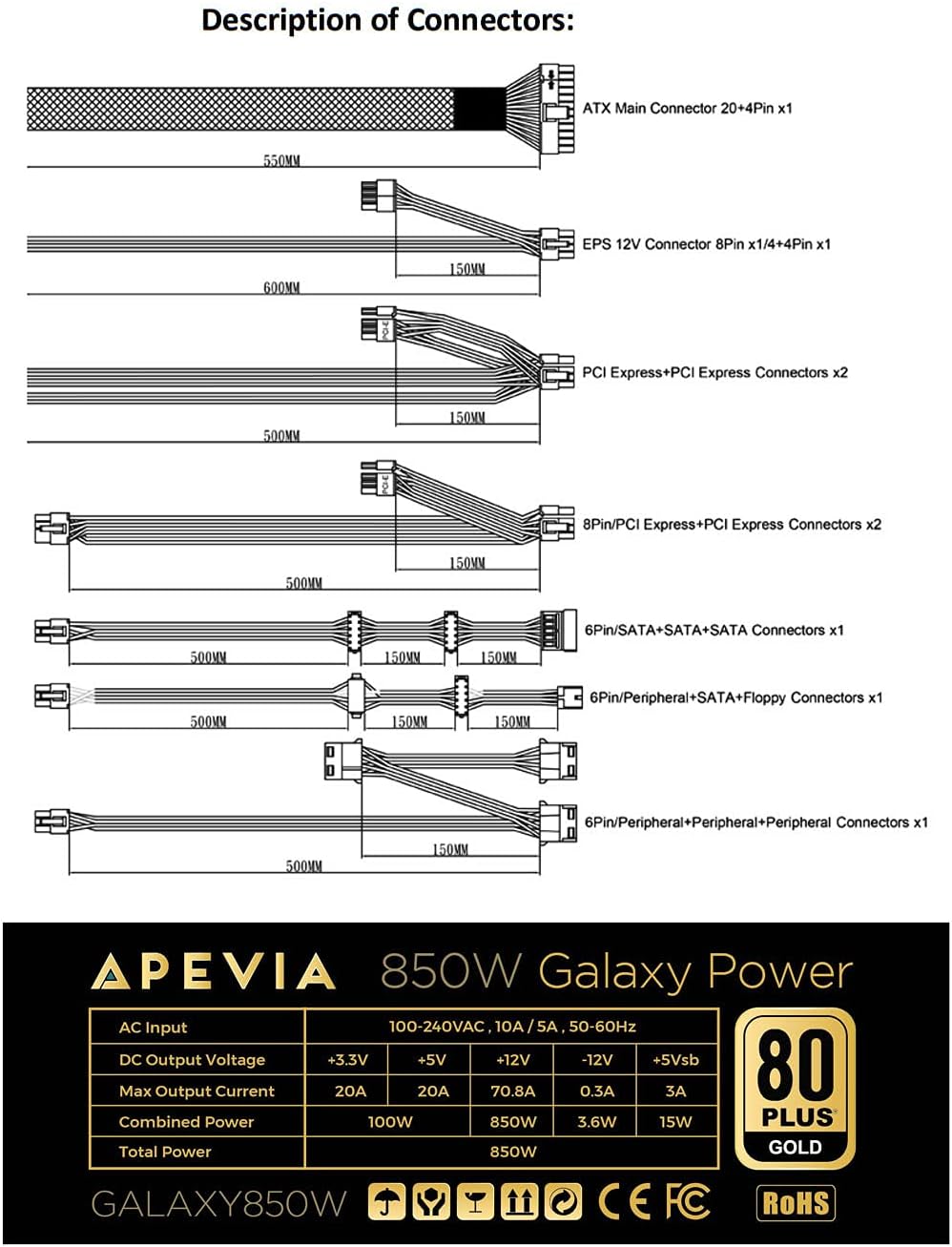
Figure 3: Description of Connectors

Figure 4: Modular Cable Ports
- 20/24-pin Main Power Connector: Connect this to your motherboard. The 24-pin connector can be split into 20+4 pins for motherboards requiring a 20-pin connector.
- P8 (4+4P) EPS 12V Connector: Connect this to your motherboard's CPU power input. The 8-pin connector can be split into 4+4 pins for motherboards requiring a 4-pin connector.
- 8 (6+2)pin PCI-E Connectors: Connect these to your graphics card(s). The 8-pin connector can be split into 6+2 pins for graphics cards requiring a 6-pin connector.
- SATA stik: Connect these to SATA devices such as SSDs, HDDs, and optical drives.
- Peripheral (Molex) Connectors: Used for older peripherals or case fans.
- Floppy Connector: Used for legacy floppy drives or some fan controllers.
IMPORTANT: The power supply will not power on simply by connecting the power cord to both the power supply and wall outlet. Ensure that all the power supply cables are properly connected to the PC for it to power on.
5.4 Strømtilslutning
- Once all internal connections are made, close your computer case.
- Connect the AC power cord to the power supply's input socket.
- Sæt den anden ende af netledningen i en jordet stikkontakt.
- Flip the power switch on the back of the power supply to the 'ON' position.

Figure 5: Power Supply Rear Panel with AC Input and Switch
6. Betjeningsvejledning
After successful installation, you can power on your computer. The power supply's 135mm fan will automatically adjust its speed based on the internal temperature, providing efficient cooling while minimizing noise.
To power off your computer, use the operating system's shutdown function. For a complete power cycle, you can also switch off the power supply using the switch on its rear panel after the system has shut down.
7. Vedligeholdelse
For at sikre optimal ydeevne og levetid for din strømforsyning:
- Rensning: Periodically clean the exterior of the power supply and the fan grille to prevent dust buildup. Use compressed air to gently clear dust from the fan and vents. Ensure the power supply is disconnected from the wall outlet before cleaning.
- Ventilation: Ensure your PC case has adequate airflow and that the power supply's fan is not obstructed.
- Kabelstyring: Proper cable management not only improves aesthetics but also enhances airflow, contributing to better cooling for all components, including the PSU.
8. Fejlfinding
8.1 Strømforsyningen tænder ikke
- Tjek strømledningen: Ensure the AC power cord is securely connected to both the power supply and a working wall outlet.
- Afbryderen: Verify that the power switch on the back of the power supply is in the 'ON' position.
- Interne forbindelser: Double-check all modular cables are firmly connected to both the power supply and your computer components (motherboard, CPU, GPU, drives). A loose connection can prevent the system from powering on.
- Motherboard Stand-offs: Ensure your motherboard is correctly installed with stand-offs to prevent short circuits.
- Faulty Components: If the issue persists, try testing the power supply with a known working system or consult a qualified technician.
8.2 For meget ventilatorstøj
- Støvopbygning: Clean the power supply fan and vents as described in the Maintenance section.
- Overbelaste: Ensure your system's power requirements do not exceed the 850W capacity of the power supply. High loads can cause the fan to spin faster.
- Obstruktion: Check for any cables or objects obstructing the fan's rotation.
9. Specifikationer
| Feature | Specifikation |
|---|---|
| Modelnavn | Galaxy |
| Mærke | Apevia |
| Kompatible enheder | Personlig computer |
| Connector Type | ATX, Floppy, PCI-E, SATA |
| Output Wattage | 850 watt |
| Formfaktor | ATX |
| Afkølingsmetode | Luft (135 mm blæser) |
| Varedimensioner (L x B x H) | 6.2 x 5.9 x 3.4 tommer |
| Varens vægt | 4.6 pund |
| Design af strømforsyning | Semi-modulær |
| Antal fans | 1 |
| Maksimal indgang Voltage | 230 volt |
| Minimum input voltage | 110 volt |
| System Bus Connector Type | 24 ben |
| UPC | 810047130796 |
| Mfr varenummer | ATX-GX850W |
Output Table:
| Produktion | Strøm |
|---|---|
| +3.3V | 20A |
| +5V | 20A |
| +12V | 66A |
| -12V | 0.3A |
| +5Vsb | 3A |
10. Garantioplysninger
The Apevia ATX-GX850W Galaxy 850W 80+ Gold Certified Power Supply typically comes with a 3-year manufacturer's warranty. Please retain your proof of purchase for warranty claims. For detailed warranty terms and conditions, refer to the official Apevia webwebsted eller kontakt deres kundesupport.
11. Support
For yderligere assistance, teknisk support eller til view other Apevia products, please visit the official Apevia store: