
1. Introduktion
Thank you for choosing the Hoco W27 Cat Ear Bluetooth Headphones. These headphones combine advanced Bluetooth 5.0 technology with a unique glowing cat ear design, offering a versatile audio experience. They support Bluetooth, TF card, and AUX playback modes, making them compatible with a wide range of mobile phones and tablets. This manual provides detailed instructions for setup, operation, maintenance, and troubleshooting to ensure you get the most out of your device.
2. Produktet er slutview
Familiarize yourself with the components of your Hoco W27 headphones.
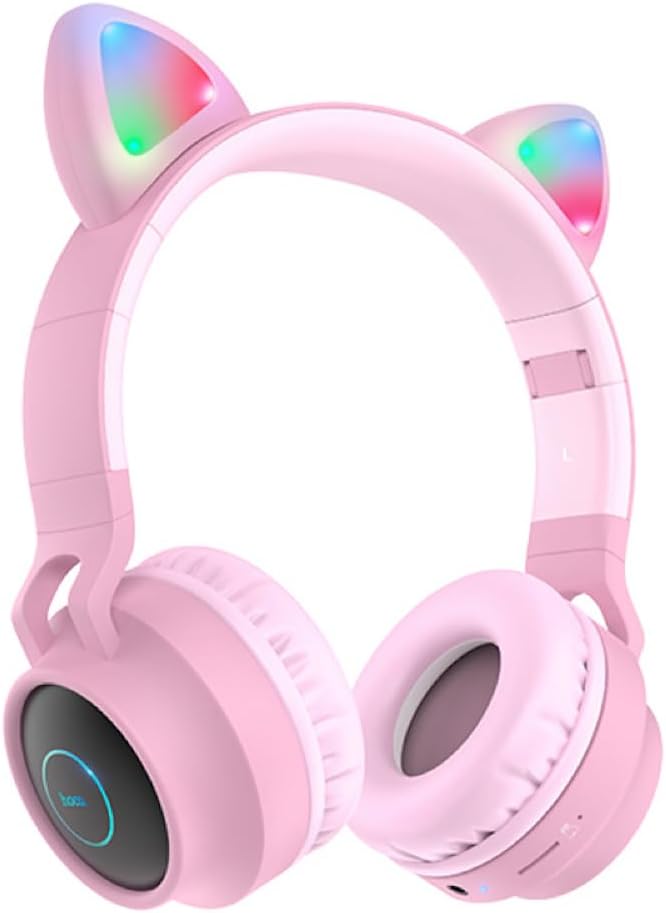
Figur 2.1: Front view of the Hoco W27 Cat Ear Bluetooth Headphones in pink, showcasing the glowing cat ears and over-ear design.

Figur 2.2: Side view of the Hoco W27 headphones, highlighting the control buttons on the left earcup, including volume, track control, and mode switch.

Figur 2.3: Top-down view of the Hoco W27 headphones, showing the adjustable headband and the placement of the control panel on the earcup.
3. Opsætning
3.1 Opladning af hovedtelefonerne
Before first use, fully charge the headphones. The built-in 300mAh battery requires approximately 2 hours for a full charge.
- Connect the charging cable (usually USB-C or Micro-USB, depending on model) to the charging port on the headphones.
- Tilslut den anden ende af kablet til en USB-strømkilde (f.eks. en computers USB-port eller en vægadapter).
- The indicator light will show charging status (e.g., red light while charging, off or blue when fully charged).
3.2 Bluetooth -parring
The Hoco W27 headphones feature Bluetooth 5.0 for stable and efficient wireless connection.
- Sørg for, at hovedtelefonerne er slukket.
- Tryk på tænd/sluk-knappen, og hold den nede, indtil indikatorlampen blinker skiftevis blåt og rødt, hvilket angiver parringstilstand.
- Aktiver Bluetooth på din enhed (smartphone, tablet, computer) og søg efter tilgængelige enheder.
- Select "Hoco W27" or a similar name from the list of found devices.
- Once connected, the indicator light will typically flash blue slowly or turn off, and you will hear a confirmation tone.
3.3 TF-korttilstand
The headphones support TF (MicroSD) card playback.
- Insert a TF card with your desired audio files ind i TF-kortstikket på hovedtelefonerne.
- The headphones should automatically switch to TF card playback mode. If not, press the Mode button to cycle through modes until TF card mode is active.
3.4 AUX-tilstand
For wired connection, use the AUX mode.
- Connect one end of a 3.5mm audio cable (not always included) to the AUX port on the headphones.
- Tilslut den anden ende til lydudgangsstikket på din enhed.
- The headphones will automatically switch to AUX mode. Note that controls on the headphones may be limited in this mode, and playback is controlled by the connected device.
4. Betjeningsvejledning
4.1 Tænd/sluk
- Tænd: Press and hold the Power button for approximately 3 seconds until the indicator light turns on and you hear a power-on prompt.
- Sluk: Press and hold the Power button for approximately 3-5 seconds until the indicator light turns off and you hear a power-off prompt.
4.2 Musikafspilning
- Afspil/pause: Tryk én gang på multifunktionsknappen (ofte tænd/sluk-knappen eller en dedikeret afspil/pause-knap).
- Næste nummer: Tryk og hold på knappen Lydstyrke op (+) eller en dedikeret Næste nummer-knap.
- Forrige nummer: Tryk og hold på knappen Lydstyrke ned (-) eller en dedikeret knap til Forrige nummer.
- Lydstyrke op: Tryk kort på knappen Lydstyrke op (+).
- Skrue ned for lyden: Tryk kort på lydstyrke ned-knappen (-).
The headphones offer up to 5 hours of continuous music playback on a full charge.
4.3 Opkaldsfunktioner
- Besvar/afslut opkald: Tryk én gang på multifunktionsknappen under et indgående opkald.
- Afvis opkald: Press and hold the Multi-function button for approximately 2 seconds during an incoming call.
- Genopkald sidste nummer: Dobbelttryk på multifunktionsknappen, når du ikke er i gang med et opkald.
4.4 Modeskift
Press the 'M' (Mode) button to cycle between Bluetooth, TF Card, and AUX playback modes.
4.5 Cat Ear Lights
The glowing cat ear design adds a unique aesthetic. The lights typically activate automatically when the headphones are powered on. Refer to the product packaging or specific model features for details on controlling the lights, if a dedicated button exists.
4.6 Voice Prompt Switch
To switch the voice prompt language or disable prompts:
- When the headphones are ikke tilsluttet to a device, double-click the 'M' (Mode) button. You will hear a beep, indicating a change in the voice prompt setting.
5. Vedligeholdelse
Korrekt pleje sikrer dine hovedtelefoners levetid.
- Rensning: Brug en blød, tør og fnugfri klud til at rengøre hovedtelefonernes overflader. Brug ikke slibende rengøringsmidler, opløsningsmidler eller spray direkte på hovedtelefonerne.
- Opbevaring: Store the headphones in a cool, dry place away from direct sunlight and extreme temperatures. If storing for an extended period, ensure they are partially charged.
- Batteripleje: To preserve battery life, avoid fully discharging the headphones frequently. Charge them regularly, even if not in use for a long time.
- Undgå fugt: Udsæt ikke hovedtelefonerne for vand eller overdreven fugt.
6. Fejlfinding
If you encounter issues with your Hoco W27 headphones, try the following solutions:
| Problem | Mulig årsag | Løsning |
|---|---|---|
| Hovedtelefonerne tændes ikke. | Lavt batteri. | Oplad hovedtelefonerne i mindst 30 minutter. |
| Kan ikke parres via Bluetooth. | Hovedtelefoner er ikke i parringstilstand; enhedens Bluetooth er slået fra; for langt fra enheden. | Ensure headphones are in pairing mode (flashing red/blue). Turn device Bluetooth off and on. Move headphones closer to device. |
| Ingen lyd fra hovedtelefoner. | Volume too low; incorrect mode; loose AUX cable; corrupted TF card files. | Increase volume on headphones and device. Ensure correct mode (Bluetooth, TF, AUX). Re-insert AUX cable. Check TF card files. |
| Dårlig lydkvalitet. | Interferens; lavt batteri; afstand fra enhed. | Move away from sources of interference. Charge headphones. Reduce distance between headphones and device. |
| Cat ear lights not working. | Headphones off; specific light control setting. | Ensure headphones are powered on. Check if there's a dedicated button for lights (refer to product specifics). |
7. Specifikationer
Key technical specifications for the Hoco W27 Cat Ear Bluetooth Headphones:
| Feature | Specifikation |
|---|---|
| Bluetooth version | 5.0 (JL AC6925F chip) |
| Batterikapacitet | 300mAh |
| Opladningstid | Cirka 2 timer |
| Call / Music Time | Op til 5 timer |
| Standby tid | Op til 200 timer |
| Højttaler diameter | 40 mm |
| Dimensioner (L*B*H) | 203 x 175 x 80 mm (8 x 6.9 x 3.1 tommer) |
| Vægt | 182 g (6.4 oz) |
| Understøttede tilstande | Bluetooth, TF-kort, AUX |
| Designfunktion | Glowing cat ear shape |
| Øreplacering | Over Ear |
| Støjkontrol | Ingen |
8. Sikkerhedsoplysninger
Please read and follow these safety guidelines for safe operation:
- Produktet må ikke skilles ad, repareres eller ændres. Dette kan forårsage brand, elektrisk stød eller fuldstændig skade på produktet.
- Hold hovedtelefonerne væk fra ekstreme temperaturer, direkte sollys og høj luftfugtighed.
- Undgå at udsætte hovedtelefonerne for vand eller andre væsker.
- Brug ikke hovedtelefonerne ved for høj lydstyrke i længere perioder, da dette kan forårsage høreskader.
- Opbevares utilgængeligt for børn.
9. Garanti og support
For warranty information and customer support, please refer to the documentation provided with your purchase or contact the retailer where you purchased the Hoco W27 headphones. Keep your proof of purchase for any warranty claims.