
Indledning
This manual provides detailed instructions for the installation, operation, and maintenance of your LogiLink BP0144 Monitor Wall Bracket. Please read this manual thoroughly before installation to ensure correct setup and safe use. This wall bracket is designed to securely mount 17-32 inch flat or curved monitors, offering flexible positioning with its gas lift mechanism.
Sikkerhedsoplysninger
Before installation, ensure you have read and understood all instructions. Failure to do so may result in personal injury, property damage, or voiding of warranty.
- Vægt kapacitet: Overskrid ikke den maksimale belastningskapacitet på 9 kg (19.8 lbs).
- Vægtype: Ensure the mounting surface can safely support the combined weight of the bracket and your monitor. Consult a professional if unsure.
- Værktøjer: Brug passende værktøjer til installation.
- Børn: Hold børn væk under installationen.
- Bevægelige dele: Be aware of moving parts during adjustment to avoid pinching.
- Gasfjeder: Do not attempt to disassemble the gas spring mechanism.
- Stramning: Spænd ikke skruerne for hårdt, da dette kan forårsage skader.
Pakkens indhold
Kontroller venligst, at alle komponenter er til stede, før installationen påbegyndes.
- 1 x LogiLink BP0144 Monitor Wall Mount
- 1 x Screw Set (various screws, washers, anchors for different wall types)
- 1 x Brugermanual (dette dokument)

Image: LogiLink BP0144 Monitor Wall Bracket product packaging, showing the box with product features.
Opsætning og installation
Note: Installation requires drilling into a wall. Ensure you have the necessary tools and expertise. If you are unsure, seek professional assistance.
- Forbered væggen: Choose a suitable location on a solid wall (e.g., concrete, brick, or wood stud). Use a stud finder to locate wood studs if mounting to drywall. Mark the drilling points according to the wall plate dimensions.
- Fastgør vægplade: Drill pilot holes at the marked locations. Secure the wall plate to the wall using the appropriate screws and anchors from the provided screw set. Ensure it is level and firmly attached.
- Assemble Arm: Attach the monitor arm to the wall plate. Follow the specific instructions in the included diagram for your model to ensure correct orientation and secure fastening.
- Fastgør VESA-plade til monitor: Locate the VESA mounting holes on the back of your monitor (75x75mm or 100x100mm). Attach the VESA plate from the bracket to your monitor using the appropriate screws. Do not overtighten.

Billede: Forside view of the LogiLink BP0144 Monitor Wall Bracket, showing the wall plate, arm, and VESA mounting plate.
- Monter skærm: Carefully lift the monitor with the attached VESA plate and slide it onto the arm's mounting head. Secure it with the locking mechanism or screws as indicated in the instructions.

Billede: Bagside view of a monitor with the VESA plate of the LogiLink BP0144 bracket attached, ready for mounting.

Billede: Nærbillede view of the VESA plate connection point on the LogiLink BP0144 arm, showing how the monitor attaches.
- Juster gasfjederspænding: The gas spring tension may need adjustment to properly counterbalance your monitor's weight. Use the provided Allen key to turn the adjustment screw (usually located on the arm) until the monitor stays at the desired height without drifting up or down. Turn clockwise to increase tension for heavier monitors, counter-clockwise for lighter monitors.
- Kabelstyring: Route monitor cables through the integrated cable management channels on the arm for a tidy appearance.

Billede: Side view of the LogiLink BP0144 Monitor Wall Bracket with a monitor securely attached, demonstrating its profile.
Betjeningsvejledning
Your LogiLink BP0144 Monitor Wall Bracket offers versatile adjustments for optimal viewkomfort.
- Højdejustering (gasløft): Gently push or pull the monitor to the desired height. The gas spring mechanism will hold it in place once adjusted correctly.
- Justering af hældning: The monitor can be tilted -45° to +90° (upwards/downwards). Loosen the tilt screw slightly, adjust the angle, and then retighten to secure.
- Drejejustering: Swivel the monitor -90° to +90° (left/right) for collaborative vieweller at ændre retning.
- Rotation (Portræt/Landskab): The front panel allows for 360° rotation, enabling you to switch between landscape and portrait modes without removing the monitor.
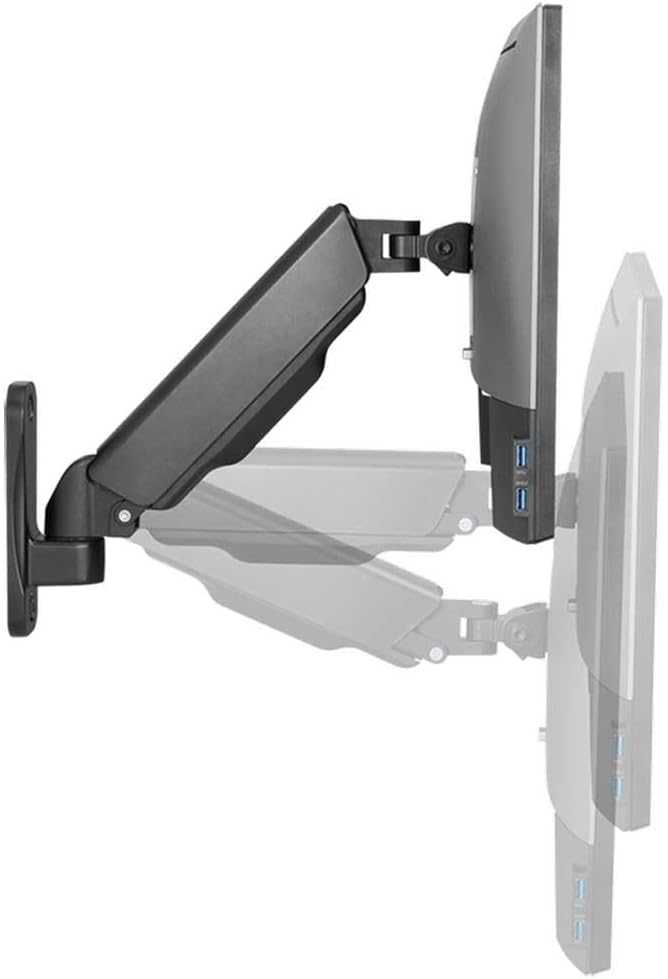
Image: The LogiLink BP0144 Monitor Wall Bracket with a monitor, illustrating the range of tilt and swivel motion.

Billede: Side view of the LogiLink BP0144 Monitor Wall Bracket, showing a cable routed through its integrated management system.
Opretholdelse
Regular maintenance ensures the longevity and safe operation of your monitor wall bracket.
- Rensning: Tør beslaget af med en blød kludamp klud. Undgå slibende rengøringsmidler eller opløsningsmidler.
- Inspektion: Kontrollér regelmæssigt alle skruer og forbindelser for at sikre, at de er stramme og sikre. Efterspænd om nødvendigt.
- Gasfjeder: The gas spring is maintenance-free. Do not attempt to lubricate or disassemble it.
Fejlfinding
If you encounter issues with your monitor wall bracket, refer to the following common solutions:
- Monitor drifts down/up: The gas spring tension needs adjustment. Refer to the 'Adjust Gas Spring Tension' step in the Setup section.
- Vanskeligheder med at bevæge armen: Check if any screws are overtightened, especially at the joints. Loosen slightly if movement is restricted. Ensure the gas spring tension is not too high for a light monitor.
- Bracket feels unstable: Re-check all wall mounting screws and monitor attachment screws. Ensure the wall type is appropriate and the anchors are correctly installed. Do not exceed the maximum weight capacity.
Specifikationer
| Feature | Detalje |
|---|---|
| Model | BP0144 |
| Mærke | Logilink |
| Kompatible skærmstørrelser | 17 - 32 inches (flat/curved) |
| Maksimal belastningskapacitet | 9 kg (19.8 lbs) |
| Monteringstype | Vægmontering |
| VESA-kompatibilitet | 75x75mm, 100x100mm |
| Afstand fra væg | 90 - 380 mm |
| Tilt rækkevidde | -45 ° / + 90 ° |
| Drejningsområde | -90 ° / + 90 ° |
| Skærmrotation | 360° (portræt/landskab) |
| Armlængde | 290 mm maks. |
| Bevægelsestype | Rotate, Swivel, Tilt (Gas Lift) |
| Materiale | Edelstahl (Stainless Steel) |
| Farve | Sort |
| Varens vægt | 2 kilo |
| Fabrikant | 2direct GmbH |
Garantioplysninger
No specific warranty information is provided in the product data. Please refer to your purchase documentation or contact the retailer for warranty details.
Supportinformation
No specific customer support contact information is provided in the product data. For assistance, please contact your retailer or visit the LogiLink official webwebsted.