
1. Vigtige sikkerhedsoplysninger
Please read this manual carefully before operating the appliance and keep it for future reference. Failure to follow these instructions may result in electric shock, fire, or injury.
- Sørg for, at strømforsyningen matcher voltage angivet på mærkatet.
- Betjen ikke enheden med en beskadiget ledning eller stik.
- Hold apparatet væk fra varmekilder og direkte sollys.
- Bloker ikke luftindtag eller -udtag.
- This appliance contains R290 refrigerant. Handle with care and ensure proper ventilation during installation and maintenance.
- Tag altid stikket ud af stikkontakten før rengøring eller servicering.
- Brug ikke kemiske opløsningsmidler til rengøring.
- Dette apparat er ikke beregnet til brug af personer (inklusive børn) med nedsatte fysiske, sensoriske eller mentale evner, eller mangel på erfaring og viden, medmindre de har fået opsyn eller instruktion i brugen af apparatet af en person, der er ansvarlig for deres sikkerhed.
2. Pakkens indhold
Kontroller, at alle genstande er til stede og ubeskadigede ved udpakning.
- 1 x Klarstein Kraftwerk Smart Portable Air Conditioner
- 1 x fjernbetjening
- 1 x Window Sealing Kit (for tilt windows)
- 1 x Exhaust Hose with Connectors
- 1 x Water Drainage Hose
- 1 x Brugermanual (engelsk)

Image: Contents of the delivery, including the air conditioner unit, remote control, window sealing kit, exhaust hose, and drainage hose.
3. Opsætning og installation
3.1 Placering af enheden
Place the air conditioner on a flat, stable surface. Ensure there is at least 30 cm (12 inches) of space around the unit for proper airflow. The integrated castors allow for easy movement between rooms.

Image: The portable air conditioner with integrated wheels for easy transport.
3.2 Montering af udstødningsslange
- Fastgør udstødningsslangen til luftudløbet på bagsiden af enheden.
- Forlæng slangen til det nærmeste vindue eller den nærmeste åbning.
- Use the provided window sealing kit to secure the exhaust hose in the window opening, preventing hot air from re-entering the room.

Image: Quick installation with the window kit, showing the exhaust hose and window seal.
3.3 Drainage Hose (Dehumidifier Mode)
For continuous dehumidification, connect the drainage hose to the designated outlet and route it to a suitable drain or container. In cooling mode, water typically evaporates, but manual drainage may be required if the internal tank fills.
4. Betjeningsvejledning
4.1 Kontrolpanel og fjernbetjening
The unit can be controlled via the touch control panel on top of the unit or the included remote control. The remote control requires 2x AAA batteries (not included).
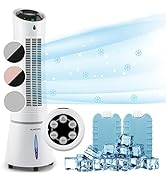
Image: Digital display and remote control for the air conditioner.
4.2 driftstilstande
- Køletilstand: Reduces room temperature. Set desired temperature and fan speed.
- Affugtertilstand: Fjerner overskydende fugt fra luften.
- Ventilatortilstand: Cirkulerer luften uden køling. Vælg den ønskede ventilatorhastighed.
- Sove mode: Operates quietly with reduced fan speed and gradually increases temperature for comfortable sleep.
4.3 Smart Control (App & Alexa)
The Klarstein Kraftwerk Smart can be controlled via the Klarstein app on your smartphone and is compatible with Amazon Alexa and Google Home. Follow the app's instructions for pairing the device.

Image: Simple and practical use with the Klarstein app, compatible with Amazon Alexa and Google Home.
4.4 Timer funktion
Use the timer function to set the unit to turn on or off automatically after a specified period.
5. Vedligeholdelse
Regelmæssig vedligeholdelse sikrer optimal ydeevne og forlænger levetiden på dit klimaanlæg. Tag altid stikket ud af enheden, før du udfører nogen form for vedligeholdelse.
5.1 Rengøring af luftfilteret
The air filter should be cleaned every two weeks or more frequently depending on usage. A dirty filter reduces efficiency.
- Sluk og tag stikket ud af enheden.
- Find og fjern luftfilteret fra bagsiden eller siden af enheden.
- Clean the filter with a vacuum cleaner or wash it with warm water and mild detergent.
- Lad filteret tørre helt, før du sætter det i igen.
5.2 Rengøring af enhedens yderside
Tør ydersiden af enheden af med en blød, damp klud. Brug ikke skrappe kemikalier, slibemidler eller opløsningsmidler.
5.3 Sæsonbestemt opbevaring
Hvis enheden opbevares i en længere periode:
- Tøm eventuelt ophobet vand ud af enheden.
- Rengør luftfilteret.
- Dæk enheden til for at beskytte den mod støv.
- Opbevares på et tørt, køligt sted.
6. Fejlfinding
Før du kontakter kundesupport, skal du se følgende tabel for almindelige problemer og løsninger.
| Problem | Mulig årsag | Løsning |
|---|---|---|
| Enheden tænder ikke. | No power, power cord unplugged, fuse blown. | Kontroller strømtilslutningen, stikkontakten og afbryderen. |
| Utilstrækkelig køling. | Snavset luftfilter, blokeret luftindtag/-udløb, rum for stort, vinduer/døre åbne, udstødningsslange ikke korrekt installeret. | Clean filter, clear obstructions, ensure proper room size for unit capacity, close windows/doors, check exhaust hose installation. |
| Enheden er støjende. | Unit not on a flat surface, internal components vibrating. | Ensure unit is on a level surface. Some operational noise is normal for portable AC units. |
| Vandlækage. | Drainage plug not properly sealed, drainage hose blocked or improperly connected. | Check drainage plug and hose connections. Clear any blockages in the drainage hose. |
| Problemer med Wi-Fi-forbindelse. | Incorrect Wi-Fi settings, 5GHz network used, temporary glitch. | Ensure you are connecting to a 2.4GHz Wi-Fi network. Try unplugging the unit for 10 seconds, then reconnecting. Refer to the app's pairing instructions. |
7. Specifikationer
| Feature | Detalje |
|---|---|
| Mærke | KLARSTEIN |
| Modelnavn | Kraftwerk Smart |
| Kølekapacitet | 10,000 BTU (2.9 kW) |
| Affugtningskapacitet | 23 liter |
| Luftstrømsvolumen | 440 m³/t |
| Anbefalet rumstørrelse | 29-49 m² |
| Støjniveau | 50 dB (Min) / 65 dB (Max) |
| Energieffektivitetsklasse | A |
| Kølemiddel | R-290 |
| Strømforbrug | 1150 watt |
| Voltage | 220 volt |
| Mål (D x B x H) | 38P x 35.5L x 82.2H cm |
| Vægt | 26 kilo |
| Kontrolmetode | Fjernbetjening, App-kontrol |
| Filtertype | Trækul |

Image: Energy efficiency label for the product.
Image: Technical drawing with product dimensions.
8. Garanti og kundesupport
8.1 Garantioplysninger
This product comes with a limited warranty. Please refer to the warranty card included in your package or contact customer support for detailed terms and conditions. The warranty covers manufacturing defects under normal use.
8.2 Kundesupport
For technical assistance, spare parts, or any questions regarding your Klarstein Kraftwerk Smart air conditioner, please contact Klarstein customer support. Contact details can typically be found on the official Klarstein webwebstedet eller i din købsdokumentation.
Before contacting support, please have your model number (Kraftwerk Smart) and purchase date available.