
1. Introduktion
Thank you for choosing the Caliber HPG318DAB Portable DAB+/FM Radio. This device offers high-quality digital and analog radio reception, a compact design for portability, and convenient alarm functions. This manual provides essential information for the safe and efficient use of your radio.
2. Sikkerhedsoplysninger
- Læs alle instruktioner omhyggeligt før brug, og gem dem til senere brug.
- Udsæt ikke enheden for regn, fugt eller ekstreme temperaturer.
- Undgå at placere enheden i nærheden af varmekilder eller i direkte sollys.
- Du må ikke selv adskille eller forsøge at reparere enheden. Overlad al service til kvalificeret personale.
- Brug kun det medfølgende opladningskabel og adapter.
- Opbevares utilgængeligt for børn.
3. Pakkens indhold
Sørg for at alle varer er til stede i pakken:
- Caliber HPG318DAB Portable DAB+/FM Radio Unit
- Brugermanual
- USB opladningskabel
- Strømadapter
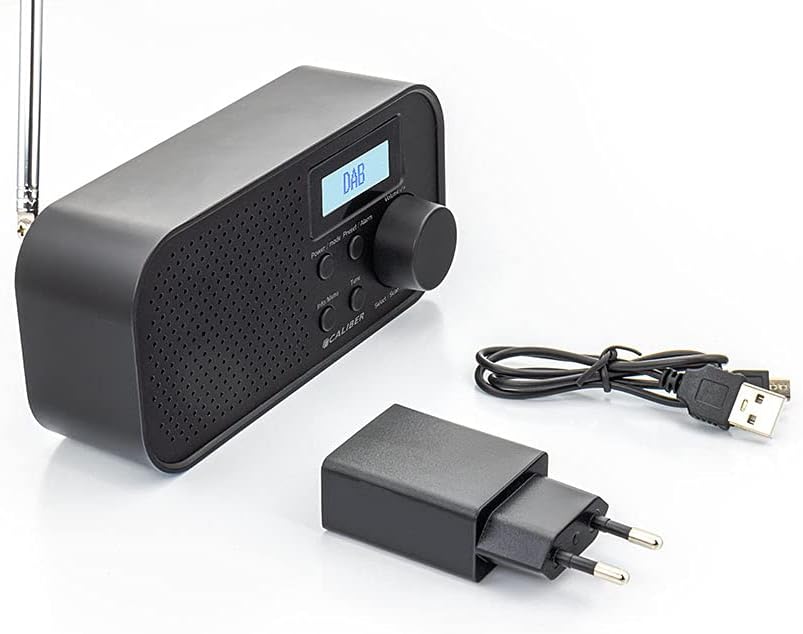
Image: Caliber HPG318DAB radio unit, USB charging cable, and power adapter.
4. Produktet er slutview
4.1 Betjeningselementer på frontpanelet
Billede: Forside view of the Caliber HPG318DAB radio, highlighting the LCD screen, speaker grille, and control buttons.
- LCD skærm: Displays station information, time, and menu options.
- Tænd/sluk-knap: Turns the radio on/off and switches between DAB+ and FM modes.
- Menu/Info-knap: Accesses menu settings and displays additional information.
- Forudindstilling/Alarm-knap: Saves/recalls preset stations and sets alarm functions.
- Select/Scan Button: Confirms selections and initiates station scans.
- Snooze knap: Slukker midlertidigt for alarmen.
- Lydstyrkeknap: Justerer lydstyrken.
- Højttalergitter: Lydudgang.
4.2 Bagpaneltilslutninger

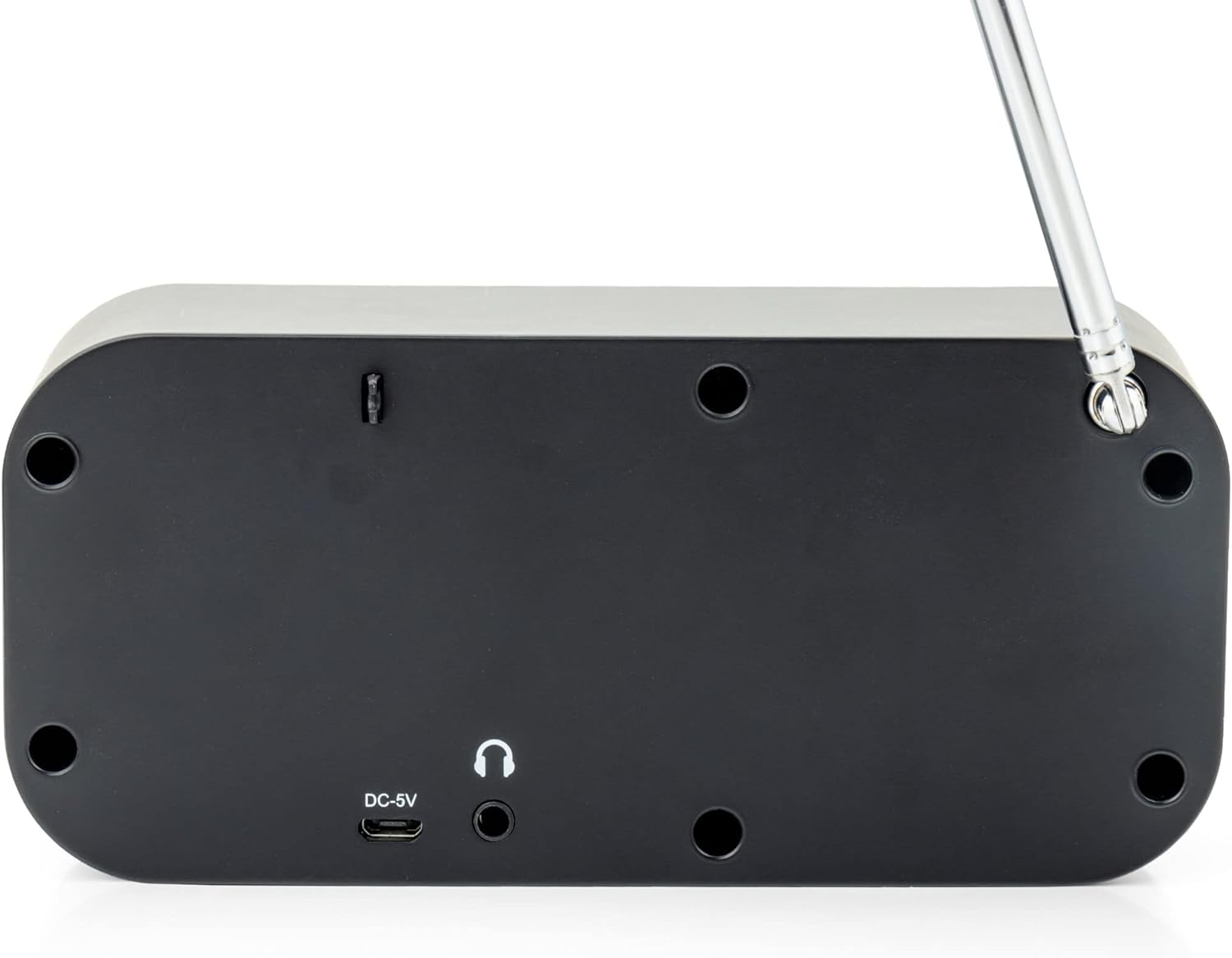
Billede: Bagside view of the Caliber HPG318DAB radio, showing the DC-5V charging port, 3.5mm headphone jack, and telescopic antenna.
- DC-5V indgang: Tilslut USB-opladerkablet her.
- 3.5 mm hovedtelefonstik: Til tilslutning af hovedtelefoner eller øretelefoner.
- Teleskopantenne: Forlæng for optimal radiomodtagelse.
5. Opsætning
5.1 Opladning af batteriet
The Caliber HPG318DAB features a built-in rechargeable battery, providing up to 8 hours of playback on a full charge.
- Connect the small end of the provided USB charging cable to the DC-5V indgang port on the rear of the radio.
- Connect the larger end of the USB cable to the provided power adapter.
- Sæt strømadapteren i en almindelig stikkontakt.
- The charging indicator on the LCD screen will show the charging status. Once fully charged, the indicator will change.
Note: It is recommended to fully charge the battery before first use.
5.2 Justering af antenne
For optimal radio reception, fully extend the telescopic antenna located on the rear of the device. Adjust its position to improve signal strength if reception is poor.
6. Betjeningsvejledning
6.1 Tænd/sluk og valg af tilstand
- At tænde radioen ON, tryk på og hold nede Strøm/tilstand knap.
- At tænde radioen SLUKKET, tryk på og hold nede Strøm/tilstand knappen igen.
- At skifte mellem DAB+ og FM modes, short press the Strøm/tilstand button while the radio is on. The current mode will be displayed on the LCD screen.
6.2 DAB+ radiobetjening
- Skift til DAB+-tilstand ved hjælp af Strøm/tilstand knap.
- The radio will automatically perform a full scan for available DAB+ stations upon first use or if no stations are found. To initiate a manual scan, press the Menu/info button, navigate to 'Full Scan', and press Select/Scan.
- Brug Volumenknap for at rulle gennem listen over tilgængelige stationer. Tryk på Select/Scan for at vælge en station.
- To save a station as a preset (up to 10 presets): While listening to a station, press and hold the Forudindstilling/Alarm knap. Brug Volumenknap for at vælge et forudindstillet nummer (1-10), og tryk derefter på Select/Scan for at bekræfte.
- Sådan henter du en forudindstillet station: Tryk kort på Forudindstilling/Alarm knappen, brug Volumenknap for at vælge det ønskede forudindstillede nummer, og tryk derefter på Select/Scan.
- Tryk på Menu/info knap til view additional information (e.g., program type, signal strength, time) provided by Radio Data System (RDS).
6.3 FM-radiofunktion
- Skift til FM-tilstand ved hjælp af Strøm/tilstand knap.
- To automatically scan for stations: Press and hold the Select/Scan knappen. Radioen vil scanne og stoppe ved den næste station med stærke signaler.
- To manually tune: Rotate the Volumenknap to adjust the frequency in small increments.
- To save a station as a preset (up to 10 presets): While listening to a station, press and hold the Forudindstilling/Alarm knap. Brug Volumenknap for at vælge et forudindstillet nummer (1-10), og tryk derefter på Select/Scan for at bekræfte.
- Sådan henter du en forudindstillet station: Tryk kort på Forudindstilling/Alarm knappen, brug Volumenknap for at vælge det ønskede forudindstillede nummer, og tryk derefter på Select/Scan.
- Tryk på Menu/info knap til view additional information (e.g., station name, program type) provided by Radio Data System (RDS).
6.4 Lydstyrkekontrol
Drej den store Volumenknap med uret for at øge lydstyrken og mod uret for at sænke den.
6.5 Brug af hovedtelefoner
Connect any standard 3.5mm headphones or earphones to the 3.5 mm hovedtelefonstik on the rear of the radio for private listening. The internal speaker will automatically mute when headphones are connected.
6.6 Alarmfunktioner
The radio includes alarm clock and sleep timer functions.
Indstilling af vækkeuret:
- Tryk og hold på Forudindstilling/Alarm button until the alarm setup menu appears.
- Brug Volumenknap to navigate through options like Alarm 1, Alarm 2, Time, Source (Buzzer/DAB/FM), and Volume. Press Select/Scan for at bekræfte hver indstilling.
- Set the desired alarm time, choose your preferred alarm source (buzzer, DAB+ station, or FM station), and set the alarm volume.
- Ensure the alarm is set to 'On' in the menu.
Brug af Snooze-funktionen:
Når alarmen lyder, skal du trykke på Snooze button to temporarily pause the alarm for a short period (e.g., 9 minutes). The alarm will sound again after the snooze period.
Indstilling af dvaletimer:
- Tryk på Menu/info knap.
- Navigate to the 'Sleep' option using the Volumenknap og tryk Select/Scan.
- Select the desired sleep timer duration (e.g., 15, 30, 45, 60, 90 minutes, or Off). The radio will automatically turn off after the selected time.
7. Vedligeholdelse
7.1 Rengøring
To clean the radio, use a soft, dry cloth. Do not use abrasive cleaners, waxes, or solvents as they may damage the finish.
7.2 Opbevaring
When not in use for extended periods, store the radio in a cool, dry place away from direct sunlight and extreme temperatures. Ensure the battery is partially charged before storage to maintain its lifespan.
7.3 Pleje af batterier
To prolong the life of the built-in Lithium-ion battery, avoid fully discharging it frequently. Charge the radio regularly, even if not in constant use.
8. Fejlfinding
| Problem | Mulig årsag | Løsning |
|---|---|---|
| Radioen tænder ikke. | Batteriet er afladet. | Connect the radio to power using the USB cable and adapter to charge the battery. |
| Dårlig radiomodtagelse (DAB+/FM). | Antennen er ikke strakt ud, eller signalet er dårligt i området. | Træk teleskopantennen helt ud, og juster dens position. Prøv at flytte radioen til en anden placering. |
| Ingen lyd. | Volume is too low or headphones are connected. | Øg lydstyrken ved hjælp af Volumenknap. Disconnect headphones if you want sound from the speaker. |
| Alarmen lyder ikke. | Alarm not set correctly or turned off. | Check alarm settings (time, source, volume, 'On' status) in the menu. |
9. Specifikationer
| Feature | Specifikation |
|---|---|
| Modelnummer | HPG318DAB |
| Dimensioner (L x B x H) | 15 x 4 x 6.5 cm |
| Vægt | 255 g |
| Strømkilde | Battery-Powered (1 Lithium-ion battery required) |
| Batterilevetid | Op til 8 timer |
| Understøttede radiobånd | DAB+, FM |
| Forbindelsesteknologi | AUX (for headphones), USB (for charging) |
| Maximum Speaker Output | 25 watt |
| Materiale | Plast |
| Farve | Sort |
| Særlige funktioner | Portable, Alarm Function, RDS, LCD Screen |
10. Garanti og support
For warranty information and customer support, please refer to the documentation provided with your purchase or visit the official Caliber webwebsted. Gem din købsbevis i tilfælde af garantikrav.