
1. Introduktion
Tak for købetasing the QFX PBX-8080 Portable Bluetooth Speaker. This manual provides important information regarding the setup, operation, and maintenance of your device. Please read it thoroughly before use and retain it for future reference.
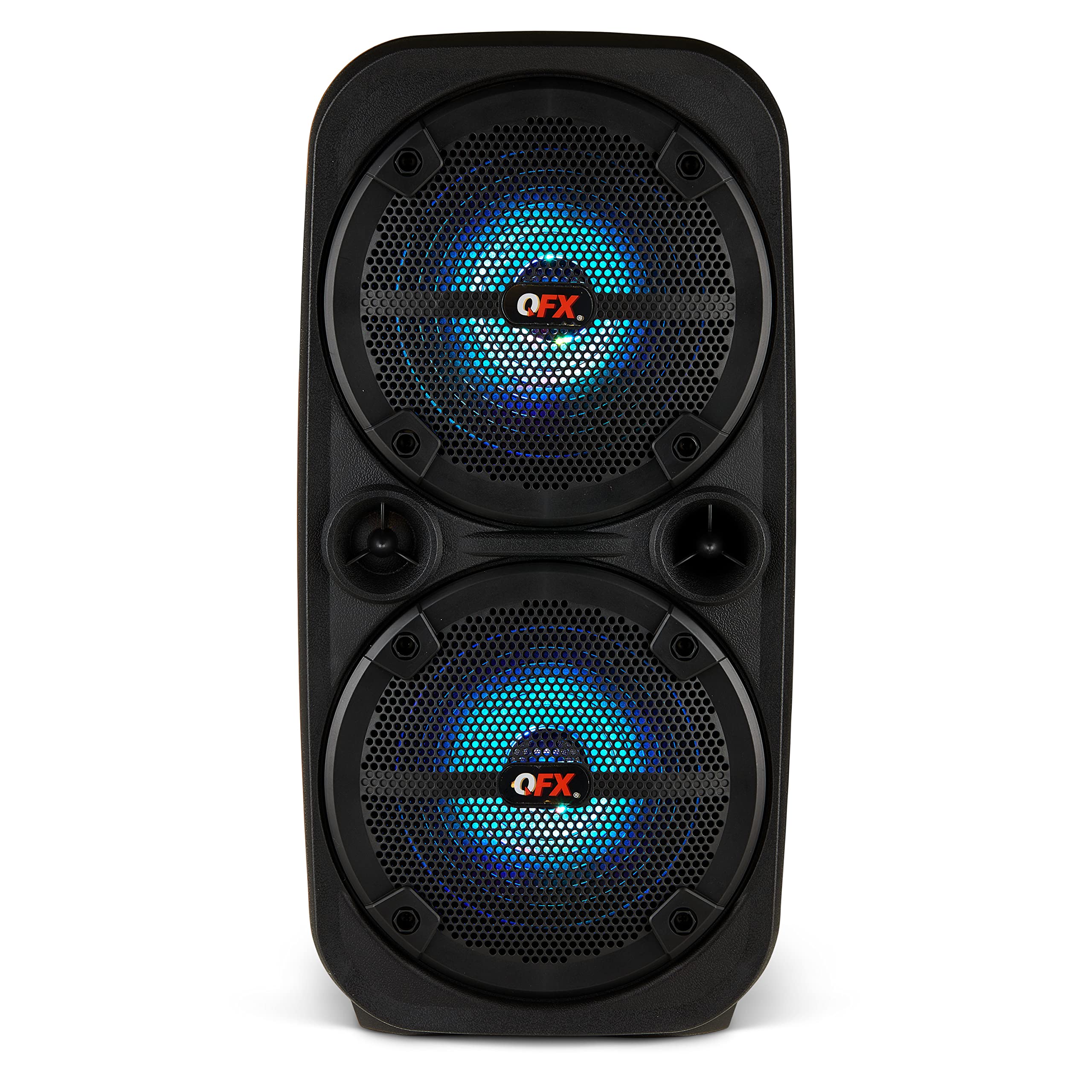
Billede 1.1: Forside view of the QFX PBX-8080 Portable Bluetooth Speaker. This image displays the speaker's robust design, featuring two 8-inch woofers, a central control panel, and illuminated LED party lights, indicating its readiness for use.
2. Sikkerhedsinstruktioner
- Læs instruktionerne: Læs alle sikkerheds- og betjeningsinstruktioner, før du bruger produktet.
- Gem instruktionerne: Gem sikkerheds- og betjeningsvejledningen til fremtidig reference.
- Vær opmærksom på advarsler: Overhold alle advarsler på produktet og i betjeningsvejledningen.
- Følg instruktionerne: Følg alle betjenings- og brugsanvisninger.
- Vand og fugt: Brug ikke dette apparat i nærheden af vand.
- Rensning: Rengør kun med en tør klud.
- Ventilation: Bloker ikke ventilationsåbninger. Installer i overensstemmelse med producentens anvisninger.
- Varme: Må ikke installeres i nærheden af varmekilder såsom radiatorer, varmeapparater, komfurer eller andre apparater (inklusive ampløftere), der producerer varme.
- Strømkabelbeskyttelse: Beskyt netledningen mod at blive trådt på eller klemt, især ved stik, stikkontakter og det sted, hvor de kommer ud af apparatet.
- Vedhæftede filer: Brug kun tilbehør/tilbehør specificeret af producenten.
- Lyn: Træk stikket ud af dette apparat under tordenvejr, eller når det ikke skal bruges i længere perioder.
- Service: Overlad al service til kvalificeret servicepersonale. Service er påkrævet, når apparatet er blevet beskadiget på nogen måde, såsom strømforsyningsledning eller stik er beskadiget, væske er blevet spildt, eller genstande er faldet ind i apparatet, apparatet har været udsat for regn eller fugt, ikke fungerer normalt , eller er blevet droppet.
3. Pakkens indhold
Markér venligst feltet for følgende elementer:
- QFX PBX-8080 Portable Bluetooth Speaker
- USB opladningskabel
- Instruktionsmanual (dette dokument)
4. Produktet er slutview
The QFX PBX-8080 is a versatile portable speaker designed for powerful audio output and various connectivity options. It features dual 8-inch woofers, LED party lights, and multiple input methods.
Nøglekomponenter:
- Dobbelte 8-tommer bashøjttalere: For powerful bass and clear audio.
- Kontrolpanel: Located on the top or front, featuring buttons for power, mode selection, volume, playback control, and LED light control.
- LED festlys: Integrated lights that synchronize with music or can be set to various patterns.
- Indgangsporte: USB, Aux-in (3.5mm), Microphone input.
- Opladningsport: Til tilslutning af USB-opladerkablet.
- Håndtag: For nem transport.
5. Opsætning
5.1 Opladning af højttaleren
- Find opladningsporten på højttaleren.
- Tilslut det medfølgende USB-opladerkabel til højttalerens opladningsport.
- Tilslut den anden ende af USB-kablet til en kompatibel USB-strømadapter (medfølger ikke) eller en USB-port med strømforsyning.
- The charging indicator light (if present) will illuminate, typically red, during charging.
- Once fully charged, the indicator light may change color (e.g., turn off or turn green). A full charge typically takes several hours.
- The speaker supports "Charge & Play," allowing you to use it while it is charging.
5.2 Tænd/sluk
- To power on the speaker, press and hold the Power button (usually marked with ⏻ or "POWER") for a few seconds until you hear an audible prompt or see the display/LEDs light up.
- For at slukke skal du trykke på tænd/sluk-knappen igen, indtil højttaleren slukker.
6. Betjeningsvejledning
6.1 Bluetooth -parring
- Ensure the speaker is powered on and in Bluetooth mode. If not, press the "MODE" button until "Bluetooth" or "BT" is displayed/announced. The Bluetooth indicator will typically flash, indicating it's in pairing mode.
- Aktiver Bluetooth på din mobilenhed (smartphone, tablet osv.) og søg efter tilgængelige enheder.
- Select "QFX PBX-8080" from the list of found devices.
- Når højttaleren er parret, udsender den en hørbar bekræftelse, og Bluetooth-indikatorlampen holder op med at blinke og lyser konstant.
- Du kan nu afspille lyd fra din enhed via højttaleren.
6.2 Ægte trådløs stereo (TWS) funktion
The TWS function allows you to connect two PBX-8080 speakers wirelessly for a stereo sound experience.
- Ensure both PBX-8080 speakers are powered on and in Bluetooth mode, but ikke tilsluttet en hvilken som helst enhed.
- On one of the speakers, press and hold the "TWS" button (or a similar button, refer to speaker markings) for a few seconds.
- The speakers will attempt to connect to each other. Once connected, you will hear a confirmation tone.
- Now, connect your mobile device to one of the paired PBX-8080 speakers via Bluetooth (as described in section 6.1). Both speakers will play audio in stereo.
6.3 LED-festlys
The PBX-8080 features dynamic LED party lights. Use the "LIGHT" button (or similar) on the control panel to cycle through different light modes or to turn the lights off.
6.4 mikrofonindgang
- Connect a wired microphone (not included) to the "MIC IN" jack on the speaker.
- Adjust the microphone volume using the dedicated "MIC VOL" knob or buttons on the control panel.
- You can use the microphone while playing music from other sources.
6.5 Aux-indgang
- Connect an external audio device (e.g., MP3 player, laptop) to the "AUX IN" jack using a 3.5mm audio cable (not included).
- Press the "MODE" button on the speaker until "AUX" mode is selected.
- Control playback and volume from your connected device or the speaker's main volume control.
6.6 USB-indgang
- Indsæt et USB-flashdrev (indeholder MP3-lyd) files) into the "USB" port.
- The speaker will automatically switch to USB mode and begin playing music from the drive. If not, press the "MODE" button to select "USB" mode.
- Use the playback controls (Play/Pause, Next/Previous Track) on the speaker to manage your music.
6.7 FM radio
- Press the "MODE" button until "FM" radio mode is selected.
- Press the "PLAY/PAUSE" button (or a dedicated scan button) to automatically scan and save available FM radio stations.
- Use the "NEXT/PREVIOUS" buttons to navigate between saved stations.
- For bedre modtagelse skal du sørge for, at højttaleren er i et åbent område.
7. Vedligeholdelse
- Rensning: Brug en blød, tør klud til at rengøre højttalerens yderside. Brug ikke slibende rengøringsmidler, voks eller opløsningsmidler.
- Opbevaring: Når højttaleren ikke er i brug i længere perioder, skal den opbevares køligt og tørt, væk fra direkte sollys og ekstreme temperaturer.
- Batteripleje: For at forlænge batteriets levetid bør du undgå at aflade batteriet helt ofte. Oplad højttaleren regelmæssigt, selvom den ikke er i brug, for at opretholde batteriets sundhed.
- Undgå vand: This speaker is not waterproof. Keep it away from water and moisture to prevent damage.
8. Fejlfinding
| Problem | Mulig løsning |
|---|---|
| Højttaleren tænder ikke. |
|
| Ingen lyd fra højttaleren. |
|
| Bluetooth-parring mislykkes. |
|
| FM-radiomodtagelsen er dårlig. |
|
9. Specifikationer
| Feature | Detalje |
|---|---|
| Modelnavn | PBX-8080 |
| Mærke | QFX |
| Højttaler type | Woofer (2 x 8-inch) |
| Forbindelsesteknologi | Bluetooth |
| Særlige funktioner | Bluetooth, True Wireless Stereo (TWS), LED Party Lights, Microphone Input, Aux Input, USB Input, FM Radio, Rechargeable, Handles |
| Lydudgangstilstand | Stereoanlæg |
| Strømkilde | Corded Electric (for charging), Rechargeable Battery |
| Varens vægt | 5.73 pund (2.6 kg) |
| Enhedsdimensioner (BxDxH) | 9.65 x 7.36 x 19.69 tommer (ca.) |
| UPC | 606540039670 |
10. Garanti og support
QFX products are designed and manufactured to the highest quality standards. For specific warranty information, please refer to the warranty card included with your purchase or visit the official QFX website. If you encounter any issues or require technical assistance, please contact QFX customer support.
QFX kundesupport:
- For de mest opdaterede supportoplysninger, besøg venligst QFX-butik på Amazon or the official QFX webwebsted.