
1. Introduktion
This manual provides detailed instructions for the safe installation, operation, and maintenance of your Lumi LPA36-463A Full-Motion TV Wall Mount. Please read this manual thoroughly before installation and retain it for future reference. This wall mount is designed to securely hold most LED and LCD televisions ranging from 37 to 70 inches, with a maximum weight capacity of 45 kg (99 lbs).
The full-motion design allows for maximum extension, tilt, and rotation of your television, providing optimal viewing angles from various positions within a room. The mount can extend up to 475 mm from the wall and retract to a slim profile på 95 mm.
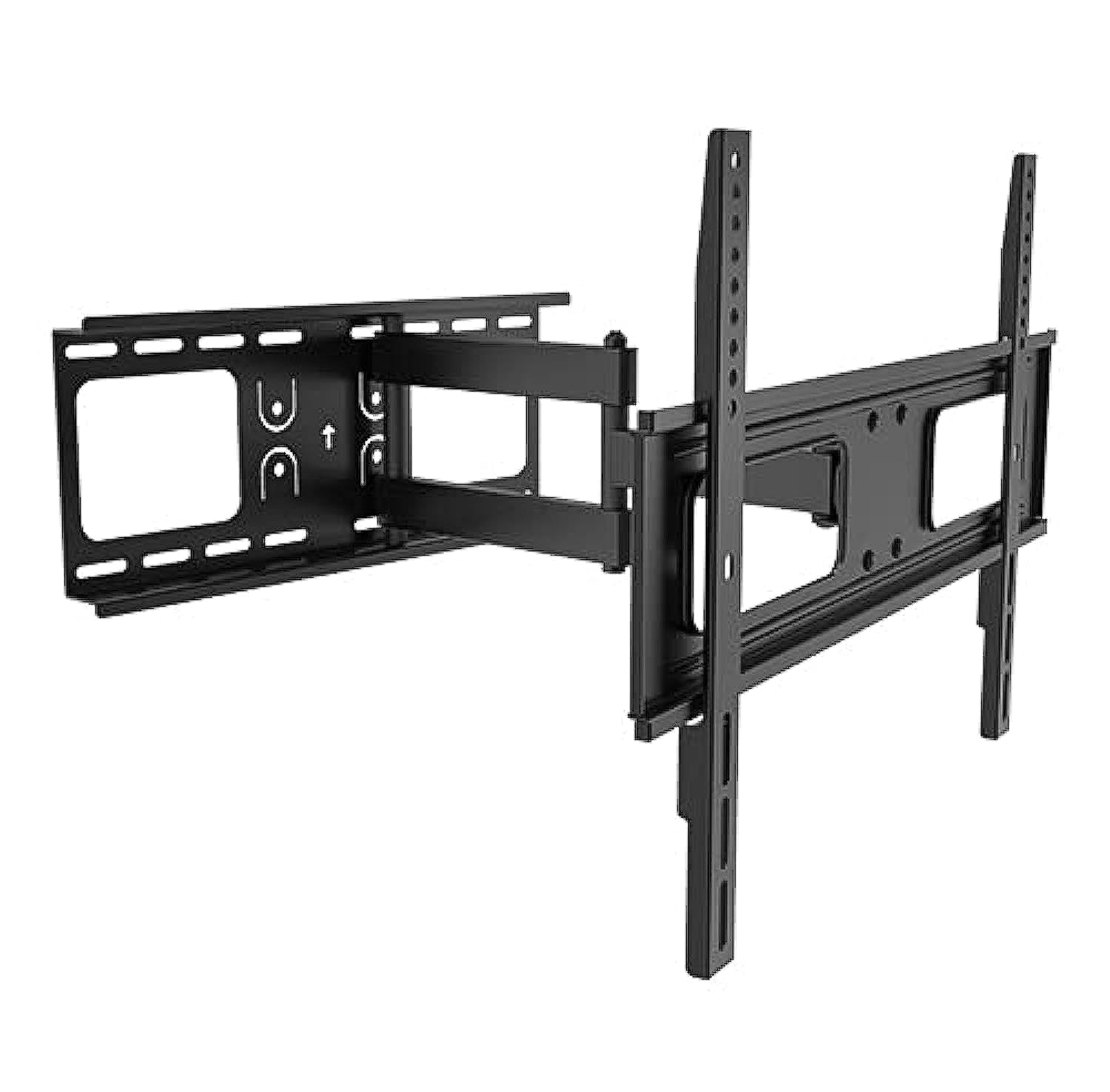
Image 1.1: The Lumi LPA36-463A Full-Motion TV Wall Mount, showing its articulated arm and VESA plate.
2. Sikkerhedsoplysninger
ADVARSEL: Manglende læsning og overholdelse af disse instruktioner kan resultere i alvorlig personskade, materielle skader eller ugyldiggørelse af garantien. Hvis du ikke forstår disse instruktioner eller er i tvivl om installationens sikkerhed, bedes du kontakte en kvalificeret installatør.
- Overskrid ikke den maksimale vægtkapacitet på 45 kg (99 lbs).
- This mount is designed for installation on solid concrete walls, brick walls, or wood stud walls. Do not install on drywall alone.
- Sørg for, at vægkonstruktionen sikkert kan bære den samlede vægt af beslaget og fjernsynet.
- Use only the mounting hardware provided. Do not use power tools to tighten screws, as this may strip threads.
- Hold alle små dele væk fra børn.
- Vær altid mindst to personer til stede ved installationen for at forhindre personskade eller beskadigelse.
- Kontrollér alle forbindelser regelmæssigt for at sikre, at de forbliver sikre.
3. Pakkens indhold
Verify that all components are present and undamaged before beginning installation. If any parts are missing or defective, contact your retailer for assistance.
| Del | Beskrivelse | Mængde |
|---|---|---|
| Vægplademontering | Main wall mounting bracket with articulated arm. | 1 |
| TV Bracket (VESA Plate) | Bracket that attaches to the back of the TV. | 1 |
| Monteringshardwaresæt | Includes various screws, washers, and anchors for wall and TV attachment. | 1 sæt |
| Niveau | For ensuring horizontal alignment during installation. | 1 |
| Instruktionsmanual | Dette dokument. | 1 |
4. Opsætning og installation
Before you begin, ensure you have the necessary tools: pencil, drill, stud finder (for wood studs), measuring tape, and a Phillips head screwdriver. It is highly recommended to have two people for installation.
4.1. Bestem monteringssted
- Choose a location on the wall that can support the weight of the TV and mount.
- For wood stud walls, locate the center of the studs using a stud finder.
- For concrete or brick walls, ensure there are no hidden pipes or electrical wires.
- Mark the desired height for the top of your TV.
4.2. Fastgør vægpladen til væggen
- Position the wall plate assembly against the wall at the desired height. Use the integrated level to ensure it is perfectly horizontal.
- Marker borehullerne gennem vægpladen på væggen med en blyant.
- Bor pilothuller:
- For wood studs: Use a 5.5mm (7/32") drill bit.
- For concrete/brick: Use a 10mm (3/8") masonry drill bit and insert wall anchors.
- Fastgør vægpladen til væggen med de medfølgende trækbolte og skiver. Spænd godt fast, men overspænd ikke.
4.3. Fastgør tv-beslag til tv'et
- Placer forsigtigt dit tv med forsiden nedad på en blød, ren overflade.
- Identify the VESA mounting holes on the back of your TV. This mount supports VESA patterns up to 400x400 mm.
- Select the appropriate screws (M4, M6, or M8) and washers from the hardware kit that fit your TV's mounting holes.
- Attach the TV brackets to the back of your TV, ensuring they are centered and securely fastened. Do not overtighten.
4.4. Mount TV to Wall Plate
- With assistance, carefully lift the TV and hook the TV brackets onto the wall plate assembly.
- Sørg for, at tv'et er sikkert monteret på vægpladen.
- Engage any safety locking mechanisms (if present) to prevent accidental dislodgement.
5. Betjeningsvejledning
The Lumi LPA36-463A mount offers full-motion capabilities for optimal viewfleksibilitet.
5.1. Adjusting Extension and Retraction
- Gently pull the TV away from the wall to extend the arm. The mount can extend up to 475 mm.
- Push the TV back towards the wall to retract the arm. The mount can retract to a minimum distance of 95 mm from the wall.
- Always move the TV smoothly and avoid sudden jerks.
5.2. Adjusting Tilt
- The mount allows for vertical tilt adjustment. Loosen the tilt adjustment knobs (if present, refer to diagram in physical manual) on the TV brackets.
- Adjust the TV to the desired upward or downward angle.
- Tighten the tilt adjustment knobs to secure the TV in position.
5.3. Adjusting Swivel (Rotation)
- The articulated arm allows for horizontal swivel of the TV up to 90 degrees left and right.
- Gently push or pull the side of the TV to rotate it to your preferred viewvinkel.
- No locking mechanism is typically required for swivel; the friction of the joints holds the position.
6. Vedligeholdelse
Regelmæssig vedligeholdelse sikrer levetiden og sikker drift af dit TV-vægbeslag.
- Rensning: Tør holderen af med en blød, tør klud. Brug ikke slibende rengøringsmidler eller opløsningsmidler.
- Periodisk eftersyn: Every 3-6 months, check all screws and bolts to ensure they are tight and secure. Retighten if necessary.
- Ledsmøring: If the arm movement becomes stiff, a small amount of silicone-based lubricant can be applied to the pivot points. Avoid oil-based lubricants.
- Skadetjek: Inspect the mount for any signs of damage, wear, or corrosion. If any damage is found, discontinue use and contact customer support.
7. Fejlfinding
If you encounter issues with your Lumi LPA36-463A TV mount, refer to the following common problems and solutions.
| Problem | Mulig årsag | Løsning |
|---|---|---|
| TV'et er ikke i vater efter installation. | Wall plate not perfectly horizontal. | Carefully loosen wall plate bolts, adjust with a level, and retighten. Some mounts have post-installation leveling adjustments; check your specific model. |
| Beslaget føles løst eller vakkelvornt. | Mounting bolts are not tight enough or incorrect wall anchors were used. | Ensure all wall bolts and TV attachment screws are securely tightened. Verify correct anchors for your wall type. If problem persists, consult a professional. |
| TV cannot tilt or swivel smoothly. | Samlingerne er for stramme eller kræver smøring. | Check if any adjustment knobs are overtightened. Apply a small amount of silicone-based lubricant to the moving joints. |
| TV'et passer ikke til beslaget. | Forkert VESA-mønster eller tv-størrelse/vægt. | Verify your TV's VESA pattern and weight against the mount's specifications. This mount supports VESA up to 400x400mm and TVs up to 45kg (99lbs). |
8. Specifikationer
| Feature | Detalje |
|---|---|
| Modelnummer | LPA36-463A |
| Mærke | Lumi |
| Monteringstype | Fuld bevægelig vægmontering |
| Materiale | Metal |
| Skærmstørrelseskompatibilitet | 37" - 70" |
| Vægt kapacitet | 45 kg (99 lbs) |
| VESA-kompatibilitet | Up to 400x400 mm |
| Forlængelse fra væg | 95 mm (tilbagetrukket) til 475 mm (udstrakt) |
| Tilt rækkevidde | Adjustable (vertical) |
| Drejningsområde | Up to 90 degrees left/right |
| Forsendelsesdimensioner | 51.4 x 22.2 x 7 cm; 2.52 kg |
9. Garanti og support
Lumi products are manufactured with quality and durability in mind. For specific warranty details, please refer to the warranty card included with your product or visit the official Lumi webwebstedet. Behold din købskvittering som købsbevis.
For technical support, missing parts, or any questions regarding the installation or operation of your Lumi LPA36-463A TV Wall Mount, please contact your local retailer or Lumi customer service.
Kontaktoplysninger: (Please refer to your product packaging or Lumi's official webhjemmeside for de seneste kontaktoplysninger.)