
Indledning
Thank you for choosing the Opal Selfie Stick OP-Sel-BT-01. This manual provides essential information for the safe and effective use of your device. Please read it thoroughly before operation and retain it for future reference.
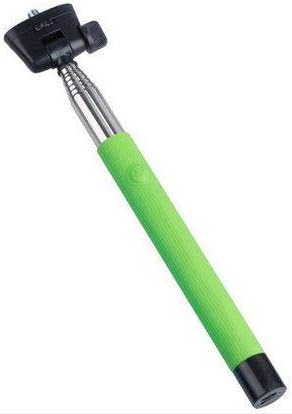
Figur 1: The Opal Selfie Stick OP-Sel-BT-01 in green, showing its extendable arm, phone holder, and comfortable grip.
Produktegenskaber
- Farve: Grøn
- Hovedmateriale: Stål
- Max belastningskapacitet: 500 g
- Forbindelse: Trådløs (Bluetooth)
- Kompatible systemer: Android 3.0 og nyere, iOS 4.0 og nyere
Opsætning
- Fold selfie-stangen ud: Gently pull the phone holder section upwards to extend the stick.
- Juster telefonholder: Åbn telefonen clamp and securely place your smartphone within it. Ensure the phone is centered and stable. The clamp is designed to hold various phone sizes.
- Tænd: Locate the power button (if applicable, usually on the handle) and press it to turn on the selfie stick. An indicator light may illuminate.
Betjeningsvejledning
Bluetooth-parring
- Ensure the selfie stick is powered on and in pairing mode (indicator light may flash rapidly).
- Gå til din smartphone på Indstillinger > Bluetooth.
- Slå Bluetooth til, og søg efter tilgængelige enheder.
- Select "Opal OP-Sel-BT-01" or a similar name from the list of devices.
- Once paired, the indicator light on the selfie stick may turn solid or turn off, indicating a successful connection.
Tager billeder/videoer
- Åbn din smartphones kameraapplikation.
- Forlæng selfie-stangen til den ønskede længde.
- Placer din telefon for det ønskede billede.
- Press the shutter button on the selfie stick handle to capture a photo or start/stop video recording.
Opretholdelse
- Rensning: Wipe the selfie stick with a soft, dry cloth. Do not use abrasive cleaners or solvents.
- Opbevaring: Store the device in a cool, dry place away from direct sunlight and extreme temperatures. Retract the stick fully before storage.
- Batteripleje: If the selfie stick has a rechargeable battery, ensure it is charged periodically even when not in use to maintain battery health.
Fejlfinding
| Problem | Mulig årsag | Løsning |
|---|---|---|
| Kan ikke parres med telefonen | Selfie stick not in pairing mode; Bluetooth off on phone; battery low. | Ensure stick is on and in pairing mode. Turn phone's Bluetooth off/on. Charge the selfie stick. |
| Shutter button not working | Not paired; camera app settings. | Verify successful Bluetooth pairing. Check camera app settings for volume button shutter control. |
| Phone not stable in clamp | Phone not centered; clamp not fully secured. | Re-position phone to be centered. Ensure clamp is firmly gripping the phone. |
Specifikationer
- Model: OP-Sel-BT-01
- Mærke: Opal
- Farve: Grøn
- Hovedmateriale: Stål
- Max belastningskapacitet: 500 g
- Forbindelse: Trådløs (Bluetooth)
- Understøttede operativsystemer: Android 3.0+, iOS 4.0+
- ASIN: B091DBB122
- Første tilgængelige dato: 30. marts 2021
Garanti og support
For information regarding warranty coverage or technical support, please refer to the documentation included with your purchase or visit the official Opal webwebsted. Specifikke garantivilkår kan variere afhængigt af region og forhandler.
Sikkerhedsoplysninger
- Do not expose the device to extreme temperatures, moisture, or direct sunlight for prolonged periods.
- Opbevares utilgængeligt for børn.
- Forsøg ikke at skille enheden ad eller ændre den. Dette kan ugyldiggøre garantien og forårsage skade.
- Ensure your phone is securely fastened in the clamp before extending the stick.