
1. Introduktion
Thank you for choosing the Commax Intercom Panel with 6-Apartment Camera, Model DRC-6AC2. This manual provides essential information for the safe and efficient installation, operation, and maintenance of your new intercom system. Please read this manual thoroughly before using the product and retain it for future reference.
This intercom panel is designed to provide secure and convenient communication for multi-apartment buildings, featuring a 1/3 color gate camera and a durable aluminum casing.
2. Sikkerhedsoplysninger
- Installation: Installation should only be performed by qualified personnel to prevent electric shock or product damage.
- Strømkilde: Ensure the power source matches the specifications of the device (DC). Incorrect voltage kan forårsage skade.
- Miljø: Do not expose the unit to extreme temperatures, humidity, or direct sunlight. Avoid installing in areas with excessive dust or corrosive gases.
- Rensning: Afbryd strømmen før rengøring. Brug en blød, tør klud. Brug ikke flydende rengøringsmidler eller aerosolrengøringsmidler.
- Ændringer: Do not attempt to modify or disassemble the unit. This will void the warranty and may cause harm.
3. Pakkens indhold
Kontroller venligst, at alle følgende varer er inkluderet i din pakke:
- Commax Intercom Panel with Camera (DRC-6AC2)
- Monteringsskruer og ankre
- Brugervejledning (dette dokument)
- Wiring Diagram (may be included separately or within the manual)
Hvis der mangler eller er beskadigede varer, bedes du straks kontakte din leverandør.
4. Produktet er slutview
The Commax DRC-6AC2 is an outdoor intercom panel featuring a built-in color camera and call buttons for up to 6 apartments. Its robust aluminum casing ensures durability and resistance to outdoor elements.
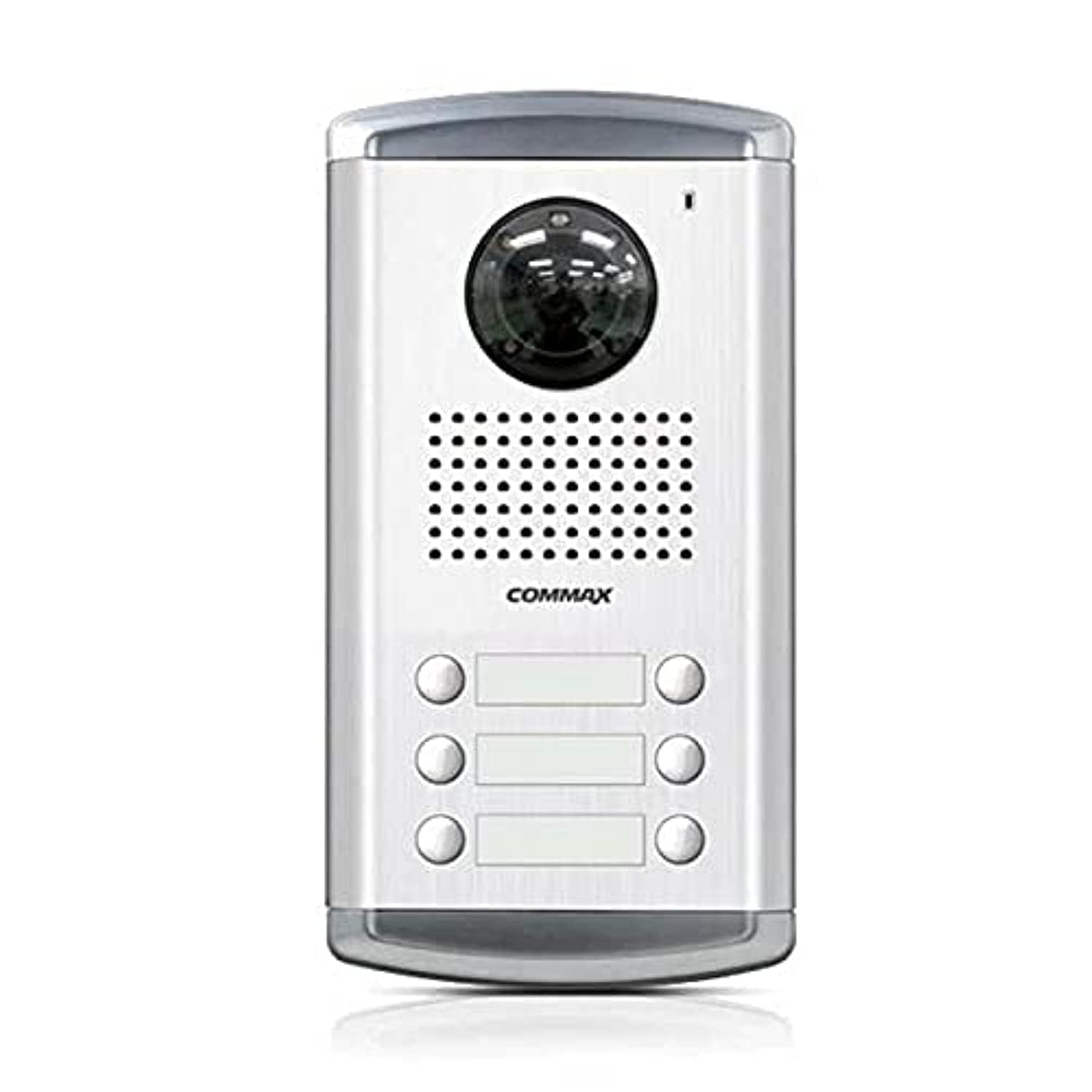
Figur 1: Front view of the Commax DRC-6AC2 Intercom Panel. This image shows the main unit with its camera lens, speaker, microphone, and multiple call buttons, all housed within a silver-colored aluminum frame.
Nøglekomponenter:
- Color Camera: Provides clear video feed of visitors.
- Opkaldsknapper: Individual buttons for each of the 6 apartments.
- Højttaler: Til tovejs audiokommunikation.
- Mikrofon: For capturing audio from visitors.
- Infrarøde lysdioder: For night vision capability (Light Source Type: Infrared).
- Aluminium Casing: Durable and weather-resistant housing.
5. Opsætning og installation
This section provides general guidelines for setting up your intercom panel. For detailed wiring diagrams and specific installation instructions, please refer to the separate wiring diagram provided with your product or consult a professional installer.
5.1 Valg af sted
- Choose a location at the entrance that provides a clear view of visitors for the camera.
- Ensure the panel is mounted at an appropriate height for all users.
- Avoid direct exposure to heavy rain or snow if possible, even with the aluminum casing.
5.2 Ledningsføring
The DRC-6AC2 requires a wired connection to indoor monitors (not included) and a DC power source. Proper wiring is crucial for functionality and safety.
- Connect the power supply (DC) to the designated terminals.
- Connect the video and audio lines from the outdoor panel to the respective indoor monitors for each apartment.
- Sørg for, at alle forbindelser er sikre og isolerede for at forhindre kortslutninger.
5.3 Montering
- Use the provided mounting screws and anchors to securely attach the panel to a wall or suitable surface.
- Ensure the panel is level and firmly fixed to prevent movement or damage.
6. Betjeningsvejledning
6.1 Calling an Apartment
- A visitor presses the corresponding call button for the desired apartment.
- The indoor monitor in the selected apartment will ring and display the video feed from the outdoor camera.
6.2 Tovejskommunikation
- Once a call is answered from the indoor monitor, two-way audio communication is established between the visitor and the resident.
6.3 Door Release (if connected)
- If connected to an electronic door lock system, the resident can press the door release button on their indoor monitor to grant access.
7. Vedligeholdelse
- Rensning: Regularly wipe the camera lens and the panel surface with a soft, dry cloth to remove dust and dirt. Do not use abrasive cleaners or solvents.
- Inspektion: Kontrollér jævnligt ledningsforbindelserne for tegn på slid eller skader.
- Miljøbeskyttelse: Mens aluminium casing is durable, prolonged exposure to harsh weather conditions may affect performance over time. Consider additional protective measures if necessary.
8. Fejlfinding
If you encounter issues with your Commax intercom panel, please refer to the following common problems and solutions:
| Problem | Mulig årsag | Løsning |
|---|---|---|
| No video feed on indoor monitor | Loose video cable connection, power issue, camera malfunction. | Check video cable connections. Ensure power supply is active. If problem persists, contact support. |
| Ingen lyd under kommunikation | Loose audio cable connection, microphone/speaker malfunction. | Check audio cable connections. Ensure microphone and speaker are not obstructed. |
| Call button not working | Faulty button, wiring issue to specific apartment. | Inspect the button for physical damage. Check wiring to the affected apartment. |
| Dårlig billedkvalitet om natten | Infrared LEDs obstructed or malfunctioning. | Ensure the camera lens and IR LEDs are clean and unobstructed. |
If these solutions do not resolve the issue, please contact customer support for further assistance.
9. Specifikationer
| Feature | Specifikation |
|---|---|
| Mærke | Kommaks |
| Modelnavn | Commax Intercom System |
| Varenummer | 2724608031164.0 |
| Forbindelsesteknologi | Kablet |
| Strømkilde | DC |
| Farve | Hvid |
| Antal kanaler | 6 |
| Trådløs kommunikationsteknologi | Wi-Fi (Note: Product description indicates wired, Wi-Fi might refer to internal module or general capability, confirm with product documentation) |
| Formfaktor | Dome (Note: This might refer to the camera type, not the panel itself which is rectangular) |
| Monteringstype | Freestanding (Note: Typically intercom panels are wall-mounted, this might refer to a specific installation option) |
| Materiale | Aluminium |
| Lyskildetype | Infrarød |
| Batterier påkrævet? | Ingen |
| Varens vægt | 11 gram |
| Dato først tilgængelig | 30. marts 2021 |
10. Garanti og support
Specific warranty information for the Commax DRC-6AC2 is not available in the provided product data. Please refer to the warranty card included with your product or contact your local Commax distributor or retailer for details regarding warranty coverage and terms.
Kundesupport:
For technical assistance, troubleshooting, or service inquiries, please contact your authorized Commax service center or the retailer from whom you purchased the product. When contacting support, please have your product model (DRC-6AC2) and purchase information ready.