
Indledning
This manual provides detailed instructions for the setup, operation, and maintenance of your INPHIC V930B Mechanical Wireless Keyboard. The V930B is a compact 60% layout keyboard featuring dual-mode connectivity (Bluetooth 5.0 and Type-C wired), RGB backlighting, and responsive blue mechanical switches. Designed for both office and gaming use, its ergonomic design aims to provide comfort during extended use.
Nøglefunktioner
Kompakt 60% layout

The V930B features a 60% compact layout with 61 keys, optimizing desk space while retaining essential functionality through Fn key combinations. Dimensions are approximately 291mm x 102mm.
Blå mekaniske kontakter
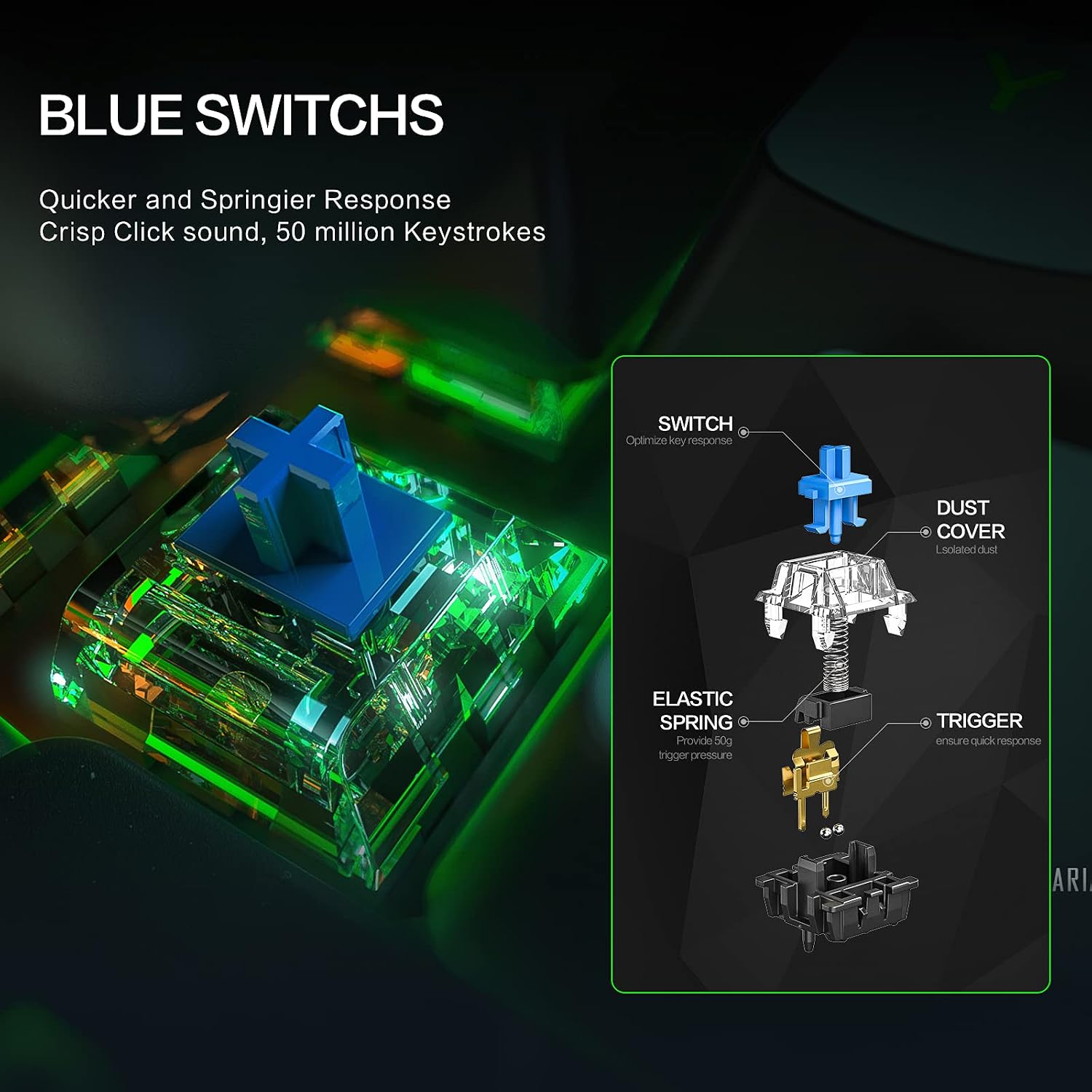
Equipped with blue mechanical switches, the keyboard provides a tactile bump and an audible click, offering a responsive and satisfying typing experience ideal for typists and gamers.
Ergonomisk design

The keyboard features an 8° tilt angle and a sculpted key design to reduce wrist strain, promoting comfortable use during long typing sessions.
Pakkens indhold
Kontroller venligst, at alle varer er til stede i pakken:
- INPHIC V930B Mechanical Wireless Keyboard
- Aftageligt Type-C kabel
- Brugervejledning (dette dokument)
Opsætning
1. Kablet forbindelse
Sådan bruger du tastaturet i kablet tilstand:
- Connect the provided Type-C cable to the keyboard's Type-C port.
- Tilslut den anden ende af kablet til en ledig USB-port på din computer eller enhed.
- Tastaturet vil automatisk blive genkendt og klar til brug.

Image: The INPHIC V930B keyboard illustrating its dual-mode connection capability, showing the Type-C port for wired connection and a Bluetooth icon for wireless pairing. This highlights the flexibility of connecting via cable or wirelessly.
2. Trådløs (Bluetooth) forbindelse
The keyboard supports Bluetooth 5.0 and can connect to up to three devices simultaneously.
- Skift til Bluetooth-tilstand: Trykke Fn + Tab to switch the keyboard to Bluetooth mode. The indicator light will flash, indicating it's ready for pairing.
- Vælg en Bluetooth-kanal: Trykke Fn + Q, Fn + W, eller Fn + E to select one of the three available Bluetooth channels. The corresponding key (Q, W, or E) will flash slowly.
- Gå ind i parringstilstand: Tryk og hold Fn + Q (or W/E) for 3-5 seconds until the Q (or W/E) key flashes rapidly. This indicates the keyboard is in pairing mode.
- Par med din enhed:
- On your device (PC, laptop, tablet), open Bluetooth settings.
- Søg efter nye enheder.
- Select "INPHIC V930B" (or similar name) from the list of available devices.
- Følg eventuelle anvisninger på skærmen for at fuldføre parringsprocessen.
- Skift mellem enheder: Once paired, you can switch between connected devices by pressing Fn + Q, Fn + W, eller Fn + E.
Betjeningsvejledning
1. Function Key (Fn) Combinations
The INPHIC V930B is a 61-key keyboard that utilizes the Function (Fn) key to access additional commands and multimedia controls. Press and hold the Fn key, then press the desired key for its secondary function.
| Nøglekombination | Fungere |
|---|---|
| Fn + Tab | Switch between Wired and Bluetooth modes. |
| Fn + Q/W/E | Select/Switch between Bluetooth devices 1, 2, or 3. |
| fn + A | Forrige spor |
| Fn + S | Afspil/pause |
| Fn + D | Næste spor |
| Fn + F | Lydstyrke ned |
| Fn + G | Lydstyrke op |
| Fn + H | Stum |
| Fn + J | Indsæt |
| Fn + K | Hjem |
| Fn + L | Side op |
| Fn + ; | Side ned |
| Fn + ' | Ende |
| Fn + P | Udskriv skærm |
| Fn + [ | Reducer baggrundsbelysningens lysstyrke |
| Fn + ] | Øg baggrundsbelysningens lysstyrke |
| Fn + \\ | Skift baggrundslystilstand (12 tilstande) |
| Fn + Enter | Toggle Arrow Keys (Right Shift, Fn, Ctrl, Alt become arrow keys) |
2. Baggrundslysstyring
The keyboard features 12 adjustable RGB backlight modes. Use the following combinations to control the lighting:
- Fn + \\ (Backslash key): Cycle through 12 different RGB lighting effects.
- Fn + [ (Left Bracket key): Reducer baggrundsbelysningens lysstyrke.
- Fn + ] (Right Bracket key): Øg baggrundsbelysningens lysstyrke.

Image: The INPHIC V930B keyboard displaying its vibrant RGB backlighting. The image also illustrates the key combinations for switching light effects, adjusting brightness, and controlling speed.
Opretholdelse
To ensure the longevity and optimal performance of your INPHIC V930B keyboard, follow these maintenance guidelines:
- Rensning: Brug en blød, tør klud til at tørre tastaturets overflade af. For en grundigere rengøring kan du bruge en dåse trykluft til at fjerne støv og snavs mellem tasterne. Undgå at bruge flydende rengøringsmidler direkte på tastaturet.
- Opbevaring: Opbevar tastaturet et køligt, tørt sted væk fra direkte sollys og ekstreme temperaturer.
- Kabelpleje: Handle the detachable Type-C cable with care. Avoid bending or twisting it excessively to prevent damage.
- Batteri: The keyboard contains a built-in Lithium Polymer battery. Do not attempt to replace the battery yourself.
Fejlfinding
If you encounter issues with your INPHIC V930B keyboard, refer to the following common problems and solutions:
| Problem | Mulig løsning |
|---|---|
| Tastaturet reagerer ikke i kablet tilstand. |
|
| Keyboard not pairing via Bluetooth. |
|
| Baggrundsbelysningen virker ikke eller sidder fast. |
|
| Cursor keys are not working as expected. |
|
| Nøglerne registreres ikke eller dobbelttastes ikke. |
|
Specifikationer
| Feature | Detalje |
|---|---|
| Modelnummer | V930B |
| Layout | 60% kompakt, 61 tangenter |
| Switch Type | Blå mekaniske kontakter |
| Forbindelse | Bluetooth 5.0 (Wireless), Type-C (Wired) |
| Understøttelse af flere enheder | Up to 3 Bluetooth devices |
| Baggrundsbelysning | RGB, 12 adjustable modes |
| Batteri | 1 Lithium Polymer batteri (medfølger) |
| Varens vægt | 1.94 pund (ca. 880 g) |
| Pakkedimensioner | 14.25 x 5.83 x 2.01 tommer |
| Kompatible enheder | PC, Laptop, Pad |
| Materiale | Plast |
Garanti og support
INPHIC products are designed for reliability and performance. For specific warranty details, please refer to the warranty card included with your purchase or visit the official INPHIC website. If you encounter any issues or require technical assistance, please contact INPHIC customer support through their official channels.
For yderligere information eller support, besøg venligst INPHIC-butik på Amazon.