
1. Introduktion
This manual provides detailed instructions for the installation, operation, and maintenance of your MOUNTUP Triple Monitor Mount MU8004. Please read this manual thoroughly before installation to ensure correct setup and safe usage. Keep this manual for future reference.
2. Sikkerhedsoplysninger
- Sørg for, at alle komponenter er til stede og ubeskadigede før montering. Må ikke anvendes, hvis nogen af delene mangler eller er defekte.
- Verify that your desk surface can support the combined weight of the mount and three monitors.
- Overskrid ikke den maksimale vægtkapacitet på 9 kg pr. arm.
- Always follow the installation steps carefully. Improper installation may result in equipment damage or personal injury.
- Hold børn og kæledyr væk under installationen.
3. Produktfunktioner
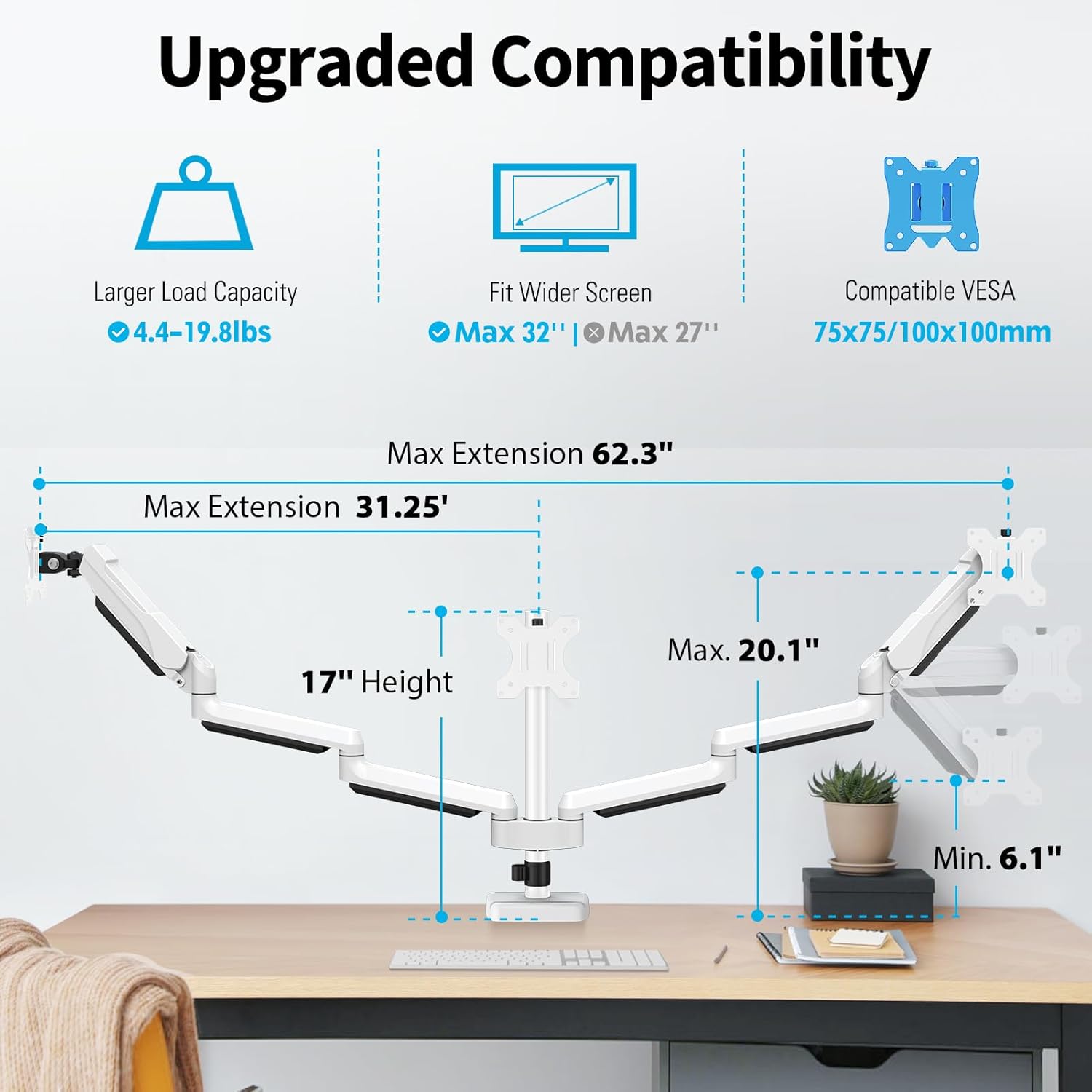
- Upgraded Compatibility: Fits most flat/curved computer screens from 17 to 32 inches with VESA 75x75mm or 100x100mm mounting patterns. Each arm supports monitors weighing 4.4-19.8 lbs.
- Fuld bevægelsesjustering: Allows for height adjustment, swivel, tilt, and rotation to achieve optimal viewing angles and ergonomic posture.
- To monteringsmuligheder: Supports both C-clamp and grommet mounting methods to suit various desk types.
- Pladsbesparende design: Frees up desktop space compared to traditional monitor stands.
- Integreret kabelhåndtering: Conceals cables for a tidy and organized workspace.
- Holdbar konstruktion: Made from heavy-gauge steel with a premium gas spring for stable and secure monitor support.
4. Kompatibilitet
The MOUNTUP Triple Monitor Mount MU8004 is designed for a wide range of monitors and desk types. Please verify the following specifications before installation:
- Skærmstørrelse: Kompatibel med skærme fra 17 til 32 tommer.
- Vægt kapacitet: Each arm supports monitors weighing between 4.4 lbs (2 kg) and 19.8 lbs (9 kg).
- VESA-kompatibilitet: Supports VESA mounting patterns of 75x75mm and 100x100mm.
- Skrivebordstykkelse (C-clamp): 0.39 inches to 3.15 inches (10mm to 80mm).
- Desk Thickness & Hole Diameter (Grommet): Thickness 0.39 inches to 1.97 inches (10mm to 50mm), Hole Diameter 0.39 inches to 3.15 inches (10mm to 80mm).
5. Installation
The MOUNTUP Triple Monitor Mount offers two installation methods: C-clamp and Grommet. Choose the method that best suits your desk.
5.1 Monteringsmuligheder overview

5.2 Installationsvideoguide
For detailed step-by-step instructions, please refer to the video above and the included printed manual. The installation process is designed to be straightforward, typically taking less than 20 minutes.
6. Justeringer og betjening
The MOUNTUP Triple Monitor Mount allows for extensive adjustments to customize your viewing experience and achieve an ergonomic setup.
6.1 Gas Spring and Tilt Adjustment

To adjust the gas spring tension, hold the arm horizontally. If the monitor faces down, turn the adjustment screw clockwise ('-') to reduce tension. If the monitor drops down, turn counter-clockwise ('+') to increase tension. For tilt angle adjustment, loosen the tilting bolt, adjust to your desired angle, and then retighten the bolt.
6.2 Full Range of Motion: Tilt, Swivel, and Rotation

The monitor arms allow for a wide range of movement:
- Vip: Adjust your monitors up or down by ±90 degrees.
- Drejelig: Pivot your monitors left or right by ±90 degrees.
- Rotation: Rotate your monitors 360 degrees (±180 degrees) to switch between landscape and portrait orientations.
6.3 Multiple Screen Setups
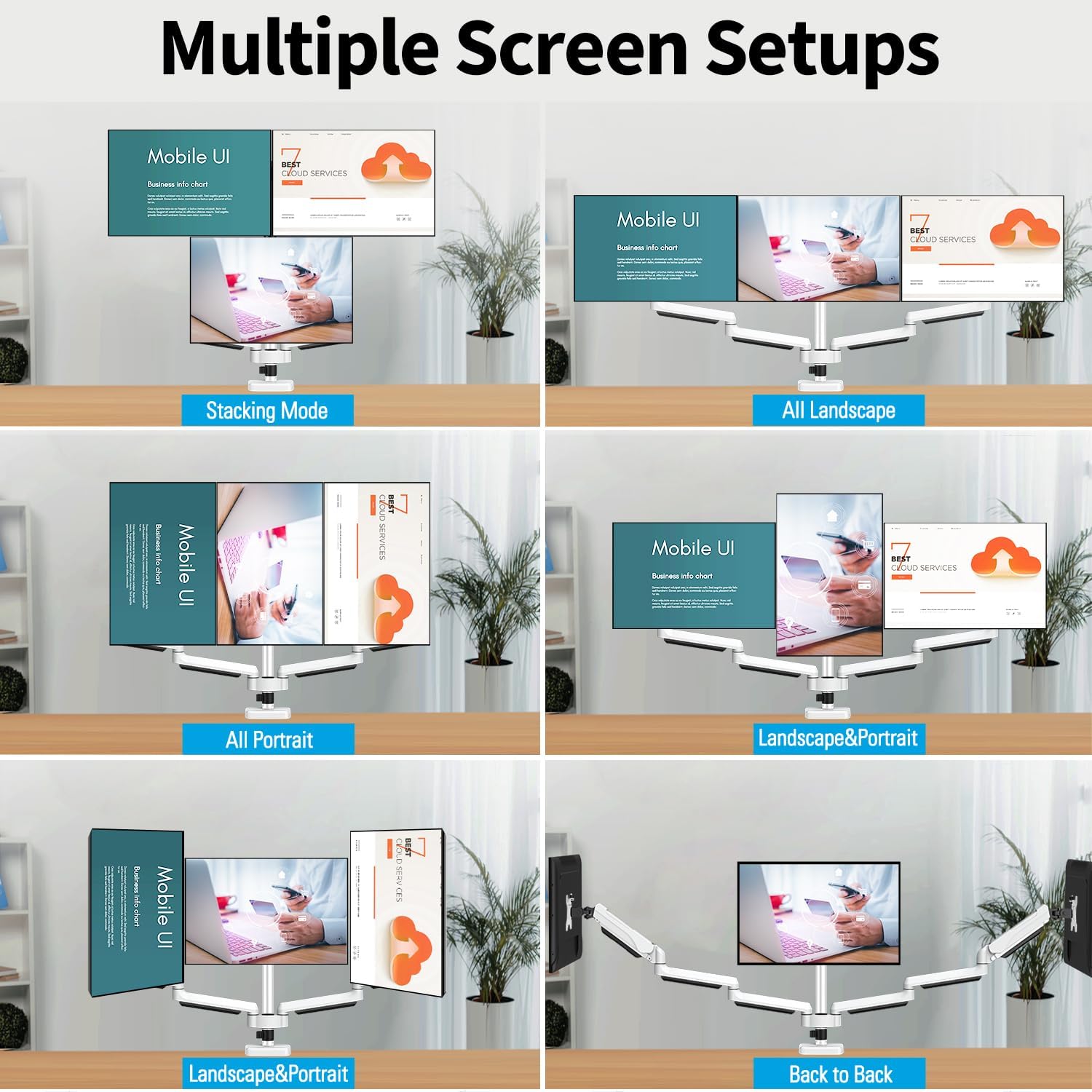
Experiment with different screen combinations to find your ideal setup, whether it's all landscape, all portrait, stacked, or a mix of orientations.
7. Kabelforvaltning
Maintain a clean and organized workspace with the integrated cable management system.
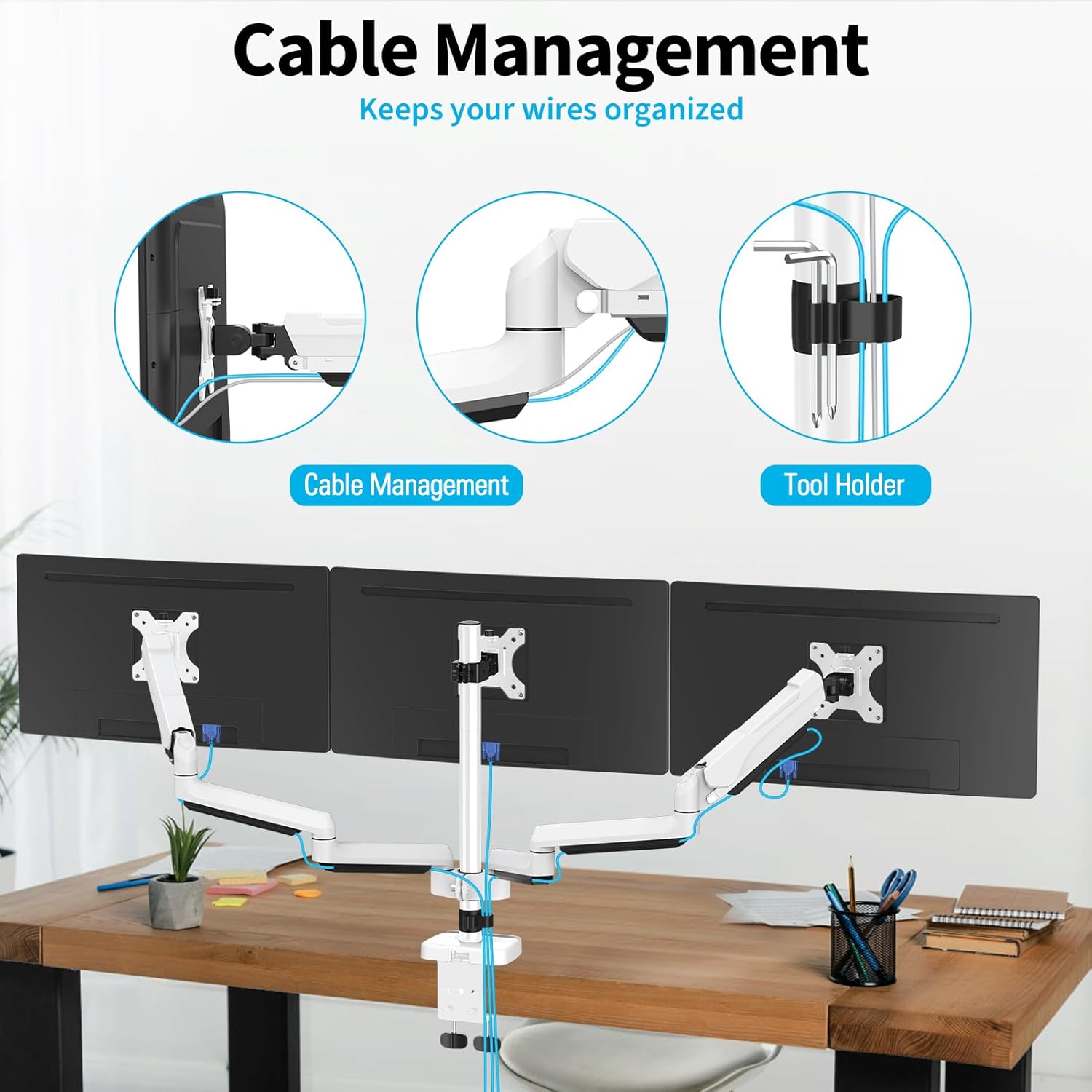
Route your monitor and power cables through the detachable cable covers and clips along the arms and pole to keep them out of sight and prevent clutter.

8. Specifikationer
| Feature | Specifikation |
|---|---|
| Monteringstype | Bordmontering (C-clamp & Grommet) |
| Bevægelsestype | Roter, drej, vip, artikuler |
| Mærke | MONTERING |
| Materiale | Legeret stål |
| Farve | Hvid |
| Kompatible enheder | Overvåge |
| Maksimal hældningsvinkel | 90 Degrees (±90°) |
| Maximum Supported Screen Size | 32 tommer |
| Minimum Supported Screen Size | 17 tommer |
| Item Weight (Mount Only) | 15.85 pund |
| Load Capacity Per Arm | 4.4-19.8 lbs (2-9 kg) |
| VESA-kompatibilitet | 75x75mm, 100x100mm |
| C-Clamp Skrivebords tykkelse | 0.39''-3.15'' (10-80mm) |
| Grommet Desk Thickness & Hole Diameter | Thickness: 0.39''-1.97'' (10-50mm), Hole Diameter: 0.39''-3.15'' (10-80mm) |
9. Fejlfinding
If you encounter issues with your MOUNTUP Triple Monitor Mount, please refer to the following common solutions:
- Overvåg Sags eller vil ikke forblive oppe: Adjust the gas spring tension. Turn the screw counter-clockwise ('+') to increase tension for heavier monitors. Ensure the monitor weight is within the specified range (4.4-19.8 lbs per arm).
- Monitor Floats Up or Won't Stay Down: Adjust the gas spring tension. Turn the screw clockwise ('-') to reduce tension for lighter monitors.
- Skærme er ikke i vater: Check that the VESA plates are securely attached and that the arms are properly aligned on the pole. Minor adjustments can be made by slightly loosening and re-tightening the VESA plate screws or arm clamps.
- Mount føles ustabil: Sørg for C-clamp or grommet mount is tightened securely to the desk. If using a C-clamp on a thin table, consider using a reinforcement plate (not included) to prevent damage and improve stability.
- Vanskeligheder med at justere bevægelse: Check all pivot points and ensure they are not overtightened. Lubrication may be applied to moving parts if necessary, following manufacturer guidelines.
10. Garanti og kundesupport
The MOUNTUP Triple Monitor Mount MU8004 is backed by a MOUNTUP 3-year support warranty. Denne garanti dækker fejl i materialer og udførelse ved normal brug.
For any questions, concerns, or assistance with your product, please do not hesitate to contact MOUNTUP customer support. Our team is available to provide friendly and knowledgeable assistance.
Gem venligst dit købsbevis for garantikrav.