
Sharp OZJONG
SHARP Digital Alarm Clock with AccuSet
Model: OZJONG
Indledning
The SHARP Digital Alarm Clock with AccuSet is designed for effortless timekeeping. Featuring automatic time setting, a clear LED display, and user-friendly controls, this clock is ideal for any bedroom. Its AccuSet technology ensures the time is always accurate, eliminating the need for manual adjustments, making it perfect for seniors, children, or anyone seeking a hassle-free alarm clock solution.

Figur 1: Forside view of the SHARP Digital Alarm Clock with green LED display.
Nøglefunktioner
- AccuSet automatisk tidsindstilling: The clock is pre-programmed to automatically set the correct time, removing the need for manual adjustments. Simply select your time zone.
- Hurtig justering af sommertid (DST): A convenient switch allows for easy adjustment for Daylight Savings Time (+1 hour) or Standard Time (-1 hour).
- Høj/lav lysdæmperkontrol: Adjust the brightness of the LED display to your preference, ensuring comfortable viewdag eller nat.
- Batteri-sikkerhedskopi: A pre-installed CR2032 button cell battery provides backup for time settings during power outages, ensuring continuous accuracy.
- Valg af tidszone: Easily select your local time zone from the options provided at the bottom of the clock.

Figure 2: Diagram illustrating the key features and functionalities of the alarm clock.
Opsætningsvejledning
- Udpakning: Tag forsigtigt vækkeuret ud af emballagen.
- Battery Installation (Pre-installed): The CR2032 button cell battery for backup is pre-installed in a screw-secured cabinet at the bottom of the clock. This battery is designed to last for several years. No immediate action is required for initial setup.
- Valg af tidszone: Before plugging in the clock, locate the time zone selection switch at the bottom of the unit. Select your correct time zone (e.g., EST, CST, MST, PST). The default time zone is Eastern Standard Time.
- Strømtilslutning: Plug the clock into an approved electrical source. The AccuSet feature will automatically program the correct time based on your selected time zone.
- Daylight Savings Time (DST) Adjustment: If applicable, slide the DST switch at the bottom of the clock to "ON" to add one hour (+1 hr) for Daylight Savings Time. For Standard Time, slide the switch to "OFF" to subtract one hour (-1 hr).

Figure 3: Top panel controls for setting time, alarm, and adjusting display.
Betjeningsvejledning
Indstilling af alarm
- Tryk på ALARM button once. The alarm time will appear on the display.
- Mens alarmtidspunktet vises, skal du trykke på TIME knappen for at justere alarmtiden.
- Tryk på MINUT knappen for at justere alarmminut.
- For at aktivere eller deaktivere alarmen skal du trykke på ALARM TIL / FRA button. An alarm indicator light (usually a small LED) will illuminate when the alarm is active.
- To return to the current time display, press the TID button or wait a few seconds for it to revert automatically.
Brug af Snooze-funktionen
Når alarmen lyder, skal du trykke på den store SLUM button located on the top of the clock. This will temporarily silence the alarm for a set period (typically 9 minutes), allowing for extra rest. The alarm will sound again after the snooze period ends.
Adjusting Display Brightness (Dimmer Control)
The clock features a High/Low dimmer control to adjust the display brightness. Locate the DIMMER HØJ/LAV button on the top panel. Press this button to toggle between high and low brightness settings to suit your environment and preference.

Figure 4: Illustration of the High & Low Display Dimmer Control.
Opretholdelse
- Rensning: To clean the clock, use a soft, dry cloth. Do not use abrasive cleaners or solvents, as they may damage the finish.
- Udskiftning af batteri: The CR2032 backup battery is designed for long-term use. If the clock loses time during a power outage after several years, it may be time to replace the battery. This is located in a screw-secured compartment at the bottom of the clock.
- Placering: Placer uret på en stabil, plan overflade. Undgå at placere det i direkte sollys, i nærheden af varmekilder eller i områder med høj luftfugtighed.
Fejlfinding
| Problem | Mulig årsag | Løsning |
|---|---|---|
| Clock does not display time after plugging in. | Not connected to power, or power outlet is not active. | Sørg for, at netledningen er korrekt tilsluttet en fungerende stikkontakt. |
| Tidspunktet er forkert. | Incorrect time zone selected, or DST switch is set incorrectly. | Verify the time zone switch at the bottom of the clock is set to your local zone. Check the DST switch position. |
| Alarmen lyder ikke. | Alarm is not activated, or alarm volume is too low (if adjustable). | Ensure the alarm is turned ON using the ALARM ON/OFF button. Check for an alarm indicator light. |
| Skærmen er for lys eller for svag. | Dæmperindstillingen skal justeres. | Tryk på DIMMER HI/LO-knappen for at gennemgå lysstyrkeindstillingerne. |
| Uret mister tid under strømafbrydelsetage. | Backup battery is depleted. | Replace the CR2032 backup battery located in the compartment at the bottom of the clock. |
Specifikationer
| Feature | Detalje |
|---|---|
| Mærke | Skarp |
| Modelnummer | OZJONG |
| Farve | Black - Green Led |
| Display Type | Digital |
| Særlige funktioner | Alarm, Daylight Saving, Auto Dimmable |
| Produktdimensioner | 5.5 cm B x 2.6 cm H |
| Strømkilde | Elektrisk med ledning, batteridrevet |
| Backup batteri | CR2032 (forinstalleret) |
| Materiale | Plast |
| Varens vægt | 9.9 ounce |
| Monteringstype | Bordplade |
| UPC | 049353006079 |
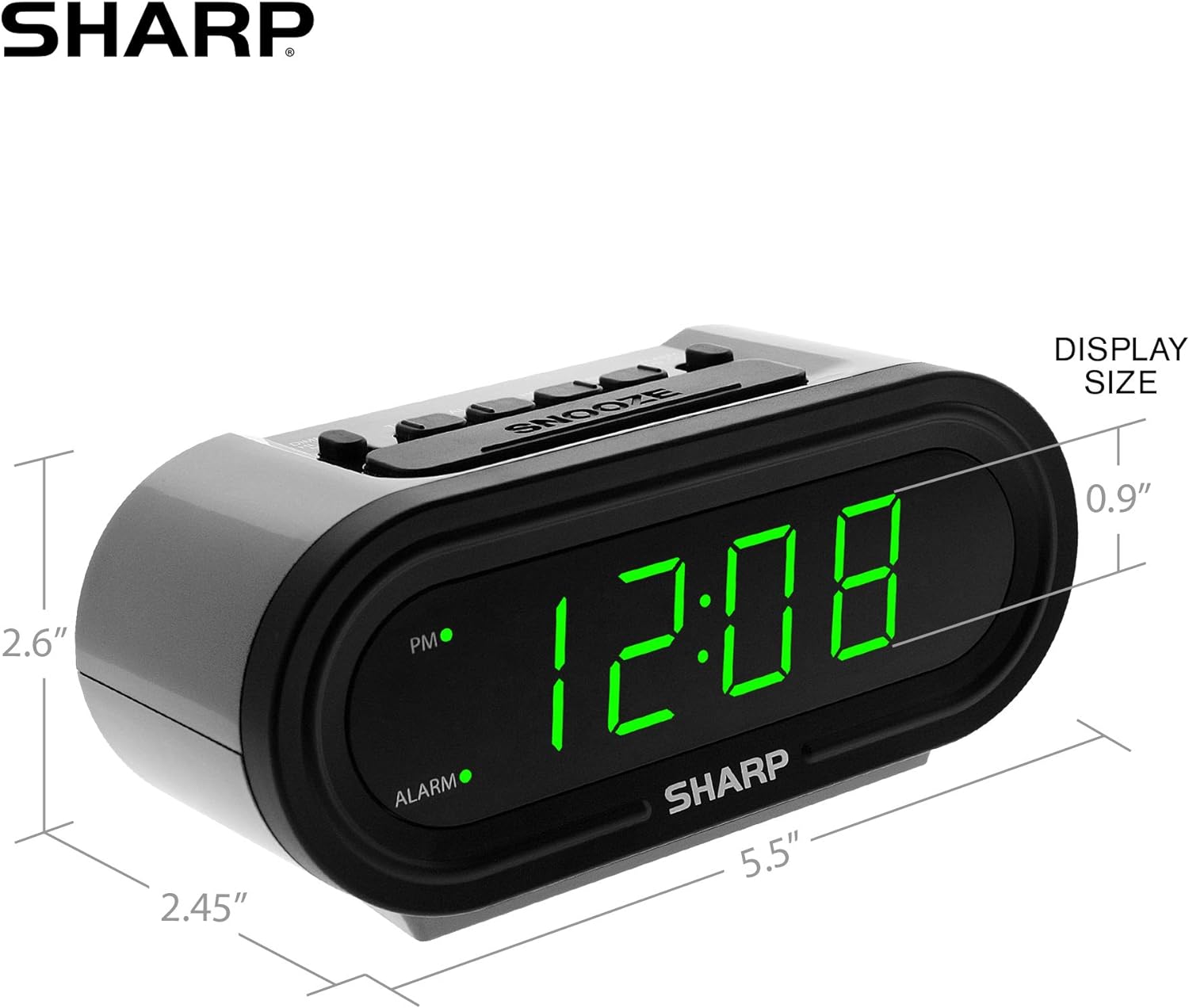
Figur 5: Produktdimensioner for nem reference.
Garanti og support
For warranty information or technical support, please refer to the contact details provided in your product packaging or visit the official Sharp webwebsted. Gem din købskvittering for garantikrav.
Ask a question about this manual
Ask about setup, troubleshooting, compatibility, parts, safety, or missing instructions. Manuals+ will review the question and use this page’s manual context to help answer it.