
1. Introduktion
The Quick 857DW+ is a high-performance SMD rework station featuring a hot air gun, designed for precise desoldering and soldering of various electronic components. It incorporates a microcomputer for temperature control, an LED digital display, and a brushless fan for soft, adjustable airflow. This manual provides essential information for the safe and effective operation, setup, maintenance, and troubleshooting of your device.
2. Vigtige sikkerhedsinstruktioner
Læs alle instruktioner, før du bruger dette produkt. Manglende overholdelse af disse instruktioner kan resultere i elektrisk stød, brand eller alvorlig personskade.
- Brug altid varmluftpistolen i et godt ventileret område for at undgå indånding af dampe.
- The nozzle and heated air can reach very high temperatures (up to 500°C). Avoid direct contact with skin or flammable materials.
- Do not point the hot air gun at people, animals, or heat-sensitive objects.
- Sørg for, at netledningen ikke er beskadiget og er korrekt jordforbundet.
- Tag stikket ud af stikkontakten, når enheden ikke er i brug, eller før du udfører vedligeholdelse.
- Lad enheden køle helt af, før den opbevares.
- Hold arbejdsområdet rent og fri for rod.
- Brug ikke enheden i nærheden af væsker eller i damp forhold.
- Dette apparat er ikke beregnet til brug af personer (inklusive børn) med nedsatte fysiske, sensoriske eller mentale evner, eller mangel på erfaring og viden, medmindre de har fået opsyn eller instruktion i brugen af apparatet af en person, der er ansvarlig for deres sikkerhed.
3. Pakkens indhold
Pak forsigtigt kassen ud, og sørg for, at alle dele er til stede og ubeskadigede. Hvis der mangler eller er beskadigede dele, skal du straks kontakte din leverandør.
- Quick 857DW+ Main Rework Station Unit
- Håndtag til varmluftpistol
- Hot Air Gun Stand
- Assorted Nozzles (typically 3-4 different sizes)
- Heating Element (replacement)
- Strømledning
4. Produktet er slutview
The Quick 857DW+ rework station consists of a main control unit and a hot air gun handle. The main unit features controls for temperature and airflow, along with a digital display for precise monitoring.
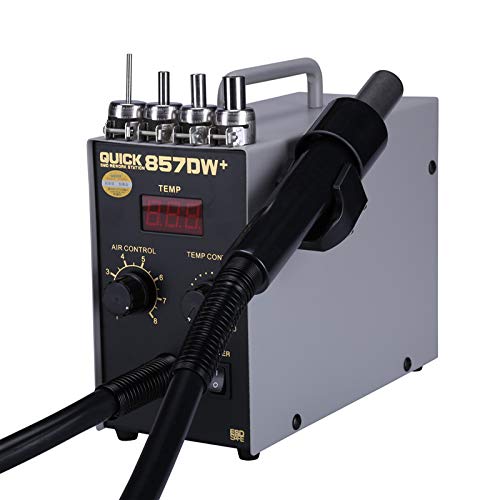
Quick 857DW+ SMD Rework Station main unit with digital LED temperature display, air control knob, temperature control knob, power switch, and the connected hot air gun handle.
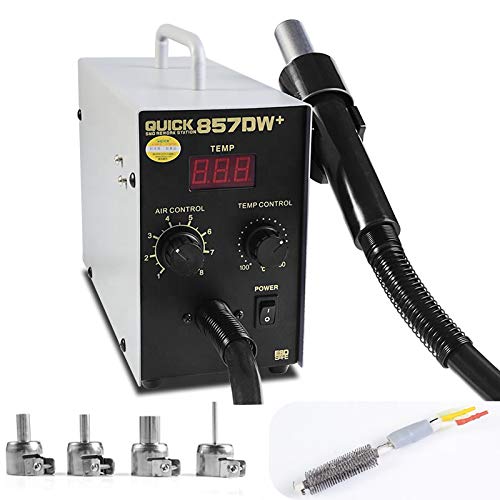
Assortment of hot air nozzles and a replacement heating element for the Quick 857DW+ SMD Rework Station.
Hovedenhedens funktioner:
- LED digitalt display: Shows real-time temperature with 1°C resolution.
- Air Control Knob: Adjusts the airflow rate (up to 120 liters/minute).
- Temperaturkontrolknap: Sets the desired temperature (100°C - 500°C).
- Afbryderen: Tænder eller slukker for enheden.
Hot Air Gun Handle:
- Induction Switch: Automatically activates the working mode when picked up and enters standby when placed in the holder.
- Børsteløs ventilator: Provides soft, consistent airflow with low noise and long lifespan.
- High-Quality Heating Element: Ensures rapid heating and stable temperature.
5. Specifikationer
| Parameter | Værdi |
|---|---|
| Model | Quick 857DW+ |
| Strømforbrug | 700 watt |
| Voltage | 220V/50HZ (also supports 110V-240V) |
| Luftstrømstype | Brushless fan soft wind |
| Gasstrømningshastighed | 120 liter/minut |
| Temperaturkontrolområde | 100°C - 500°C |
| Vis formular | LED Digital (resolution 1°C) |
| Handle Component Length | 120 cm |
| Støj | Mindre end 45 dB |
| Display Type | LED digital |
| Temperaturstabilitet | 100 degrees_celsius (range) |
| Antal kanaler | 1 |
6. Opsætning
Follow these steps to set up your Quick 857DW+ rework station:
- Pakker ud: Fjern forsigtigt alle komponenter fra emballagen.
- Placering: Place the main rework station unit on a stable, heat-resistant, and level surface in a well-ventilated area.
- Tilslut varmluftpistol: Securely connect the hot air gun handle cable to the designated port on the main unit.
- Installer dyse: Select the appropriate nozzle for your application and attach it firmly to the hot air gun handle.
- Stillingsindehaver: Place the hot air gun handle in its designated holder on the side of the unit.
- Tilslut strøm: Plug the power cord into the main unit and then into a suitable grounded electrical outlet.
7. Betjeningsvejledning
The Quick 857DW+ is designed for user-friendly operation. Familiarize yourself with the controls before beginning work.
- Tænd: Flip the POWER switch to the 'ON' position. The LED display will illuminate, showing the current temperature.
- Juster temperatur: Use the 'TEMP CONTROL' knob to set the desired temperature. The digital display will show the set temperature, and then gradually rise to meet it.
- Juster luftstrøm: Use the 'AIR CONTROL' knob to adjust the airflow rate. Start with a lower setting and increase as needed for your application.
- Start operation: Pick up the hot air gun handle from its holder. The induction switch will detect this, and the unit will quickly enter working mode, heating to the set temperature and starting airflow.
- Working Applications: This station is suitable for desoldering various components such as SOIC, CHIP, QFP, PLCC, and BGA (especially for mobile phone lines). It can also be used for heat shrinking, drying, paint removal, glue removal, thawing, preheating, and welding tasks.
- Standbytilstand: When you place the hot air gun handle back into its holder, the induction switch will activate standby mode. The system will automatically cool down the heating element with air before turning off the fan, prolonging the life of the heating element.
- Sluk: After use, ensure the hot air gun is in its holder and has cooled down. Then, flip the POWER switch to the 'OFF' position and unplug the unit from the power outlet.
8. Vedligeholdelse
Regular maintenance ensures the longevity and optimal performance of your rework station.
- Rengøring af dyser: Periodically clean the nozzles to prevent blockages from flux residue or solder. Use a soft brush or non-abrasive tool.
- Inspicer varmeelementet: Check the heating element for any signs of damage or wear. Replace if necessary (refer to the replacement heating element included in the package).
- Hold luftåbninger klare: Ensure the air intake and exhaust vents on the main unit are free from dust and debris to maintain proper airflow and cooling.
- Rengør enhed: Wipe the exterior of the unit with a soft, dry cloth. Do not use harsh chemicals or solvents.
- Opbevaring: Store the rework station in a dry, dust-free environment when not in use.
9. Fejlfinding
If you encounter issues with your Quick 857DW+ rework station, refer to the following common problems and solutions:
| Problem | Mulig årsag | Løsning |
|---|---|---|
| Enheden tænder ikke | No power supply; Power cord loose; Power switch off | Check power outlet; Ensure power cord is securely plugged in; Turn power switch to 'ON' |
| No heat from hot air gun | Heating element failure; Temperature set too low; Handle not picked up (in standby) | Replace heating element; Increase temperature setting; Pick up handle from holder |
| Insufficient or no airflow | Air control knob set too low; Fan blockage; Nozzle blockage | Increase air control setting; Clear air vents; Clean or replace nozzle |
| Temperatur ustabil | Sensor issue; Drafts in work area; Heating element wear | Ensure stable environment; Inspect sensor connection; Consider replacing heating element |
10. Garanti og support
This product comes with a standard manufacturer's warranty. For specific warranty terms, duration, and conditions, please refer to the documentation provided at the time of purchase or contact your retailer. For technical support, spare parts, or service inquiries, please contact the vendor or manufacturer directly through their official support channels.