
1. Introduktion
The Hombli Smart Doorbell 2 is an advanced video doorbell designed to enhance your home security. It features 1080p HD video, a 140-degree wide-angle view, two-way audio communication, motion detection, and infrared night vision. This manual provides detailed instructions for the installation, operation, and maintenance of your Smart Doorbell 2, ensuring optimal performance and security for your home.
Compared to its predecessor, the Smart Doorbell 2 offers a 25% faster response time and nearly double the battery life, along with flexible wired or wireless installation options.
2. Produktet er slutview
Familiarize yourself with the components and features of your Hombli Smart Doorbell 2.

Image 2.1: Hombli Smart Doorbell 2 highlighting key features such as 140° wide-angle 1080p HD camera, motion detection, built-in 5000mAh battery, optional cloud storage, Micro SD slot, two-way audio, infrared night vision, weatherproof IP65 rating, and GDPR compliance.
- Kameraobjektiv: Captures 1080p Full HD video with a 140° wide-angle view.
- Bevægelsessensor: Registrerer bevægelse foran dørklokken.
- Dørklokkeknap: Illuminates when pressed, sending a notification to your smartphone.
- Mikrofon: Til tovejs audiokommunikation.
- Højttaler: Til tovejs audiokommunikation.
- Opladningsport: Til genopladning af det interne batteri.
- Nulstil knap: Bruges til parring og nulstilling af enheden.
- Micro SD -kortplads: Supports local video storage up to 128GB.
3. Hvad er der i æsken
Sørg for, at alle komponenter er til stede, før du fortsætter installationen:
- Hombli Smart Doorbell 2
- Monteringsbeslag
- Angle Mount (optional, for optimal viewvinkel)
- 3M dobbeltklæbende tape
- Monteringsskruer og vægdyvler
- USB opladningskabel
- Brugervejledning (dette dokument)

Image 3.1: The Hombli Smart Doorbell 2 shown alongside its separate mounting bracket, illustrating how the device attaches to its base.
4. Opsætning og installation
4.1 Indledende opladning
Before installation, fully charge the Hombli Smart Doorbell 2 using the provided USB cable. A full charge ensures the device is ready for immediate use and helps calibrate the battery life indicator.
4.2 Appinstallation og parring
- Download Hombli app fra App Store (iOS) eller Google Play Store (Android).
- Opret en konto eller log ind, hvis du allerede har en.
- Tryk på ikonet "+" i appen for at tilføje en ny enhed.
- Select "Smart Doorbell 2" from the list of devices.
- Follow the on-screen instructions to connect the doorbell to your Wi-Fi-netværk på 2.4 GHz. Ensure your phone is connected to the same 2.4 GHz network during pairing.

Image 4.1: A smartphone displaying the Hombli app interface, showing options like screenshot, speak, record, playback, cloud storage, and buzzer, positioned next to the Hombli Smart Doorbell 2.
4.3 Montering af dørklokken
Choose a suitable location for your doorbell, typically at eye level, ensuring a clear view of your entrance. The doorbell can be installed wirelessly or wired to existing doorbell connections.
- Trådløs installation (batteridrevet):
- Rengør monteringsfladen grundigt.
- Attach the mounting bracket to the desired location using either the provided 3M double-sided adhesive tape or screws. For a more secure installation, screws are recommended.
- If needed, use the angle mount to adjust the viewing angle for optimal coverage of your entryway.
- Skub Hombli Smart Doorbell 2 på det monterede beslag, indtil den klikker på plads.
- Wired Installation (Continuous Power):
- Ensure power to your existing doorbell system is turned off at the circuit breaker.
- Remove your old doorbell.
- Connect the existing doorbell wires to the terminals on the Hombli Smart Doorbell 2 mounting bracket.
- Monter beslaget på væggen ved hjælp af skruer.
- Slide the Hombli Smart Doorbell 2 onto the mounted bracket.
- Gendan strømmen ved afbryderen.
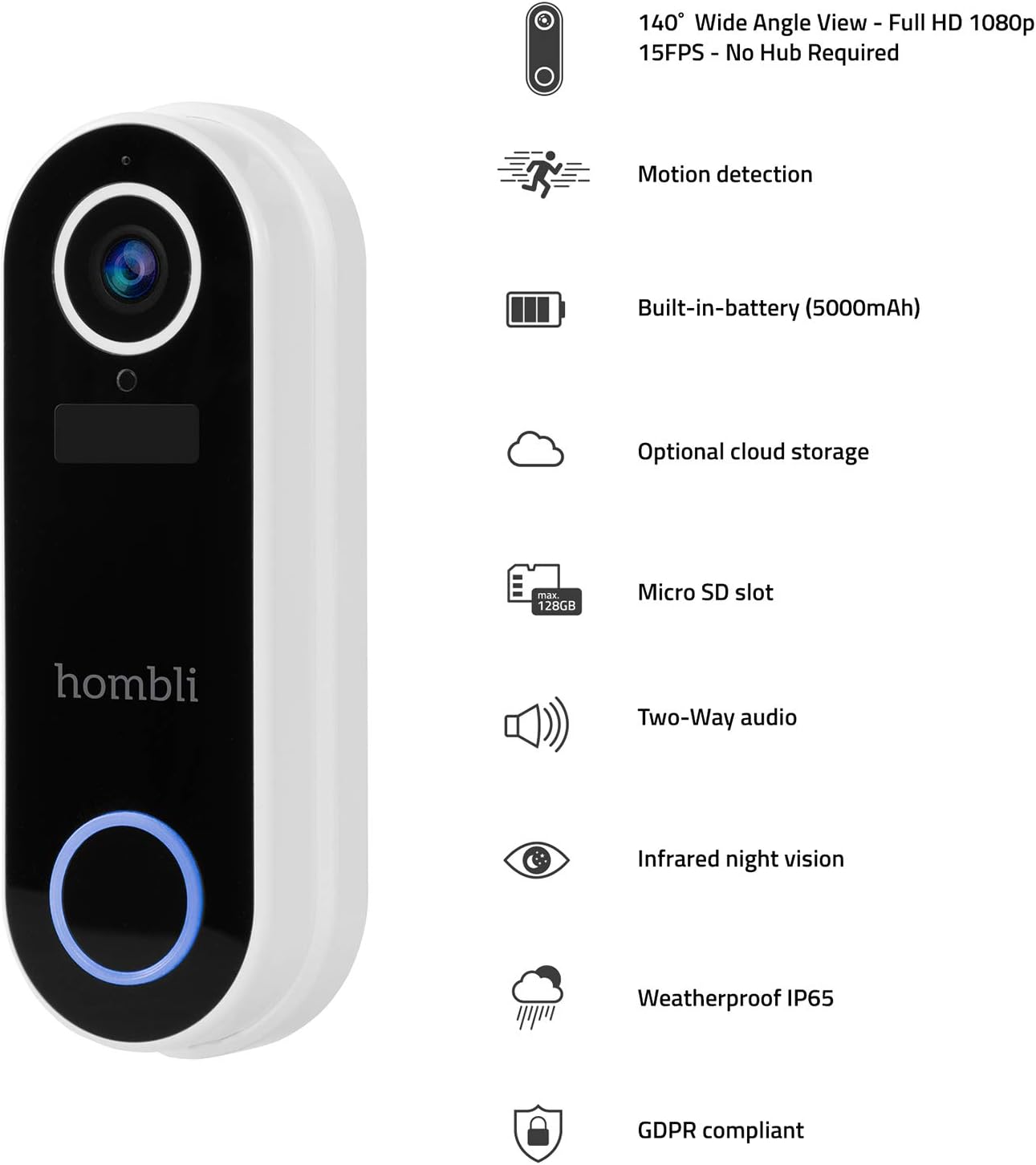
Image 4.2: The Hombli Smart Doorbell 2 is shown mounted on a brick wall, viewed from the side, demonstrating its slim profile and integration with the wall surface.

Image 4.3: The Hombli Smart Doorbell 2 is shown mounted on a brick wall, viewed from the front, highlighting its camera lens and illuminated doorbell button.
5. Operating the Smart Doorbell 2
5.1 Modtagelse af notifikationer
When someone presses the doorbell button or motion is detected, you will receive an instant notification on your smartphone via the Hombli app. Tap the notification to view det levende feed.
5.2 Tovejs lydkommunikation
Fra live view in the Hombli app, you can use the microphone and speaker icons to engage in real-time two-way audio communication with visitors at your door, even when you are away from home.
5.3 Live View og videooptagelse
Access the 1080p HD live video feed at any time through the Hombli app. You can manually record video or capture screenshots directly from the live view. The doorbell also automatically records events triggered by motion or doorbell presses.
5.4 Bevægelsesdetektion
The integrated motion sensor detects activity in its field of view. You can adjust the motion detection sensitivity and set specific detection zones within the Hombli app to minimize false alerts.
5.5 Infrarødt nattesyn
Dørklokken skifter automatisk til infrarødt nattesyn under dårlige lysforhold og giver klare sort-hvide videooptagelser.tage selv i fuldstændig mørke.
5.6 Videolagringsmuligheder
- Micro SD-kort: Insert a Micro SD card (up to 128GB, not included) into the designated slot for local storage of recorded video events.
- Cloud Storage: Optional cloud storage plans are available through the Hombli app for secure, remote access to your video history.
5.7 Batterilevetid
The built-in 5000mAh rechargeable battery provides 3 to 6 months of operation, depending on usage frequency and environmental factors. The Hombli app will notify you when the battery level is low.
6. Vedligeholdelse
6.1 Opladning af batteriet
When the battery is low, remove the doorbell from its mounting bracket and charge it using the provided USB cable. Connect the cable to the charging port on the doorbell and a standard USB power adapter (not included). The charging indicator will show the charging status.
6.2 Rengøring
Periodically clean the doorbell's camera lens and body with a soft, damp cloth to ensure clear video quality and proper functioning of the sensors. Avoid using harsh chemicals or abrasive materials.

Billede 6.1: Et nærbillede view of the Hombli Smart Doorbell 2's camera area, showing water droplets on its surface, demonstrating its IP65 weatherproof rating.
7. Fejlfinding
| Problem | Mulig årsag | Løsning |
|---|---|---|
| Doorbell not powering on | Low battery; Incorrect wired connection. | Charge the doorbell fully. For wired installation, ensure wires are correctly connected and power is on. |
| Kan ikke oprette forbindelse til Wi-Fi | Incorrect Wi-Fi password; Not a 2.4 GHz network; Weak Wi-Fi signal. | Verify Wi-Fi password. Ensure you are connecting to a 2.4 GHz network. Move the doorbell closer to your router or use a Wi-Fi extender. Reset the doorbell and try pairing again. |
| Dårlig videokvalitet | Weak Wi-Fi signal; Dirty camera lens. | Forbedr Wi-Fi-signalstyrken. Rengør kameralinsen med en blød klud. |
| Ingen advarsler om bevægelsesdetektering | Motion detection disabled; Sensitivity too low; Incorrect detection zone settings. | Enable motion detection in the Hombli app. Adjust sensitivity settings. Configure detection zones to cover the desired area. |
| Ingen notifikationer på telefonen | App notifications disabled; Phone's notification settings. | Check notification settings within the Hombli app. Ensure your phone's system settings allow notifications from the Hombli app. |
8. Specifikationer

Image 8.1: Technical drawing showing the dimensions of the Hombli Smart Doorbell 2: 14.2 cm height, 4.9 cm width (front), and 2.8 cm depth (side).
- Modelnummer: HBDB-0209
- Fabrikant: hombli
- Dimensioner (L x B x H): 2.6 x 4.6 x 13 cm
- Vægt: 420 gram
- Farve: Hvid
- Materiale: Plast
- Voltage: 5 volt
- Installationsmetode: Self-adhesive, Screws
- Inkluderede komponenter: Video dørklokke
- Batteri: 5000 mAh rechargeable (included)
- Kameraopløsning: 1080p HD
- Felt af View: 140° vidvinkel
- Nattesyn: Infrarød
- Forbindelse: 2.4 GHz Wi-Fi
- Vejrbestandighed: IP65
- Opbevaring: Micro SD card slot (up to 128GB), Optional Cloud Storage
9. Garanti og support
For warranty information, technical support, or further assistance, please refer to the official Hombli website or contact Hombli customer service directly. Details regarding specific warranty periods and support channels can typically be found on the manufacturer's official product page or within the Hombli app.
Please note that information regarding spare parts availability is not provided in this manual. For inquiries about spare parts, please contact Hombli support.