
SoFlow 300.450.01
SoFlow SO4 Pro Gen 2 Electric Scooter User Manual
Model: 300.450.01 | Brand: SoFlow
1. Introduktion
Welcome to your new SoFlow SO4 Pro Gen 2 Electric Scooter. This manual provides essential information for safe operation, maintenance, and troubleshooting. Please read it thoroughly before using your scooter to ensure a safe and enjoyable experience.
2. Sikkerhedsinstruktioner
Din sikkerhed er altafgørende. Følg altid følgende retningslinjer:
- Brug altid hjelm og passende beskyttelsesudstyr (knæbeskyttere, albuebeskyttere) under kørsel.
- Check the brakes, tire pressure, and overall condition of the scooter before each ride.
- Overhold alle lokale færdselslove og regler.
- Kør ikke i vådt føre, kraftig regn eller gennem vandpytter.
- The maximum load capacity is 150 kg. Do not exceed this limit.
- Utilize the integrated turn signals for enhanced visibility when changing direction.
- The contactless anti-theft feature with the integrated NFC chip provides additional security.
- Avoid riding on uneven surfaces, steep slopes (over 18%), or in crowded areas.
3. Pakkens indhold
Upon opening your package, ensure all the following items are present:
- SoFlow SO4 Pro Gen 2 Electric Scooter (1 piece)
- Lithiumbatteri (forinstalleret eller separat)
- Batterioplader
- Brugermanual
4. Produktet er slutview
Familiarize yourself with the main components of your SoFlow SO4 Pro Gen 2 Electric Scooter.

Figur 4.1: Front view of the SoFlow SO4 Pro Gen 2 Electric Scooter, highlighting the handlebars, front wheel, and deck.
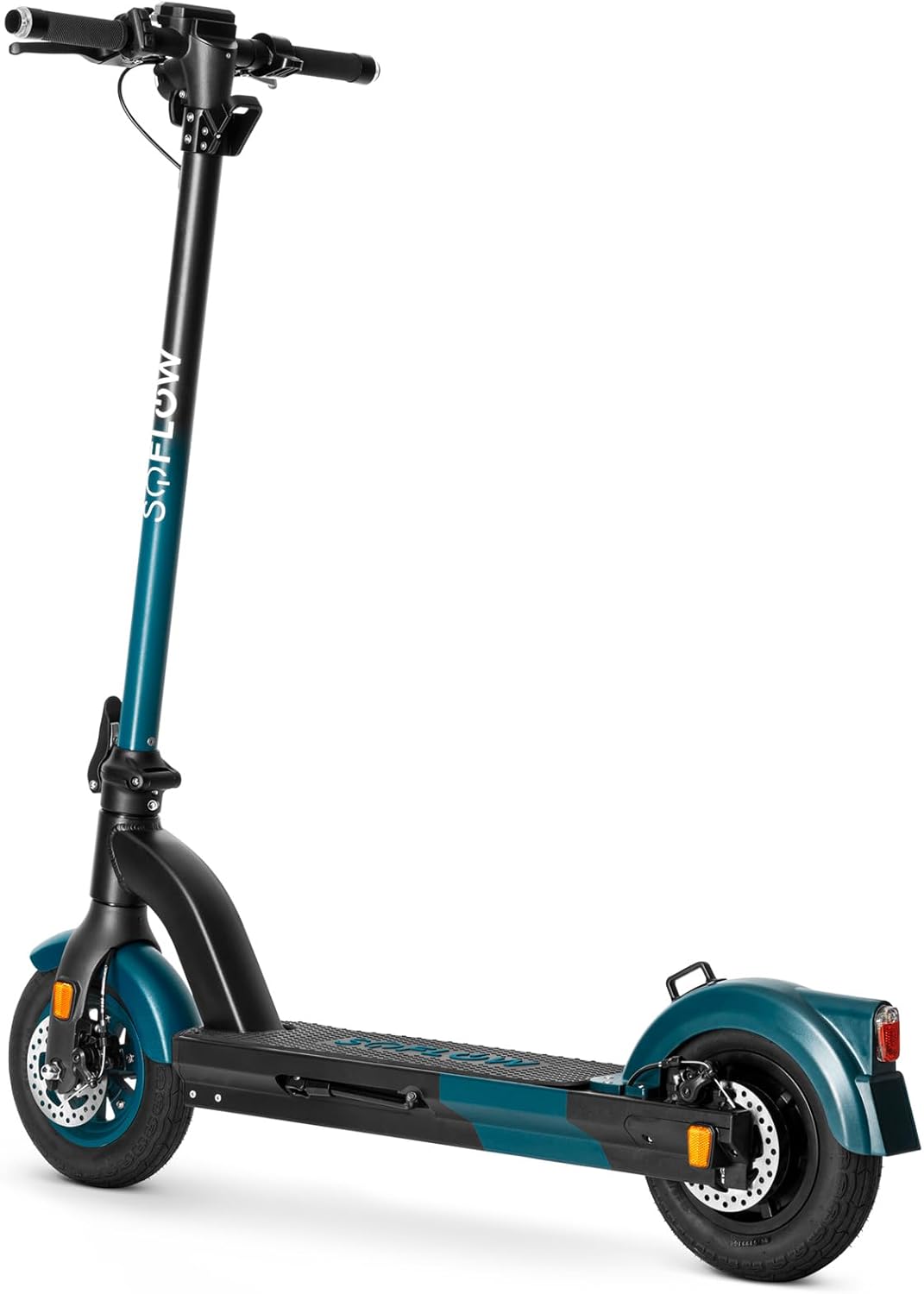
Figur 4.2: Forsiden view of the SoFlow SO4 Pro Gen 2 Electric Scooter, showing the front disc brake and tire.
Figur 4.3: Side view of the SoFlow SO4 Pro Gen 2 Electric Scooter, illustrating the overall profile and rear wheel.

Figur 4.4: Bag view of the SoFlow SO4 Pro Gen 2 Electric Scooter, showing the rear fender, brake light, and disc brake.

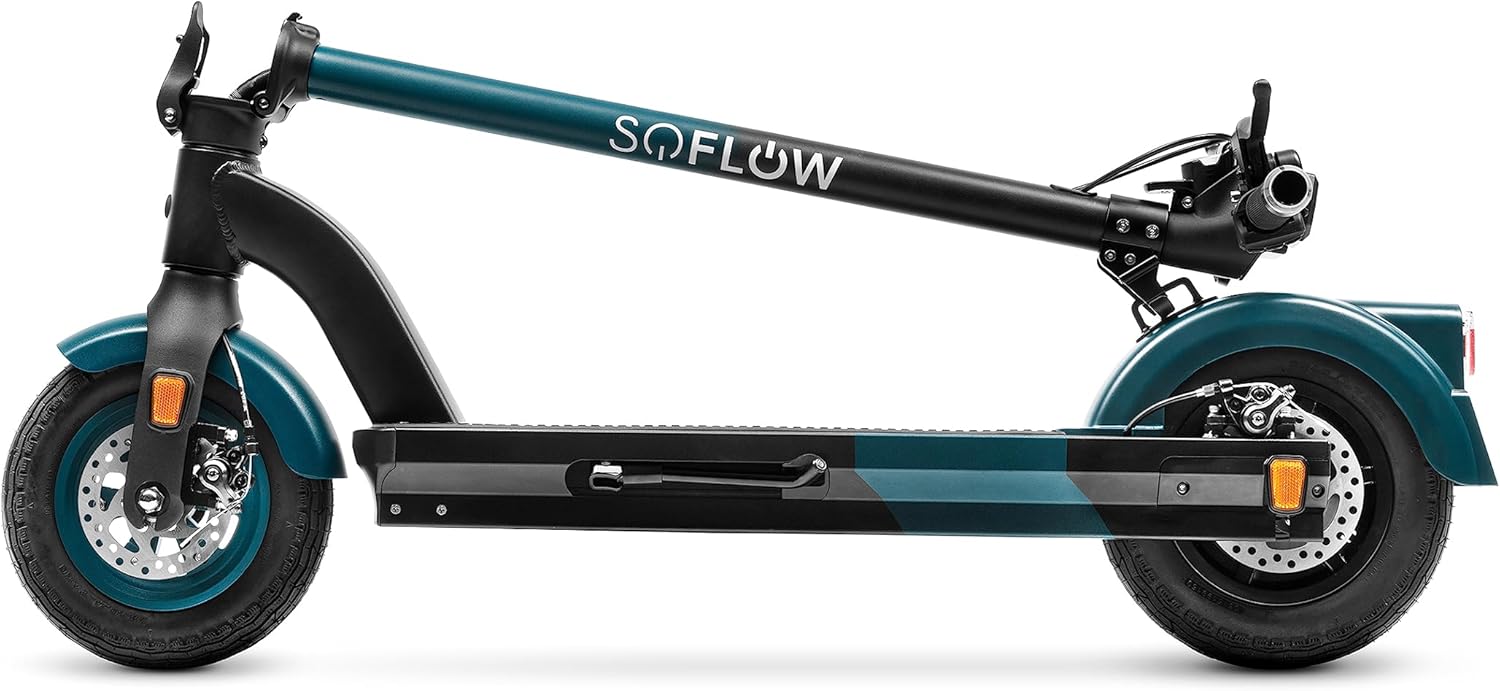
Figur 4.5: The SoFlow SO4 Pro Gen 2 Electric Scooter in its folded position, demonstrating its compact design for transport.

Figur 4.6: A hand removing the lithium battery from the scooter's deck compartment, illustrating the removable battery feature.
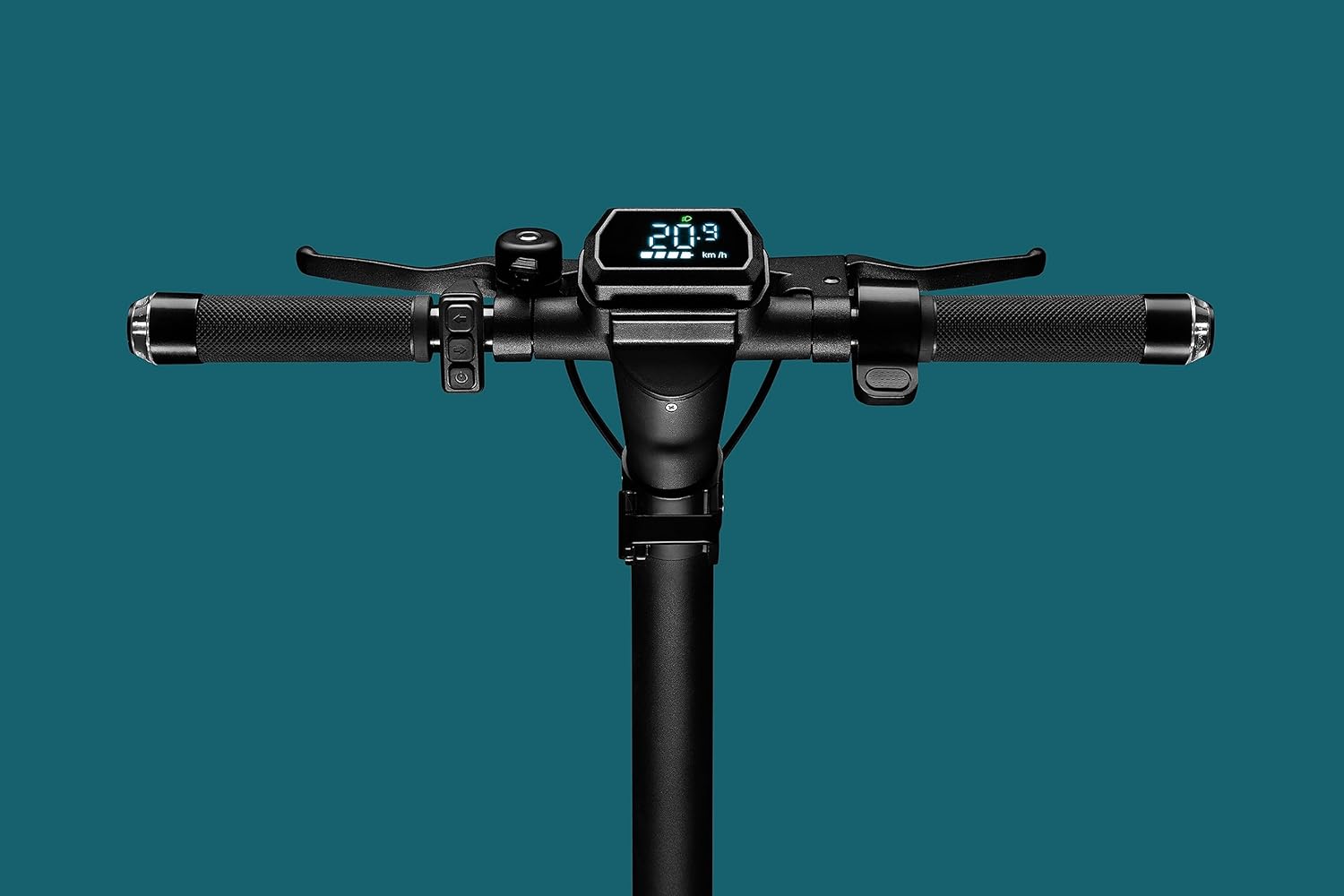
Figur 4.7: Close-up of the handlebar display, showing the digital screen with speed and battery indicators, along with controls.

Figur 4.8: The scooter's headlight illuminated, with integrated turn signals on the handlebars also lit, emphasizing visibility features.

Figur 4.9: Detaljeret view of the front wheel and disc brake assembly.

Figur 4.10: Detaljeret view of the rear wheel and disc brake assembly.
5. Opsætning
5.1 Udfoldning af scooteren
- Placer scooteren på en flad overflade.
- Release the folding mechanism latch, usually located near the base of the handlebar stem.
- Carefully lift the handlebar stem until it locks securely into the upright position. Ensure the locking mechanism is fully engaged.
- Adjust the handlebars to your desired height if adjustable, and tighten any quick-release clamps.
5.2 Opladning af batteriet
The SoFlow SO4 Pro Gen 2 is equipped with a Lithium battery. For optimal performance and battery longevity, follow these charging instructions:
- Find ladeporten på scooteren.
- Tilslut opladeren til opladningsporten, og sæt derefter opladeren i en almindelig stikkontakt.
- Ladeindikatoren på opladeren viser opladningsstatussen (f.eks. rød for opladning, grøn for fuldt opladet).
- A full charge takes approximately 3 hours and 50 minutes with the special "fast charge" charger.
- Always ensure the battery is fully charged before your first ride and after each use for maximum range.
6. Betjeningsvejledning
6.1 Tænd/sluk
- For at tænde: Press and hold the power button on the handlebar display until the screen illuminates.
- For at slukke: Tryk på tænd/sluk-knappen igen, og hold den nede, indtil skærmen slukker.
6.2 At køre på scooter
- Placer den ene fod fast på dækket og skub fra med den anden fod for at få indledende momentum.
- Once moving, place your second foot on the deck.
- Gently press the accelerator lever (throttle) to engage the motor.
- The 500-watt motor provides ample power for speeds up to 25 km/h and inclines up to 18%.
- Use the integrated turn signals on the handlebars to indicate your direction changes.
6.3 Bremsning
The scooter is equipped with front and rear disc brakes for precise and controlled stopping.
- For at sænke farten eller stoppe, klem forsigtigt bremsegrebene på styret.
- Apply both brakes simultaneously for more effective stopping power.
- Undgå pludselig eller hård opbremsning, især ved høje hastigheder, for at forhindre tab af kontrol.
6.4 Using the SoFlow App
Enhance your riding experience by connecting your scooter to the intuitive SoFlow application:
- Download the SoFlow app from your smartphone's app store.
- Enable Bluetooth on your smartphone and open the SoFlow app.
- Følg instruktionerne i appen for at parre dit løbehjul.
- The app provides important details such as battery capacity, current speed, Bluetooth status, and light indicators.
- You can also track your completed journeys and electronically lock the scooter for added security.
7. Vedligeholdelse
Regular maintenance ensures the longevity and optimal performance of your SoFlow SO4 Pro Gen 2 Electric Scooter.
- Rensning: Tør scooteren af med reklameamp klud efter hver brug. Undgå at bruge højtryksvand eller skrappe kemikalier.
- Dæktryk: Regularly check the tire pressure of the 10-inch pneumatic tires. Maintain recommended pressure for optimal ride quality and range.
- Bremseinspektion: Periodically inspect the front and rear disc brakes for wear and proper function. Adjust or replace brake pads as needed.
- Batteripleje: Charge the battery regularly, even if the scooter is not in use for extended periods, to maintain battery health. Store the scooter in a cool, dry place.
- Generel kontrol: Routinely check all screws, bolts, and connections to ensure they are tight and secure.
8. Fejlfinding
Dette afsnit omhandler almindelige problemer, du kan støde på med din scooter.
| Problem | Mulig årsag | Løsning |
|---|---|---|
| Scooteren tænder ikke | Low or depleted battery; Loose battery connection; Power button malfunction | Charge the battery fully; Ensure battery is securely seated; Contact support if issue persists |
| Reduced range/autonomy | Under-inflated tires; Heavy load; Riding uphill frequently; Cold weather | Check and inflate tires to recommended pressure; Reduce load; Adjust riding style; Battery performance may be reduced in cold temperatures |
| Bremserne føles svage | Worn brake pads; Loose brake cable; Disc brake misalignment | Inspect brake pads and replace if worn; Adjust brake cable tension; Consult a technician for disc brake alignment |
| Usædvanlige lyde under drift | Løse komponenter; Affald i hjul/bremser; Motorproblem | Check all fasteners; Clean wheels and brakes; If noise persists, contact customer support |
9. Tekniske specifikationer
Detailed specifications for the SoFlow SO4 Pro Gen 2 Electric Scooter:
| Feature | Specifikation |
|---|---|
| Mærke | SoFlow |
| Modelnavn | SO4 PRO Gen2 |
| Varemodelnummer | 300.450.01 |
| Produktmål (L x B x H) | 109.1 x 46.6 x 114.5 cm |
| Vægt | 17.50 kg |
| Maksimal vægtkapacitet | 150 kilo |
| Motorkraft | 500W |
| Batteritype | Lithium-ion |
| Opladningstid | Ca. 3 timer 50 minutter |
| Maksimal hastighed | 25 km/t |
| Rækkevidde (Autonomi) | Approx. 40 KM |
| Maksimal hældning | 18 % |
| Hjulstørrelse | 10 tommer |
| Bremser | Front and Rear Disc Brakes, Regenerative Braking |
| Rammemateriale | Aluminium |
| Særlige funktioner | NFC Anti-theft, Integrated Turn Signals, SoFlow App Connectivity, Foldable |
10. Garanti og support
Your SoFlow SO4 Pro Gen 2 Electric Scooter comes with a standard manufacturer's warranty covering defects in materials and workmanship under normal use. Please refer to the warranty card included in your package for specific terms and conditions, including the warranty period and coverage details.
For technical support, warranty claims, or any questions regarding your scooter, please contact SoFlow customer service through their official webwebstedet eller kontaktoplysningerne i din købsdokumentation.
Ask a question about this manual
Ask about setup, troubleshooting, compatibility, parts, safety, or missing instructions. Manuals+ will review the question and use this page’s manual context to help answer it.