
iHip WLG-PP27
iHip 3ft PVC Micro USB High-Speed Data and Charging Cable
Model: WLG-PP27
Indledning
This manual provides essential information for the proper use, setup, maintenance, and troubleshooting of your iHip 3ft PVC Micro USB High-Speed Data and Charging Cable. Please read this manual thoroughly before using the product.
The iHip Micro USB cable is designed for fast charging and high-speed data transfer, compatible with a wide range of devices including Android phones, tablets, gaming consoles, and other devices with a Micro USB interface. It features a durable rubber finish and a metal tip, engineered for longevity with a 10,000 bend test certification.
Pakkens indhold
- 1 x iHip 3ft PVC Micro USB High-Speed Data and Charging Cable
Opsætning
The iHip Micro USB cable is designed for plug-and-play functionality. Follow these steps to connect your device:
- Identificér porte: Locate the Micro USB port on your device (e.g., smartphone, tablet, game controller) and a standard USB-A port on your power adapter, computer, or other charging/data source.
- Opret forbindelse til enhed: Gently insert the Micro USB connector (the smaller, trapezoidal end) into the Micro USB port on your device. Ensure it is inserted horizontally and correctly to avoid damage.
- Connect to Power/Data Source: Insert the standard USB-A connector (the larger, rectangular end) into a compatible USB-A port on your power adapter, computer, or other charging/data source.
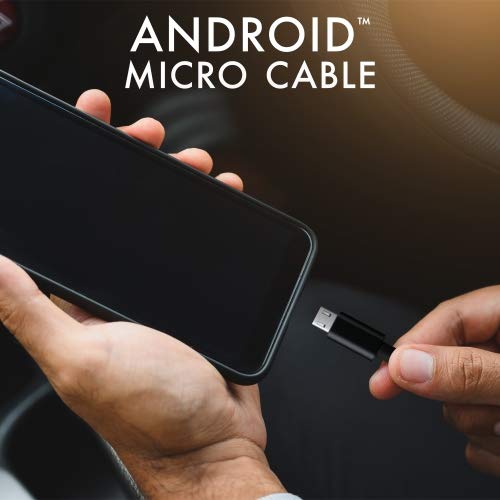
Image: Connecting the iHip Micro USB cable to a smartphone. The cable is designed for easy and secure connection.
Betjeningsvejledning
Opladning af din enhed
To charge your device using the iHip Micro USB cable:
- Tilslut kablet som beskrevet i afsnittet "Opsætning".
- Ensure your power adapter or USB port provides sufficient power. For fast charging, use a Quick Charge compatible power adapter (e.g., 9V/2A output) or a standard power adapter with 5V/2.4A output.
- Enhedens opladningsindikator bør aktiveres, hvilket bekræfter, at opladningen er begyndt.
Dataoverførsel
Sådan overfører du data mellem din enhed og en computer:
- Connect the Micro USB end to your device and the USB-A end to a USB port on your computer.
- Din computer burde genkende den tilsluttede enhed. Du skal muligvis vælge "File Transfer" or "MTP" mode on your device's screen if prompted.
- Du kan nu få adgang til din enheds lagerplads for at overføre files at speeds up to 480Mb/s.
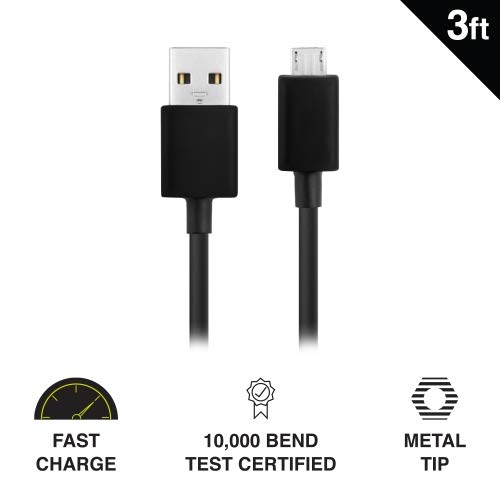
Image: Key features of the iHip Micro USB cable, highlighting its fast charge capability, durability, and robust metal tip.
Vedligeholdelse og pleje
To ensure the longevity and optimal performance of your iHip Micro USB cable, follow these maintenance guidelines:
- Korrekt håndtering: Always grasp the connector head when plugging or unplugging the cable. Avoid pulling directly on the cable itself, as this can damage the internal wires.
- Opbevaring: Store the cable in a clean, dry place away from extreme temperatures and direct sunlight. Avoid tightly coiling or bending the cable at sharp angles.
- Rensning: If the connectors become dirty, gently wipe them with a dry, lint-free cloth. Do not use liquids or abrasive cleaners.
- Undgå stress: Do not place heavy objects on the cable or allow it to be pinched, which can lead to internal damage.
Fejlfinding
If you encounter issues with your iHip Micro USB cable, try the following troubleshooting steps:
- Enheden oplades ikke:
- Sørg for, at begge ender af kablet er forsvarligt forbundet.
- Prøv at bruge en anden strømadapter eller USB-port.
- Test the cable with a different compatible device to rule out a device issue.
- Kontrollér Micro USB-porten på din enhed for snavs eller skader.
- Langsom opladning:
- Ensure you are using a power adapter with adequate output (e.g., 5V/2.4A or Quick Charge compatible).
- Avoid charging from low-power USB ports (e.g., some laptop USB 2.0 ports).
- Problemer med dataoverførsel:
- Bekræft, at din enhed er indstillet til "File "Overførsel" eller "MTP"-tilstand, når den er tilsluttet en computer.
- Prøv en anden USB-port på din computer.
- Genstart både din enhed og computer.
Specifikationer
| Feature | Detalje |
|---|---|
| Modelnummer | WLG-PP27 |
| Kabellængde | 3 fod (ca. 0.91 meter) |
| Connector Type | USB-A to Micro USB |
| Materiale | PVC with Rubber Finish, Metal Tip |
| Dataoverførselshastighed | Op til 480 Mb/s |
| Holdbarhed | 10,000+ bend lifespan certified |
| Kompatibilitet | Android Cell Phones, Tablets, Windows Phones (Samsung Note/Galaxy, Nokia Lumia, LG, HTC), MP4, hard drives, PlayStation 4, Xbox One controller, and other Micro USB devices. |
| Produktdimensioner | 6.5 x 3 x 1 tommer; 1.76 ounce |

Image: The iHip 3ft PVC Micro USB cable, showcasing dens kompakte og fleksible design.
Garanti og support
The iHip Micro USB cable comes with a lifetime guarantee. For detailed warranty information and support, please visit the official iHip webwebsted:
For any further assistance or inquiries, please refer to the contact information provided on the iHip webwebsted.