
1. Introduktion
This manual provides instructions for the installation, setup, and operation of the Layfuz Tuya WiFi M515EGWT Intelligent Pull Bead Curtain Motor. This device is designed to automate bead-chain roller blinds, allowing control via a mobile application or voice commands through compatible smart home assistants.
2. Produktet er slutview
The Layfuz M515EGWT motor offers convenient automation for your curtains. It integrates with the Tuya Smart App for remote control and supports voice commands via Amazon Alexa and Google Home. Key features include:
- Mobil APP-kontrol: Manage your curtains from anywhere using the Tuya Smart App.
- Stemmestyring: Kompatibel med Amazon Alexa og Google Home for håndfri betjening.
- Timing funktion: Schedule curtain opening and closing times to suit your daily routine.
- Adjustable Travel Limits: Set custom upper, lower, and intermediate stop positions.
- Direct Current Power Supply: Sikrer sikker og pålidelig drift.

Figur 2.1: Layfuz M515EGWT motor with compatible bead chain types. The motor is designed to work with various bead chain sizes and materials, including 2mm, 4mm, 6mm, 4.5*6mm, 4.5*12mm, metal chain, beaded, and 3.2mm chains.
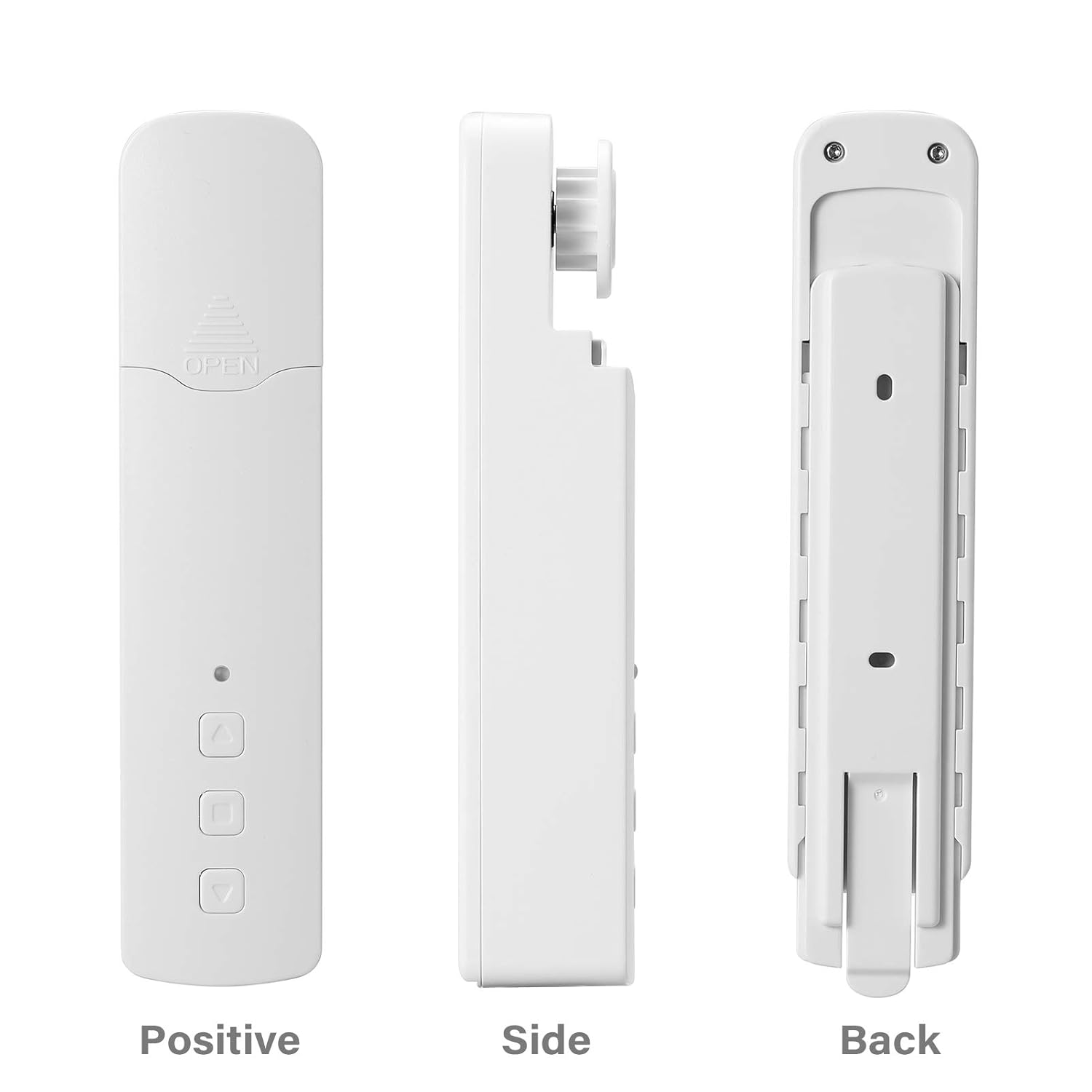
Figur 2.2: Anderledes views of the Layfuz M515EGWT motor, showing its positive (front), side, and back profiles. The front includes an indicator light and control buttons, while the back features mounting points.

Figur 2.3: The motor is suitable for various curtain types, including Venetian blinds, vertical blinds, honeycomb shades, triple shades, roller shades, and zebra shades, provided they use a compatible bead chain mechanism.

Figur 2.4: This image highlights the motor's control buttons: Up, Stop, and Down. It also shows the Set button and the charging port. Compatibility logos for Amazon Alexa, Google Home, and Tuya Smart are visible, indicating smart home integration.
3. Pakkens indhold
Kontroller venligst, at alle varer er til stede i pakken:
- 1 x Curtain Motor (M515EGWT)
- 1 x Power Adapter (EU, UK, USA, or AU type, optional based on region)
- 1 x brugermanual
4. Specifikationer
| Feature | Specifikation |
|---|---|
| Mærke | Layfuz |
| Modelnummer | M515EGWT |
| Materiale | ABS |
| Farve | Hvid |
| Nominel voltage | 5V DC |
| Nominel effekt | 6.0W |
| Nominel drejningsmoment | 0.45 Nm |
| Roterende hastighed | 30 rpm |
| Driftstemperatur | -20℃ ~ +65℃ |
| Built-in Receiving Frequency | 915 MHz, 2.4 GHz |
| Produktdimensioner | 22 x 18.5 x 4 cm |
| Varens vægt | 640 g |
| Oprindelsesland | Kina |
5. Installation
Follow these steps to install the curtain motor. Refer to Figure 5.1 for visual guidance.

Figur 5.1: Comprehensive guide for the Layfuz M515EGWT motor, detailing its appearance, step-by-step installation, Tuya Smart App connection process, and instructions for setting and deleting travel limits.
5.1 Product Installation Steps (Refer to '2 Product install' in Figure 5.1)
- Fix the Wall Panel: Secure the mounting panel to the wall at the desired location for the motor.
- Installer motoren: Slide the motor onto the fixed wall panel until it clicks into place.
- Insert the Bead Chain: Carefully place the curtain's bead chain into the motor's drive wheel. Ensure it is seated correctly.
- Close Wheel Cover: Close the wheel cover and tighten the curtain bead chain to prevent slippage.

Figur 5.2: The motor features fast switching capability for different drive gears, making it applicable to multiple models of bead chains. Ensure the correct gear is installed for your curtain's bead chain type.
6. Opsætning
After physical installation, proceed with the smart app setup and limit settings. Refer to '3 Instructions for use' and '3.2 Limit Setting' in Figure 5.1.
6.1 Add Tuya Smart App (Refer to '3.1 Add Tuya Smart App' in Figure 5.1)
- Download app: Download the Tuya Smart App from your mobile phone's app store (Google Play or Apple App Store).
- Registrer/Log ind: Åbn appen, og opret en ny konto, eller log ind med en eksisterende.
- Tilføj enhed: Click '+' or 'Add Device' in the app. The indicator light on the motor should be flashing red. If not, press and hold the 'Set' key for 3-5 seconds until it flashes rapidly.
- Vælg enhedstype: Choose 'Manual Add' or 'Auto Scan'. For manual, select 'Curtain Motor'.
- Opret forbindelse til Wi-Fi: Enter your 2.4GHz Wi-Fi network name and password. Ensure your phone is connected to the same 2.4GHz Wi-Fi network.
- Parring: The app will search for and connect to the device. Once connected, you can rename the device.
6.2 Limit Setting (Refer to '3.2 Limit Setting' in Figure 5.1)
Setting the upper and lower travel limits is crucial for proper operation. You must set these limits before setting any middle limits.
- Indstil øvre grænse: Press the 'Set' key once. The indicator light will flash red. Use the 'Up' key to move the curtain to the desired upper limit. Press the 'Set' key again to confirm. The indicator light will flash red three times, indicating the upper limit is set.
- Indstil nedre grænse: Press the 'Set' key once. The indicator light will flash red. Use the 'Down' key to move the curtain to the desired lower limit. Press the 'Set' key again to confirm. The indicator light will flash red three times, indicating the lower limit is set.
6.3 Middle Limit Setting (Refer to '3.3 Middle Limit Setting' in Figure 5.1)
You can set an intermediate stop point for your curtain.
- Initiate Middle Limit Setting: Press the 'Set' key once. The indicator light will flash red.
- Move to Desired Position: Use the 'Up' or 'Down' keys to move the curtain to the desired middle stop position.
- Confirm Middle Limit: Press the 'Set' key again. The indicator light will flash red three times, confirming the middle limit is set.
6.4 Delete Middle Limit (Refer to '3.4 Delete Middle Limit' in Figure 5.1)
To remove a previously set middle limit:
- Initiate Deletion: Press the 'Set' key once. The indicator light will flash red.
- Bekræft sletning: Press and hold the 'Set' key for 5 seconds. The indicator light will flash red, release, and then flash red three times, indicating the middle limit has been deleted.
7. Betjening
The Layfuz M515EGWT motor can be operated via its physical buttons, the Tuya Smart App, or voice commands.
7.1 Manual Control (Device Buttons)
- Op-knap: Flytter gardinet opad.
- Ned-knap: Flytter gardinet nedad.
- Stop-knap: Stopper gardinet i dets aktuelle position.
- Indstil knap: Used for pairing and setting travel limits (as described in Section 6).
7.2 Tuya Smart App Control
Once the motor is successfully paired with the Tuya Smart App (Section 6.1), you can:
- Open/Close Curtains: Use the virtual buttons in the app to fully open or close the curtains.
- Juster position: Precisely control the curtain's position by sliding a bar or setting a percentage.
- Indstil tidsplaner: Utilize the timing function to create automated schedules for opening and closing curtains at specific times.
- Fjernbetjening: Operate your curtains from any location with internet access.
7.3 Stemmekontrol
The motor is compatible with Amazon Alexa and Google Home. After linking your Tuya Smart account to your voice assistant, you can use commands such as:
- "Alexa, åbn gardinet."
- "Hey Google, close the curtain."
- "Alexa, sæt gardinet til 50%."
8. Vedligeholdelse
To ensure the longevity and optimal performance of your Layfuz M515EGWT motor, follow these maintenance guidelines:
- Rensning: Wipe the motor's exterior with a soft, dry cloth. Do not use abrasive cleaners or immerse the device in water.
- Strømtilslutning: Ensure the power adapter and cable are securely connected and free from damage. Disconnect power before cleaning or performing any maintenance.
- Bead Chain Inspection: Periodically check the curtain's bead chain for wear, damage, or obstructions that could hinder motor operation. Ensure the chain is properly seated in the motor's drive wheel.
- Miljøforhold: Operate the motor within the specified temperature range (-20℃ to +65℃) and avoid excessive humidity.
9. Fejlfinding
If you encounter issues with your Layfuz M515EGWT motor, refer to the following common problems and solutions:
- Motoren reagerer ikke:
- Check if the power adapter is securely connected and the motor is receiving power.
- Sørg for, at stikkontakten fungerer.
- Verify that the bead chain is correctly installed and not jammed.
- Difficulty Connecting to Tuya App:
- Ensure your mobile phone is connected to a 2.4GHz Wi-Fi network. The motor does not support 5GHz Wi-Fi.
- Confirm that the motor's indicator light is flashing rapidly during pairing mode. If not, press and hold the 'Set' button for 3-5 seconds.
- Kontrollér, at din Wi-Fi-adgangskode er nøjagtig.
- Move the motor closer to your Wi-Fi router to improve signal strength.
- Genstart din Wi-Fi-router, og prøv parringsprocessen igen.
- Curtain Not Moving to Correct Limits:
- Re-calibrate the upper and lower travel limits as described in Section 6.2.
- Ensure the bead chain is not slipping or obstructed.
- Stemmestyring virker ikke:
- Verify that your Tuya Smart account is correctly linked to your Amazon Alexa or Google Home app.
- Tjek din internetforbindelse.
- Ensure the device name in the Tuya app is recognized by your voice assistant.
10. Sikkerhedsoplysninger
Læs og overhold venligst følgende sikkerhedsforanstaltninger:
- Denne enhed er kun til indendørs brug.
- Do not expose the motor to water, moisture, or extreme temperatures.
- Ensure the power adapter and cable are not damaged. Do not use if damaged.
- Hold enheden utilgængeligt for børn og kæledyr.
- Do not attempt to disassemble or repair the motor yourself. Contact qualified personnel for service.
- Ensure the curtain's bead chain is installed correctly and securely to prevent accidents.
11. Garanti og support
For garantioplysninger og teknisk support henvises til den dokumentation, der blev leveret ved køb, eller kontakt din forhandler. Gem din købskvittering som købsbevis.