
Indledning
This manual provides detailed instructions for the safe and efficient use of your XO B26 Bluetooth 4.2 Wireless Earbud. Please read this manual thoroughly before using the product and retain it for future reference.
Produkt overview
The XO B26 is a single Bluetooth 4.2 wireless earbud designed for mobile phones, offering ease of use and portability. It is crafted from high-quality materials to ensure durability and a secure fit.
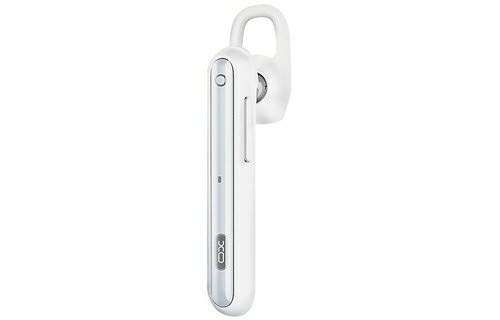
Image: The XO B26 Bluetooth Wireless Earbud, shown in white with a silver accent, featuring its ergonomic design and ear hook.
Nøglefunktioner:
- Bluetooth 4.2 connectivity for stable wireless connection.
- Kompakt og let design for nem transport.
- Ergonomisk designet for en sikker og komfortabel pasform.
- Touch control method for intuitive operation.
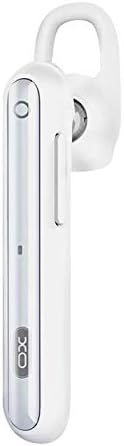
Billede: Et nærbillede view of the XO B26 earbud, highlighting the control button and sleek design.
Opsætning
1. Charging the Earbud
- Connect the charging cable (not included) to the earbud's charging port.
- Sæt den anden ende af kablet i en kompatibel USB-strømkilde.
- Indikatorlampen viser opladningsstatussen. En fuld opladning tager cirka 2 timer.
- Once fully charged, disconnect the earbud from the power source.
2. Parring med en enhed
- Ensure the earbud is fully charged and turned off.
- Press and hold the multi-function button on the earbud until the indicator light flashes red and blue alternately, indicating it is in pairing mode.
- On your mobile phone or compatible device, enable Bluetooth and search for available devices.
- Select "XO B26" from the list of found devices.
- Once paired, the indicator light will flash blue slowly, and you may hear a confirmation tone.
- Hvis du bliver bedt om en adgangskode, skal du indtaste "0000".
Betjeningsvejledning
Tænd/sluk
- Tænd: Tryk på multifunktionsknappen, og hold den nede i cirka 3 sekunder, indtil den blå indikatorlampe blinker.
- Sluk: Tryk og hold multifunktionsknappen nede i cirka 5 sekunder, indtil den røde indikatorlampe blinker og derefter slukker.
Making and Receiving Calls (Touch Control)
- Besvar opkald: Briefly tap the multi-function button when an incoming call rings.
- Afslut opkald: Briefly tap the multi-function button during a call.
- Afvis opkald: Tryk på multifunktionsknappen, og hold den nede i cirka 2 sekunder under et indgående opkald.
- Genopkald sidste nummer: Double-tap the multi-function button when not on a call.
Music Playback (Touch Control)
- Afspil/pause: Briefly tap the multi-function button to play or pause music.
- Næste nummer: Press and hold the multi-function button for approximately 2 seconds to skip to the next track.
- Lydstyrkekontrol: Lydstyrken styres typisk via den tilsluttede enhed.
Opretholdelse
Rensning
- Wipe the earbud with a soft, dry, lint-free cloth.
- Brug ikke slibende rengøringsmidler, opløsningsmidler eller sprayrengøringsmidler.
- Hold opladningsporten fri for støv og snavs.
Opbevaring
- Store the earbud in a cool, dry place away from direct sunlight and extreme temperatures.
- Undgå opbevaring i nærheden af magnetfelter.
Batteripleje
- Charge the earbud regularly, even if not in use, to maintain battery health.
- Undgå at aflade batteriet helt ofte.
Fejlfinding
| Problem | Mulig løsning |
|---|---|
| Øreproppen tænder ikke. | Ensure the earbud is fully charged. Press and hold the multi-function button for a longer duration. |
| Kan ikke parres med enheden. | Make sure the earbud is in pairing mode (flashing red and blue). Turn off and on Bluetooth on your device. Move the earbud closer to your device. |
| No sound during music or calls. | Check the volume level on both the earbud and your connected device. Ensure the earbud is properly paired and connected. |
| Dårlig lydkvalitet. | Ensure there are no obstructions between the earbud and your device. Move closer to your device. Check for interference from other wireless devices. |
| Earbud not charging. | Verify the charging cable is securely connected. Try a different USB power source or cable. Ensure the charging port is clean. |
Specifikationer
| Feature | Detalje |
|---|---|
| Mærke | XO |
| Modelnavn | B26 |
| Farve | Hvid |
| Bluetooth version | 4.2 |
| Trådløs kommunikationsteknologi | Trådløs |
| Kompatible enheder | Multiple (Mobile Phones) |
| Kontrolmetode | Røre |
| Taletid | Cirka 3 timer |
| Musik Tid | Cirka 3 timer |
| Opladningstid | Cirka 2 timer |
| Inkluderede komponenter | Ørepuder |
| Varens vægt | 106 gram |
| Forsendelsesdimensioner | 17.8 x 3.4 x 0.8 cm |
| ASIN | B08WT1RK59 |
Sikkerhedsoplysninger
Overhold venligst følgende sikkerhedsretningslinjer for at forhindre skader på produktet eller personskade på dig selv:
- Do not disassemble, repair, or modify the earbud.
- Keep the earbud away from water, moisture, and extreme temperatures.
- Undgå langvarig eksponering for høje lydstyrker for at forhindre høreskader.
- Opbevares utilgængeligt for børn og kæledyr.
- Use only compatible charging accessories.
Garanti og support
For garantioplysninger eller teknisk support henvises til den dokumentation, der blev leveret ved køb, eller kontakt din forhandler. Gem din købsbevis i tilfælde af garantikrav.