
1. Introduktion
Tak for købetasing the ANXONIT Cylinder X2 Mini Projector. This manual provides essential information for the safe and efficient operation of your device. Please read it thoroughly before use and retain it for future reference.

Image 1.1: The ANXONIT Cylinder X2 Mini Projector, a compact device designed for portability and ease of use.
Pakkens indhold
- ANXONIT Cylinder X2 Mini Projector
- Fjernbetjening
- Strømadapter
- USB kabel
- Brugermanual

Image 1.2: Included accessories with the ANXONIT Cylinder X2 Mini Projector.
2. Opsætning
2.1 Tænd
- Tilslut strømadapteren til projektorens strømindgang.
- Sæt strømadapteren i en stikkontakt.
- Press and hold the power button on the projector or remote control for a few seconds until the device powers on.
2.2 Placement and Focus Adjustment
Placer projektoren på en stabil, flad overflade. For optimal viewing, position the projector perpendicular to the projection surface. Adjust the focus wheel located on the side of the projector until the image appears clear and sharp.

Image 2.1: The compact design of the projector allows for easy portability.
2.3 Netværksforbindelse (Wi-Fi)
- Gå til 'Indstillinger' fra startskærmen.
- Vælg 'Wi-Fi' og tænd det.
- Vælg dit ønskede Wi-Fi-netværk fra listen.
- Enter the network password using the on-screen keyboard and confirm.
3. Betjeningsvejledning
3.1 Navigering i Android 8.1-grænsefladen
The projector runs on Android 8.1, providing access to various applications. Use the remote control to navigate through menus, select apps, and input text. The interface is similar to a standard Android tablet or smartphone.

Image 3.1: The Android 8.1 operating system interface on the projector.
3.2 Brug af applikationer
Pre-installed applications like YouTube and Netflix are available. You can download additional applications from the Google Play Store after connecting to Wi-Fi.
3.3 Wireless Display (Screen Mirroring)
The projector supports AirPlay for iOS devices and Miracast for Android devices, allowing you to mirror your smartphone or tablet screen wirelessly.
- Sørg for, at både din mobilenhed og projektoren er forbundet til det samme Wi-Fi-netværk.
- On the projector, select the 'AirPlay' or 'Miracast' application.
- On your mobile device, activate screen mirroring (e.g., 'Screen Mirroring' on iOS, 'Cast' on Android) and select the projector from the list of available devices.

Image 3.2: Wireless screen mirroring in action.
3.4 Bluetooth-forbindelse
Connect Bluetooth speakers or headphones for enhanced audio experience.
- Gå til 'Indstillinger' og vælg 'Bluetooth'.
- Slå Bluetooth til, og scan efter enheder.
- Vælg den ønskede Bluetooth-enhed fra listen for at parre den.
4. Vedligeholdelse
4.1 Cleaning the Projector Lens
Use a soft, lint-free cloth specifically designed for optical lenses to gently wipe the projector lens. Avoid using abrasive materials or chemical cleaners, as these can damage the lens coating.
4.2 Generel rengøring
Wipe the exterior of the projector with a soft, dry cloth. Do not use liquid cleaners directly on the device. Ensure ventilation ports are free from dust and obstructions.
4.3 Pleje af batterier
The projector includes a built-in 4400mAh Lithium-Ion battery. For optimal battery life, avoid fully discharging the battery frequently and store the projector in a cool, dry place when not in use for extended periods.

Image 4.1: The projector features a 4400mAh built-in lithium battery.
5. Fejlfinding
| Problem | Mulig årsag | Løsning |
|---|---|---|
| Intet billede projiceret | Projector not powered on; Lens cap on; Input source not selected. | Ensure power is connected and unit is on; Remove lens cap; Verify correct input source. |
| Sløret billede | Fokus ikke justeret; Projektoren er for langt/tæt på skærmen. | Adjust the focus wheel; Reposition the projector. |
| Ingen Wi-Fi-forbindelse | Forkert adgangskode; Uden for rækkevidde; Routerproblem. | Re-enter password; Move closer to router; Restart router. |
| Bluetooth device won't connect | Enhed ikke i parringstilstand; Uden for rækkevidde; Interferens. | Ensure Bluetooth device is in pairing mode; Move devices closer; Restart both devices. |
| Apps (e.g., Netflix) not working | Poor internet connection; App requires update; App data corrupted. | Check Wi-Fi stability; Update the app via Google Play Store; Clear app cache/data in settings. |
6. Specifikationer
| Feature | Detalje |
|---|---|
| Mærke | ANXONIT |
| Modelnummer | Cylinder X2 |
| Displayteknologi | DLP |
| Skærmopløsning | 854 x 480 pixels |
| Lysstyrke | 100 ANSI Lumens |
| Synlig skærmdiagonal | Op til 120 tommer / 305 cm |
| Operativsystem | Android 8.1 |
| Forbindelse | USB2.0, Bluetooth 4.0, 802.11 ac/b/g/n Wi-Fi |
| Særlige funktioner | Internet Built-In, Pico, Short Throw, Stereo Speakers |
| Batteri | 4400mAh litium-ion (inkluderet) |
| Varens vægt | 10.6 ounce |
| Produktdimensioner | 4.33 x 2.36 x 2.36 tommer |
| Certificeringer | CE, FCC, ROHS |
7. Garanti og support
7.1 Garantioplysninger
Se venligst garantikortet, der er inkluderet i produktemballagen, for detaljerede garantivilkår. Gem din købsbevis til garantikrav.
7.2 Kundesupport
For technical assistance, troubleshooting, or service inquiries, please contact ANXONIT customer support through the contact information provided on the official ANXONIT webwebsted eller din købsplatform.
8. Yderligere oplysninger
8.1 Diffuse Reflection Technology
The ANXONIT Cylinder X2 utilizes diffuse reflection technology, which projects light indirectly onto the screen. This method is designed to be gentler on the eyes compared to direct light emission from traditional displays, potentially reducing eye strain during prolonged viewing.
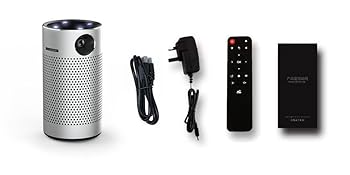
Image 8.1: Diffuse Reflection technology for eye comfort.
8.2 Advanced DLP Technology
This projector incorporates advanced DLP (Digital Light Processing) technology, which contributes to clear and vibrant image reproduction. DLP technology is known for its high contrast and color accuracy.

Image 8.2: Enhanced color reproduction with Advanced DLP Technology.
8.3 Brugsscenarier
The portable design and built-in battery make the Cylinder X2 suitable for various environments, including home theater setups, outdoor movie nights, and presentations.

Image 8.3: The projector is suitable for outdoor movie experiences.