
1. Introduktion
This instruction manual provides detailed guidance for the proper use and maintenance of your Zeerkeer Electronic Automatic Pill Dispenser. This device is designed to assist with timely medication management through timed reminders and organized storage. Please read this manual thoroughly before operating the device to ensure safe and effective use.
2. Produktfunktioner
- Tidsbestemte påmindelser: Features timed vibration and audible reminders for medication.
- Digital skærm: Clear digital display shows time and timer settings.
- Holdbar konstruktion: Made from high-quality, food-grade ABS and PP materials, ensuring safety and durability.
- Partitioned Storage: Multiple compartments for easy classification and organization of different medications.
- Fugt- og støvbeskyttelse: Designed to protect medication from moisture, dust, and deterioration.
- Kompakt og bærbar: Slim and lightweight design for easy carrying in a pocket or bag.
- Clock and Timer Function: Displays time in 12-hour or 24-hour format and includes a countdown timer function.
3. Pakkens indhold
Når du åbner pakken, skal du kontrollere, at alle varer er til stede og ubeskadigede:
- Zeerkeer Electronic Automatic Pill Dispenser (1 unit)
Note: Batteries may not be included and might need to be purchased separately.
4. Produktet er slutview
Familiarize yourself with the main components of your pill dispenser:
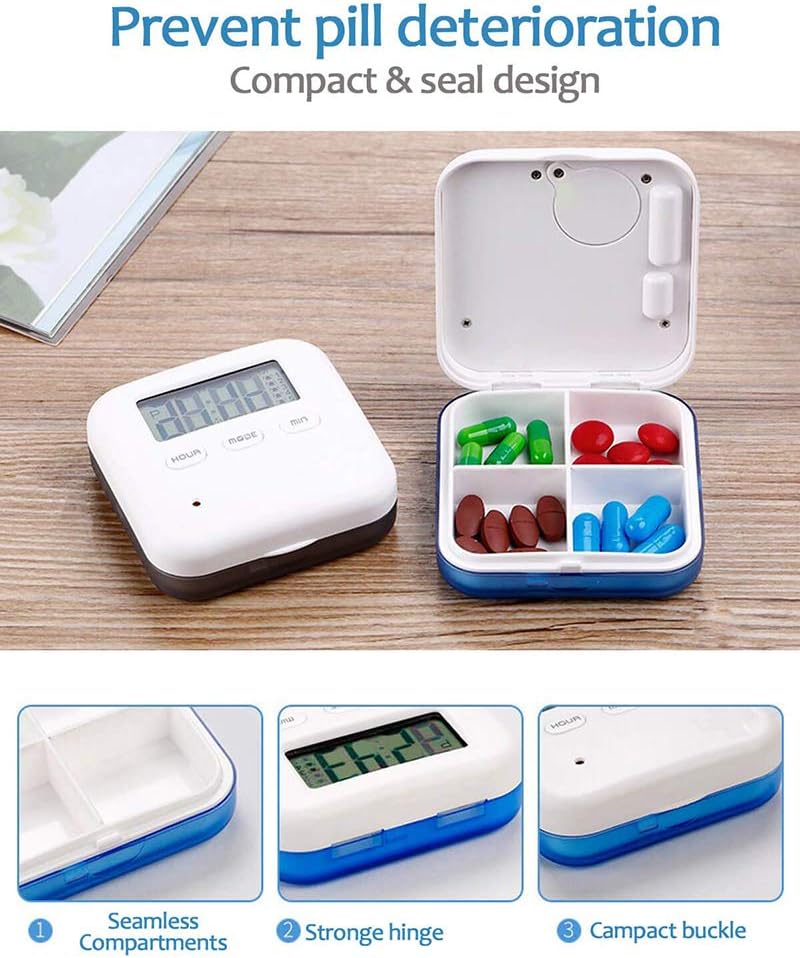
Image: This image displays the Zeerkeer Electronic Automatic Pill Dispenser. On the left, the main unit with a digital display showing time and control buttons (HOUR, MODE, MIN). On the right, the pill dispenser is open, revealing four internal compartments, each containing different colored pills. Below, three detailed close-up images highlight key features: (1) "Seamless Compartments" showing the smooth, easy-to-clean interior, (2) "Strong Hinge" illustrating the durable connection between the lid and base, and (3) "Compact Buckle" demonstrating the secure closing mechanism.
The device consists of a main unit with a digital display and control buttons, and a hinged lid that opens to reveal four internal compartments for medication storage. It features a secure buckle and a robust hinge for durability.
5. Opsætning
5.1. Batteriinstallation
The pill dispenser requires batteries for operation. Locate the battery compartment, usually on the back or bottom of the device. Insert the required batteries, ensuring correct polarity (+/-). Close the battery compartment securely.
5.2. Indstilling af starttidspunkt
After battery installation, the display may show a default time or be blank. To set the current time:
- Tryk på MODE button to enter time setting mode. The hour digits will likely flash.
- Brug TIME knappen for at justere timen.
- Brug MIN knappen for at justere minutterne.
- Trykke MODE igen for at bekræfte tiden og afslutte tidsindstillingstilstanden.
- Select 12-hour or 24-hour format if available, typically by pressing MODE or TIME while in time display mode.
6. Betjeningsvejledning
6.1. Setting Medication Reminders (Alarms)
The device supports up to 5 daily medication reminders. To set an alarm:
- Fra hovedtidsvisningen skal du trykke på MODE button repeatedly until "ALARM 1" (or similar indicator) appears.
- The hour digits for the alarm will flash. Use the TIME knappen for at indstille den ønskede alarmtime.
- Brug MIN knappen for at indstille de ønskede alarmminutter.
- Trykke MODE to save "ALARM 1" and proceed to "ALARM 2" if needed, or exit alarm setting mode.
- Repeat for up to 5 alarms.
- To activate or deactivate an alarm, there may be a dedicated switch or a combination of button presses (refer to on-screen indicators).
6.2. Brug af nedtællingstimeren
The device includes a countdown timer function (up to 23 hours 59 seconds).
- Fra hovedtidsvisningen skal du trykke på MODE until the countdown timer display appears (e.g., "00:00").
- Brug TIME og MIN knapperne for at indstille den ønskede nedtællingsvarighed.
- Trykke MODE or a dedicated START/STOP button to begin the countdown.
- When the countdown reaches zero, an alarm will sound or vibrate.
6.3. Filling the Compartments
Open the lid of the pill dispenser. Carefully place your medications into the four separate compartments. Ensure the lid closes securely to protect the contents.

Image: This image shows the Zeerkeer Electronic Automatic Pill Dispenser with its lid open, revealing four distinct compartments. Each compartment is filled with different types and colors of pills, demonstrating its organizational capacity. Above the dispenser, two icons are visible: one representing "Vibration" (a battery with vibration waves) and another representing "Voice" (an alarm clock), indicating the reminder features of the device.
7. Vedligeholdelse
7.1. Rensning
To clean your pill dispenser:
- Ensure all medication is removed from the compartments.
- Tør de udvendige og indvendige overflader af med en blød kludamp klæde.
- For stubborn spots, use a mild soap solution, then wipe clean with a damp klud og tør grundigt.
- Do not immerse the device in water or use harsh chemical cleaners, as this can damage the electronic components.
7.2. Udskiftning af batteri
When the display dims or the alarms become weak, it is time to replace the batteries. Follow the battery installation steps (Section 5.1) to replace old batteries with new ones.
8. Fejlfinding
| Problem | Mulig årsag | Løsning |
|---|---|---|
| Enheden tændes ikke, eller displayet er tomt. | No batteries, incorrect battery installation, or dead batteries. | Check battery installation, ensure correct polarity, or replace batteries. |
| Alarms are not sounding/vibrating. | Alarms not set, alarms deactivated, or low battery. | Verify alarm settings, ensure alarms are activated, or replace batteries. |
| Tidsvisningen er forkert. | Time not set correctly or battery removed/replaced. | Nulstil det aktuelle klokkeslæt i henhold til afsnit 5.2. |
| Låget lukker ikke ordentligt. | Obstruction in hinge or buckle area, or overfilled compartments. | Check for debris, ensure compartments are not overfilled, and inspect hinge/buckle for damage. |
9. Specifikationer
- Model: 9A03088
- Mærke: Zeerkeer
- Materiale: ABS + PP (Acrylonitrile Butadiene Styrene + Polypropylene)
- Farve: Blå
- Dimensioner: 6.5 cm (L) x 6.5 cm (B) x 2 cm (H)
- Vægt: Cirka 60 gram
- Funktioner: 12/24 hour time display, 5-time 24-hour timing vibration reminder, 23-hour 59-second countdown reminder.
- UPC: 699900277805

Image: This image provides a top-down view of the Zeerkeer Electronic Automatic Pill Dispenser, clearly showing its digital display and control buttons. Overlaid on the image are precise dimensions: 6.5 cm (2.55 inches) for both length and width, and 2 cm (0.78 inches) for height, illustrating the compact size of the device.
10. Sikkerhedsoplysninger
- Hold enheden utilgængeligt for børn og kæledyr.
- Udsæt ikke enheden for ekstreme temperaturer, direkte sollys eller fugt.
- Forsøg ikke selv at skille enheden ad eller reparere den. Kontakt kundesupport, hvis der opstår problemer.
- Bortskaf gamle batterier ansvarligt i henhold til lokale regler.
- This device is intended for organizing and reminding about medication. It is not a substitute for professional medical advice. Always consult with a healthcare professional regarding your medication regimen.
11. Garanti og support
For warranty information or technical support, please refer to the contact details provided with your purchase or visit the official Zeerkeer website. Please have your model number (9A03088) and purchase date available when contacting support.