
Indledning
This manual provides instructions for the Fintie Keyboard Case designed for the iPad 10.2 inch (9th, 8th, and 7th Generation). It covers product features, setup, operation, maintenance, and troubleshooting to ensure optimal use of your device.
Kompatibilitet
Dette tastaturcover er specielt designet til følgende iPad-modeller:
- iPad 9th Generation 10.2 inch (2021 Model: A2602, A2603, A2604, A2605)
- iPad 8th Generation 10.2 inch (2020 Model: A2270, A2428, A2429, A2430)
- iPad 7th Generation 10.2 inch (2019 Model: A2197, A2198, A2200)
Note: This product is not compatible with any other iPad models or devices. The iPad and Apple Pencil are not included.

Image: The Fintie Keyboard Case with text indicating compatibility for iPad 9th, 8th, and 7th Generation 10.2 inch models.
Pakkens indhold
Kontroller venligst, at alle varer er til stede i din pakke:
- 1 x trådløst tastatur med aftageligt etui
- 1 x opladningskabel (USB-kabel)
- 1 x Brugermanual (dette dokument)
Video: Udpakning og overview of the Fintie iPad 10.2 Inch Keyboard Case, showing the case, keyboard, and charging cable.
Produktegenskaber
The Fintie Keyboard Case offers several features to enhance your iPad experience:
- Detachable Wireless Bluetooth Keyboard: Converts your iPad into a functional laptop for convenient use.
- 7-farvet baggrundsbelyst tastatur: Features 3 levels of brightness and 7 distinct backlight colors, along with hundreds of vibrant color-changing modes for comfortable typing in various lighting conditions.
- 135-Degree Magnetic Hinge: Allows for free angle adjustment, providing optimal viewing and typing experiences.
- Scissor Switch Design: Ensures a comfortable and responsive typing experience.
- iOS-genvejstaster: Provides one-tap access to media controls and other functions.
- Integreret blyantholder: Conveniently stores your Apple Pencil or stylus.
- Automatisk dvale-/vågnefunktion: Automatically puts your iPad to sleep or wakes it up, helping to extend battery life.
- Præcise udskæringer: Ensures full access to all ports, buttons, and features of your iPad.
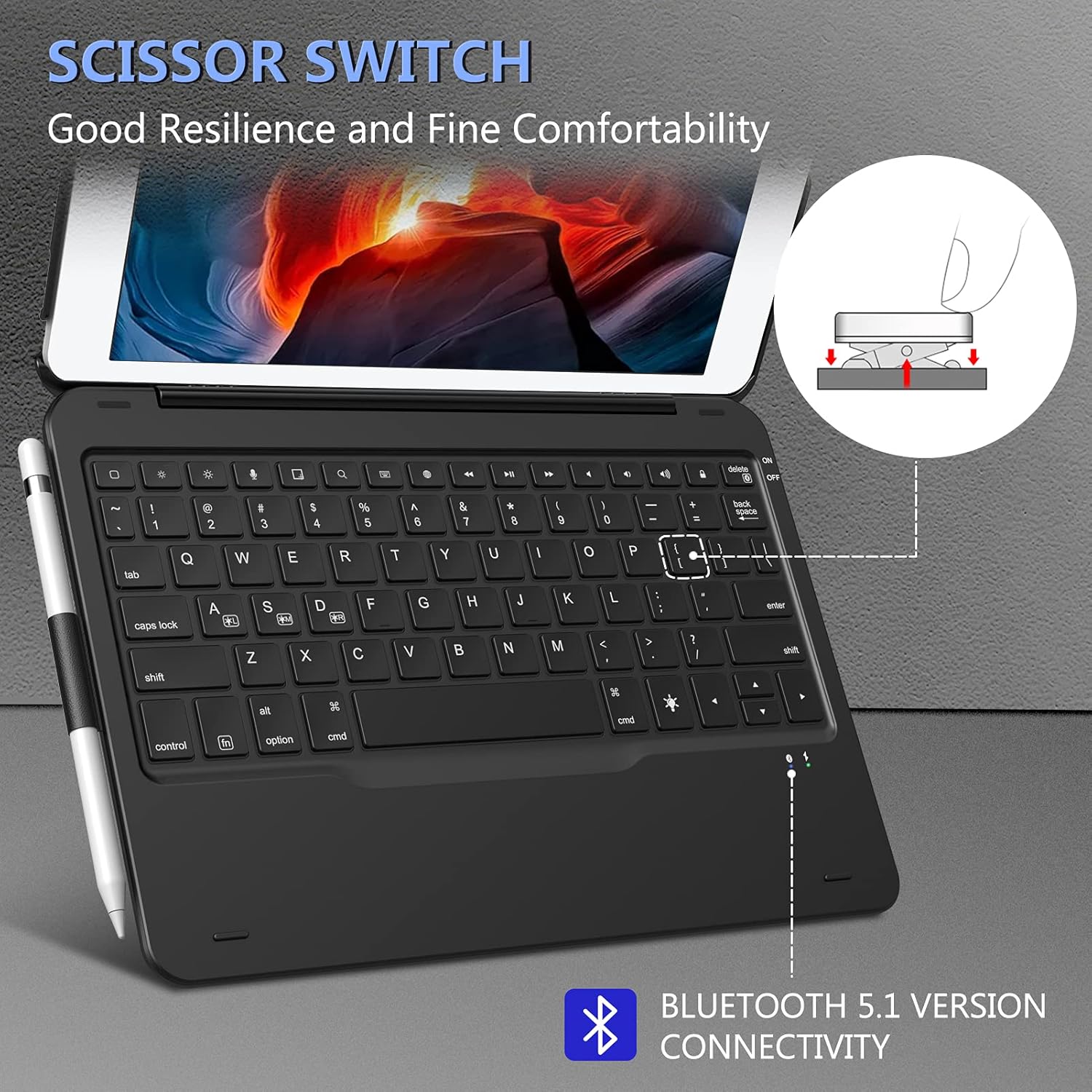
Image: Close-up of the keyboard highlighting the scissor switch design and Bluetooth 5.1 connectivity.

Billede: Detaljeret view of the case showing precise cutouts for the iPad's camera, speakers, and charging port.
Opsætningsinstruktioner
1. Opladning af tastaturet
Before initial use, fully charge the keyboard. Connect the provided USB charging cable to the keyboard's charging port and a USB power adapter (not included). The charging indicator light will show the charging status.
2. Fastgørelse af din iPad til etuiet
Carefully place your iPad into the protective case. Ensure all edges are securely fitted and that the cutouts align with your iPad's ports and buttons.
3. Parring af tastaturet via Bluetooth
- Tænd tastaturet ved at skubbe tænd/sluk-knappen til "ON"-positionen. Bluetooth-indikatorlampen blinker.
- På din iPad skal du gå til Indstillinger > Bluetooth.
- Sørg for, at Bluetooth er slået til ON.
- The iPad will search for available devices. Select "Bluetooth Keyboard" (or similar name) from the list.
- If prompted, enter the pairing code displayed on your iPad using the keyboard, then press Indtast.
- Once paired, the Bluetooth indicator light on the keyboard will stop flashing, and your iPad will show the keyboard as "Connected".
Note: The keyboard will automatically attempt to reconnect to the last paired device when turned on. If it fails to connect, repeat the pairing steps.
Betjeningsvejledning
Using the Detachable Design
The keyboard is magnetically attached to the case, allowing it to be easily detached for tablet-only use or repositioned for optimal comfort.

Image: The keyboard magnetically detaching from the iPad case, illustrating the detachable design.
Justering Viewi vinkler
The case features a 135-degree magnetic hinge, allowing you to adjust the iPad's screen to various viewing angles for typing, watching videos, or drawing.

Image: The iPad case adjusted to various angles, showcasing the 135-degree magnetic hinge.
Automatisk dvale-/vågnefunktion
The case supports the iPad's auto sleep/wake feature. Closing the case will put your iPad to sleep, and opening it will wake it up, conserving battery life.

Image: Visual representation of the auto sleep/wake function, showing the iPad screen turning off when the case is closed and on when opened.
Using iOS Shortcut Keys
The keyboard includes dedicated iOS shortcut keys for quick access to common functions. These may include:
- Hjem-knap
- Søg
- Justering af lysstyrke
- Media playback controls (play/pause, next/previous track)
- Lydstyrkekontrol (lydløs, lydstyrke op/ned)
- Låseskærm
Baggrundslys kontrol
The keyboard features a 7-color backlight with adjustable brightness levels. To control the backlight:
- Tryk på Lyspære key (often located near the spacebar or function keys) to cycle through the 7 different backlight colors.
- Tryk på Fn tasten + Lyspære key to adjust the brightness level (3 levels available).
- Some models may offer additional modes or color-changing effects. Refer to the specific key legends on your keyboard.

Image: The keyboard displaying various backlight color options and controls for adjusting them.
Opretholdelse
To ensure the longevity and optimal performance of your Fintie Keyboard Case, follow these maintenance guidelines:
- Rensning: Use a soft, lint-free cloth to gently wipe the keyboard and case. Avoid using harsh chemicals or abrasive cleaners.
- Batteripleje: Charge the keyboard regularly, even if not in frequent use, to maintain battery health. Avoid fully depleting the battery for extended periods.
- Opbevaring: Når tastaturetuiet ikke er i brug, skal det opbevares køligt og tørt, væk fra direkte sollys og ekstreme temperaturer.
- Undgå væsker: Keep the keyboard away from liquids to prevent damage.
Fejlfinding
If you encounter issues with your Fintie Keyboard Case, refer to the following common solutions:
Keyboard Not Connecting to iPad
- Sørg for, at tastaturet er opladet og tændt.
- Sluk og tænd derefter for Bluetooth på din iPad.
- Forget the "Bluetooth Keyboard" device in your iPad's Bluetooth settings and re-pair it following the "Pairing the Keyboard via Bluetooth" steps.
- Genstart din iPad og tastaturet.
- Sørg for, at din iPads software er opdateret.
Keys Not Responding or Typing Incorrectly
- Kontroller, om tastaturet er korrekt forbundet via Bluetooth.
- Sørg for, at tastaturet er tilstrækkeligt opladet.
- Genstart tastaturet og din iPad.
- Fjern eventuelt snavs omkring tasterne.
Backlight Not Working or Changing
- Ensure the keyboard is turned ON and charged.
- Press the Light Bulb key to activate or change the backlight.
- Use the Fn + Light Bulb key combination to adjust brightness.
Auto Sleep/Wake Not Functioning
- Ensure your iPad is correctly seated in the case.
- Check your iPad's settings: Go to Indstillinger > Display & lysstyrke and ensure "Lock/Unlock" (or "Cover Lock/Unlock") is enabled.
Specifikationer
| Feature | Detalje |
|---|---|
| Mærke | FINTIE |
| Kompatible enheder | iPad 10.2 inch (9th/8th/7th Generation) |
| Forbindelsesteknologi | Bluetooth |
| Tastaturbeskrivelse | Sakseafbryder |
| Speciel funktion | Magnetic, Detachable, Backlit, Auto Sleep/Wake |
| Tastaturbaggrundsbelysning Farvestøtte | RGB (7 colors, multiple modes) |
| Materiale | Plast |
| Varens vægt | 1.58 pund |
| Pakkedimensioner | 11.39 x 8.39 x 1.1 tommer |
Garanti og support
For warranty information and customer support, please refer to the documentation included with your purchase or visit the official FINTIE webwebsted. Gem din købskvittering som købsbevis i tilfælde af garantikrav.
If you require further assistance, please contact FINTIE customer service.