
Indledning
This manual provides essential information for the safe and efficient use of your Walfront 5V 500mA 2.5W Mini Polycrystalline Solar Panels. These panels are designed for various low-power applications, including DIY projects, experimental setups, and powering small electronic devices. Please read these instructions thoroughly before installation and operation.
Produktegenskaber
- Dimensioner: Approximately 130 x 150 mm (5.1 x 5.9 inches) with a 2 mm (0.08 inches) thickness.
- Kabellængde: 100 cm (39.4 inches) pre-attached cable.
- Operation Voltage: DC 5V
- Driftsstrøm: 0.5A (500mA)
- Maksimal effekt: 2.5W
- Materiale: Polysilicium
- High conversion efficiency and power output.
- Effective performance in low-light conditions.
- Weather-resistant design, suitable for snow and wind.
- Easy to install for DIY projects.
- Ideal for solar lawn lamps, solar landscape lights, solar mobile phone chargers, solar flashlights, and various small solar toys.
Pakkens indhold
- 2 x Walfront 5V 500mA 2.5W Mini Polycrystalline Solar Panels
Sikkerhedsoplysninger
- Do not attempt to disassemble or modify the solar panels.
- Avoid direct contact with the electrical terminals when the panel is exposed to light.
- Ensure proper polarity when connecting to devices. Incorrect polarity can damage the connected device or the solar panel.
- Keep the panels away from flammable materials.
- Do not immerse the panels in water. While weather-resistant, they are not designed for submersion.
- Handle with care to avoid physical damage to the panel surface.
Opsætning
The Walfront mini solar panels are designed for straightforward integration into various projects.
1. Udpakning
Carefully remove the solar panels from their packaging. Inspect for any visible damage.
2. Placering
For optimal performance, position the solar panel in a location that receives maximum direct sunlight throughout the day. Avoid shaded areas. The panel should be angled towards the sun for best efficiency.

Image: Two Walfront mini solar panels connected to a breadboard and multimeter, demonstrating their use in a garden for experimental power.
3. Elektrisk tilslutning
Each solar panel comes with a pre-attached cable. The red wire typically indicates the positive (+) terminal, and the black wire indicates the negative (-) terminal.
- Connect the red wire to the positive input of your device or charging circuit.
- Connect the black wire to the negative input of your device or charging circuit.
- Sørg for, at alle forbindelser er sikre og isolerede for at forhindre kortslutninger.

Billede: Bagside view of a Walfront mini solar panel, highlighting the attached red (positive) and black (negative) connection wires.
Betjeningsvejledning
Once properly set up, the solar panels will begin generating electricity when exposed to sunlight.
1. Power Generation
The panels convert sunlight into DC electrical energy. The output voltage and current will vary depending on the intensity of the sunlight and the load connected.
2. Optimal ydeevne
For maximum power output, ensure the panels are clean and positioned directly facing the sun. Any shading, even partial, can significantly reduce efficiency.
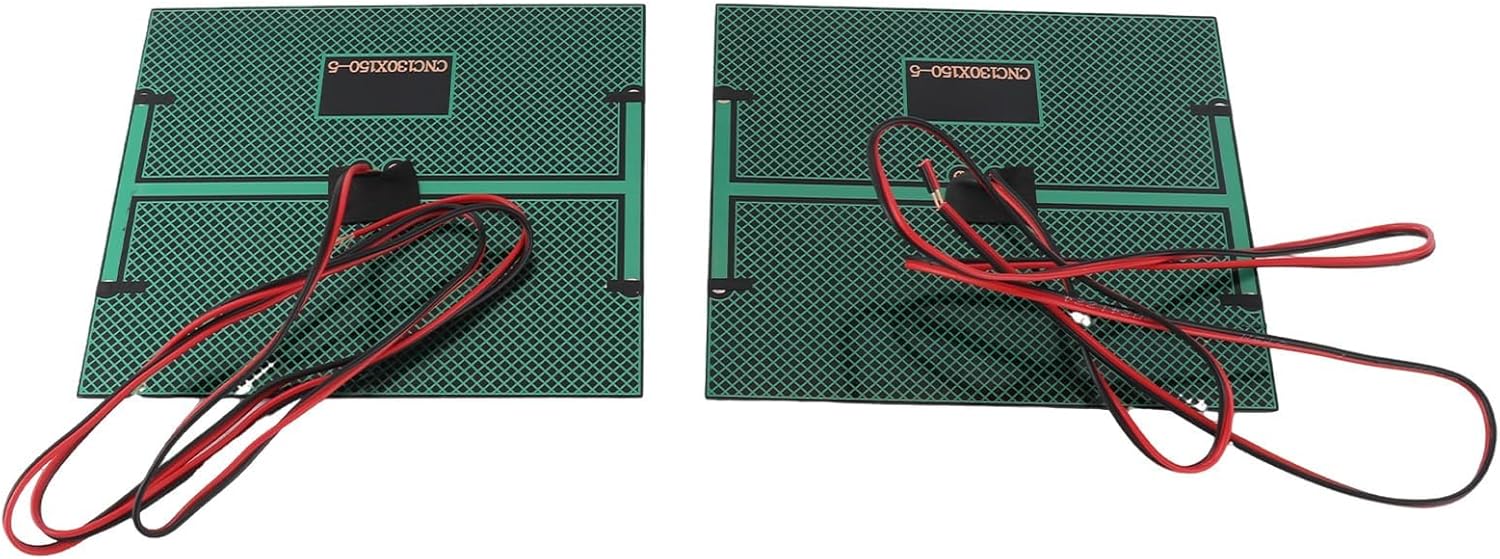
Billede: Forside view of two Walfront mini solar panels, showcasing their polycrystalline solar cells.
3. Ansøgninger
These panels are suitable for:
- Powering small DC motors or fans.
- Charging small batteries (requires a charge controller, not included).
- Educational projects and scientific experiments.
- DIY solar lighting or small electronic devices.
Opretholdelse
Minimal maintenance is required for these solar panels.
- Rensning: Tør regelmæssigt overfladen af solpanelerne af med en blød, tør klud.amp cloth to remove dust, dirt, or debris. A clean surface ensures maximum light absorption and efficiency. Do not use abrasive cleaners or harsh chemicals.
- Inspektion: Periodically check the cables and connections for any signs of wear, damage, or corrosion. Ensure connections remain secure.
- Opbevaring: If storing the panels for an extended period, keep them in a dry, cool place away from direct sunlight and extreme temperatures.
Fejlfinding
If your solar panels are not performing as expected, consider the following:
Ingen strømudgang
- Tjek sollys: Ensure the panels are receiving direct, unobstructed sunlight. Even partial shading can drastically reduce output.
- Ren overflade: Verify that the panel surface is clean and free of dirt, dust, or obstructions.
- Tjek forbindelser: Inspect all wiring for loose connections, incorrect polarity, or damage.
- Test med multimeter: Brug et multimeter til at måle volumentage output of the panel directly under sunlight. A 5V panel should show approximately 5V or slightly higher (open circuit voltage) in good sunlight.
Lav effekt
- Angle and Orientation: Adjust the panel's angle and orientation to face the sun directly.
- Temperatur: Extreme temperatures can affect solar panel performance.
- Skydække: Overcast conditions will naturally reduce power output.
- Load Matching: Ensure the connected device's power requirements are within the panel's capacity (5V, 500mA, 2.5W).
Specifikationer
| Feature | Detalje |
|---|---|
| Modelnummer | 5V500mA |
| Materiale | Polysilicium |
| Dimensioner (L x B x H) | Ca. 130 x 150 x 2 mm (5.1 x 5.9 x 0.08 tommer) |
| Kabellængde | 100 cm (39.4 tommer) |
| Operation Voltage | DC 5V |
| Driftsstrøm | 0.5A (500mA) |
| Maksimal effekt | 2.5W |
| Effektivitet | 16-18 % |
| Outputforbindelse | Bare wire leads (Red for positive, Black for negative) |
Garantioplysninger
Walfront products typically come with a standard manufacturer's warranty. For specific warranty details, including duration and coverage, please refer to the product packaging or contact Walfront customer support directly. Keep your proof of purchase for warranty claims.
Supportinformation
For technical assistance, troubleshooting not covered in this manual, or general inquiries, please visit the official Walfront webwebsted eller kontakt deres kundeserviceafdeling.
Webwebsted: www.walfront.com
E-mail: support@walfront.com


