
1. Introduktion
The MakerHawk N20 USB Multimeter is a versatile testing device designed to measure various electrical parameters of USB chargers, PCs, laptops, mobile phones, and other USB-powered devices. It supports multiple fast charging protocols including PD, QC2.0, QC3.0, and QC4.0, making it an essential tool for diagnosing power delivery and cable performance.
This manual provides detailed instructions on how to set up, operate, and maintain your MakerHawk N20 USB Multimeter, ensuring optimal performance and longevity.
2. Nøglefunktioner
- Ny opgradering: Supports two-way insertion detection and current direction indication. Features a 1.54-inch large LCD screen with a super clear 240x240 resolution. Equipped with 4 operation buttons and 5 interfaces for convenient page switching. Gold-plated USB contacts enhance durability and protect against scratches and damage.
- Bredt anvendelsesområde: Capable of measuring various USB chargers, PCs, laptops, desktop computers, mobile phones, and discharge loads. Supports Type-C interface with full digital compatibility for PD protocol and Qualcomm QC3.0/4.0 protocols. Fast charge support includes PD, QC2.0, QC3.0/4.0, and MTK. USB2.0 (500M) and USB-A (up to 5G) are also supported.
- New Reminder Functions:
- Temperature Alarm: Display flashes if temperature exceeds 45℃.
- Voltage Alarm: Display flashes if voltage is less than 3.8V or more than 30V.
- Current Alarm: Display flashes if current is greater than 3A.
- Flexible Color Display Interface: Supports 360-degree screen rotation, allowing for easy reading from any angle. A positive reading can be obtained regardless of the device's insertion angle.

Figure 2.1: MakerHawk N20 USB Multimeter with included Type-C adapter.

Figur 2.2: Detaljeret view of the MakerHawk N20's ports and 1.54-inch TFT Color LCD Screen.

Figur 2.3: Eksamples of the high-definition display showing different measurement interfaces like Main, Quick Charge, Charging Recording, Wire Impedance, Graphing, and System Settings.

Figure 2.4: Illustration of the N20's new upgrade featuring a current flow direction indicator, distinguishing it from older designs.
3. Opsætning
To begin using your MakerHawk N20 USB Multimeter, follow these steps:
- Connect the MakerHawk N20 to a USB power source (e.g., charger, PC USB port) via its USB-A input or Type-C input port.
- Connect the device you wish to test (e.g., phone, laptop, USB fan) to the corresponding output port (USB-A, Type-C, or Micro USB) on the N20.
- For Type-C connections, ensure proper orientation. If the screen does not light up upon initial connection, try flipping the Type-C connector. This is a common behavior for Type-C PD protocols where power is not supplied by default without a connected load.
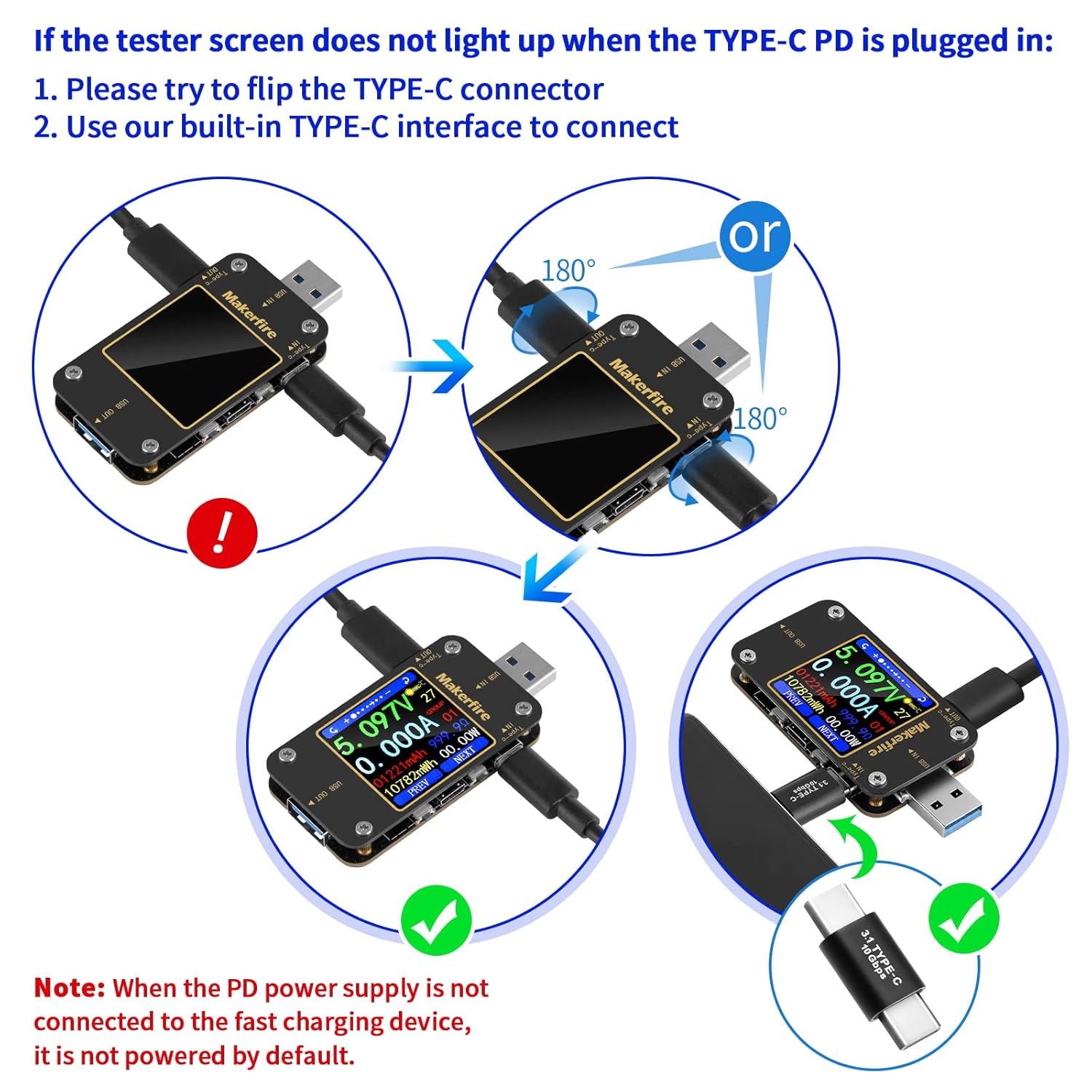
Figure 3.1: Guide for troubleshooting Type-C PD connections, emphasizing flipping the connector if the screen doesn't light up.

Figure 3.2: Various application scenarios demonstrating how to connect the MakerHawk N20 to different devices and power sources.
4. Betjeningsvejledning
The MakerHawk N20's 1.54-inch LCD screen displays real-time measurements. Use the four physical buttons to navigate and interact with the device.
4.1. Navigating Interfaces
Press the corresponding buttons (labeled PREV and NEXT on the screen, or indicated by numbers 1-4 on the device diagram) to cycle through different measurement interfaces:
- Measurement Main Interface: Viser realtid voltage (V), current (A), capacity (mAh), energy (mWh), and power (W).
- Quick Charge Charging Recording Interface: Shows details related to fast charging protocols.
- Charging Recording Interface: Records charging data over time.
- Wire Impedance Measurement Interface: Helps determine cable resistance.
- Measurement Graphing Interface: Provides a visual representation of data.
- System Parameter Setting Interface: Allows adjustment of device settings, such as screen brightness.
4.2. Fortolkning af aflæsninger og alarmer
The device provides clear digital readouts. Pay attention to the following alarm indicators:
- Temperaturalarm: If the temperature displayed exceeds 45℃, the temperature value will flash, indicating a high temperature condition.
- Voltage Alarm: Hvis voltage drops below 3.8V or rises above 30V, the voltage display will flash, signaling an out-of-range voltage.
- Aktuel alarm: If the current exceeds 3A, the current display will blink, indicating a high current draw.

Figure 4.1: Visual representation of the three reminder functions: temperature, voltage, and current alarms.

Figure 4.2: Demonstration of the voltage and current accuracy of the MakerHawk N20 compared to a professional instrument.
5. Vedligeholdelse
To ensure the longevity and accurate performance of your MakerHawk N20 USB Multimeter, adhere to the following maintenance guidelines:
- Keep the device clean and dry. Use a soft, dry cloth to wipe the screen and body. Avoid using abrasive cleaners or solvents.
- Opbevar enheden et køligt, tørt sted væk fra direkte sollys, ekstreme temperaturer og høj luftfugtighed.
- Avoid dropping or subjecting the device to strong impacts, as this can damage internal components or the screen.
- Do not attempt to disassemble or repair the device yourself. Unauthorized modifications will void the warranty and may lead to malfunction or injury.
6. Fejlfinding
If you encounter issues with your MakerHawk N20, refer to the following common troubleshooting tips:
- Screen not lighting up when Type-C PD is plugged in:
- First, try flipping the Type-C connector. Type-C connections can be sensitive to orientation for initial power negotiation.
- Ensure you are using a Type-C charger that supports the PD protocol.
- According to the PD protocol, power may not be supplied by default if no load is connected. Ensure a device (load) is connected to the output of the multimeter.
- Upræcise læsninger: Ensure all connections are secure and clean. Test with different cables and power sources to isolate the issue.
- Alarm Flashing Continuously: This indicates that the measured parameter (temperature, voltage, or current) is outside the safe or expected operating range. Disconnect the device and power source, identify the cause of the anomaly, and resolve it before reconnecting.
7. Specifikationer
| Parameter | Værdi |
|---|---|
| Produktdimensioner | 2.87 x 1.38 x 0.39 tommer |
| Varens vægt | 1.76 ounce |
| Varemodelnummer | se |
| Input bindtagRækkevidde | 3.80V - 30.00V |
| Nuværende rækkevidde | 0 - 3.000A |
| Skærmopløsning | 240 x 240 |
| Skærmtype | 1.54 tommer LCD |
| Strømkilde | Battery Powered (internal) |
| Fabrikant | MakerHawk |

Figure 7.1: Package contents and physical dimensions of the MakerHawk N20 USB Multimeter.
8. Garanti og support
MakerHawk is committed to providing high-quality products and excellent customer service. Your satisfactory purchase experience is their greatest hope.
For any questions or concerns regarding your MakerHawk N20 USB Multimeter, please contact the MakerHawk-US support team directly. You can typically find contact information by clicking on "MakerHawk-US" on the product page and then selecting "Ask" to send an email.