
1. Introduktion
The Yanzeo AR980 RFID FDX-B Animal Tag Scanner is designed for efficient and reliable identification of animal microchips. This device supports FDX-B and FDX-A protocols, including HDX and EM4102 chips, compliant with ISO11784/85 standards. It features an Android system for customizable applications, enabling GPS, mobile networking, Bluetooth, and Wi-Fi connectivity. The scanner is composed of a card reader, a display board, a battery board, and a rod-shaped shell antenna. Its primary function is to read low-frequency ear tags in the animal industry. The display board, powered by an Android core board, controls the reader, while the battery board provides power. Stable and reliable serial communication between the core board and card reader facilitates easy development. A communication protocol is provided for users to develop custom applications. The rod-shaped antenna design allows for quick and convenient reading of ear tags without precise alignment, requiring only proximity to the tag.
2. Produktet er slutview
2.1 Nøglefunktioner
- Supports FDX-B and FDX-A protocols.
- 3.5-inch display with 480*320 resolution.
- Integrated 5-megapixel camera.
- Operating temperature range: 0 - 35℃.
- Storage temperature range: -20 to 45℃.
- Bluetooth 4.0-forbindelse.
- Rod-shaped antenna for easy tag læsning.
- Android system for custom application development.
2.2 Komponenter
The Yanzeo AR980 scanner is comprised of several key components:
- Kortlæser: The core unit responsible for detecting and reading RFID microchips.
- Displaytavle: Features a 3.5-inch screen and an Android core board for controlling the reader and displaying information.
- Batterikort: Provides power to the display board and card reader, ensuring portable operation.
- Shell Antenna: A rod-shaped antenna designed to emit an electromagnetic field for efficient tag læsning.
2.3 Produkt Views

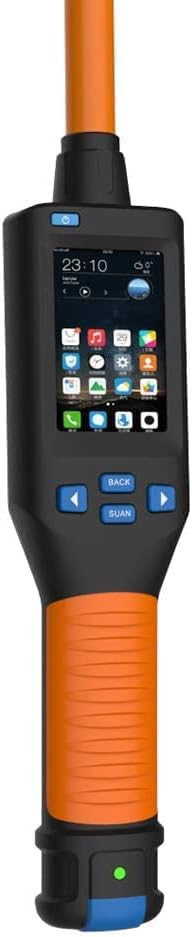

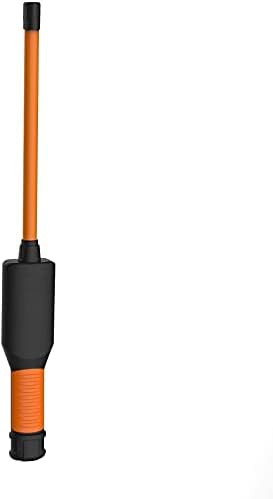
3. Opsætning
3.1 Indledende opladning
Before first use, ensure the AR980 scanner is fully charged. Connect the device to a power source using the provided USB cable. The battery indicator on the display will show charging status.
3.2 Connecting to a Computer for Data Transfer
The AR980 scanner can connect to a computer via USB for data transfer. This allows you to upload stored tag IDs to a text file til journalføring.
- Slut scanneren til din computer ved hjælp af et USB-kabel.
- Open a text editor (e.g., Notepad) on your computer.
- On the scanner, long-press the scan button for approximately 3 seconds. The scanner will begin uploading stored data to the open text file.
- Wait for the data upload to complete. The scanner can store up to 128 records for upload.
Video 1: Demonstrates how to upload stored data from the Yanzeo AR180 (similar model) scanner to a computer via USB. This process is applicable to the AR980 model.
4. Betjeningsvejledning
4.1 Tænd/sluk
To power on the device, press and hold the power button until the display illuminates. To power off, press and hold the power button again until the display shuts down.
4.2 Scanning Animal Tags
The AR980 scanner is designed for quick and easy reading of low-frequency animal ear tags. Its rod-shaped antenna simplifies the scanning process.
- Sørg for, at scanneren er tændt.
- Position the top of the scanner (antenna area) near the animal's ear tag.
- The scanner will automatically detect and read the tag ID, displaying it on the screen. There is no need for precise alignment.
- The read time is typically less than 100 milliseconds.
Video 2: Overståetview of the Yanzeo AR180 (similar model) Pet Microchip Scanner, demonstrating its features and how to scan various RFID tags. This functionality is consistent with the AR980 model.
Video 3: Shows the Yanzeo Pet Microchip Reader (similar model) in action, scanning different types of animal ID tags and microchips. This demonstrates the AR980's tag kompatibilitet.
4.3 Datalagring
The AR980 scanner automatically stores the IDs of scanned tags. It has a capacity to store up to 128 records before requiring data upload to a computer.
4.4 Android System Customization
For advanced users, the integrated Android system allows for customization and development of specific applications. A communication protocol is available to facilitate this process, enabling features like GPS integration, mobile networking, and enhanced data management.
5. Vedligeholdelse
5.1 Rengøring
Brug en blød, tør klud til at rengøre scanneren. Til genstridigt snavs kan du bruge en let tør klud.amp cloth with mild soap can be used, ensuring no liquid enters the device openings. Do not use harsh chemicals or abrasive cleaners.
5.2 Pleje af batterier
The AR980 uses a Lithium Ion battery. To prolong battery life:
- Undgå at aflade batteriet helt ofte.
- Opbevar enheden et køligt og tørt sted, når den ikke er i brug i længere perioder.
- Oplad enheden regelmæssigt, selvom den ikke er i konstant brug, for at opretholde batteriets sundhedstilstand.
6. Fejlfinding
6.1 Almindelige problemer og løsninger
| Spørgsmål | Mulig årsag | Løsning |
|---|---|---|
| Enheden tænder ikke. | Lavt eller afladet batteri. | Oplad enheden ved hjælp af det medfølgende USB-kabel. |
| Kan ikke læse tags. | Tag out of range, incorrect tag type, or damaged tag. | Ensure the antenna is close to the tag. Verify tag compatibility (FDX-A/FDX-B). Try scanning a different tag. |
| Data not uploading to computer. | Incorrect USB connection, no text editor open, or scan button not held long enough. | Check USB connection. Open a text editor. Long-press the scan button for 3 seconds. |
| Skærmen er svag eller ulæselig. | Environmental conditions (too bright) or display settings. | Move to a shaded area. Check device settings for display brightness if available. |
Hvis du støder på problemer, der ikke er nævnt her, eller hvis de foreslåede løsninger ikke løser problemet, bedes du kontakte kundesupport.
7. Specifikationer
| Feature | Detalje |
|---|---|
| Mærke | Yanzeo |
| Modelnummer | AR980 |
| Understøttede protokoller | FDX-B, FDX-A (ISO11784/85, HDX, EM4102) |
| Skærm | 3.5 tommer, 480*320 opløsning |
| Kamera | 5 millioner pixels |
| Arbejdsmiljø temperatur | 0-35 ℃ |
| Opbevaringstemperatur | -20 til 45 ℃ |
| Trådløs Standard | Bluetooth 4.0 |
| Connector Type | Bluetooth, USB |
| Strømkildetype | Batteridrevet |
| Batteritype | Lithium-ion (1 påkrævet, inkluderet) |
| Produktdimensioner | 71.5 x 7.8 x 3.8 cm |
| Kompatible enheder | Smartphone, Tablet (for app customization) |
8. Garanti og support
For warranty information, technical support, or service inquiries regarding your Yanzeo AR980 RFID Animal Tag Scanner, please refer to the documentation included with your purchase or contact Yanzeo customer service directly. Contact details can typically be found on the manufacturer's webwebsted eller produktemballage.