
1. Introduktion
Thank you for choosing the Estink 2.4-inch Smart Electronic Peephole Camera. This device provides enhanced home security with its wide-angle camera, clear TFT LCD screen, and 24-hour monitoring capabilities. This manual will guide you through the installation, operation, and maintenance of your new electronic peephole.
2. Produktfunktioner
- 2.4-tommer TFT LCD-skærm: Provides a clear and smooth display of visitors.
- 1 Megapixel HD Camera: Captures and records visitor information with high clarity.
- 145° vidvinkel View: Offers a broad perspective of the area outside your door for comprehensive security.
- 24-Hour Security Monitoring: Equipped with an intelligent operating system for continuous surveillance.
- Manual Photo Recording: Allows users to manually capture photos of visitors.
- TF-kortopbevaring: Supports up to 32GB TF card (not included) for storing recordings, with automatic overwrite functionality.
- Skjult design: The outdoor camera resembles a traditional peephole, maintaining privacy.
- Nem installation: Designed for simple setup without the need for specialized tools or installers.
3. Pakkens indhold
Tjek venligst pakken for følgende varer:
- Indoor Display Unit (with 2.4-inch TFT LCD screen)
- Udendørs kighulskamera
- Monteringsbeslag
- Set of Installation Screws (various lengths)
- Brugermanual

Image: All components of the Estink Smart Electronic Peephole Camera, including the indoor monitor, outdoor camera, mounting plate, and various screws.
4. Opsætning og installation
The Estink Smart Electronic Peephole Camera is designed for easy, direct installation. No special tools are required beyond a screwdriver.
4.1 Før installation
- Ensure your door has an existing peephole or can accommodate a hole with a diameter of approximately 15-50mm (0.6-2 inches).
- The door panel thickness should be approximately 35-110mm (1.4-4.3 inches).
- Prepare 3 AAA batteries (not included) for the indoor display unit.
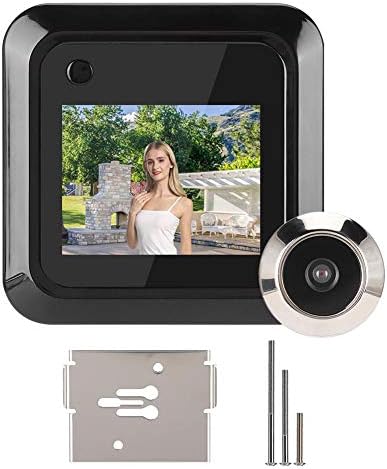
Image: The indoor display unit mounted on the door, showing a live view, with the outdoor camera visible through the door.
4.2 Installationstrin
- Fjern eksisterende kighul: If present, unscrew and remove your old peephole from the door.
- Insert Outdoor Camera: Insert the outdoor peephole camera through the door hole from the outside. Ensure the camera is facing outwards and the cable is threaded through to the inside.
- Fastgør monteringsbeslag: From the inside of the door, place the mounting bracket over the camera cable and align it with the camera's threaded base.
- Sikkert kamera: Select the appropriate length screw from the provided set. Thread the screw through the mounting bracket and into the outdoor camera's threaded base. Tighten securely with a screwdriver until the outdoor camera is firmly in place.
- Tilslut indendørsenhed: Connect the cable from the outdoor camera to the corresponding port on the back of the indoor display unit.
- Monter indendørsenhed: Align the indoor display unit with the mounting bracket and slide it downwards until it clicks into place.
- Indsæt batterier: Open the battery compartment on the back of the indoor unit and insert 3 AAA batteries, observing polarity.

Billede: Bagside view of the indoor display unit, highlighting the battery compartment and connection points.
5. Betjening
Operating your Estink Electronic Peephole Camera is straightforward.
5.1 Viewing Visitors
- Press the power button on the indoor display unit to activate the screen.
- The screen will display a live view fra udendørskameraet.
- The wide-angle lens provides a comprehensive view af området uden for din dør.

Image: A visual representation of the 160-degree wide-angle view provided by the camera, showing a broad area in front of a door.
5.2 Photo Recording
- Mens viewing the live feed, press the designated photo button (usually the same as the power button or a separate button, refer to device markings) to capture a still image.
- Images will be saved to the inserted TF card.
- The system features an intelligent FIFO (First-In, First-Out) storage function, automatically overwriting the oldest filenår TF-kortet er fuldt.

Image: The indoor unit displaying a photo, with icons indicating one-touch photo capture and TF card storage.
5.3 24-Hour Monitoring
The device is designed for continuous monitoring, providing security around the clock. Ensure batteries are adequately charged for uninterrupted operation.

Image: The electronic peephole camera shown in different environments, highlighting its application for continuous home security.
6. Vedligeholdelse
To ensure optimal performance and longevity of your electronic peephole camera, follow these maintenance guidelines:
- Rensning: Gently wipe the screen and camera lens with a soft, dry cloth. Avoid using abrasive cleaners or solvents.
- Udskiftning af batteri: When the battery indicator shows low power, replace the 3 AAA batteries in the indoor unit promptly.
- TF-korthåndtering: Periodisk vedrview and back up important recordings from your TF card. Format the TF card occasionally to maintain performance.
- Miljøforhold: Ensure the outdoor camera is protected from extreme weather conditions if not already designed for it. The indoor unit should be kept in a dry environment.
7. Fejlfinding
If you encounter issues with your Estink Electronic Peephole Camera, refer to the following common problems and solutions:
| Problem | Mulig årsag | Løsning |
|---|---|---|
| Skærmen tænder ikke | Low or dead batteries; incorrect battery installation; loose cable connection. | Replace batteries; ensure batteries are inserted with correct polarity; check that the cable between the outdoor camera and indoor unit is securely connected. |
| Intet billede på skærmen | Loose cable connection; faulty outdoor camera; screen malfunction. | Verify cable connection; contact customer support if the issue persists after checking connections. |
| Cannot record photos | No TF card inserted; TF card full; TF card error. | Insert a TF card (up to 32GB); check if the TF card is full and back up/delete files; try formatting the TF card or using a different one. |
| Billedet er sløret eller uklart | Dirty camera lens; protective film still on lens/screen. | Clean the camera lens and screen with a soft cloth; remove any protective films. |
| Device does not fit door | Door hole or thickness outside specified range. | Ensure your door hole diameter is 15-50mm and door thickness is 35-110mm. If not, the product may not be compatible. |
8. Specifikationer
| Feature | Detalje |
|---|---|
| Fabrikant | Estink |
| Modelnummer | Estink9p6stdxgnk |
| Varens vægt | 7.4 ounce |
| Farve | Sort |
| Voltage | 1 volt |
| Applicable Door Hole | Approx. 15 - 50mm (0.6 - 2 inches) |
| Dørpanelets tykkelse | Approx. 35 - 110mm (1.4 - 4.3 inches) |
| Strømkilde | 3 x AAA batterier (medfølger ikke) |
| Opbevaring | TF Card (up to 32GB, not included) |
| Kameraopløsning | 1 megapixel |
| Viewi vinkel | 145° (or 160° as per some descriptions) |
9. Officiel produktvideo
Video: An official product video demonstrating the features and functionality of the Estink 2.4-inch Smart Electronic Peephole Camera. This video showcases the device's design, screen clarity, and ease of use.
10. Garanti og support
For warranty information or technical support, please refer to the product packaging or contact the seller directly through your purchase platform. Keep your purchase receipt for any warranty claims.