
Naztech 15350
Naztech Xpods PRO True Wireless Noise Cancelling Earbuds
Model: 15350
Brand: Naztech
Indledning
The Naztech Xpods PRO are advanced true wireless noise-cancelling earbuds designed for an immersive audio experience and clear communication. Featuring HD sound, touch controls, and IPX4 water resistance, these earbuds are suitable for various activities, including sports and daily use. They come with a wireless charging case for extended playtime and convenient recharging.

Image: Naztech Xpods PRO earbuds, charging case, and product packaging, highlighting key features like 25 hours play time and touch controls.
Opsætning
Hvad er der i æsken
- Trådløs opladningsetui
- USB-C ladekabel
- 6 Sets of Silicone Ear Tips (3 sizes, 2 colors)
Opladning af øretelefoner og etui
Before first use, fully charge the Xpods PRO and their charging case. The case can be charged via the included USB-C cable or a Qi-compatible wireless charging pad.
- USB-C opladning: Tilslut USB-C-kablet til opladningsporten på etuiet og til en strømkilde.
- Trådløs opladning: Place the charging case on a Qi-compatible wireless charging pad. Ensure the case is properly aligned for charging.
A 10-minute quick charge provides approximately 1 hour of playback. A full charge offers up to 5 hours of playtime for the earbuds, with the charging case providing an additional 20 hours, totaling 25 hours of playtime.
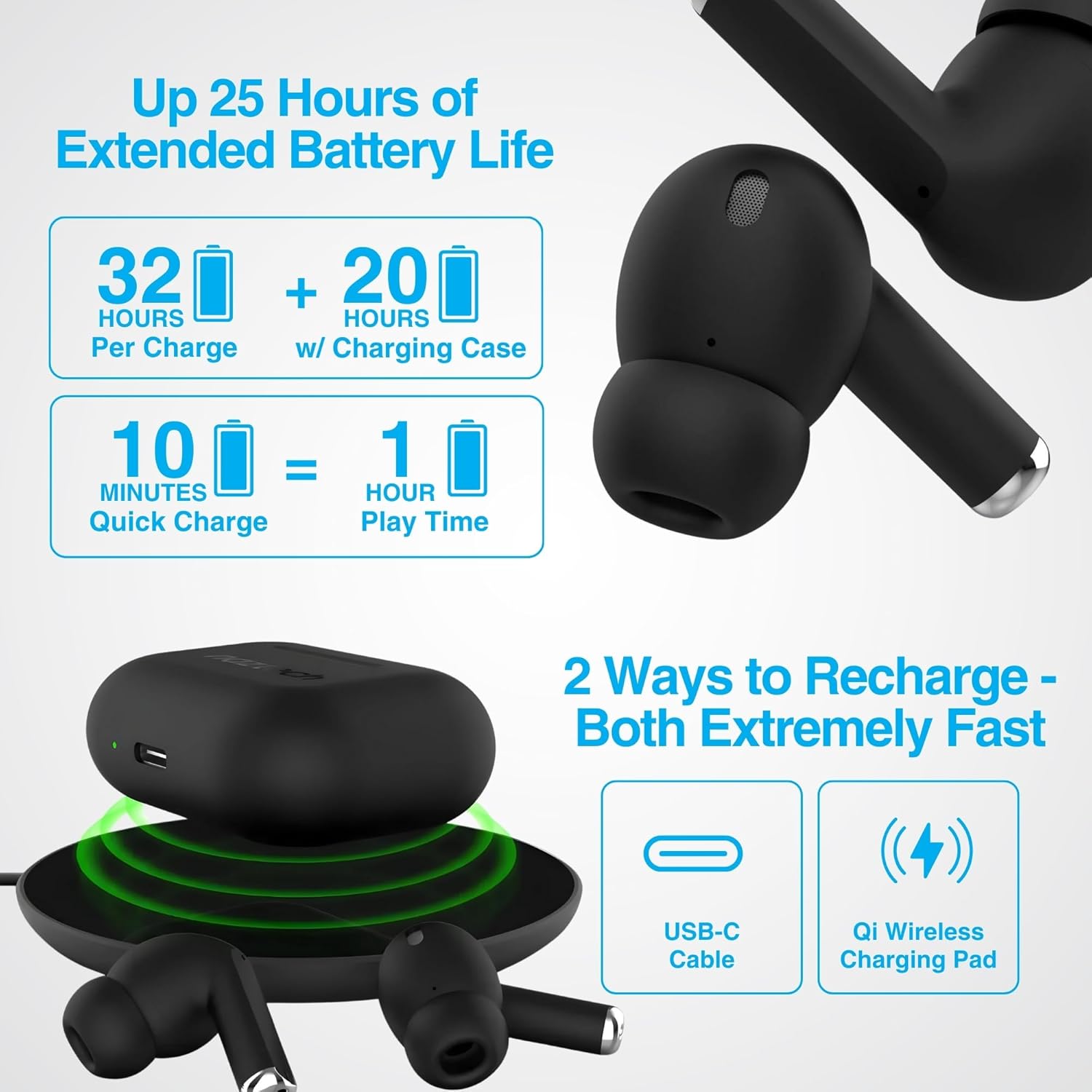
Image: Illustration showing USB-C and Qi wireless charging options for the Naztech Xpods PRO case, along with battery life indicators.
Parring med din enhed
- Sørg for, at øretelefonerne er opladet.
- Åbn opladningsetuiet. Ørepropperne går automatisk i parringstilstand.
- Gå til Bluetooth-indstillinger på din enhed (smartphone, tablet osv.), og aktiver Bluetooth.
- Select "NAZTECH Xpods PRO" from the list of available devices.
- Når der er oprettet forbindelse, hører du en bekræftelseslyd, og ørepropperne er klar til brug.
The Xpods PRO feature Bluetooth 5.0 for stable connectivity up to 33 feet (10 meters) and auto-pair technology for seamless re-connection with previously paired devices.

Image: A smartphone screen showing the "NAZTECH Xpods PRO" listed in Bluetooth settings, demonstrating universal compatibility with various devices.
Betjeningsvejledning
Tryk på kontrolelementer
The Xpods PRO feature intuitive touch sensor controls on each earbud for easy management of audio playback and calls.
| Handling | Kontrollere |
|---|---|
| Afspil/pause musik | Et enkelt tryk på begge øretelefoner |
| Næste spor | Dobbelttryk på den højre øreprop |
| Forrige spor | Dobbelttryk på den venstre øreprop |
| Besvar/afslut opkald | Et enkelt tryk på begge øretelefoner |
| Afvis opkald | Tryk på en af øretelefonerne, og hold den nede i 2 sekunder |
| Aktiver Voice Assistant | Tryk tre gange på begge øretelefoner |

Image: Diagram illustrating the touch control functions on the Naztech Xpods PRO earbuds.
Iført øretelefoner
For optimal sound quality and a secure fit, choose the silicone ear tips that best suit your ear canal. The Xpods PRO come with 6 sets of silicone ear tips in 3 sizes and 2 colors to ensure a comfortable and noise-isolating fit.

Image: Naztech Xpods PRO earbuds shown with various silicone ear tip sizes, emphasizing customizable fit.
Støjreduktion
The Xpods PRO feature Passive Noise Cancellation through their closed-system design, which helps to immerse you in music by preserving low-frequency bass richness and reducing ambient noise. Dual microphones with advanced voice capture technology filter out wind and background noise for clear conversations.

Image: A person using Naztech Xpods PRO, illustrating the clear call quality and passive noise cancellation features.
Opretholdelse
Rensning
To maintain optimal performance and hygiene, regularly clean your Xpods PRO earbuds and charging case. Use a soft, dry, lint-free cloth to wipe down the surfaces. For ear tips, you may gently wipe them with a slightly damp kluden, og lad dem tørre helt, før de sættes på igen.
Avoid using abrasive materials, solvents, or harsh chemicals, as these can damage the product.
Vandtæthed (IPX4)
The Naztech Xpods PRO are rated IPX4 water-resistant, meaning they are protected against splashing water from any direction. This makes them suitable for workouts and light rain. However, they are not designed for submersion in water or exposure to pressurized water jets. Do not use them while swimming or showering.

Image: A person wiping sweat from their face, indicating the IPX4 water-resistant rating of the Naztech Xpods PRO for active use.
Opbevaring
When not in use, store your Xpods PRO in their charging case to protect them from dust, dirt, and physical damage. Store the case and earbuds in a cool, dry place away from extreme temperatures and direct sunlight.
Fejlfinding
If you encounter issues with your Naztech Xpods PRO, refer to the following common solutions:
Ørepropper parrer eller opretter ikke forbindelse
- Tjek batteri: Sørg for, at både ørepropper og opladningsetuiet er tilstrækkeligt opladet.
- Reparation: Turn off Bluetooth on your device, place earbuds back in the case, close and reopen the case. Then, re-enable Bluetooth on your device and try pairing again.
- Glem enhed: On your device's Bluetooth settings, "forget" or "unpair" the "NAZTECH Xpods PRO" and then attempt to pair from scratch.
- Afstand: Ensure your device is within the 33ft (10m) Bluetooth range.
- Interferens: Flyt dig væk fra andre trådløse enheder, der kan forårsage interferens.
Sound Quality Issues (e.g., Static, Low Volume)
- Rene ørepropper: Ensure the mesh filters and ear tips are clean and free of debris.
- Øreproppasform: Experiment with different sized silicone ear tips to ensure a proper seal in your ear canal, which significantly impacts sound quality and bass response.
- Kildekvalitet: Sørg for, at lydkilden (musik) file, streamingtjeneste) er af høj kvalitet.
- Enhedsvolumen: Kontroller lydstyrkeniveauerne på både din tilsluttede enhed og ørepropperne.
Opladningsproblemer
- Kabeltjek: Ensure the USB-C cable is securely connected to both the case and the power source. Try a different USB-C cable and power adapter if available.
- Trådløs pude: Hvis du bruger trådløs opladning, skal du sørge for, at etuiet er korrekt placeret på opladningspad'en, og at pad'en er tændt.
- Placering af ørepropper: Sørg for, at ørepropperne er korrekt placeret i opladningsetuiet, og at der er ordentlig kontakt med opladningsbenene.
Specifikationer
| Feature | Detalje |
|---|---|
| Modelnavn | NAZTECH Xpods PRO |
| Varemodelnummer | 15350 |
| Forbindelsesteknologi | Trådløs (Bluetooth 5.0) |
| Wireless Range | Op til 33ft / 10m |
| Kontroltype | Touch (Media Control) |
| Støjkontrol | Passiv støjreduktion |
| Vandmodstandsvurdering | IPX4 |
| Samlet spilletid | Op til 25 timer (med opladningsetui) |
| Earbud Playtime (per charge) | Op til 5 timer |
| Hurtig opladning | 10 minutters opladning giver 1 times afspilning |
| Opladningsgrænseflade | USB-C, Qi trådløs opladning |
| Inkluderede komponenter | USB-C Charging Cable, 6 Sets of Silicone Ear Tips, Wireless Charging Case |
| Materiale | Plast |
| Produktdimensioner | 2.39 x 1.81 x 0.91 tommer |
| Varens vægt | 4.4 ounce |
Garanti og support
Naztech products are designed for quality and performance. While specific warranty details are not provided in this manual, Naztech generally backs its products with warranties. For detailed warranty information, product support, or technical assistance, please visit the official Naztech webhjemmeside eller kontakt deres kundeservice direkte.
Du kan finde flere oplysninger og supportressourcer ved at besøge Naztech Store on Amazon eller deres embedsmand webwebsted.