
Indledning
This manual provides detailed instructions for the safe and effective operation of the AOPUTTRIVER AP-7200APP Professional True-RMS Clamp Meter. This device is designed for measuring AC/DC current, AC/DC voltage, resistance, capacitance, continuity, and temperature, and features non-contact voltage (NCV) detection and Bluetooth connectivity for mobile app integration.
Sikkerhedsoplysninger
Always adhere to safety precautions when using electrical testing equipment. This device complies with IEC 61010-1, CAT III 600V safety standards and features double insulation for enhanced protection.
- Overskrid ikke de maksimale inputværdier, der er angivet for hvert måleområde.
- Udvis ekstrem forsigtighed, når du arbejder med spændingsførende kredsløb.
- Ensure the test leads are in good condition and properly connected before use.
- Brug ikke måleren, hvis den ser beskadiget ud, eller hvis casing er åben.
- Refer to local and national safety codes for proper electrical work procedures.
Pakkens indhold
Bekræft, at alle nedenstående varer er inkluderet i din pakke:
- AOPUTTRIVER AP-7200APP Clamp Måler
- Temperatursonde
- Test Leads (Red/Black)
- Batteries (AAA type, typically 2)
- Instruktionsmanual

Image: Contents of the AP-7200APP package, including the clamp meter, temperature probe, test leads, batteries, and instruction manual.
Produkt overview
Familiarize yourself with the components of the AP-7200APP Clamp Måler:

Image: Labeled diagram of the AP-7200APP Clamp Meter, highlighting its main components and controls.
- Clamp Kæber: Opens 26mm to enclose conductors for current measurement.
- Jaw-opening Handle: Bruges til at åbne og lukkeamp kæber.
- NCV Detection Area: Located at the top, used for non-contact voltage afsløring.
- Lamp Lys: Illuminates the measurement area. Press the "HOLD" key for over 2 seconds to activate.
- Drejekontakt: Vælger målefunktioner og -områder.
- LCD-skærm: 6000 counts display, showing measurement values and function symbols.
- HOLD-tast: Freezes the current display reading. Press for >2 seconds to activate backlight.
- SEL Key: Used to change measurement modes within a function (e.g., AC/DC, Diode/Continuity/Capacitance).
- MAX/MIN Key: Records maximum and minimum measured values. Press for >2 seconds to exit.
- Hz/Duty Key: Vælger frekvens- eller duty cycle-måling.
- REL Key: Aktiverer relativ måletilstand.
- COM-indgangsstik: Common terminal for test leads and temperature probe.
- VΩHz°C°F Input Jack: Indgangsterminal for voltage, resistance, frequency, capacitance, and temperature measurements.
Opsætning
1. Batteriinstallation
The meter requires two AAA batteries. Open the battery compartment cover on the back of the device, insert the batteries according to the polarity indicators, and securely close the cover. A low battery indicator will appear on the LCD when replacement is needed.
2. Bluetooth Connection (AiLink App)
The AP-7200APP can connect to a mobile device via Bluetooth for remote monitoring and data analysis. The effective control distance is approximately 10-15 meters.
- Download appen: Scan the QR code provided in the manual or search for "AiLink" in the Google Play Store (for Android) or Apple App Store (for iOS). Download and install the application. You can also download it from aicare.net.cn/app/ailink/download/.
- Åbn appen: Launch the AiLink application on your mobile phone.
- Opret forbindelse til enhed: Within the app, press the "ADD" or "Connect" button to search for nearby devices. Select the "Clamp Meter" from the list to establish a connection.
- Overvågningsdata: Once connected, the app will display real-time measurement data from the clamp meter. You can analyze and save this data.

Image: Visual guide for Bluetooth connection and app usage, showing the AiLink app interface.
Betjeningsvejledning
Before any measurement, ensure the rotary switch is set to the OFF position when not in use.
1. AC/DC strømmåling (Clamp)
- Sæt drejekontakten til 60A~ or 400A~ position for AC current, or 60A= or 400A= for jævnstrøm.
- Press the jaw-opening handle to open the clamp kæber.
- Omslut en enkelt leder med clamp jaws. Ensure the conductor is centered within the jaws for accurate readings.
- Aflæs den aktuelle værdi på LCD-displayet.
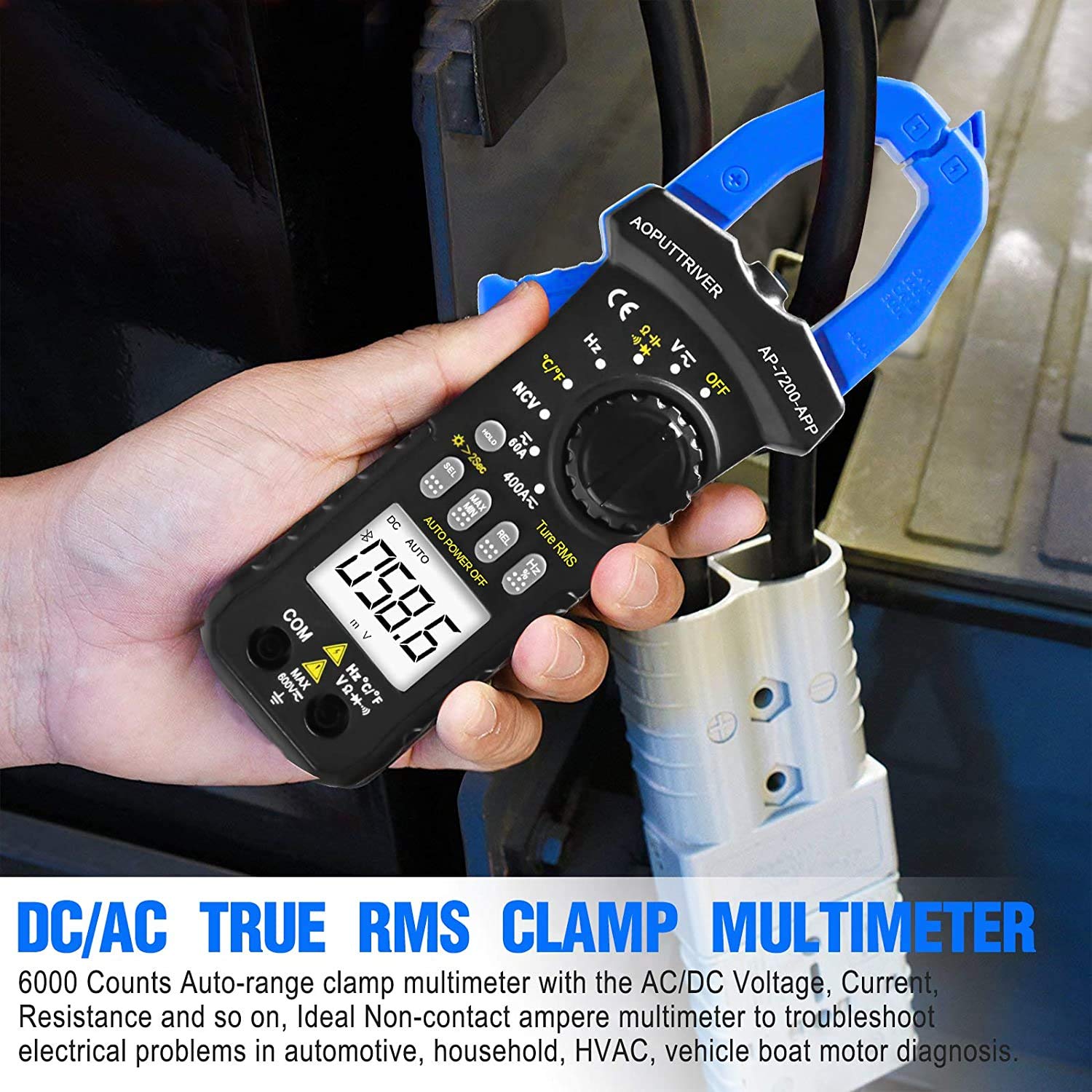
Image: Demonstrating current measurement using the clamp jaws on an electrical cable.
2. AC/DC Voltage Måling
- Insert the red test lead into the VΩHz°C°F jack and the black test lead into the COM jack.
- Sæt drejekontakten til V~ (AC-volumentage) eller V= (DC bindtage) stilling.
- Tilslut testledningerne parallelt til det kredsløb eller den komponent, der testes.
- Læs bindtage -værdi på LCD -displayet.
3. Resistance, Capacitance, Continuity, Diode Measurement
- Insert the red test lead into the VΩHz°C°F jack and the black test lead into the COM jack.
- Sæt drejekontakten til Ω position.
- Tryk på SEL key to cycle through Resistance (Ω), Continuity (buzzer icon), Diode (diode icon), and Capacitance (F) modes.
- Tilslut testledningerne til komponenten. Sørg for, at komponenten er spændingsløs for at måle modstand og kapacitans.
- Read the measurement on the LCD. For continuity, a beep indicates a continuous circuit.
4. Non-Contact Voltage (NCV) Detektion
- Sæt drejekontakten til NCV position.
- Place the NCV detection area (top of the clamp jaws) near the conductor or outlet to be tested.
- Hvis AC voltage ≥ 90V RMS is detected, the lamp light will illuminate, and an audible alarm will sound.

Image: Demonstrations of temperature measurement, NCV detection, continuity testing, and current measurement.
5. Temperaturmåling
- Insert the temperature probe into the VΩHz°C°F and COM jacks, observing polarity.
- Sæt drejekontakten til ° C / ° F position.
- Placer spidsen af temperatursonden på eller i nærheden af det objekt, hvis temperatur skal måles.
- Read the temperature value on the LCD display. Press the SEL key to switch between Celsius (°C) and Fahrenheit (°F).

Image: Temperature measurement using the included probe, with display examples in Celsius and Fahrenheit.
6. Baggrundsbelysningsfunktion
To activate the backlight for improved visibility in dim environments, press and hold the HOLDE key for more than 2 seconds. Press and hold again for 2 seconds to turn it off.

Billede: clamp meter's backlight feature in action, enhancing readability in low-light conditions.
Opretholdelse
1. Rensning
Tør målerens c afasing med annonceamp cloth and mild detergent. Do not use abrasives or solvents. Ensure the meter is completely dry before storage or use.
2. Udskiftning af batteri
When the low battery indicator appears on the display, replace the batteries promptly to ensure accurate measurements. Refer to the "Battery Installation" section for instructions.
3. Opbevaring
If the meter is not used for an extended period, remove the batteries to prevent leakage. Store the device in a cool, dry place, away from direct sunlight and extreme temperatures.
Fejlfinding
| Problem | Mulig årsag | Løsning |
|---|---|---|
| Måleren tænder ikke. | Døde eller forkert installerede batterier. | Kontroller batteripolariteten; udskift batterierne. |
| Upræcise aflæsninger. | Forkert funktion valgt; dårlig forbindelse til testledning; ekstern interferens. | Verify rotary switch setting; ensure secure test lead connection; move away from strong electromagnetic fields. |
| Bluetooth-forbindelse mislykkes. | Meter too far from phone; Bluetooth off on phone; app not installed correctly. | Ensure meter is within 10-15m range; enable Bluetooth on phone; reinstall AiLink app. |
| NCV detection not working. | Not in NCV mode; voltage under tærskelværdien. | Set rotary switch to NCV; ensure voltage is ≥ 90V AC RMS. |
Specifikationer
| Feature | Specifikation |
|---|---|
| Modelnummer | AP-7200APP |
| Vise | 6000 tællinger LCD |
| AC VoltagRækkevidde | 6V ~ 600V |
| DC bindtagRækkevidde | 600mV ~ 600V |
| AC nuværende rækkevidde | 60A ~ 400A |
| DC strømområde | 60A ~ 400A |
| Modstandsområde | 600Ω ~ 60MΩ |
| kapacitans Range | 6nF ~ 60mF (Inferred from 6000 counts and common multimeter ranges) |
| Temperaturområde | -20°C ~ 1000°C |
| NCV Detection Threshold | ≥ 90V AC RMS |
| Sikkerhedsstandard | IEC 61010-1, CAT III 600V |
| Strømkilde | Batteridrevet |
| Dimensioner | 207 x 75 x 37 mm |
| Varens vægt | 390 gram |
| Bluetooth rækkevidde | 10-15m (ca.) |
Garanti og support
AOPUTTRIVER provides a 48 måneders produktgaranti for the AP-7200APP Clamp Meter. For any product issues or technical assistance, please contact our customer service. We offer Kundesupport døgnet rundt to resolve your concerns promptly.
Contact information can typically be found on the product packaging or the official AOPUTTRIVER webwebsted.