
1. Introduktion
The rockspace AC1200 WiFi Range Extender is designed to expand your existing wireless network coverage and eliminate Wi-Fi dead zones. Utilizing dual-band technology, it supports both 2.4GHz and 5GHz bands, providing stable and high-speed connections for up to 20 wireless devices across an area of up to 2624 sq.ft. This manual provides detailed instructions for setting up, operating, and maintaining your device.

The rockspace AC1200 WiFi Range Extender expands your network coverage.
2. Sikkerhedsoplysninger
- Do not expose the device to water, fire, or high temperatures.
- Undgå at placere enheden i nærheden af stærke elektromagnetiske felter.
- Ensure proper ventilation; do not cover the device's vents.
- Brug kun den strømadapter, der fulgte med enheden.
- Opbevares utilgængeligt for børn.
3. Pakkens indhold
- 1 x rockspace AC1200 WiFi Range Extender
- 1 x brugsanvisning
4. Produktet er slutview
The rockspace AC1200 WiFi Range Extender features a compact design with dual external antennas for enhanced signal reception and transmission. It includes a WPS button for quick setup, an Ethernet port for wired connections, and LED indicators to show device status.

Front view of the rockspace AC1200 WiFi Range Extender.
LED-indikatorer:
- Signal LED: Indicates the strength of the signal received from the router.
- WPS LED: Indikerer WPS-forbindelsesstatus.
- PWR LED: Indikerer strømstatus.
Porte og knapper:
- WPS knap: Til hurtig og nem opsætning med WPS-aktiverede routere.
- Ethernet-port: For connecting wired devices or setting up in Access Point mode.
5. Opsætning
Metode 1: Opsætning af WPS-knap (anbefales)
- Plug the extender into an electrical outlet near your wireless router. Wait for the PWR LED to turn solid blue.
- Press the WPS button on the extender. The WPS LED will start blinking.
- Within 2 minutes, press the WPS button on your wireless router.
- Wait for the Signal LED on the extender to turn solid blue, indicating a successful connection.
- Once connected, you can unplug the extender and relocate it to a desired location within your router's Wi-Fi range. Ensure the Signal LED remains solid blue for optimal performance.

WPS setup for quick connection.
Metode 2: Web-based Setup
- Plug the extender into an electrical outlet near your wireless router. Wait for the PWR LED to turn solid blue.
- Connect your computer or mobile device to the extender's default Wi-Fi network (e.g., 'rockspace_EXT' or 'rockspace_5G_EXT'). No password is required initially.
- Åbn a web browser and enter the default IP address (e.g., 192.168.0.254) or domain name (e.g., re.rockspace.local) in the address bar.
- Follow the on-screen instructions to create an administrator password, select your router's Wi-Fi network, and enter its password.
- Once configured, the extender will restart. Reconnect your devices to the new extended Wi-Fi network (usually your original network name with '_EXT' appended).
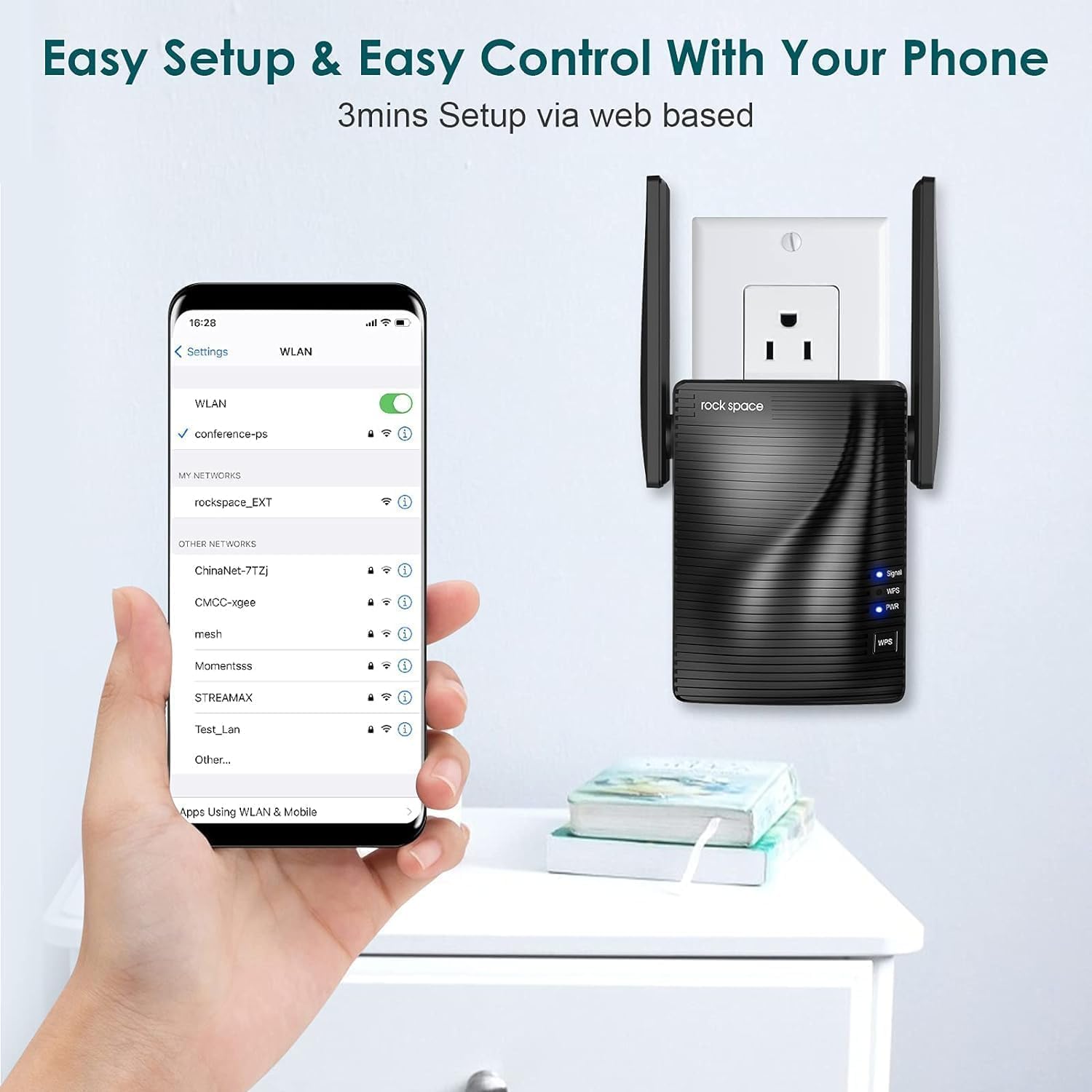
Web-based setup via smartphone.
6. Driftstilstande
Repeatertilstand (standard)
I repeatertilstand opretter extenderen trådløs forbindelse til din eksisterende router og amplifies its Wi-Fi signal, extending coverage to areas with weak or no signal. This is ideal for expanding your wireless network without running new cables.
Access Point (AP) tilstand
In AP Mode, the extender connects to your router via an Ethernet cable and creates a new wireless network. This is useful for converting a wired network connection into a wireless hotspot, providing Wi-Fi access in areas where only wired connections are available.

Access Point mode provides stable wired-to-wireless conversion.
7. Vedligeholdelse
- Optimal placering: Place the extender halfway between your router and the Wi-Fi dead zone. Avoid physical obstructions like thick walls or large metal objects.
- Firmwareopdateringer: Regularly check the rockspace official webwebsted for firmwareopdateringer for at sikre optimal ydeevne og sikkerhed.
- Rensning: Tør forsigtigt enheden af med en blød, tør klud. Brug ikke flydende rengøringsmidler eller aerosoler.
8. Fejlfinding
- Ingen strøm: Ensure the extender is securely plugged into a working electrical outlet. Check the PWR LED.
- Intet signal/svagt signal: Relocate the extender closer to your main router. Ensure there are minimal obstructions between the router and the extender.
- Langsom internethastighed: This can be caused by interference, too many connected devices, or improper placement. Try adjusting antenna positions or moving the extender.
- Kan ikke få adgang Web Ledelsesside: Ensure your device is connected to the extender's Wi-Fi network. Clear your browser's cache and cookies, or try a different browser.
- Glemt adgangskode: Perform a factory reset on the extender by pressing and holding the Reset button (usually a small pinhole) for about 8-10 seconds until the LEDs flash. This will revert all settings to factory defaults.
9. Specifikationer
| Feature | Detalje |
|---|---|
| Modelnummer | 2020 1200RPT |
| Standard for trådløs kommunikation | 802.11a/b/g/n |
| Dataoverførselshastighed | 1200 Megabytes Per Second (Mbps) |
| Frekvensbåndsklasse | Dobbeltbånd (2.4 GHz og 5 GHz) |
| Connector Type | RJ45 (Ethernet) |
| Varens vægt | 10.4 ounce |
| Pakkedimensioner | 5 x 5 x 4 tommer |
10. Garanti og support
rockspace products typically come with a standard manufacturer's warranty. For specific warranty details, technical support, or to download the latest user guide, please visit the official rockspace website or refer to the included Brugervejledning (PDF).