
Indledning
This manual provides essential information for the safe and efficient operation of your MEDION P64145 All-in-One Audio System. Please read it thoroughly before using the device and keep it for future reference.
Vigtige sikkerhedsoplysninger
Følg altid grundlæggende sikkerhedsforanstaltninger, når du bruger dette produkt, for at reducere risikoen for brand, elektrisk stød og personskade. Opbevar denne manual i nærheden til senere brug.
- Udsæt ikke enheden for regn eller fugt.
- Bloker ikke nogen ventilationsåbninger.
- Brug kun tilbehør/tilbehør specificeret af producenten.
- Overlad al service til kvalificeret servicepersonale.
Pakkens indhold
Sørg for, at alle genstande er til stede og i god stand ved udpakning:
- MEDION Life MD44125 P64145 AiO Audio System
- Fjernbetjening (inkl. batteri)
- Strømledning
- Brugermanual
Opsætning
1. Udpakning og placering
Carefully remove the audio system from its packaging. Place the unit on a stable, flat surface away from direct sunlight, heat sources, and excessive dust or moisture. Ensure adequate ventilation around the unit.
2. Connecting the Power and Antenna
Connect the provided power cord to the AC IN socket on the rear of the audio system, then plug the other end into a wall outlet. Extend the telescopic antenna on the rear of the unit for optimal FM and DAB+ radio reception. Adjust its position for the best signal quality.
Billede: Bag view of the MEDION P64145 audio system with the power cord connected and the telescopic antenna extended. This image demonstrates how to properly connect power and set up the antenna for improved radio signal reception.
3. Installation af fjernbetjeningsbatteri
Open the battery compartment on the remote control and insert the provided battery, observing the correct polarity.
Betjeningsvejledning
1. Tænd/sluk
Tryk på MAGT knappen på enheden eller fjernbetjeningen for at tænde eller slukke systemet.
2. Kildevalg
Tryk på KILDE button repeatedly to cycle through available input sources: DAB+, FM, CD, USB, Bluetooth, AUX-in.
3. DAB+ radiobetjening
- Select DAB+ mode.
- The system will automatically scan for available DAB+ stations.
- Brug TUNE +/- buttons or rotary knob to navigate through stations.
- Trykke OK for at vælge en station.
- To save a station, press and hold a preset number button (1-30).
Video: This video demonstrates selecting DAB+ radio, adjusting volume, and other functions on a similar MEDION micro audio system. It illustrates the user interface and controls for various audio modes.
4. Betjening af FM-radio
- Vælg FM -tilstand.
- Brug TUNE +/- buttons to manually tune or press and hold to auto-scan for the next available station.
- To save a station, press and hold a preset number button (1-30).
5. CD-afspilning
- Vælg CD-tilstand.
- Insert a CD (audio CD or MP3 CD) into the CD slot.
- The system will automatically begin playback.
- Bruge AFSPIL/PAUSE, STOP, SPRING OVER +/- knapper til kontrol.

Billede: Front view of the audio system highlighting the integrated CD player. This image shows where to insert CDs for playback.
6. USB-afspilning
- Indsæt et USB-flashdrev, der indeholder MP3 files i USB-porten.
- Vælg USB-tilstand.
- Use the navigation buttons to browse and select tracks.
7. Bluetooth-streaming
- Select Bluetooth mode. The display will show "Pairing".
- On your smartphone or tablet, enable Bluetooth and search for "MEDION P64145".
- Vælg den enhed, der skal parres. Når den er tilsluttet, kan du streame lyd trådløst.

Billede: A smartphone displaying a music app connected via Bluetooth to the MEDION audio system. This image demonstrates wireless music streaming capability.
8. AUX-indgangstilslutning
Connect an external audio device (e.g., MP3 player) to the AUX-in port using a 3.5mm audio cable. Select AUX-in mode to play audio from the connected device.
9. Alarm and Sleep Timer
The system features an alarm function (wake via radio, alarm sound, CD, or USB) and a sleep timer. Refer to the detailed instructions in the full user manual for setting these features.
10. Lydindstillinger
Juster lydproffenfile using the equalizer settings. The system offers five selectable sound settings (Pop, Rock, Jazz, Classic, Flat) to optimize your listening experience.

Billede: Icons representing different sound equalizer presets (Pop, Rock, Jazz, Classic, Flat) available on the audio system. This image highlights the customizable sound options.
Opretholdelse
- Rensning: Use a soft, dry cloth to clean the unit. Do not use liquid cleaners or aerosol sprays.
- CD-pleje: Hold cd'er i kanterne. Hold dem rene og fri for ridser.
- Opbevaring: Hvis enheden ikke er i brug i længere tid, skal den tages ud af stikkontakten og opbevares et køligt og tørt sted.
Fejlfinding
| Problem | Mulig årsag | Løsning |
|---|---|---|
| Ingen strøm | Power cord not connected properly; Power outlet not working. | Kontroller netledningens forbindelse; prøv en anden stikkontakt. |
| Ingen lyd | Lydstyrken er for lav; Lydløs funktion er aktiv; Forkert kilde valgt. | Increase volume; Deactivate mute; Select correct source. |
| Dårlig radiomodtagelse | Antennen er ikke strakt ud eller placeret korrekt; Interferens. | Extend and adjust antenna; Move unit away from other electronic devices. |
| Problemer med Bluetooth-parring | Enheden er ikke i parringstilstand; Bluetooth er deaktiveret på den eksterne enhed. | Ensure system is in Bluetooth pairing mode; Enable Bluetooth on external device and retry pairing. |
Specifikationer
- Model: MEDION P64145 (MD44125)
- Lydudgangseffekt: 15 watt
- Radiotuner: DAB+, PLL-FM Stereo (30 presets each)
- CD-afspiller: Supports Audio CD, MP3-CD
- Forbindelse: Bluetooth, USB, AUX-in
- Særlige funktioner: Alarm function, Sleep timer, Color display
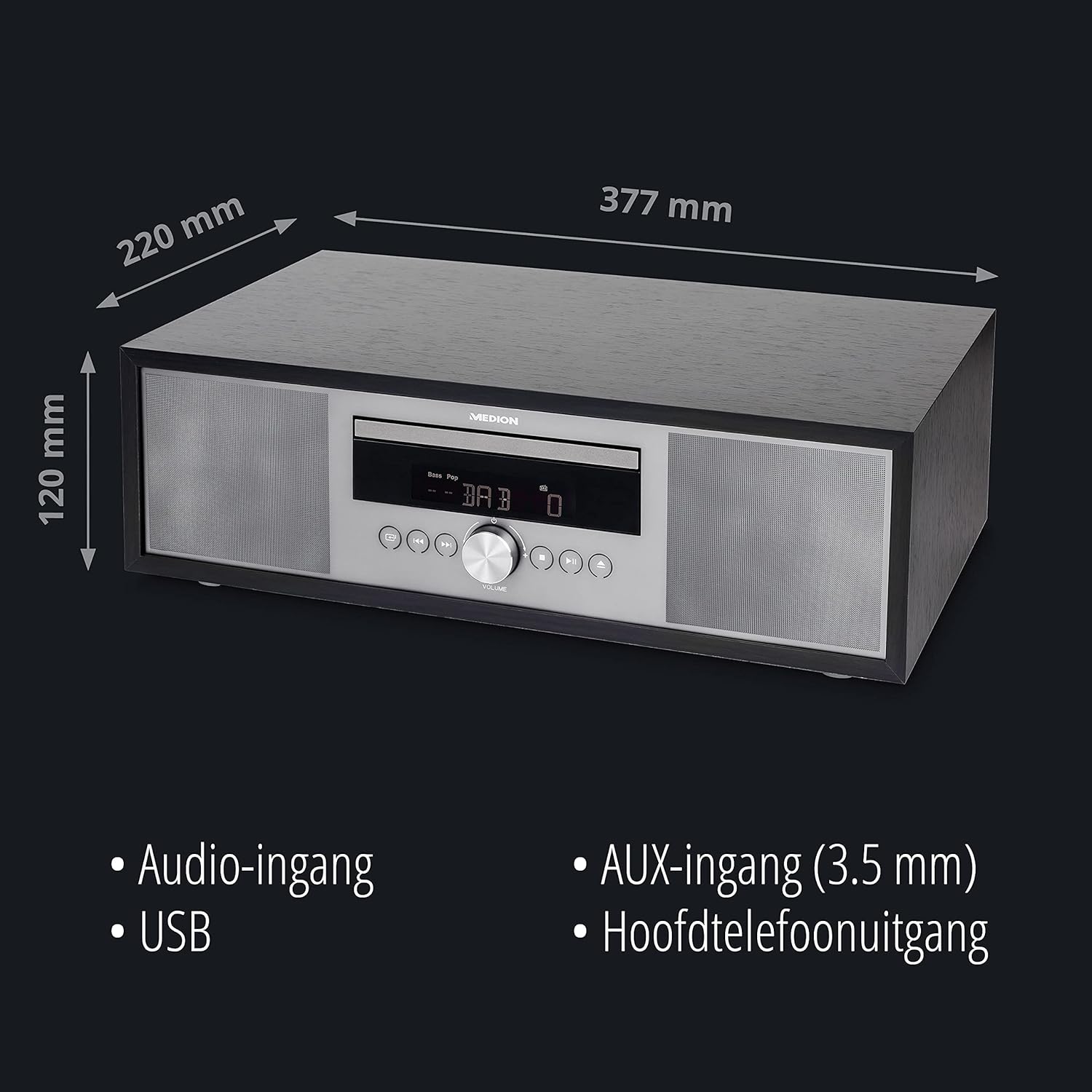
- Dimensioner (ca.): 41.8 x 27.3 x 15.5 cm
- Vægt (ca.): 3.95 kg

Billede: The MEDION P64145 audio system with its dimensions indicated. This image provides a visual representation of the product's size.
Garanti og support
For warranty information, technical support, or service inquiries, please refer to the warranty card included in your package or visit the official MEDION webwebsted. Gem din købsbevis til garantikrav.