
1. Introduktion
Thank you for choosing the FANGOR F405 1080P Projector. This manual provides detailed instructions to help you set up, operate, and maintain your projector for an optimal viewing experience. Please read this manual thoroughly before use and retain it for future reference.
2. Hvad er der i æsken
Upon opening your FANGOR F405 projector package, you should find the following items:
- FANGOR F405 Projector
- Projector Screen (120 inches)
- Fjernbetjening
- HDMI kabel
- AV-kabel
- Strømkabel
- Rengøringssæt til linser
- Brugervejledning (dette dokument)
3. Opsætning
3.1 Placering
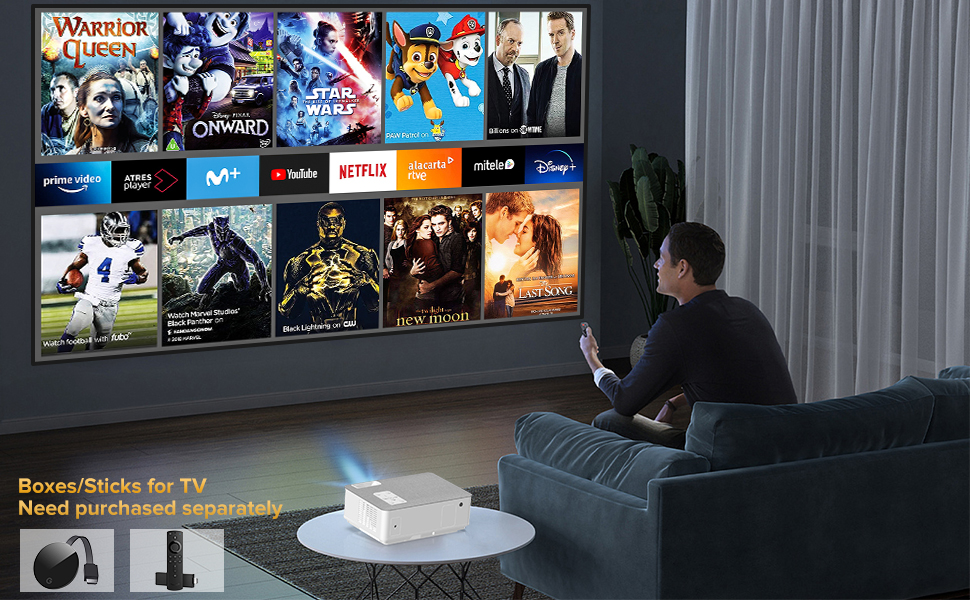
Position the projector on a stable, flat surface or mount it using a compatible bracket. Ensure there is adequate ventilation around the device. The projection distance and screen size can be adjusted to fit your viewing area, supporting up to a 300-inch display.
3.2 Strømtilslutning
Tilslut strømkablet til projektorens strømindgang og derefter til en stikkontakt.
3.3 Tilslutning af enheder
The FANGOR F405 offers multiple connectivity options:
- HDMI: Use the provided HDMI cable to connect to laptops, TV boxes, gaming consoles (Xbox, PS4), etc.
- USB: Indsæt USB-drev til medieafspilning.
- AV: Brug AV-kablet til ældre enheder som DVD-afspillere.
- VGA: Connect to computers with VGA output.
- Micro SD: Indsæt Micro SD-kort for medieafspilning.

4. Betjeningsvejledning
4.1 Tænd/sluk
Tryk på tænd/sluk-knappen på projektoren eller fjernbetjeningen for at tænde eller slukke enheden.
4.2 Fokus- og Keystone-korrektion
Adjust the focus ring on the projector lens until the image is clear. Use the manual keystone correction feature (±15°) to adjust the image shape if the projector is not perfectly perpendicular to the screen.

4.3 Valg af indgangskilde
Use the "Source" button on the remote or projector to select your desired input (HDMI, USB, AV, VGA, Micro SD).
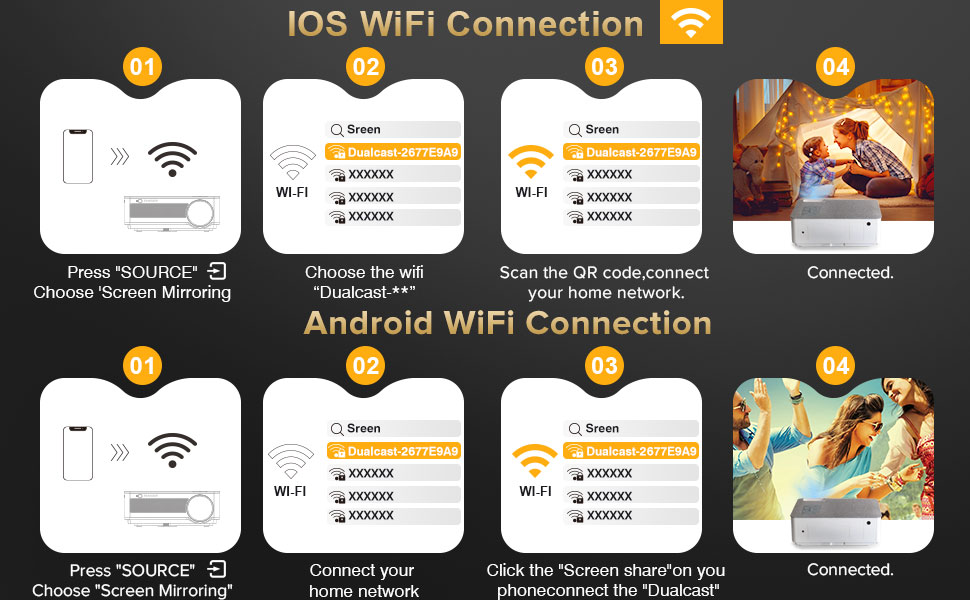
4.4 Screen Mirroring (Wireless & Wired)
The F405 supports both 2.4G/5G WiFi for wireless screen mirroring and wired mirroring using a data cable (no app required).
- iOS WiFi-forbindelse:
- Press "SOURCE" and choose "Screen Mirroring".
- Connect your iOS device to the projector's WiFi network (e.g., "Dualcast-XXXXXX").
- Scan the QR code or connect to your home network.
- Once connected, enable Screen Mirroring on your iOS device.
- Android WiFi-forbindelse:
- Press "SOURCE" and choose "Screen Mirroring".
- Connect your Android device to your home network.
- Click "Screen share" on your phone and connect to "Dualcast".
- Once connected, your Android screen will be mirrored.

4.5 Bluetooth-lydforbindelse
The projector features Bluetooth 5.0 for connecting to external Bluetooth speakers or headsets. Note: This feature is for audio output only and cannot connect to smartphones for content mirroring.

4.6 Indbyggede højttalere
The F405 is equipped with dual 5W HiFi stereo speakers and an SRS audio system, providing high-quality sound directly from the projector.

5. Vedligeholdelse
5.1 Rengøring af linser
Use the provided lens cleaning kit to gently clean the projector lens. Avoid touching the lens directly with your fingers or abrasive materials.
5.2 Kølesystem
The projector features an innovative cooling system to prevent overheating. Ensure that the ventilation vents are not blocked to maintain optimal performance and extend the projector's lifespan.
5.3 Opbevaring
Når projektoren ikke er i brug, skal den opbevares et køligt og tørt sted, væk fra direkte sollys og for meget støv.
6. Fejlfinding
- Intet billede: Check power connections, input source selection, and ensure the lens cap is removed.
- Sløret billede: Adjust the focus ring and perform keystone correction.
- Ingen lyd: Verify volume settings on both the projector and connected device. Ensure external Bluetooth speakers are properly paired if used.
- Overophedning: Ensure ventilation vents are clear and the projector is not in an enclosed space.
- Problemer med skærmspejling: Check WiFi connection stability (2.4G/5G) and ensure devices are on the same network. For wired mirroring, confirm the data cable is functional.
7. Specifikationer
| Feature | Detalje |
|---|---|
| Mærke | FANGOR |
| Modelnummer | F405 |
| Indfødt opløsning | 1920 x 1080 (1080P Full HD) |
| 4K support | Ja |
| Lysstyrke | 16000L / 450 ANSI |
| Kontrastforhold | 10000:1 |
| Forbindelsesteknologi | HDMI, VGA, USB, AV, Micro SD, 5G WiFi, Bluetooth 5.0 |
| Særlige funktioner | 5G WiFi, Bluetooth 5.0, Dual Stereo Speaker, Built-In Cooling System, Portable |
| Højttaler type | Stereo (2*5W) |
| Varens vægt | 5.29 pund |
| Produktdimensioner | 9.2 x 6.78 x 3.45 tommer |
| Anbefalede anvendelser | Home Cinema, Indoor, Outdoor, Gaming, Entertainment |
8. Garanti og support
FANGOR offers 2 years of professional technical lifetime customer service. For any inquiries or support needs, please refer to the contact information provided in your product packaging or visit the official FANGOR webwebsted.
For yderligere information og support kan du besøge FANGOR-butik på Amazon.