
Indledning
Thank you for choosing the TECNOSWITCH CR035WB Wi-Fi Touch Thermostat. This device is designed to provide precise and convenient control over your home's heating and cooling systems. With its intuitive touch interface and Wi-Fi connectivity, you can manage your climate settings locally or remotely via a dedicated smartphone application. Please read this manual carefully before installation and operation to ensure proper use and optimal performance.
Vigtige sikkerhedsoplysninger
ADVARSEL: Electrical installation should only be performed by a qualified electrician. Disconnect power at the circuit breaker before installing or servicing the thermostat to prevent electrical shock or equipment damage.
- Ensure the power supply is 230VAC, 50-60Hz as specified.
- Udsæt ikke termostaten for vand eller for høj luftfugtighed.
- Forsøg ikke selv at reparere eller ændre enheden. Kontakt kvalificeret servicepersonale.
- Hold emballagemateriale væk fra børn.
Produkt overview
The TECNOSWITCH CR035WB is a wall-mounted Wi-Fi touch thermostat featuring a backlit LCD display. It offers daily and weekly programming capabilities for both heating and cooling modes. Remote control is available via iOS and Android applications.
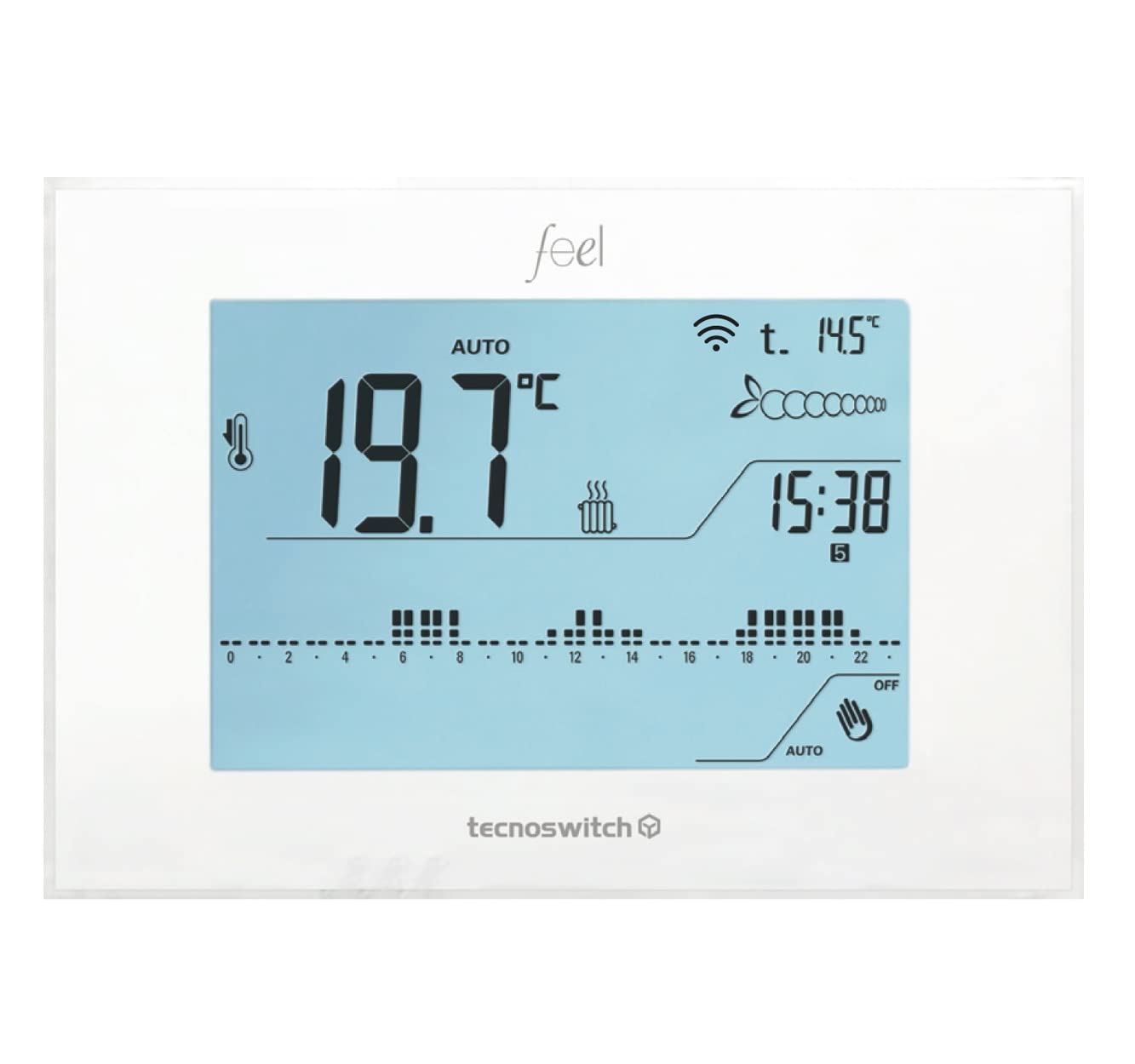
Figur 1: Forside view of the TECNOSWITCH CR035WB Wi-Fi Touch Thermostat, showing its LCD display and touch interface.
Opsætning
1. Installation
- Strømafbrydelse: Turn off the main power supply to your heating/cooling system at the circuit breaker before beginning installation.
- Montering: Mount the thermostat on a standard wall box. Ensure it is placed in an area free from direct sunlight, drafts, or heat sources that could affect temperature readings.
- Ledningsføring: Connect the power supply (230VAC, 50-60Hz) to the designated terminals. Connect the heating/cooling system wires to the appropriate relay terminals (6A 250VAC contact rating). Refer to the wiring diagram provided in the product packaging for specific connections.
- Optional External Probe: If using an external temperature probe (model SO001SE), connect it to the dedicated terminals.
- Sikker montering: Secure the thermostat to the wall box using screws.
- Strømgendannelse: Restore power to the system at the circuit breaker.
2. Første opstart og grundlæggende indstillinger
- Upon first power-on, the LCD display will illuminate.
- Set the current date and time using the touch controls.
- Select the operating mode: Heating (Riscaldamento) or Cooling (Affrescamento).
- Adjust the temperature differential (from 0 to 1°C) if proportional temperature control is desired.
3. Wi-Fi og app-forbindelse
- Download app: Download the official TECNOSWITCH app from the App Store (iOS) or Google Play Store (Android).
- Opret konto: Open the app and create a user account, or log in if you already have one.
- Tilføj enhed: Follow the in-app instructions to add your CR035WB thermostat. This typically involves putting the thermostat into pairing mode (refer to the on-screen instructions on the thermostat or the app) and connecting it to your home Wi-Fi network.
- Fjernbetjening: Når den er tilsluttet, kan du styre termostaten eksternt via appen.
Betjeningsvejledning
1. Basic Controls (Touch Interface)
The CR035WB features a touch-sensitive LCD display. Navigate menus and adjust settings by tapping the corresponding icons or areas on the screen.
2. Temperaturjustering
- Manuel justering: In manual mode, you can directly set the desired temperature using the up/down arrows on the display. The thermostat will maintain this temperature until changed or until a programmed schedule takes over.
- Temperaturområde: The adjustable temperature range is +2°C to +35°C.
3. Driftstilstande
The thermostat supports two main operating modes:
- Opvarmning (Riscaldamento): Aktiverer varmesystemet, når omgivelsestemperaturen falder til under den indstillede værdi.
- Cooling (Affrescamento): Aktiverer kølesystemet, når omgivelsestemperaturen stiger over sætpunktet.
- Switch between modes via the thermostat's menu or the mobile app.
4. Programming (Daily/Weekly)
The CR035WB allows for daily and weekly programming to automate temperature control.
- Adgang til programmenu: Navigate to the programming section on the thermostat's display or through the app.
- Set Time Slots: Define specific time periods for each day of the week.
- Set Temperature Levels: Assign one of three customizable temperature levels (e.g., Comfort, Economy, Away) to each time slot.
- Gem program: Ensure you save your programmed schedule. The internal supercapacitor maintains programming in case of power loss.
5. App Control (iOS/Android)
The mobile application provides comprehensive control and monitoring features:
- Remote temperature adjustment and mode selection.
- Creation and modification of daily/weekly programs.
- Monitoring of current temperature and system status.
- Access to advanced functions and statistics.
6. Avancerede funktioner
- Keyboard Lock (Password): Secure the thermostat's physical controls with a password to prevent unauthorized changes.
- Anti-seize Pump Function: Periodically activates the pump to prevent seizing during long periods of inactivity.
- Boiler Block Detection: Monitors the boiler status and can detect potential issues.
- Statistik: View usage statistics and temperature trends.
- Nedtælling: Timer function for temporary temperature changes.
Opretholdelse
- Rensning: Gently wipe the thermostat's display and casing with a soft, dry cloth. Do not use abrasive cleaners, solvents, or spray cleaners directly onto the device.
- Ingen dele, der kan serviceres af brugeren: The CR035WB does not contain user-serviceable parts. Do not attempt to open the casing.
- Superkondensator: The internal supercapacitor maintains programming settings during power outages, eliminating the need for battery replacement for this function.
Fejlfinding
| Problem | Mulig årsag | Løsning |
|---|---|---|
| Termostatdisplayet er tomt. | Ingen strømforsyning. | Check the circuit breaker and wiring connections. Ensure 230VAC power is supplied. |
| Varme-/kølesystemet reagerer ikke. | Incorrect wiring; System mode incorrect; Temperature setpoint not reached. | Verify wiring connections. Ensure the thermostat is in the correct operating mode (Heating/Cooling). Adjust the setpoint to be above/below the ambient temperature to trigger the system. |
| Wi-Fi connection fails or disconnects. | Forkert Wi-Fi-adgangskode; Router for langt væk; Netværksproblemer. | Re-enter Wi-Fi password. Move router closer or use a Wi-Fi extender. Restart router and thermostat. Ensure your Wi-Fi network is 2.4GHz. |
| App kontrol virker ikke. | No internet connection; App not updated; Thermostat not connected to Wi-Fi. | Check phone's internet connection. Update the app to the latest version. Verify the thermostat's Wi-Fi connection status. |
| Temperaturmålingerne virker unøjagtige. | Termostat udsat for træk, direkte sollys eller varmekilder. | Relocate the thermostat if possible, or shield it from external influences. If an external probe is connected, ensure it is correctly installed and functioning. |
Specifikationer
| Model | CR035WB |
| Mærke | TECNOSWITCH |
| Strømforsyning | 230VAC, 50-60Hz |
| Display Type | LCD, Backlit Blue |
| Temperaturreguleringsområde | +2°C til +35°C |
| Kontaktvurdering | 6A 250VAC |
| Temperaturkontrol type | ON-OFF, Proportional |
| Adjustable Thermal Differential | 0 til 1°C |
| Driftstilstande | Opvarmning / køling |
| Forbindelse | Wi-Fi |
| Kontrolmetode | App (iOS, Android), Touch Interface |
| Intern hukommelse | Supercapacitor for program retention |
| Ekstern probeunderstøttelse | Yes (SO001SE) |
Garantioplysninger
TECNOSWITCH products are manufactured to high-quality standards. This product is covered by a standard manufacturer's warranty against defects in materials and workmanship. The specific duration and terms of the warranty may vary by region and retailer. Please refer to your purchase documentation or contact TECNOSWITCH customer support for detailed warranty information applicable to your product.
Købsbevis er påkrævet for alle garantikrav.
Kundesupport
If you encounter any issues or have questions regarding the installation, operation, or maintenance of your TECNOSWITCH CR035WB thermostat, please contact our customer support team.
- Webwebsted: Visit the official TECNOSWITCH webwebsted med ofte stillede spørgsmål, supportressourcer og kontaktformularer.
- E-mail/Telefon: Refer to the contact information provided in your product packaging or on the official TECNOSWITCH webwebsted for direkte support.
Please have your product model (CR035WB) and purchase details ready when contacting support.