
1. Produktet er slutview
The MakerHawk TPA3116D2 Bluetooth 5.0 Stereo Audio Amplifier Module (Model ZK-502H) is a high-performance Class D amplifier designed for HiFi stereo audio applications. It features multiple audio input methods and robust protection mechanisms, making it suitable for various DIY audio projects and home entertainment systems.
Nøglefunktioner:
- Høj ydeevne: Utilizes the TPA3116D2 Class D amplifier IC, offering high power output with low distortion (<0.1%).
- HiFi Stereo: Dual-channel 100W (50W*2) output for clear and rich audio.
- Flere lydindgange: Supports AUX (3.5mm), Bluetooth 5.0, USB flash drive, and PC sound card input.
- Alsidige udgange: Compatible with both active and passive speakers.
- Bluetooth 5.0: Ensures higher transmission efficiency, stability, and an extended wireless range of up to 15m (49 feet) in open spaces.
- Robust beskyttelse: Includes short-circuit, thermal, overvoltage, undervoltage, and DC protection to prevent damage.
- Brugervenlig: Features a potentiometer for volume adjustment with an integrated power switch.

Figur 1: Detaljeret view of the ZK-502H amplifier board, highlighting various inputs, outputs, and the TPA3116D2 chip with heatsink.

Figure 2: The assembled amplifier module, showing the volume knob and various input ports for AUX, Bluetooth, and USB.
2. Pakkens indhold
Bekræft at alle komponenter er til stede i din pakke:
- TPA3116D2 Bluetooth 5.0 Stereo Audio Amplifier Module (ZK-502H)
- Acrylic protective casing-komponenter
- Monteringsudstyr (skruer, afstandsstykker)
- Volumen knap
- Lille skruetrækker
- DC power adapter cable (optional, may vary)
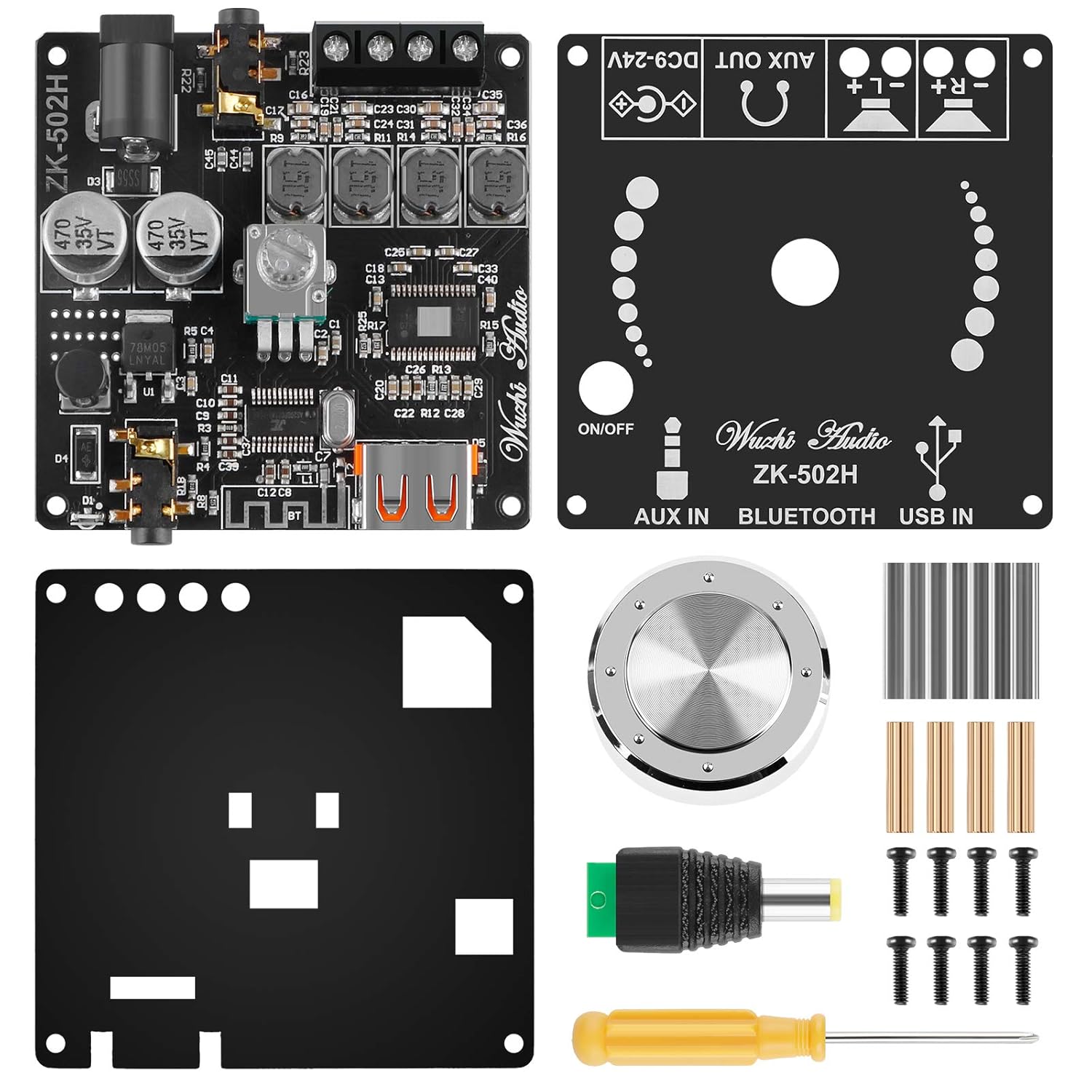
Figure 3: Contents of the ZK-502H amplifier kit, including the main board, acrylic case parts, knob, and tools.
3. Opsætningsvejledning
3.1 Assembly (Optional)
If your module came unassembled with an acrylic case, follow these steps:
- Carefully remove all protective films from the acrylic panels.
- Attach the standoffs to the main amplifier board using the provided screws.
- Secure the bottom acrylic panel to the standoffs.
- Mount the top acrylic panel, ensuring all cutouts align with the board's components (e.g., volume knob, ports).
- Attach the volume knob to the potentiometer shaft.
3.2 Strømtilslutning
The module requires a DC power supply between 9V and 24V. Connect the power supply to the DC input port on the board. Ensure correct polarity.
3.3 Højttalertilslutning
Connect your speakers to the speaker output terminals. The module supports both active and passive speakers. For passive speakers, ensure they are rated appropriately for the amplifier's output (50W per channel). Observe correct polarity for optimal sound quality.

Figure 4: Connection diagram showing how to connect audio sources (PC, USB, AUX) and speakers to the amplifier modul.
4. Betjeningsvejledning
4.1 Tænd/sluk og lydstyrkekontrol
The volume potentiometer also functions as the power switch. Rotate the knob clockwise to turn on the module and increase volume. Rotate counter-clockwise to decrease volume and turn off the module.
4.2 Valg af lydindgang
The module automatically detects and switches between input sources. Prioritize the desired input by connecting it first or disconnecting other sources.
- Bluetooth-indgang: Once powered on, the module will enter Bluetooth pairing mode. Søg efter "ZK-502H" on your device (smartphone, tablet, laptop) and pair. A confirmation sound will indicate successful pairing.
- AUX-indgang: Connect an audio source (e.g., MP3 player, CD player) to the 3.5mm AUX IN jack.
- USB-indgang: Indsæt et USB-flashdrev med lyd files into the USB port. The module will automatically play the audio.
- PC Sound Card Input: Connect the module to a PC via a USB cable. The PC should recognize it as an external sound card.
5. Vedligeholdelse
For at sikre din levetid og optimale ydeevne ampFølg disse vedligeholdelsesretningslinjer for væskeopløsningsmodulet:
- Rensning: Brug en blød, tør klud til at rengøre modulet. Undgå at bruge flydende rengøringsmidler eller opløsningsmidler.
- Miljø: Operate and store the module in a dry, well-ventilated area, away from direct sunlight, high temperatures, and excessive humidity.
- Forbindelser: Kontrollér regelmæssigt alle forbindelser (strøm, højttalere, lydindgange) for at sikre, at de er fastgjorte og fri for korrosion.
- Undgå overbelastning: Do not exceed the recommended power supply voltage or speaker impedance to prevent damage to the amplivligere.
6. Fejlfinding
Hvis du støder på problemer med din ampLifier-modulet, se følgende almindelige problemer og løsninger:
| Problem | Mulig årsag | Løsning |
|---|---|---|
| Ingen lydudgang |
|
|
| Problemer med Bluetooth-forbindelse |
|
|
| Forvrænget lyd |
|
|
| Modulet tænder ikke |
|
|
7. Specifikationer
| Specifikation | Værdi |
|---|---|
| Modelnummer | ZK-502H |
| Amplifier Chip | TPA3116D2 |
| Kanaler | 2.0 Stereo |
| Udgangseffekt | 2 x 50W (Max 100W total) |
| Forsyning VoltagRækkevidde | 9V - 24V DC |
| Bluetooth version | 5.0 |
| Wireless Range | Up to 15m (49 feet) in open space |
| Lydindgange | AUX (3.5mm), Bluetooth, USB Flash Drive, PC Sound Card |
| Beskyttelsesfunktioner | Short-circuit, Thermal, Overvoltage, Undervoltage, DC Protection |
| Dimensioner (L x B x H) | 6 cm x 6 cm x 1.4 cm (ca. 2.36 x 2.36 x 0.71 tommer) |
| Varens vægt | Ca. 2.4 ounces |

Figure 5: The assembled amplifier module with its approximate dimensions.
8. Garanti og support
Specific warranty information and direct support contact details are not provided within this manual. Please refer to the product packaging or the retailer's website for warranty terms and customer support options.