
1. Introduktion
Tak for købetasing the SHARP XL-B512 Stereo Sound System. This micro sound system offers a rich 45-watt sound experience with versatile connectivity options including Bluetooth, CD player, USB, and FM radio. Its elegant design with a wooden speaker housing and LED display complements any living space. This manual provides essential information for setting up, operating, and maintaining your device to ensure optimal performance and longevity.
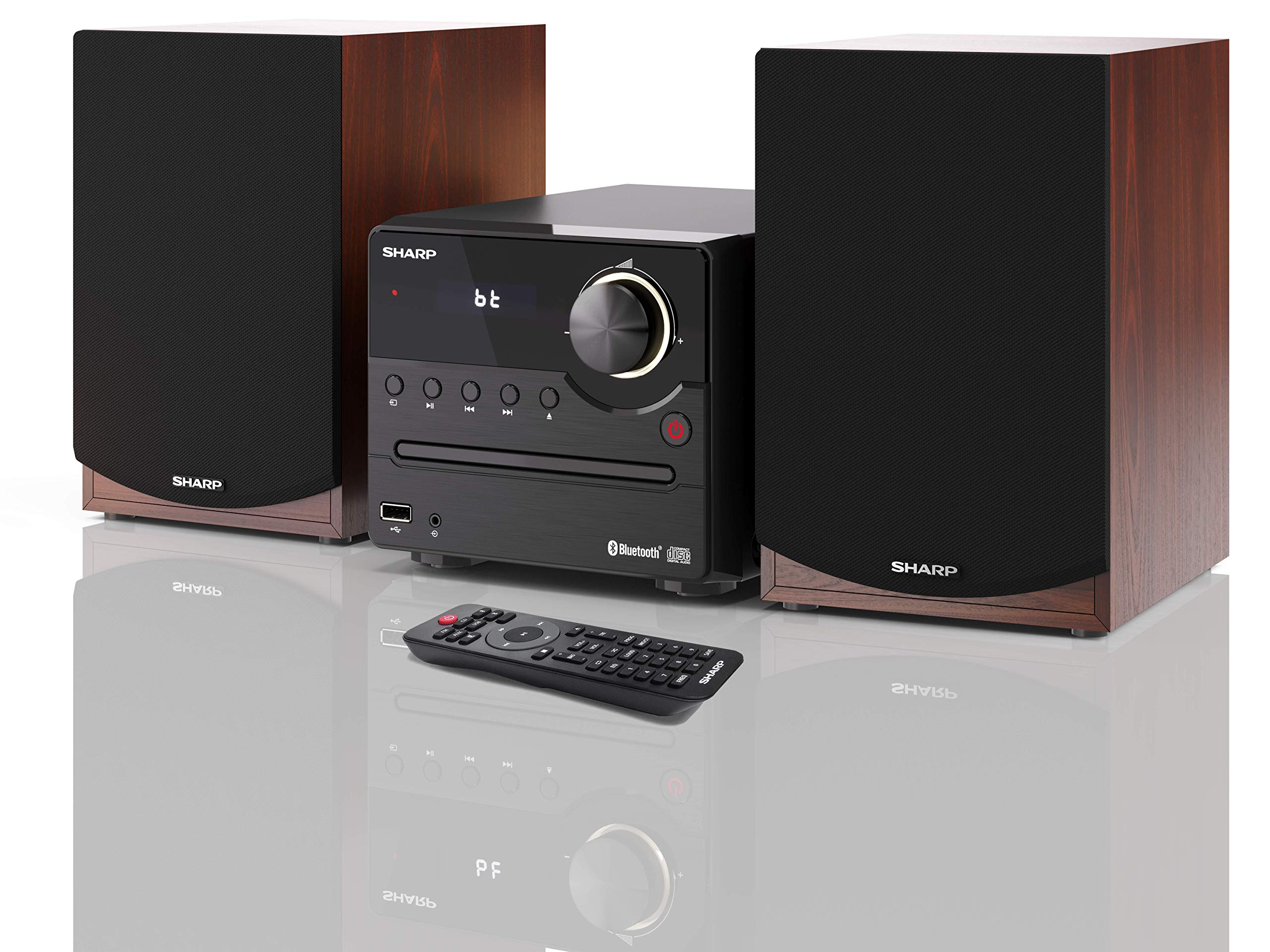
Figur 1: SHARP XL-B512 Stereo Sound System. This image shows the central unit flanked by two wooden-cased speakers, reflecting on a polished surface.
2. Sikkerhedsoplysninger
Læs venligst alle sikkerhedsinstruktioner omhyggeligt, inden produktet tages i brug. Gem denne manual til senere brug.
- Strømkilde: Use only the specified power supply. Ensure the voltage matcher din lokale strømforsyning.
- Ventilation: Bloker ikke ventilationsåbninger. Sørg for tilstrækkelig plads omkring enheden til korrekt luftgennemstrømning.
- Vand og fugt: Udsæt ikke enheden for regn, fugt eller dryppende/sprøjtende væsker. Placer ikke genstande fyldt med væsker, såsom vaser, oven på apparatet.
- Varme: Hold enheden væk fra varmekilder såsom radiatorer, varmeapparater, komfurer eller andre apparater (herunder ampløftere), der producerer varme.
- Rensning: Tag stikket ud af stikkontakten før rengøring. Brug kun en tør klud.
- Service: Forsøg ikke selv at servicere dette produkt. Overlad al service til kvalificeret servicepersonale.
3. Pakkens indhold
Bekræft, at alle nedenstående varer er inkluderet i din pakke:
- SHARP XL-B512 Micro Sound System (Main Unit)
- Two Speakers (with wooden housing)
- Strømkabel
- Fjernbetjening (med batterier)
- Instruktionsmanual (dette dokument)
- Hurtig startvejledning
4. Opsætning
4.1 Højttalertilslutning
Connect the two speakers to the main unit using the provided speaker cables. Ensure correct polarity (positive to positive, negative to negative) for optimal sound quality.
4.2 Strømtilslutning
Connect the power cable to the AC IN port on the rear of the main unit, then plug it into a wall outlet.

Figur 2: Rear panel connections. This image displays the back of the central unit with ports for speaker wires and the AC power input, alongside the rear of the two speakers.
4.3 Indledende tænding
Tryk på tænd/sluk-knappen på hovedenheden eller fjernbetjeningen for at tænde systemet. LCD-displayet lyser.
5. Betjeningsvejledning
5.1 Betjeningselementer på frontpanelet

Figur 3: Front panel controls. This close-up shows the central unit's display, volume knob, and various control buttons for playback and source selection.
- Power knap: Tænder eller slukker for enheden.
- Kildeknap: Cycles through available input sources (CD, FM, Bluetooth, USB, AUX).
- Lydstyrkeknap: Justerer masterlydstyrkeniveauet.
- Afspilningskontroller: Play/Pause, Stop, Skip Forward/Backward for CD and USB modes.
- USB-port: Til tilslutning af USB-lagerenheder til musikafspilning.
- AUX-indgang: 3.5 mm jackstik til tilslutning af eksterne lydenheder.
5.2 CD-afspilning
- Tryk på Kilde knappen for at vælge 'CD'-tilstand.
- Open the CD tray by pressing the Eject button.
- Place a CD (CD/CD-R/CD-RW/MP3 format) with the label side up into the tray.
- Close the CD tray. The system will read the disc and begin playback automatically or display track information.
- Brug afspilningsknapperne (Afspil/Pause, Stop, Spring over) til at administrere din musik.
5.3 FM radio
- Tryk på Kilde knappen for at vælge 'FM'-tilstand.
- The system will automatically search for available stations or you can manually tune.
- To save a station as a preset, tune to the desired station, then press and hold the Forudindstillet button (if available on remote) or follow on-screen instructions. The system supports 40 preset memories.
- Brug Forudindstillet op/ned knapper til at navigere gennem gemte stationer.
5.4 Bluetooth -parring
- Tryk på Kilde button to select 'Bluetooth' mode. The display will show 'bt' and flash, indicating it's in pairing mode.
- Aktiver Bluetooth på din mobilenhed, og søg efter tilgængelige enheder.
- Select 'SHARP XL-B512' from the list of devices.
- Once paired, the 'bt' indicator on the system's display will stop flashing. You can now stream audio from your device.
5.5 USB-afspilning
- Indsæt en USB-lagerenhed i USB-porten på frontpanelet.
- Tryk på Kilde knappen for at vælge 'USB'-tilstand.
- Systemet vil automatisk registrere og afspille kompatibel lyd files (MP3).
- Brug afspilningsknapperne til at navigere i numre.
5.6 AUX-indgang
- Connect an external audio device (e.g., smartphone, MP3 player) to the AUX IN jack on the front panel using a 3.5mm audio cable (not supplied).
- Tryk på Kilde -knappen for at vælge 'AUX'-tilstand.
- Play audio from your connected device. The sound will be output through the SHARP XL-B512 system.
5.7 Equalizer-indstillinger
The system features 6 preset equalizers with independent treble and depth control. Use the EQ button on the remote control or main unit to cycle through the presets and adjust sound to your preference.
6. Vedligeholdelse
6.1 Rengøring af enheden
Wipe the unit with a soft, dry cloth. Do not use abrasive cleaners, waxes, or solvents as they may damage the finish. Ensure the unit is unplugged before cleaning.
6.2 CD-pleje
Hold cd'er i kanterne. Hold dem rene og fri for ridser. Opbevar cd'er i deres etuier, når de ikke er i brug.
6.3 Speaker Care
The wooden speaker housing can be cleaned with a soft, dry cloth. Avoid placing heavy objects on the speakers or exposing them to direct sunlight or extreme temperatures.
7. Fejlfinding
If you encounter any issues with your SHARP XL-B512 system, refer to the following table for common problems and solutions.
| Problem | Mulig årsag | Løsning |
|---|---|---|
| Ingen strøm | Power cable not connected securely; Power outlet not active. | Kontroller strømkablets forbindelse; prøv en anden stikkontakt. |
| Ingen lyd | Volume too low; Incorrect source selected; Speaker cables disconnected. | Increase volume; Select correct input source; Check speaker cable connections. |
| Bluetooth ikke parring | System not in pairing mode; Device too far; Bluetooth disabled on device. | Ensure system is in Bluetooth pairing mode; Move device closer; Enable Bluetooth on your device. |
| CD'en afspiller ikke | CD inserted incorrectly; CD is dirty or scratched; Incorrect format. | Reinsert CD correctly; Clean CD; Ensure CD is a supported format (CD/CD-R/CD-RW/MP3). |
| Fjernbetjening virker ikke | Batterierne er døde eller isat forkert; Blokering mellem fjernbetjening og enhed. | Replace batteries; Ensure correct battery polarity; Remove any obstructions. |
Hvis problemet fortsætter efter at have prøvet disse løsninger, bedes du kontakte kundesupport.
8. Specifikationer
Below are the technical specifications for the SHARP XL-B512 Stereo Sound System:
- Model: XL-B512
- Samlet udgangseffekt: 45 watt
- Lydudgangstilstand: Stereoanlæg
- Speaker Output Channel Quantity: 2
- Understøttede lydformater: MP3, CD, CD-R, CD-RW
- Tuner teknologi: FM PLL Tuner
- FM-frekvensområde: 87.5 til 108 MHz
- FM Preset Memory: 40 stationer
- Forbindelse: Bluetooth, USB, Aux-stik (3.5 mm)
- Særlige funktioner: 6 Preset Equalizers, LCD Display with white backlight
- Sound System Dimensions (W x H x D): 17 x 22 x 15 cm
- Speaker Dimensions (W x H x D): 14.5 x 17.7 x 22.3 cm (each)
- Varens vægt: 4 kg
- Strømkilde: Elektrisk med ledning
- Fjernbetjening: Ja (batterier inkluderet)
9. Garanti og support
Your SHARP XL-B512 Stereo Sound System comes with a standard manufacturer's warranty. Please refer to the warranty card included in your package for specific terms and conditions, including the warranty period and coverage details.
For technical support, service inquiries, or further assistance, please contact your local SHARP customer service center. Contact information can typically be found on the manufacturer's webwebstedet eller i garantidokumentationen.