
Indledning
The 4smarts Powerbank Enterprise 2 is a high-capacity 20000 mAh portable charger designed to provide fast and efficient power to a wide range of electronic devices. With a total output of 130 watts and multiple charging ports, it supports various fast charging standards, including Power Delivery (PD), Qualcomm Quick Charge 3.0 (QC3.0), and Samsung Adaptive Fast Charge. This manual provides essential information for the safe and optimal use of your power bank.

Image: The 4smarts Powerbank Enterprise 2, highlighting its 130W output capability.
Opsætning
Indledende opladning
Before first use, fully charge your 4smarts Powerbank Enterprise 2. For the fastest charging experience, use a 100W Power Delivery (PD) compatible wall charger and a USB-C to USB-C cable (sold separately). The power bank can be fully recharged in approximately 60 minutes with a 100W charger.
LED-indikatorer
The power bank features LED indicators to display the current charge level. Observe these lights to monitor the battery status during charging and discharging.
Betjeningsvejledning
Opladning af Power Bank
- Connect a compatible charging cable to either the USB-C1 or USB-C2 input port on the power bank. For optimal speed, use the USB-C1 port with a 100W PD charger.
- Alternativt kan du bruge Micro USB input port with a compatible cable and charger.
- LED-indikatorerne lyser for at vise opladningsforløbet. Alle LED-indikatorer lyser konstant, når batteriet er fuldt opladet.
Opladning af eksterne enheder
The Powerbank Enterprise 2 offers multiple output ports to charge your devices:
- USB-C1 Output (PD/PPS): Up to 100W for fast charging laptops (e.g., MacBook Pro), tablets, and smartphones.
- USB-C2 Output (PD): Up to 30W for fast charging tablets and smartphones.
- USB-A Output (QC3.0): Up to 18W for devices supporting Qualcomm Quick Charge 3.0 or other standard charging protocols.
Sådan oplades en enhed:
- Connect your device to the appropriate output port on the power bank using a compatible charging cable.
- Powerbanken begynder automatisk at oplade din enhed. Hvis ikke, skal du trykke én gang på tænd/sluk-knappen for at aktivere opladningen.
- You can charge multiple devices simultaneously. The total output is up to 130W (e.g., USB-C1 at 100W + USB-C2 at 30W). For safety, if the total output exceeds 130W, the power bank will regulate the output of each port accordingly.

Image: Diagram illustrating the various input and output ports of the power bank, including their respective wattages and functions (Micro USB input, USB-C1 input/output with PD/PPS, USB-C2 input/output with PD, and USB-A output with QC3.0).
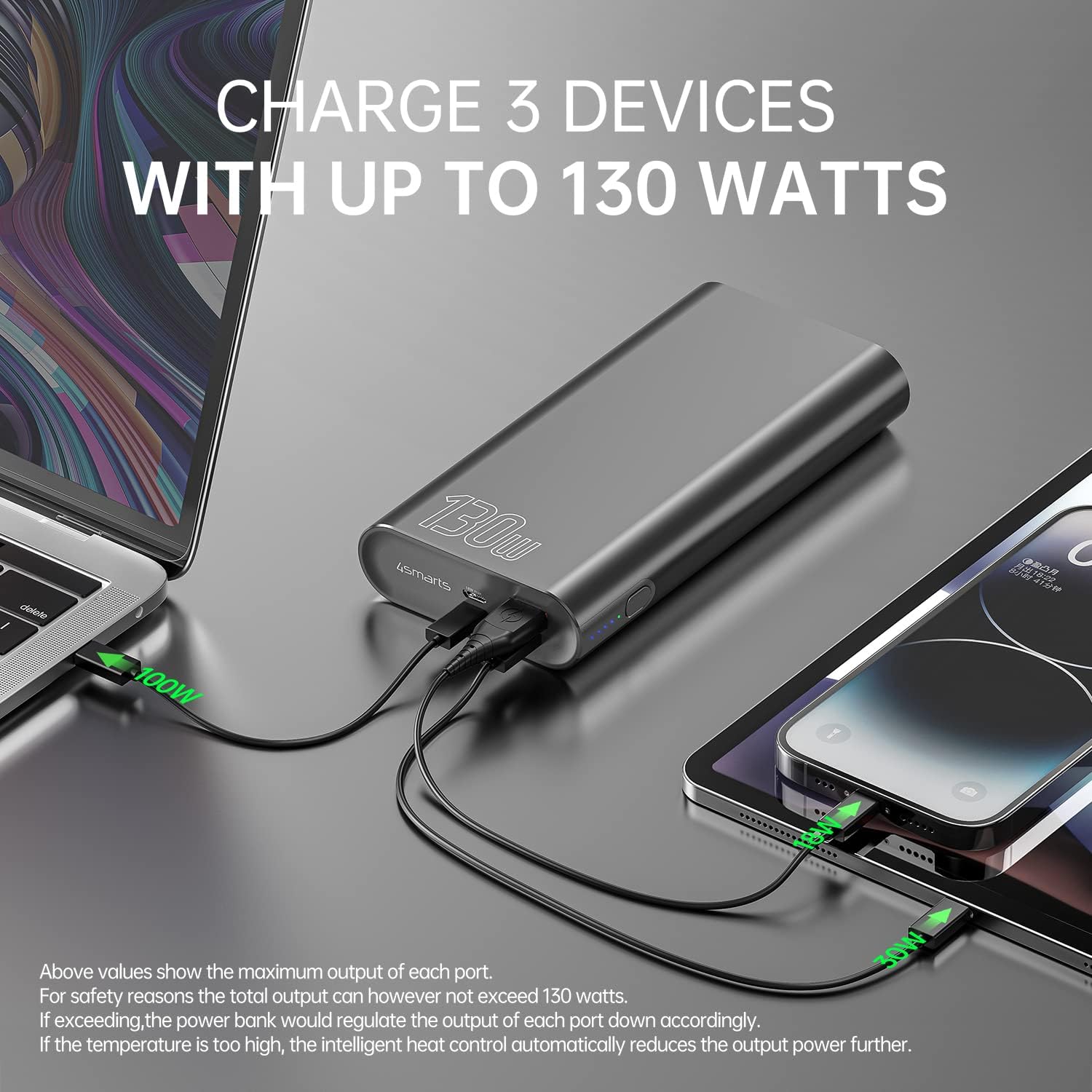
Image: The power bank connected and simultaneously charging a laptop and a tablet, demonstrating its multi-device charging capability.

Image: The power bank charging a MacBook Pro 16", illustrating 100W fast charging to reach 50% in 45 minutes.
Opretholdelse
- Rensning: Brug en blød, tør klud til at rengøre powerbanken. Undgå at bruge skrappe kemikalier eller slibende materialer.
- Opbevaring: Opbevar powerbanken et køligt, tørt sted væk fra direkte sollys, ekstreme temperaturer og fugtighed.
- Batteripleje: For at forlænge batteriets levetid, bør du oplade powerbanken fuldt op mindst én gang hver tredje måned, hvis den ikke bruges regelmæssigt. Undgå at aflade batteriet helt i længere perioder.
- Håndtering: Do not drop, puncture, or disassemble the power bank. This can damage the internal components and void the warranty.
Fejlfinding
- Powerbanken oplader ikke: Ensure the charging cable and wall adapter are functioning correctly and are securely connected. For fastest charging, use a 100W PD charger with the USB-C1 port.
- Enheden oplades ikke fra powerbanken: Ensure the power bank has sufficient charge. Press the power button to activate output if necessary. Check that the cable connecting your device to the power bank is not damaged and is compatible.
- Langsom opladning: Verify that your device and cable support fast charging protocols (PD, QC3.0) and are connected to the appropriate high-output port (USB-C1 for up to 100W, USB-C2 for up to 30W, USB-A for up to 18W).
- Overophedning: The power bank features intelligent heat control. If the temperature is too high, it will automatically reduce output power. Ensure proper ventilation during use.
The 4smarts Powerbank Enterprise 2 is equipped with multiple safety features, including overload protection, short circuit protection, intelligent charge shutdown, and deep discharge protection, to ensure safe operation.

Image: An internal diagram of the power bank, showcasing its certified safety features such as overload protection, short circuit protection, intelligent charge shutdown, and deep discharge protection.
Specifikationer
| Feature | Detalje |
|---|---|
| Modelnavn | Powerbank Enterprise 2 |
| Varemodelnummer | 4S468747 |
| Batterikapacitet | 20000 mAh |
| Battericellesammensætning | Lithium-ion (4 Tesla 21700 Li-ion cells) |
| Micro USB-indgang | DC 5V/2A, 9V/2A, 12V/1.5A (maks. 18W) |
| USB-C1 Input/Output (PD/PPS) | DC 5V/3A, 9V/3A, 12V/3A, 15V/3A, 20V/5A (Max 100W) |
| USB-C2 Input/Output (PD) | DC 5V/3A, 9V/3A, 12V/3A, 15V/2A, 20V/1.5A (Max 30W) |
| USB-A-udgang (QC3.0) | DC 5V/3A, 9V/2A, 12V/1.5A (maks. 18W) |
| Samlet output | 130W (USB-C1 100W + USB-C2 30W) |
| Power Bank Charging Time | Approx. 60 minutes (with 100W AC charger and cable, sold separately) |
| Dimensioner (L x B x H) | 15.2 x 7.5 x 2.5 cm (5.98 x 2.95 x 0.98 tommer) |
| Varens vægt | 515 gram (1.13 lbs) |
| Farve | Sort |
| Særlige funktioner | Fast Charging, Overload Protection, Short Circuit Protection, Deep Discharge Protection |
| Anbefalede anvendelser | iPhone, Laptop, Smartphone, Tablet |
Sikkerhedsoplysninger
- Udsæt ikke powerbanken for vand, ild eller ekstreme temperaturer.
- Undgå at tabe eller udsætte powerbanken for kraftige stød.
- Forsøg ikke at skille ad, reparere eller modificere powerbanken.
- Opbevares utilgængeligt for børn.
- Brug kun originale eller certificerede kompatible opladningskabler og adaptere.
- Bortskaf powerbanken ansvarligt i henhold til lokale regler for elektronisk affald.
Garanti og support
Garanti
The 4smarts Powerbank Enterprise 2 comes with a manufacturer's warranty. Please refer to the warranty card included in the product packaging or visit the official 4smarts webwebstedet for detaljerede garantivilkår og -betingelser, der er specifikke for din region.
Kundesupport
For technical assistance, troubleshooting, or any questions regarding your 4smarts Powerbank Enterprise 2, please contact 4smarts customer support. Contact information can typically be found on the official 4smarts webwebsted eller i produktemballagen.