
Indledning
The Fostex 6301DT is a compact and versatile 4-inch powered studio monitor, designed for broadcast, production facilities, mobile setups, project studios, and home recording environments. Building upon the legacy of the 6301-series, this model incorporates a D-class power amplifier and a new driver unit, featuring an energy-saving auto stand-by function. The 6301DT integrates Dante network audio capabilities, allowing playback of any two channels of Dante network audio signals, alongside traditional 1/4-inch TS analog inputs. Its ultra-rugged die-cast aluminum enclosure ensures durability for professional use.
Sikkerhedsoplysninger
- Strømkilde: Tilslut kun enheden til den angivne strømforsyningsvolumen.tage. Ensure the power cord is securely connected.
- Ventilation: Bloker ikke ventilationsåbningerne. Sørg for tilstrækkelig luftgennemstrømning omkring enheden for at forhindre overophedning.
- Fugtighed: Udsæt ikke enheden for regn, fugt eller for høj luftfugtighed. Undgå at placere væskefyldte genstande på enheden.
- Fremmedobjekter: Indsæt ikke genstande i enhedens åbninger.
- Service: Overlad al service til kvalificeret servicepersonale. Forsøg ikke selv at åbne eller reparere enheden.
- Placering: Place the monitor on a stable surface. Avoid locations with excessive vibration, dust, or direct sunlight.
Pakkens indhold
Bekræft at alle varer er til stede i pakken:
- Fostex 6301DT Active Monitor Speaker
- IEC strømledning
Produkt overview
Frontpanel

Figur 1: Betjeningselementer på frontpanelet
- Power knap: Press to turn the unit ON or OFF. An LED indicator shows the power status.
- Lydstyrkeknap: Adjusts the output level of the monitor.
Bagpanel
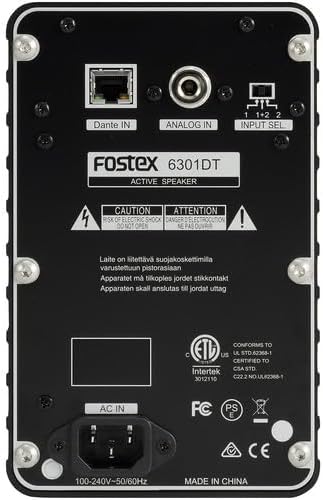
Figur 2: Tilslutninger på bagpanelet
- Dante IN (RJ45): Connects to a Dante network for digital audio input.
- Analog IN (1/4" TS): Connects to an analog audio source using a 1/4-inch TS cable.
- Indgangsvælgerknap: Selects the audio input channel for monitoring (1, 2, or 1+2 mixed).
- AC IN: Connects the supplied IEC power cord.
Opsætning
Placering
Place the Fostex 6301DT on a stable, flat surface. For optimal sound reproduction, position the monitor at ear level and equidistant from your listening position. An optional EB-6301 mounting bracket (not included) allows for easy surface-mounting at various angles.

Figur 3: Eksample Applikationsopsætning
Strømtilslutning
- Ensure the monitor's power button is in the OFF position.
- Connect the supplied IEC power cord to the AC IN port on the rear panel of the monitor.
- Sæt den anden ende af netledningen i en passende stikkontakt.
Lydforbindelser
The 6301DT supports both analog and Dante network audio inputs.
- Analog input: Connect your analog audio source (e.g., mixer, audio interface) to the 1/4" TS Analog IN port on the rear panel using a 1/4-inch TS cable.
- Dante Network Input: Connect an RJ45 Ethernet cable from your Dante network switch or device to the Dante IN port on the rear panel.
Drift
Tænd/sluk
Press the Power button on the front panel to turn the monitor ON. The power indicator LED will illuminate. Press the button again to turn the monitor OFF.
Lydstyrkejustering
Rotate the Volume knob on the front panel clockwise to increase the output level and counter-clockwise to decrease it. Start with a low volume setting and gradually increase it to a comfortable listening level.
Valg af input
Use the Input Select switch on the rear panel to choose the desired audio source:
- Analog: Selects the 1/4" TS analog input.
- Dante Channel 1: Monitors the first Dante audio channel.
- Dante Channel 2: Monitors the second Dante audio channel.
- Dante Channel 1+2 (Mixed): Monitors a mix of both Dante channels.
Dante Network Configuration
For Dante network operation, you will need to use Audinate's Dante Controller software on a computer connected to the same Dante network. This software allows you to route audio signals to the Fostex 6301DT and configure its network settings. The 6301DT supports sampling frequencies of 44.1 kHz, 48 kHz, 88.2 kHz, and 96 kHz.
Opretholdelse
- Rensning: Use a soft, dry cloth to clean the exterior of the monitor. Do not use abrasive cleaners, waxes, or solvents.
- Opbevaring: Hvis enheden opbevares i længere tid, skal den afbrydes til strømmen og opbevares et køligt, tørt sted væk fra direkte sollys og ekstreme temperaturer.
- Ventilation: Ensure that the ventilation openings are kept clear of dust and debris.
Fejlfinding
| Problem | Mulig årsag | Løsning |
|---|---|---|
| Ingen lydudgang |
|
|
| Forvrænget lyd |
|
|
| Dante connection issues |
|
|
Specifikationer

Figur 4: Produktmål
| Feature | Specifikation |
|---|---|
| Modelnummer | AMS-6301DT |
| Højttaler type | Powered Studio Monitor |
| Højttaler størrelse | 4 tommer |
| Bashøjttaler diameter | 4 tommer |
| Amplivligere Type | Klasse D |
| Maksimal udgangseffekt | 20 watt |
| Lydudgangstilstand | Stereoanlæg |
| Antal lydkanaler | 2.0 |
| Forbindelsesteknologi | RJ45 (Dante), 1/4" TS (Analog) |
| Forbindelsesprotokol | Dante |
| Understøttet Samplingfrekvenser | 44.1/48/88.2/96 kHz |
| Signal-støjforhold | 85 dB |
| Strømkilde | Elektrisk med ledning |
| Indkapslingsmateriale | Støbt Aluminium |
| Farve | Sort |
| Varedimensioner (D x B x H) | 4.7 cm x 7.5 cm x 4.7 cm |
| Varens vægt | 5.1 pund |
| Yderligere funktioner | Auto stand-by function, Recessed front-panel controls |
Garanti og support
Garantioplysninger
The Fostex 6301DT is covered by a 1 års begrænset producentgarantiGem venligst din købsbevis i tilfælde af garantikrav.
Kundesupport
For technical assistance, troubleshooting, or warranty service, please contact American Music and Sound, the manufacturer, or your authorized Fostex dealer. Refer to the Fostex official webwebstedet for de seneste kontaktoplysninger til support.