
1. Introduktion
The Ewent EW1538 Dual Monitor Desk Mount is designed to create an ergonomic and space-saving workspace. This gas spring-powered desk mount allows you to position two monitors (13-27 inches, 2-7 kg each) at your ideal height and viewing angle with ease. Its flexible adjustments help reduce strain on your neck, back, and shoulders, promoting a more comfortable and productive environment. The integrated cable management system keeps your workspace tidy.

Image 1.1: Ewent EW1538 Dual Monitor Desk Mount without monitors.
2. Sikkerhedsoplysninger
Læs venligst alle instruktioner omhyggeligt inden montering og brug. Manglende overholdelse af disse instruktioner kan resultere i materielle skader, alvorlig personskade eller død.
- Vægt kapacitet: Do not exceed the maximum weight capacity of 7 kg (15.4 lbs) per monitor. Ensure your monitors are within the specified weight range.
- Skærmstørrelse: This mount is suitable for monitors between 13 and 27 inches.
- VESA-kompatibilitet: Ensure your monitors have VESA mounting patterns (75x75mm or 100x100mm).
- Skrivebords tykkelse: Verify your desk is thick enough and structurally sound to support the combined weight of the mount and monitors.
- Klemmepunkter: Be aware of moving parts and potential pinch points during assembly and adjustment. Keep hands clear.
- Forsamling: Assemble the product exactly as described in this manual. Do not modify the mount.
- Børn: Hold børn væk fra samleområdet. Små dele kan være en kvælningsfare.
3. Pakkens indhold
Before assembly, ensure all parts are present and undamaged. If any parts are missing or damaged, contact your retailer for assistance.
- Bordplade
- Hovedpol
- Dobbelt skærmarmsamling
- VESA Mounting Plates (x2)
- Hardware-sæt (skruer, skiver, afstandsstykker)
- Unbrakonøgler / skruenøgler
- Kabelhåndteringsklip
4. Opsætningsvejledning
Follow these steps to assemble and install your Ewent EW1538 Dual Monitor Desk Mount.
4.1. Attach Base to Pole
- Place the desk base on a stable surface.
- Insert the main pole into the designated slot on the desk base.
- Secure the pole to the base using the provided screws and an Allen key from underneath the base. Tighten firmly.
4.2. Attach Monitor Arm Assembly to Pole
- Slide the dual monitor arm assembly onto the main pole.
- Adjust the arm to your desired initial height and secure it by tightening the locking screw on the back of the arm assembly with an Allen key.

Billede 4.1: Overview of the monitor mount components and assembly.
4.3. Fastgør VESA-plader til skærme
- Placer forsigtigt din skærm med forsiden nedad på en blød, ren overflade.
- Attach a VESA mounting plate to the back of each monitor using the appropriate screws and washers from the hardware kit. Ensure the screws are tightened securely but do not overtighten.

Image 4.2: Detail of VESA plate attachment to a monitor.
4.4. Mount Monitors to Arms
- With assistance, carefully lift each monitor and slide the VESA plate attached to the monitor onto the corresponding arm bracket.
- Ensure the monitor is securely seated on the bracket. Some brackets may have a quick-release or locking mechanism; engage it if present.
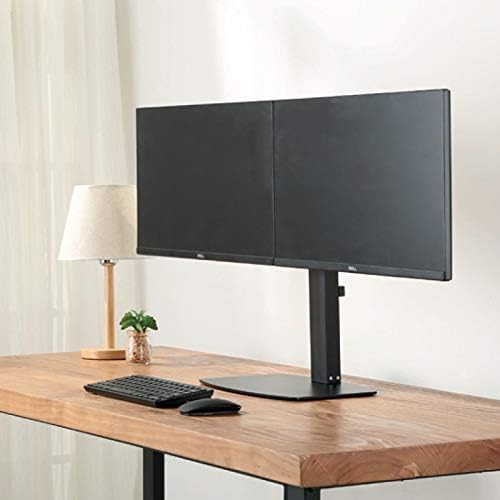
Billede 4.3: Forside view of two monitors mounted on the desk stand.
4.5. Juster gasfjederspændingen
- The gas spring tension may need adjustment to properly support your monitor's weight.
- Locate the tension adjustment screw on the arm (usually near the VESA plate or the arm pivot point).
- If the monitor sags, turn the screw clockwise to increase tension. If the monitor floats up too easily, turn the screw counter-clockwise to decrease tension. Adjust until the monitor stays in place when moved.
4.6. Kabelforvaltning
- Route your monitor cables (power, video) through the integrated cable management clips or channels on the monitor arms and down the main pole.
- This helps keep your workspace organized and prevents cable clutter.
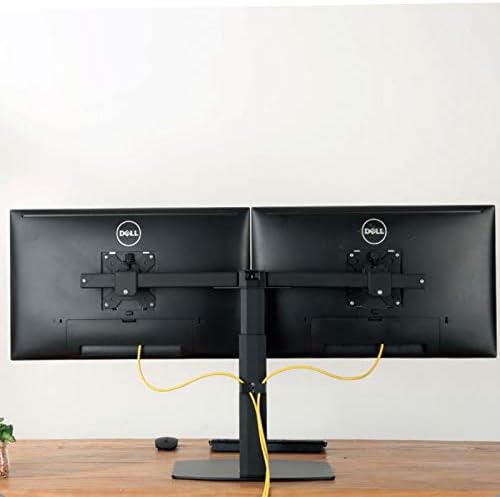
Billede 4.4: Bagside view illustrating cable management with monitors mounted.
5. Betjeningsvejledning
The Ewent EW1538 offers various adjustments for optimal viewkomfort.
- Højdejustering: Gently push or pull the monitor up or down to adjust its height. The gas spring mechanism will hold it in place.
- Justering af hældning: Tilt the monitor screen up or down to reduce glare and find your preferred viewvinkel.
- Drejejustering: Drej skærmen til venstre eller højre for at dele din skærm eller justere din viewing stilling.
- Rotation: Drej skærmen 360 grader for at skifte mellem liggende og stående retning.

Image 5.1: Monitors adjusted to different orientations (landscape and portrait).
6. Vedligeholdelse
Regelmæssig vedligeholdelse sikrer din skærmbeslags levetid og korrekte funktion.
- Rensning: Rengør holderen med en blød kludamp klud. Undgå slibende rengøringsmidler eller opløsningsmidler.
- Tjek forbindelser: Kontrollér regelmæssigt alle skruer og forbindelser for at sikre, at de forbliver fastspændte. Efterspænd om nødvendigt.
- Gasfjeder: The gas spring is designed for long-term use and generally requires no maintenance. If adjustment becomes difficult, re-check the tension setting.
7. Fejlfinding
If you encounter issues with your monitor mount, refer to the following common solutions:
| Problem | Mulig årsag | Løsning |
|---|---|---|
| Overvåg hængninger eller fald | Gasfjederens spænding er for lav til skærmens vægt. | Øg gasfjederens spænding ved at dreje justeringsskruen med uret. |
| Monitor floats up too easily | Gasfjederens spænding er for høj til skærmens vægt. | Reducer gasfjederens spænding ved at dreje justeringsskruen mod uret. |
| Monitors are not level | Minor height discrepancy between arms or VESA plates. | Adjust the individual VESA plate height or arm tilt to level the monitors. |
| Mount føles ustabil | Base screws are loose or desk is not sturdy. | Ensure all assembly screws are tightened. Verify desk stability. |
8. Specifikationer
- Model: EW1538
- Mærke: Ewent
- Skærmstørrelseskompatibilitet: 13-27 tommer
- Vægt kapacitet: 2 - 7 kg (4.4 - 15.4 lbs) per monitor
- VESA-kompatibilitet: 75x75mm, 100x100mm
- Bevægelse: Height adjustment (gas spring), Tilt (up to 15 degrees), Swivel, 360° Rotation
- Materiale: Holdbar metal- og plastkonstruktion
- Farve: Sort
- Produktvægt: Cirka 6 kg (13.2 lbs)
9. Garanti og support
For warranty information or technical support, please refer to the documentation provided with your purchase or visit the official Ewent webKontaktoplysninger til kundeservice kan typisk findes der.