
Indledning
Welcome and thank you for choosing the Umax Webcam W5. This manual provides essential information for setting up, operating, maintaining, and troubleshooting your webcam. Please read it carefully before use to ensure proper functionality and longevity of your device.
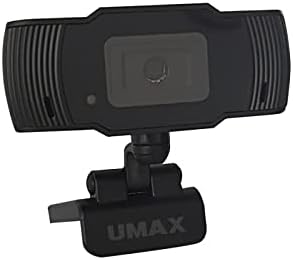
Billede: Forside view of the Umax W5 Webcam. This image displays the main unit of the webcam, highlighting its lens and overall design.
1. Opsætning
1.1 Pakkens indhold
- Umax W5 Webcam
- Spejl
1.2 Systemkrav
Umax W5 Webcam is compatible with most operating systems that support standard USB webcams, including Windows, macOS, and Linux distributions.
1.3 Tilslutning af Webcam
- Fold ud webcam's integrated clip/stand.
- Placer webcam securely on top of your monitor, laptop screen, or a flat surface.
- Tilslut USB-kablet fra webcam til en ledig USB-port på din computer.
- De webcam should be automatically recognized by your operating system. No additional drivers are typically required for basic functionality.
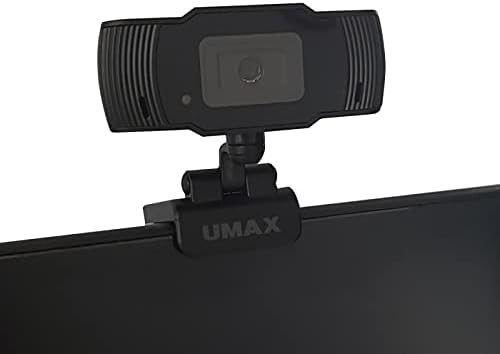
Image: Umax W5 Webcam mounted on top of a computer monitor. This image shows the webcam securely positioned on the upper edge of a computer monitor, demonstrating its typical mounting configuration.
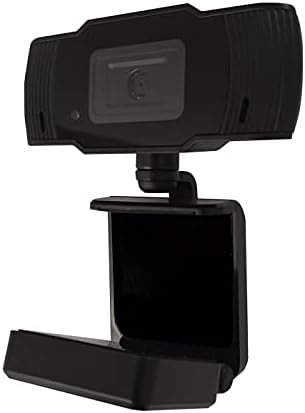
Image: Umax W5 Webcam with its adjustable clip/stand unfolded. This image displays the webcam with its integrated clip fully extended, illustrating how it can be adjusted to fit various monitor thicknesses or stand independently on a flat surface.
2. Betjening af Webcam
2.1 Grundlæggende funktionalitet
Once connected, the Umax W5 Webcam is ready for use with various video conferencing applications, streaming software, and other programs that utilize a webcam.
2.2 Brug med applikationer
- Open your desired application (e.g., Zoom, Skype, OBS Studio).
- Navigate to the application's settings or preferences menu.
- Select "Umax W5 Webcam" as your primary video input device.
- Adjust video settings such as resolution or frame rate within the application if these options are available.
2.3 Manuel fokus
Umax W5 Webcam features manual focus. To adjust the focus, gently rotate the lens ring located around the camera lens until the image displayed on your screen appears clear and sharp.
3. Vedligeholdelse
3.1 Rengøring af linsen
To ensure optimal image quality, periodically clean the webcam linse.
- Use a soft, lint-free cloth specifically designed for optical surfaces.
- Avoid abrasive materials or harsh chemical cleaners, as these can damage the lens coating.
- Tør forsigtigt linsen af i en cirkulær bevægelse for at fjerne støv eller pletter.
3.2 Opbevaring
Når den ikke er i brug, skal du opbevare den webcam in a clean, dry place away from extreme temperatures, high humidity, and direct sunlight to prevent damage.
4. Fejlfinding
4.1 WebKamera ikke fundet
- Sørg for, at USB-kablet er korrekt tilsluttet til begge webcam and an active USB port on your computer.
- Prøv at forbinde webkameraet til en anden USB-port på din computer.
- Genstart din computer.
- Tjek dit operativsystems Enhedshåndtering (Windows) eller Systemoplysninger (macOS) for at se, om webkameraet er angivet.
4.2 Dårlig billedkvalitet
- Adjust the manual focus ring on the webcam until the image is clear.
- Ensure adequate lighting in your environment. Poor lighting can significantly affect image quality.
- Rengør webkamlinsen som beskrevet i afsnittet Vedligeholdelse.
- Check the video settings within your application (e.g., resolution, frame rate) to ensure they are set appropriately.
5. Specifikationer
| Feature | Detalje |
|---|---|
| Mærke | Umax |
| Modelnavn | W5 |
| Varemodelnummer | W5 |
| Farve | Sort |
| Pakkedimensioner | 6.18 x 3.43 x 1.89 tommer |
| Varens vægt | 5.6 ounce |
| Linsetype | Zoom |
| Fokus Type | Manuel fokus |
| Billedstabilisering | Ingen |
| Batterier | 2 AA batterier påkrævet. (inkluderet) |
| Inkluderede komponenter | Spejl |
| Dato først tilgængelig | 14. september 2020 |
| Fabrikant | Umax |
6. Garanti og support
For warranty information and technical support, please refer to the official Umax webwebstedet eller kontakt deres kundeservice direkte. Det anbefales at gemme din købskvittering som købsbevis i tilfælde af garantikrav.
Fabrikant: Umax
Dato først tilgængelig: 14. september 2020


