
1. Introduktion
Tak, fordi du har valgt Sinopé TH1310WF Smart Wi-Fi-termostaten. Denne enhed er designet til at give præcis og effektiv kontrol over dit gulvvarmesystem, hvilket forbedrer komforten og energibesparelserne. Den integreres problemfrit med forskellige smart home-platforme og tilbyder praktisk kontrol via mobilapplikationer og stemmekommandoer.
Denne manual indeholder detaljerede instruktioner til installation, betjening og vedligeholdelse af din TH1310WF-termostat. Læs den grundigt inden installation, og gem den til senere brug.

Figur 1: Sinopé TH1310WF Smart Wi-Fi-termostat
Billedet viser forsiden af Sinopé TH1310WF-termostaten, en hvid rektangulær enhed med et sort digitalt display, der viser tid, indetemperatur og udetemperatur. Under skærmen er Sinopé-logoet synligt sammen med to cirkulære knapper.
2. Sikkerhedsoplysninger
ADVARSEL: Risiko for elektrisk stød. Dette produkt skal installeres af en kvalificeret elektriker i overensstemmelse med lokale og nationale el-forskrifter. Afbryd strømmen ved afbryderen før installation eller vedligeholdelse.
- Sørg for, at strømforsyningen er SLUK, før du håndterer ledninger.
- Installer ikke termostaten med våde hænder eller mens du står på våde overflader.
- Denne termostat er kun beregnet til indendørs brug.
- Kontroller, at termostatens volumentage og wattage-klassificeringerne matcher kravene til dit varmesystem (240V, maks. 3600W).
3. Produktet er slutview
3.1 Nøglefunktioner
- Ingen hub påkrævet: Forbinder direkte til dit Wi-Fi-netværk.
- Kompatibilitet med gulvvarme: Fungerer med varmekabler og varmekabelmåtter. Inkluderer en 15 meter lang gulvføler.
- Hjælpeudgang: Har en anden udgang til styring af et ekstra varmesystem eller tilslutning af op til 10 udvidelsesenheder (TR1310) til systemer over 15 A.
- Smart Home Integration: Kompatibel med Apple HomeKit, Amazon Alexa, Google Home og Neviweb.
- Neviweb App: Tilbyder avancerede funktioner såsom automatiseringer, scener, geofencing og energirapporter i realtid.

Figur 2: Kompatibilitet med Smart Home-platforme
Dette billede viser Sinopé TH1310WF-termostaten sammen med logoer fra kompatible smart home-platforme: Neviweb, SmartThings, Apple HomeKit, Amazon Alexa og Google Home, hvilket fremhæver dens alsidige integrationsmuligheder.
3.2 Komponenter
- TH1310WF termostatenhed
- 15-fods gulvsensor
- Monteringsskruer
4. Opsætning
4.1 Installation og ledningsføring
Installation af TH1310WF-termostaten involverer elektrisk ledningsføring og bør kun udføres af en kvalificeret elektriker. Sørg for, at strømmen er afbrudt ved hovedafbryderen, før du påbegynder nogen form for ledningsføring.
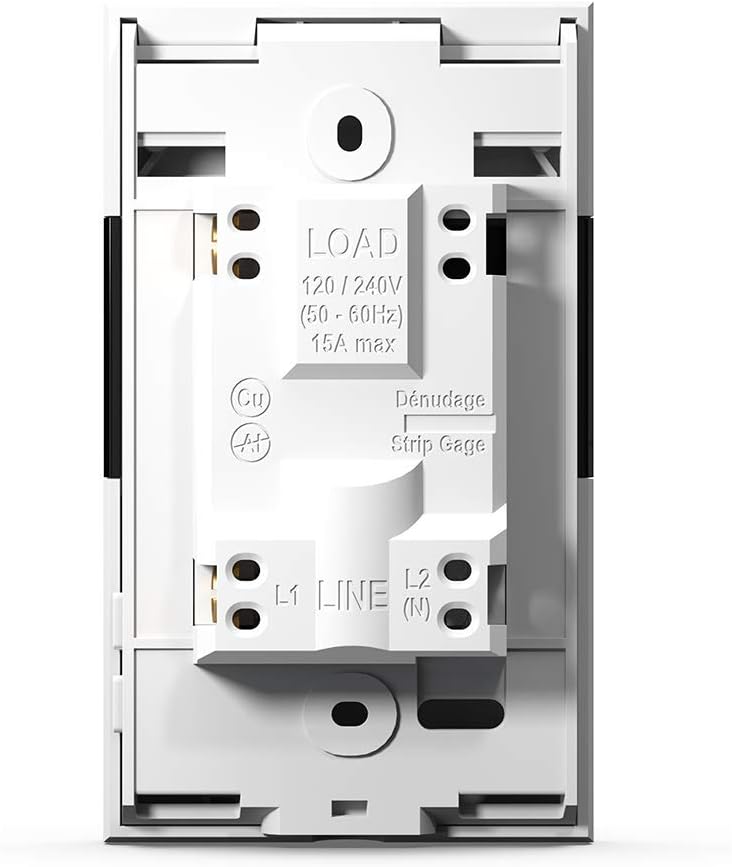
Termostaten er designet til en 240V AC strømkilde og kan håndtere op til 3600 watt. Tilslut varmekablerne eller måtterne til LOAD-terminalerne og strømforsyningen til LINE-terminalerne. Den medfølgende gulvføler skal installeres i varmemåtteområdet for at måle gulvtemperaturen nøjagtigt.

Figur 3: Termostatens ledningsterminaler
Dette billede viser bagsiden af Sinopé TH1310WF-termostaten, hvor ledningsterminalerne LOAD (120/240V, 15A maks.) og LINE (L1, L2(N)) fremhæves. En afisoleringsstrimmel er også synlig for korrekt ledningsforberedelse.

Figur 4: Termostatens bagpanel og sensorporte
Billedet viser bagpanelet på Sinopé TH1310WF-termostaten, der viser lovgivningsmæssige oplysninger (FCC, IC, cETLus-certificering) samt tilslutningsportene til hjælpeenheden (Aux 1, Aux 2) og sensoren (Sonde).
4.2 Indledende konfiguration og Wi-Fi-forbindelse
Tænd termostaten efter den fysiske installation. Følg vejledningen på skærmen for at indstille dato, klokkeslæt og den indledende driftstilstand. For at aktivere smarte funktioner skal du tilslutte termostaten til dit Wi-Fi-netværk.
- Download Neviweb app fra din smartphones appbutik (tilgængelig til iOS og Android).
- Lav en Neviweb konto eller log ind, hvis du allerede har en.
- Følg instruktionerne i appen for at tilføje din nye TH1310WF-termostat til din konto. Dette indebærer typisk at sætte termostaten i parringstilstand og tilslutte den til dit Wi-Fi-hjemmenetværk.
5. Betjening
5.1 Grundlæggende kontrol på enheden
Termostaten har et tydeligt LCD-display og to fysiske knapper til grundlæggende betjening. Du kan justere den indstillede temperatur, skifte mellem driftstilstande (f.eks. Manuel, Program) og view aktuelle temperaturaflæsninger direkte på enheden.
5.2 Neviweb App kontrol
Nevienweb app'en giver omfattende kontrol og avancerede funktioner til din termostat:
- Fjernbetjening: Juster indstillinger hvor som helst.
- Planlægning: Opret brugerdefinerede varmeplaner til forskellige tidspunkter af dagen og ugen.
- Automatiseringer: Opsæt udløsere og handlinger baseret på tidsplaner eller andre begivenheder.
- Scener: Aktiver personlige stemninger med et enkelt tryk.
- Geofencing: Juster automatisk varmen baseret på din afstand til hjemmet.
- Energirapporter: Overvåg dit energiforbrug og dine besparelser i realtid.
- Administration af flere lokationer: Styr termostater i flere ejendomme fra én konto.

Figur 5: Næviweb Liste over appsenheder
Dette billede viser en smartphone-skærm, der viser Neviweb app-grænsefladen, som viser forskellige tilsluttede smart-enheder og deres aktuelle status, så brugerne kan administrere deres smart home-økosystem.

Figur 6: Næviweb Administration af flere lokationer i apps
Billedet viser en smartphone-skærm med Neviweb appen åben i sektionen 'Lokationer', der viser ikoner for 'Hjem', 'Hytte' og andre ejendomme, hvilket illustrerer muligheden for at administrere flere lokationer fra en enkelt konto.
Figur 7: Næviweb App-energirapport
Dette billede viser en smartphone, der viser Neviweb appens energirapportfunktion, der viser et søjlediagram over energiforbruget over tid (24 timer, 30 dage, 24 måneder) og estimerede omkostninger, så brugerne kan spore deres energibesparelser.
5.3 Stemmekontrol
TH1310WF-termostaten kan styres ved hjælp af stemmekommandoer via kompatible smarte assistenter:
- Amazon Alexa: "Alexa, indstil termostaten i stuen til 72 grader."
- Google Home: "Hey Google, hvad er temperaturen i køkkenet?"
- Apple HomeKit: Brug Siri til at styre din termostat, når den er tilføjet til HomeKit.

Figur 8: Integration af stemmeassistent
Billedet viser en Amazon Echo Dot smarthøjttaler på en køkkenhylde, der illustrerer, hvordan brugere kan interagere med deres termostat ved hjælp af stemmekommandoer via kompatible stemmeassistenter.
6. Vedligeholdelse
Sinopé TH1310WF termostaten kræver minimal vedligeholdelse. Hold enheden ren ved at tørre den af med en blød, tør klud. Brug ikke slibende rengøringsmidler eller opløsningsmidler. Sørg for, at ventilationsåbningerne er fri for støvophobning for at opretholde korrekt drift.
Der er ingen dele inde i termostaten, som brugeren kan servicere. Eventuelle reparationer skal udføres af kvalificeret personale.
7. Fejlfinding
| Problem | Mulig årsag | Løsning |
|---|---|---|
| Termostatdisplayet er tomt. | Ingen strømforsyning. | Kontroller afbryderen. Sørg for korrekt ledningsforbindelse. |
| Kan ikke oprette forbindelse til Wi-Fi. | Forkert Wi-Fi-adgangskode; Termostat for langt fra routeren; Routerproblemer. | Bekræft Wi-Fi-adgangskoden. Flyt termostaten tættere på routeren, eller brug en Wi-Fi-forstærker. Genstart routeren. |
| Varmesystemet reagerer ikke. | Termostat i OFF-tilstand; Ledningsproblem; Fejl i varmesystemet. | Kontrollér termostattilstand. Bekræft ledningsføringen. Kontakt en kvalificeret elektriker eller HVAC-tekniker. |
| Upræcis temperaturaflæsning. | Gulvføleren er ikke korrekt installeret eller beskadiget. | Sørg for, at gulvføleren er korrekt placeret i varmemåtten. Undersøg, om føleren er beskadiget. |
8. Specifikationer
| Feature | Specifikation |
|---|---|
| Modelnummer | TH1310WF |
| Voltage | 240 volt |
| Wattage | 3600 watt |
| Strøm | 15A max |
| Forbindelse | Wi-Fi |
| Controller type | Amazon Alexa, Apple HomeKit, Google Assistant, Neviweb |
| Temperaturområde | 41 til 97 grader Fahrenheit |
| Inkluderede komponenter | Gulvsensor - 15 fod |
| Dimensioner | 4.8 x 2.83 x 1.02 tommer |
| Varens vægt | 13 ounce |
| Materiale | Plast |
| Display Type | LCD |
| Monteringstype | Vægmontering |
9. Garanti og support
9.1 Garantioplysninger
Sinopé TH1310WF Smart Wi-Fi-termostaten er dækket af en 3 års producentgaranti fra købsdatoen. Denne garanti dækker defekter i materialer og udførelse ved normal brug. Den dækker ikke skader som følge af forkert installation, ulykker, misbrug, misbrug eller uautoriserede ændringer.
Gem venligst dit købsbevis for garantikrav.
9.2 Kundesupport
For teknisk assistance, fejlfinding eller garantiforespørgsler, kontakt venligst Sinopé Technologies kundesupport:
- Webwebsted: www.sinopetech.com
- E-mail: support@sinopetech.com
- Telefon: Se kontaktsektionen på den officielle Sinopé webhjemmeside for regionale telefonnumre.
Når du kontakter support, bedes du have dit produktmodelnummer (TH1310WF) og købsdato klar.