
1. Introduktion
Thank you for choosing Senso Wireless Earbuds. These True Wireless Stereo (TWS) earphones are designed for an active lifestyle, featuring a secure fit, high-quality audio, and sweatproof construction. This manual will guide you through the setup, operation, and maintenance of your new earbuds.
2. Hvad er der i æsken
- Senso Wireless Earbuds (Left and Right)
- Bærbart opladningsetui
- USB opladningskabel
- Brugervejledning
- Flere størrelser af ørepropper
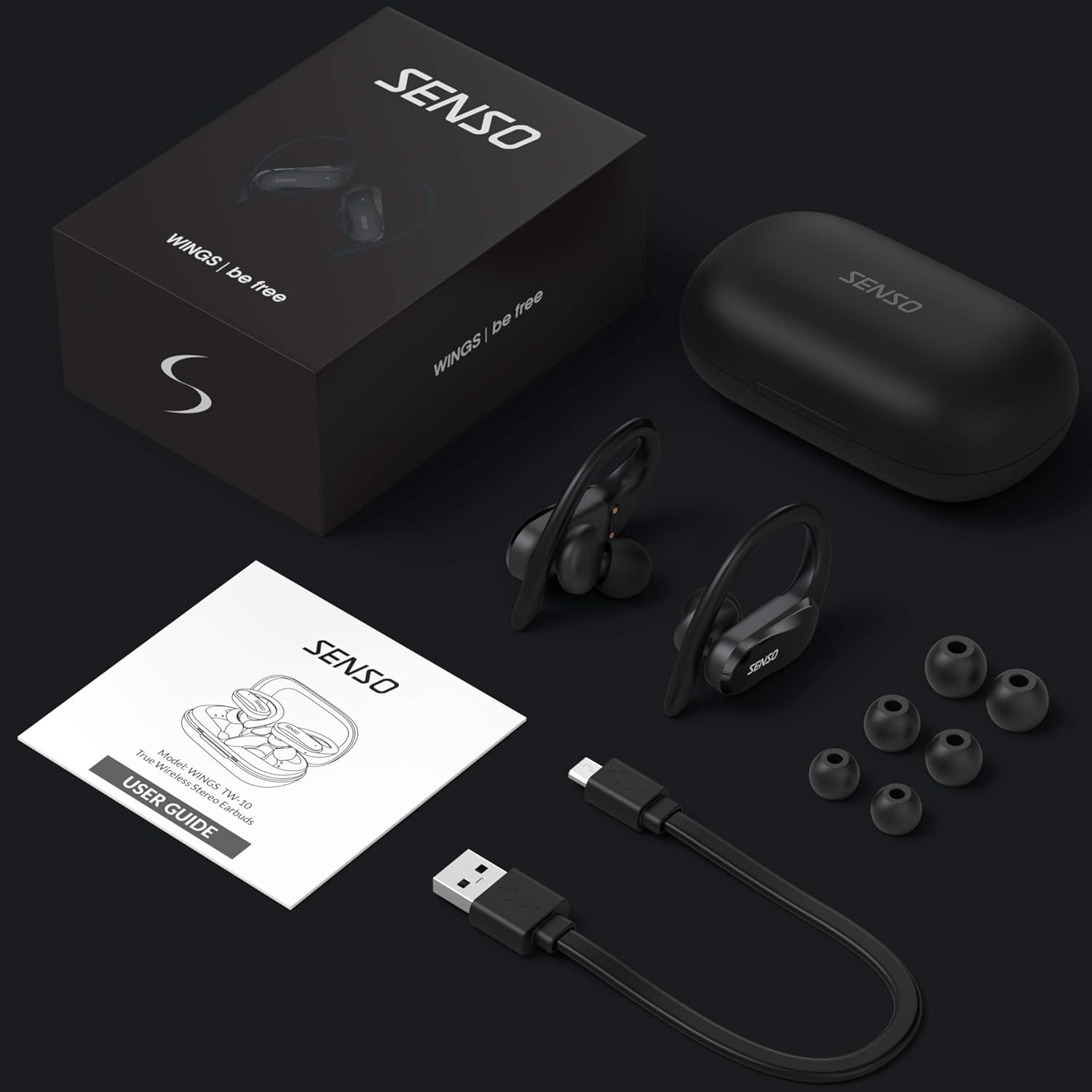
Image: The Senso Wireless Earbuds packaging, displaying the earbuds, charging case, user guide, USB charging cable, and various ear tip sizes.
3. Produktet er slutview
The Senso Wings TW10 earbuds are designed for comfort and performance, featuring advanced audio technology and a durable build.

Billede: En eksploderet view of the earbud, illustrating the 13mm dynamic driver responsible for delivering premium sound quality with intense bass and dynamic range.

Billede: En detaljeret view of the earbud's internal circuitry, emphasizing the Bluetooth 5.0 chipset and CVC 8.0 Noise Cancellation Technology for stable connection and clear audio.

Image: Two scenarios demonstrating the earbuds' versatility: one earbud in use for mono mode (e.g., driving) and both earbuds for dual mode (e.g., binaural calls).

Image: The earbuds are shown resisting water splashes, indicating their IPX6 waterproof rating, suitable for sweat, water, and rain.
4. Opsætning
4.1 Opladning af øretelefoner og etuiet
Before first use, fully charge the earbuds and the charging case. Place the earbuds into the charging case. Connect the USB charging cable to the case and a power source. The indicator lights on the case will show the charging status.
4.2 Indledende parring
- Sørg for, at dine ørepropper er opladet.
- Åbn opladningsetuiet. Ørepropperne tændes automatisk og går i parringstilstand.
- Aktiver Bluetooth på din enhed (smartphone, tablet osv.).
- Søg efter available Bluetooth devices and select "SENSO Wings TW10" from the list.
- Når der er oprettet forbindelse, hører du en lydmeddelelse, og indikatorlamperne på øretelefonerne skifter.

Image: The earbuds are shown connecting to a smartphone, demonstrating the simple and fast pairing process upon removal from the charging case.
Video: An official product video demonstrating the features and setup of the Senso WINGS Ultra Durable Premium Audio Wireless Earbuds.
5. Betjeningsvejledning
5.1 Sådan tager du ørepropperne på
Place the earbuds in your ears and adjust the ear hooks for a secure and comfortable fit. The 60-degree twist lock system ensures they stay in place during physical activity.

Image: A user demonstrating the secure fit of the earbuds with the 60-degree twist lock system, ideal for sports and exercise.
5.2 Grundlæggende kontroller
The earbuds feature touch-sensitive controls for media playback and call management. Refer to the detailed user guide included in the box for specific touch commands for functions such as play/pause, skip track, answer/end call, and voice assistant activation.
5.3 Mono or Dual Mode
You can use either earbud independently (mono mode) or both together (dual mode) for a stereo audio experience. This flexibility allows for awareness of your surroundings when needed.
5.4 Opkaldsfunktioner
Each earbud is equipped with a microphone, enabling binaural calls for clear communication. Use the touch controls to answer, end, or reject calls.
6. Vedligeholdelse
6.1 Rengøring
- Rengør regelmæssigt ørepropperne og opladningsetuiet med en blød, tør og fnugfri klud.
- Fjern ørepropperne, og rengør dem med mild sæbe og vand. Tør dem derefter grundigt, inden de sættes på igen.
- Undgå at bruge slibende rengøringsmidler eller opløsningsmidler.
6.2 Opbevaring
- Opbevar øretelefonerne i deres opladningsetui, når de ikke er i brug for at beskytte dem og holde dem opladet.
- Opbevar enheden et køligt, tørt sted, væk fra ekstreme temperaturer og direkte sollys.
7. Fejlfinding
7.1 Parringsproblemer
- Sørg for, at begge øretelefoner er fuldt opladede.
- Sluk Bluetooth på din enhed, og tænd den derefter igen.
- Forget the device from your Bluetooth list and attempt to pair again.
- If only one earbud connects, try resetting the earbuds (refer to the full user guide for specific reset instructions).
7.2 Ingen lyd eller lav lydstyrke
- Kontroller lydstyrkeniveauerne på både din enhed og ørepropperne.
- Sørg for, at ørepropperne sidder korrekt i dine ører.
- Rengør eventuelt snavs fra øreproppernes højttalere og ørepropper.
7.3 Opladningsproblemer
- Kontroller, at opladningskablet er korrekt tilsluttet til både etuiet og strømkilden.
- Sørg for, at opladningskontakterne på ørepropperne og inde i etuiet er rene og fri for blokeringer.
- Prøv et andet opladningskabel eller en anden strømadapter.
8. Specifikationer
| Feature | Detalje |
|---|---|
| Modelnavn | Wings TW10 |
| Forbindelsesteknologi | Bluetooth 5.0, Trådløs |
| Trådløs kommunikationsteknologi | Bluetooth |
| Støjkontrol | Aktiv støjreduktion |
| Vandmodstandsniveau | Vandtæt (IPX6) |
| Batterilevetid (ørepropper) | 8 timer |
| Samlet spilletid (med etui) | Op til 30 timer |
| Audio driver størrelse | 10 millimeter |
| Impedans | 32 Ohm |
| Kontroltype | Mediekontrol |
| Kontrolmetode | Fjern |
| Øreplacering | In Ear |
| Formfaktor | In Ear |
| Materiale | Silikone |
| Varens vægt | 7 ounce |

Image: The earbuds and charging case illustrating the extended playtime: 6 hours for the earbuds and up to 30 hours total with the portable charging case.
9. Garanti og support
Senso offers a standard warranty for its products. Additionally, you may be eligible for an extended warranty.
9.1 Udvidet garanti
To convert to a two-year extended warranty, visit www.sensoshop.com/warranty. This must be claimed within 7 days of receiving your product.
9.2 Kundesupport
For any product-related issues or inquiries, please contact Senso customer support. Details can be found on the warranty card included in your product packaging or on the official Senso webwebsted.