
1. Introduktion
The Amcrest AMCPFA134-B Waterproof Junction Box is designed to provide a secure and weather-resistant enclosure for the wiring and connections of compatible Amcrest Bullet Cameras. This junction box helps protect cables from environmental elements and tampering, ensuring a clean and professional installation.
2. Produktfunktioner
- Kompatibilitet: Fits most Amcrest Bullet Cameras with a 1.3-inch / 3.5-inch diameter.
- Kabelstyring: Designed for hiding wires and connectors, offering rear and bottom access for cable routing.
- Vandtæt Design: Provides a waterproof enclosure to protect internal connections.
- Holdbar konstruktion: Made from Aluminum and SECC for long-lasting performance.
3. Pakkens indhold
Kontroller, at alle komponenter er til stede før installation:
- Amcrest AMCPFA134-B Waterproof Junction Box
- Monteringsskruer og vægdyvler
- Gummi pakning
4. Opsætning og installation
Follow these steps to properly install your Amcrest AMCPFA134-B Waterproof Junction Box with a compatible bullet camera.
- Forberedelse: Ensure the mounting surface is clean and capable of supporting the weight of the junction box and camera.
- Markering af borehuller: Place the junction box on the desired mounting location. Use a pencil or marker to mark the positions for the mounting screws.
- Boring: Drill pilot holes at the marked locations. If mounting on masonry or concrete, insert the provided wall plugs into the drilled holes.
- Kabelføring: Route the camera's cables through the designated cable entry points on the junction box (rear or bottom access).
- Mounting the Junction Box: Secure the junction box to the mounting surface using the provided screws. Ensure it is firmly attached.
- Tilslutning af kameraet: Connect the camera's cables inside the junction box. Ensure all connections are secure and properly insulated.
- Montering af kameraet: Mount the compatible Amcrest bullet camera onto the junction box. The junction box has pre-drilled holes designed to align with various Amcrest bullet camera bases. Secure the camera using its mounting screws.
- Forsegling: Ensure the rubber gasket is properly seated between the junction box and the camera base to maintain a waterproof seal.
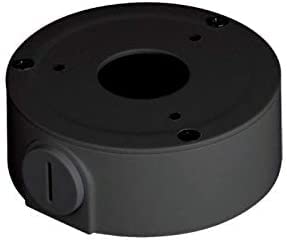
Image of the Amcrest AMCPFA134-B Waterproof Junction Box, designed for secure camera mounting and cable management.
5. Betjeningsvejledning
The AMCPFA134-B is a passive accessory designed to house and protect camera wiring. Once installed, it requires no direct operation. Its function is to provide a secure and waterproof environment for your camera's connections.
6. Vedligeholdelse
To ensure the longevity and effectiveness of your junction box:
- Periodisk eftersyn: Annually inspect the junction box for any signs of wear, damage, or loose connections.
- Rensning: Gently wipe the exterior of the junction box with a damp klud til at fjerne snavs eller snavs. Undgå at bruge skrappe kemikalier.
- Seglintegritet: Check the rubber gasket for cracks or deterioration, especially in harsh weather conditions, to ensure the waterproof seal remains intact.
7. Fejlfinding
If you experience issues with your camera system after installing the junction box, consider the following:
- No Power/Signal: Carefully open the junction box and verify that all cable connections are secure and correctly wired. Ensure no wires are pinched or damaged.
- Vandindtrængning: If moisture is found inside the box, check the rubber gasket for proper seating and any damage. Ensure all screws are tightened evenly to create a complete seal.
- Løs montering: If the junction box feels loose, re-tighten the mounting screws. If the wall plugs are compromised, consider using new ones or relocating the box slightly.
8. Specifikationer
| Attribut | Detalje |
|---|---|
| Modelnummer | AMCPFA134-B |
| Mærke | Amcrest |
| Materiale | Aluminum & SECC |
| Farve | Sort |
| Finish Type | Mat |
| Installationstype | Indskruning |
| Varens vægt | 0.29 kilo |
| UPC | 854088008256 |
| GTIN | 854088008256 |
9. Garanti og support
Garanti: This product comes with a 1-Year Warranty provided by Amcrest.
Støtte: For technical assistance, troubleshooting, or warranty claims, please visit the official Amcrest support website or contact their customer service directly. Refer to the Amcrest webwebsted for de mest opdaterede kontaktoplysninger og supportressourcer.