
1. Introduktion
This user manual provides essential information for the safe and efficient operation of your Philips Audio HTL1020/94 Soundbar. Please read these instructions carefully before using the product and retain them for future reference.
The Philips HTL1020/94 is a 20W soundbar designed to enhance your audio experience with versatile connectivity options including Bluetooth 5.0, AUX, and USB. Its low-rise profile allows for flexible placement in various home entertainment setups.

Billede 1.1: Forside view of the Philips HTL1020/94 Soundbar.
2. Sikkerhedsoplysninger
Følg altid grundlæggende sikkerhedsforanstaltninger, når du bruger dette produkt, for at reducere risikoen for brand, elektrisk stød og personskade.
- Udsæt ikke soundbaren for regn eller fugt.
- Bloker ikke nogen ventilationsåbninger.
- Sørg for korrekt strømforsyning voltage as indicated on the product.
- Keep the soundbar away from heat sources and direct sunlight.
- Brug kun tilbehør/tilbehør specificeret af producenten.
3. Hvad er der i æsken
Pak forsigtigt indholdet ud, og sørg for, at alle genstande er til stede:
- Philips Audio HTL1020/94 Soundbar
- Strømledning
- Hurtig startvejledning
- Fjernbetjening
- Brugervejledning (dette dokument)
- Garantikort
4. Produktet er slutview
4.1. Kontroller og indikatorer
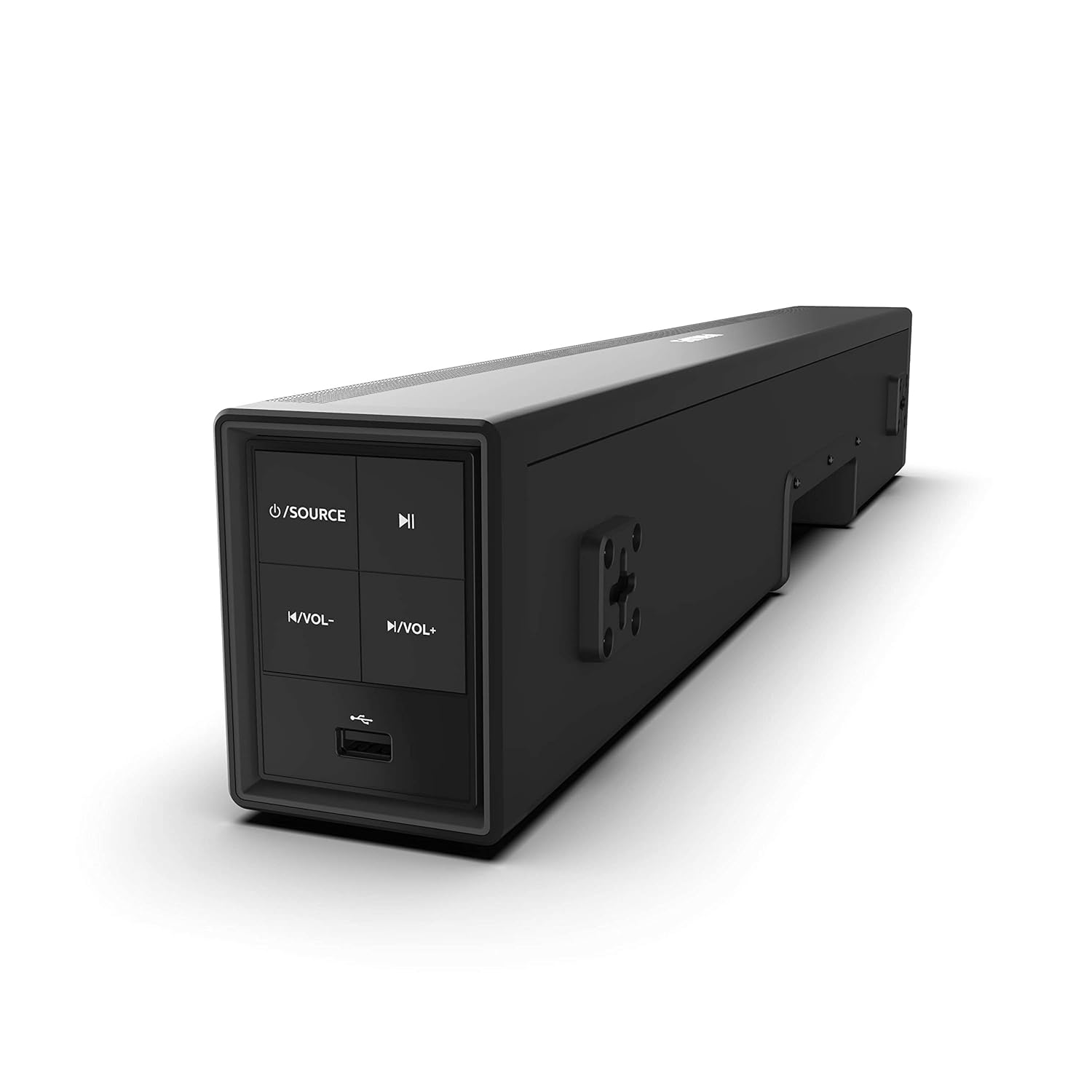
Image 4.1: Side panel controls of the Philips HTL1020/94 Soundbar.
- Tænd/sluk-/kildeknap: Press to turn on/off or switch input sources (Bluetooth, AUX, USB).
- Afspil/pause knap: Styrer medieafspilning i Bluetooth- eller USB-tilstand.
- Lydstyrke ned-knap: Sænker lydstyrken.
- Lydstyrke op-knap: Øger lydstyrken.
- USB-port: Til afspilning af lyd fra USB-lagerenheder.
4.2. Bagpaneltilslutninger
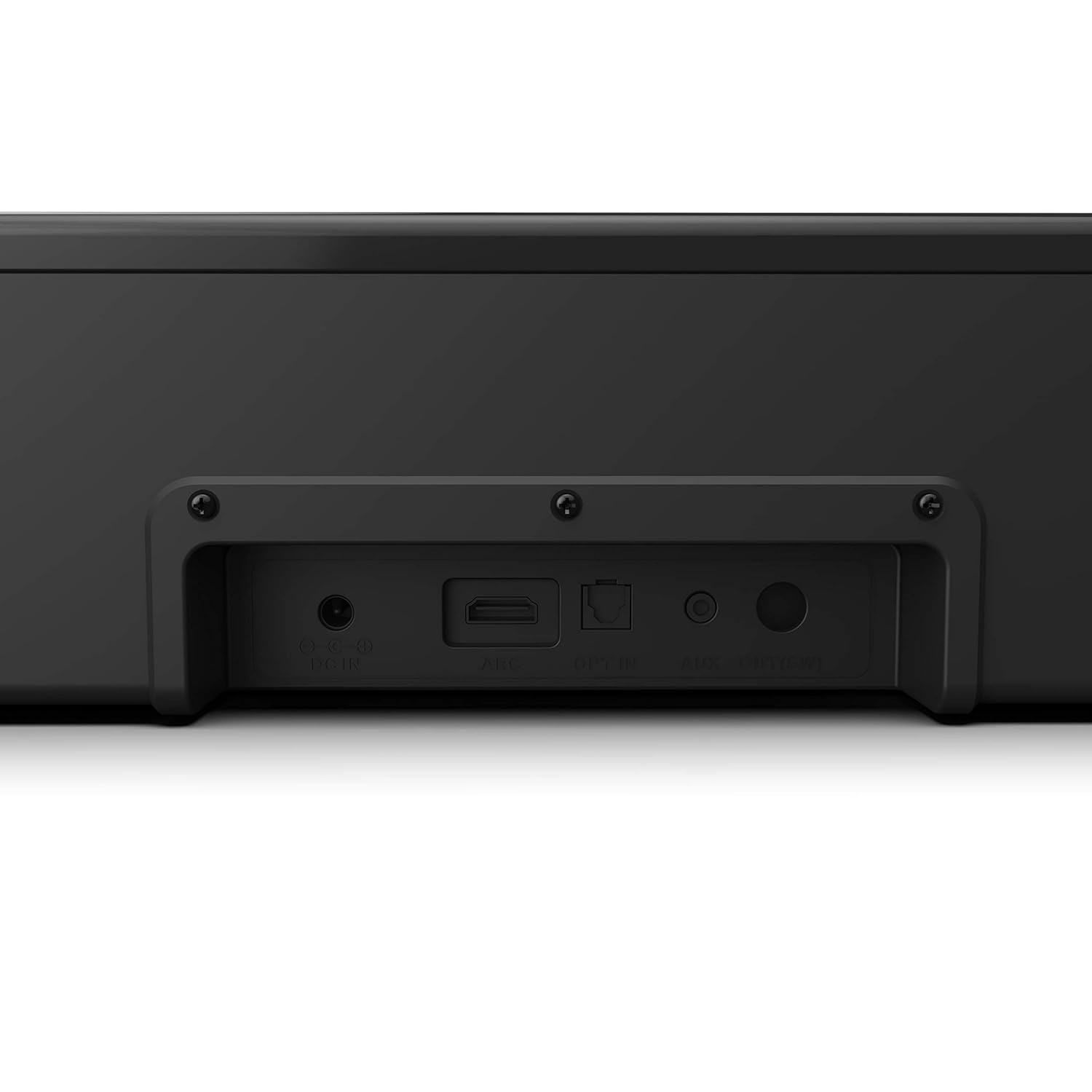
Image 4.2: Rear panel connections of the Philips HTL1020/94 Soundbar.
- DC IN: Tilslut strømadapteren her.
- ARC (HDMI): Connect to a TV's HDMI ARC port for audio input.
- TILMELD: Connect to a TV or audio device's optical digital output.
- AUX IN: Connect to an audio device's analog output using a 3.5mm audio cable.
5. Opsætning og installation
5.1. Placering
The soundbar can be placed on a tabletop or mounted on a wall. Ensure it is positioned centrally in front of your television for optimal sound distribution.
- Bordpladeplacering: Place the soundbar on a stable, flat surface below your TV.
- Vægmontering: Use appropriate wall mounting hardware (not included) and follow the instructions provided in the Quick Start Guide for secure installation.
5.2. Tilslutning til strøm
- Tilslut netledningen til DC IN port on the rear of the soundbar.
- Sæt den anden ende af netledningen i en stikkontakt.
5.3. Tilslutning af lydkilder
Vælg en af følgende metoder til at tilslutte din lydkilde:
5.3.1. Bluetooth-forbindelse
- Tryk på Strømkilde button on the soundbar or remote control to select Bluetooth mode. The indicator light will flash.
- Aktiver Bluetooth på din mobilenhed, og søg efter tilgængelige enheder.
- Select "Philips HTL1020/94" from the list.
- Når den er parret, holder indikatorlampen op med at blinke og forbliver konstant.
5.3.2. AUX-forbindelse
- Connect a 3.5mm audio cable (not included) from your audio device's headphone jack or AUX output to the AUX IN port på soundbaren.
- Tryk på Strømkilde -knappen for at vælge AUX-tilstand.
5.3.3. USB-forbindelse
- Insert a USB storage device (e.g., USB flash drive) into the USB-port on the side panel of the soundbar.
- Tryk på Strømkilde button to select USB mode. The soundbar will automatically begin playing compatible audio files.
5.3.4. HDMI ARC-forbindelse
- Connect an HDMI cable (not included) from your TV's HDMI ARC port to the BUE port på soundbaren.
- Sørg for, at dit tv's HDMI ARC-funktion er aktiveret i dets indstillinger.
- Tryk på Strømkilde button to select ARC mode.
5.3.5. Optisk forbindelse
- Connect an optical cable (not included) from your TV's optical digital output to the TILMELD port på soundbaren.
- Tryk på Strømkilde button to select OPTICAL mode.
6. Betjening
6.1. Tænd/sluk
Tryk på Strømkilde knappen på soundbaren eller fjernbetjeningen for at tænde eller slukke enheden.
6.2. Kildevalg
Tryk gentagne gange på Strømkilde button on the soundbar or the remote control to cycle through available input sources: Bluetooth, AUX, USB, ARC, Optical.
6.3. Lydstyrkekontrol
Brug Lydstyrke op og Lydstyrke ned buttons on the soundbar or the remote control to adjust the audio level.
6.4. Bluetooth Pairing (Re-pairing)
If the soundbar is not automatically connecting to a previously paired device, or if you wish to pair a new device:
- Ensure the soundbar is in Bluetooth mode (indicator light flashing).
- On your device, go to Bluetooth settings and select "Philips HTL1020/94" to connect.
7. Vedligeholdelse
For at sikre din soundbars levetid og optimale ydeevne skal du følge disse vedligeholdelsesretningslinjer:
- Rensning: Brug en blød, tør klud til at rengøre overfladen på soundbaren. Brug ikke flydende rengøringsmidler eller slibende materialer.
- Ventilation: Hold ventilationsåbningerne fri for at forhindre overophedning.
- Opbevaring: Hvis du opbevarer soundbaren i længere tid, skal du afbryde strømmen til den og opbevare den et køligt og tørt sted.
8. Fejlfinding
Hvis du støder på problemer med din soundbar, kan du se følgende almindelige problemer og løsninger:
| Problem | Mulig årsag | Løsning |
|---|---|---|
| Ingen strøm | Netledning ikke tilsluttet; Strømudtag ikke aktivt | Ensure power cord is securely connected; Test outlet with another device |
| Ingen lyd | Incorrect source selected; Volume too low; Cables not connected | Select correct input source; Increase volume; Check all audio cables |
| Bluetooth-parring mislykkes | Soundbaren er ikke i parringstilstand; Enheden er for langt væk; Interferens | Ensure soundbar is in Bluetooth mode; Move device closer; Restart both devices |
| Problemer med USB-afspilning | Uforenelig file format; USB device not recognized | Sørg for lyd files are compatible (e.g., MP3); Try a different USB device |
9. Specifikationer
Technical specifications for the Philips Audio HTL1020/94 Soundbar:
| Feature | Specifikation |
|---|---|
| Modelnavn | HTL1020/94 |
| Højttaler type | Soundbar |
| Lydudgangskanaler | 2.0 |
| Samlet udgangseffekt | 20 watt |
| Forbindelsesteknologi | Bluetooth 5.0, AUX, USB, HDMI ARC, Optical |
| Kontrolmetode | Berøring, fjernbetjening |
| Dimensioner (LxBxH) | 60 x 15 x 9.2 cm |
| Varens vægt | 2 kg |
| Strømkilde | Elektrisk med ledning |
| Signal-støjforhold | 55 dB |
| Inkluderede komponenter | Power cord, Quick Start Guide, Remote, User Manual, Warranty Card |
10. Garanti og support
Your Philips Audio HTL1020/94 Soundbar comes with a 1-year warranty. Please refer to the included Warranty Card for detailed terms and conditions.
For technical support or service inquiries, please contact Philips Audio customer service. Contact information can typically be found on the Philips Audio official webwebstedet eller på dit garantikort.