
Cuifati Cuifatix46an5kvtz-01
Mini LED Projector User Manual
Model: Cuifatix46an5kvtz-01 | Brand: Cuifati
Indledning
This Mini LED Projector is designed for versatile use in outdoor recreation, entertainment venues, and home theaters. Its compact and portable design allows for easy transport, enabling you to enjoy movies, videos, and games in various dark environments, whether at home, in a courtyard, or during travel and camping. It supports multiple input interfaces including HDMI, AV, VGA, USB, and SD Card, facilitating easy connection to a wide range of devices for high-definition image and video display. With support for up to 1080P HD displaying, you can experience clear and vibrant content anytime, anywhere.

Image: The Cuifati Mini LED Projector in use, projecting a vibrant movie scene onto a screen, with a remote control held by a hand in the foreground. This illustrates the projector's primary function and portability.
Pakkens indhold
Kontroller venligst, at alle nedenstående varer er inkluderet i din pakke. Hvis der mangler eller er beskadigede varer, bedes du kontakte kundesupport.
- 1 x Mini LED Projector
- 1 x Remote Control (Batterier medfølger ikke)
- 1 x Power Adapter (US/EU/UK/EU - specific to region)
- 1 x AV-kabel
- 1 x brugermanual

Image: A flat lay of the Cuifati Mini LED Projector and its accessories, including the projector unit, remote control, power adapter, and AV cable, laid out on a white surface. This visually confirms the items expected in the product package.
Video: An unboxing video demonstrating the contents of the Mini LED Projector package. It shows the projector, remote control, power adapter, and AV cable being removed from the box, providing a clear visual guide to what is included.
Produkt overview og funktioner
The Cuifati Mini LED Projector is engineered for optimal performance and user convenience. Key features include:
- Long-Life LED Light Source: Utilizes a 30,000-hour LED light source, which is harmless, radiation-free, and environmentally friendly.
- High Definition Display: Supports 720P and 1080P HD display, delivering clear and natural images and videos on a large screen.
- Høj lysstyrke: 1500 lumens brightness ensures stunning true color presentations with rich color and detail.
- Multiple Input Interfaces: Equipped with HDMI, USB, AV, VGA, and 3.5mm Earphone Port for broad compatibility.
- Justerbar Viewing erfaring: Manual focusing and adjustable aspect ratio (4:3) with a projection distance of 1.0-2.8 meters.
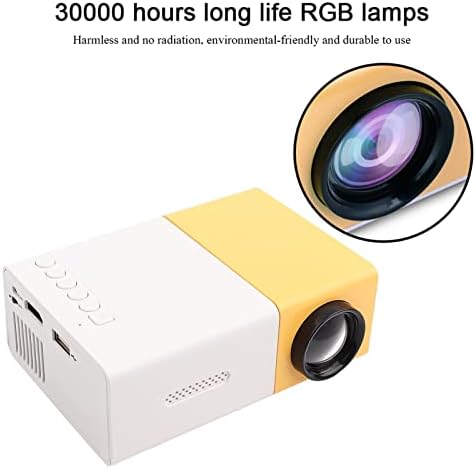
Billede: Et nærbillede view of the Mini LED Projector, emphasizing its lens and the text "30000 hours long life RGB lamps," indicating the durability and eco-friendliness of its light source.

Image: The Mini LED Projector shown with an overlay indicating "Support 1080P HD Displaying," illustrating its capability to project high-definition content for a clear viewoplevelse.

Image: A split image demonstrating the "1500lm High Brightness" of the projector, comparing a scene with common lumen to the brighter, more vibrant output of 1500 lumens, highlighting improved visual quality.
Opsætning
Follow these steps to set up your Mini LED Projector:
- Placering: Place the projector on a stable, flat surface. Ensure there is adequate ventilation around the unit.
- Strømtilslutning: Connect the power adapter to the projector's DC12V-1.5A input port and then plug it into a power outlet.
- Tilslutning af enheder:
- HDMI: Use an HDMI cable to connect your device (e.g., laptop, TV box, game console) to the projector's HDMI port.
- AV: Use the provided AV cable to connect devices with AV output to the projector's AV port.
- VGA: Connect devices with VGA output (e.g., desktop PC) to the projector's VGA port.
- USB: Indsæt et USB-drev i USB-porten for at afspille medier files direkte.
- Micro SD: Insert a Micro SD card into the Micro SD slot to play media files.
- Lydudgang: Connect external speakers or headphones to the 3.5mm Earphone Port for enhanced audio.
- Tænd: Tryk på tænd/sluk-knappen på projektoren eller fjernbetjeningen for at tænde enheden.

Image: A circular diagram illustrating the various input interfaces of the Mini LED Projector, including HDMI, AV, USB, and Micro SD, and the types of devices they can connect to, such as laptops, game consoles, and TV boxes.
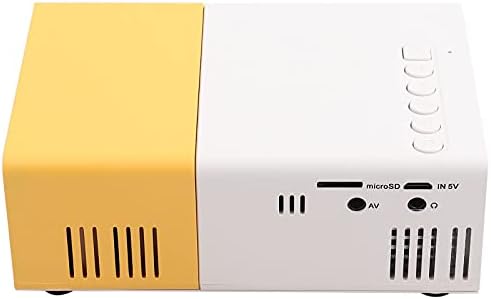
Billede: En detaljeret view of the back panel of the Mini LED Projector, clearly showing all available input ports including USB, Micro SD, AV, and the 3.5mm earphone jack, essential for understanding connectivity options.
Betjeningsvejledning
Once the projector is powered on and a device is connected, you can begin operating it:
- Kildevalg: Use the "Source" button on the remote control or the projector's control panel to select the correct input source (HDMI, AV, VGA, USB, Micro SD).
- Fokusjustering: Drej fokusringen på projektorlinsen, indtil det projicerede billede er klart og skarpt.
- Lydstyrkekontrol: Adjust the volume using the remote control or the projector's built-in controls.
- Media Playback (USB/Micro SD):
- Naviger gennem mapper og files using the remote control's arrow keys.
- Select the desired audio, video, or image file at spille.
- Supported formats include:
- Audio: MP3, WMA, OGG, AAG, FLAC, APE, WAV
- Image: JPEG, BMP, PNG
- Video: Supports Full Format Files
- Tekst: TXT
- Aspektforhold: The projector supports a 4:3 aspect ratio. Adjust your source device settings if necessary for optimal display.
Specifikationer
| Feature | Detalje |
|---|---|
| Mærke | Cuifati |
| Modelnummer | Cuifatix46an5kvtz-01 |
| Lyskilde | LED, 30,000 hours life |
| Indfødt opløsning | 320 x 240 pixels |
| Support opløsning | 720P, 1080P |
| Lysstyrke | 1500 lm |
| Kontrastforhold | 2800:1 |
| Fokuseringstilstand | Manuel fokusering |
| Visbare farver | 1.67M |
| Aspektforhold | 4:3 |
| Projektionsafstand | 1.0-2.8m |
| Projektionsskærmstørrelse | 10-60 tommer |
| Indgangseffekt | DC12V-1.5A |
| Dimensioner | Ca. 127 x 81.5 x 48.5 mm / 5 x 3.2 x 1.9 tommer |
| Vægt | 500g / 15.5 ounces |
| Forbindelsesteknologi | VGA, USB, HDMI |
| Særlige funktioner | Built-In Speaker, Lightweight, Built-In Media Player |
Opretholdelse
Korrekt vedligeholdelse sikrer projektorens levetid og optimale ydeevne:
- Rengøring af linsen: Brug en blød, fnugfri klud, der er specielt designet til optiske linser. Brug ikke slibende rengøringsmidler eller klude, der kan ridse linsen.
- Rengøring af ydersiden: Tør projektorens yderside af med en blød, tør klud. Ved genstridigt snavs kan du bruge en let tør klud.amp En klud kan bruges, men sørg for, at der ikke trænger fugt ind i enheden.
- Ventilation: Ensure the ventilation vents are clear of dust and obstructions to prevent overheating. Do not block the vents during operation.
- Opbevaring: Når projektoren ikke er i brug i længere perioder, skal den opbevares køligt og tørt, væk fra direkte sollys og ekstreme temperaturer.
- Sluk korrekt: Sluk altid projektoren ved hjælp af den dertil beregnede tænd/sluk-knap, og lad den køle af, før du tager stikket ud eller flytter den.
Fejlfinding
Hvis du støder på problemer med din projektor, kan du se følgende almindelige problemer og løsninger:
| Problem | Mulig årsag/løsning |
|---|---|
| Intet billede projiceret |
|
| Billedet er sløret |
|
| Ingen lyd |
|
| Fjernbetjening virker ikke |
|
| Projektoren overopheder og slukker |
|
Garanti og support
The Cuifati Mini LED Projector comes with a 90-day exchange warranty. For any product issues or support inquiries, please contact Cuifati customer service.

Image: The Cuifati brand logo, which may be used for identification and support contact.

Image: Text stating "CUIFATI 90-day warranty," confirming the warranty period for the product.
For further assistance, please visit the official Cuifati store on Amazon: Cuifati-butik
Ask a question about this manual
Ask about setup, troubleshooting, compatibility, parts, safety, or missing instructions. Manuals+ will review the question and use this page’s manual context to help answer it.