
1. Introduktion
This manual provides detailed instructions for the IPEGA PG-SW023 Bluetooth Wireless Game Controller. This versatile controller is designed to enhance your gaming experience across multiple platforms, including N-S consoles, PlayStation 3 (PS3), Android devices, and personal computers running Windows 7, 8, or 10.
Please read this manual carefully before using the product to ensure proper operation and to maximize its features.
2. Produktfunktioner
- Multi-platform kompatibilitet: Suitable for gaming on N-S consoles, PS3, Android devices, and PCs (Windows 7/8/10).
- Forbedret spiloplevelse: Supports vibration feedback and a six-axis gyroscope function for immersive gameplay and precise control.
- Customizable Macro Function: Rear buttons can be configured as common keys or combination keys for simplified actions.
- Continuous TURBO Function: Features a dedicated TURBO button for rapid-fire actions, compatible with N-S Pro gamepads.
- Ergonomisk design: Engineered for comfort during extended gaming sessions, fitting securely in the palm.

Image: The IPEGA PG-SW023 Wireless Game Controller highlighting its key features: two vibrating motors, six-axis design, high-sensitive buttons, and Turbo function.
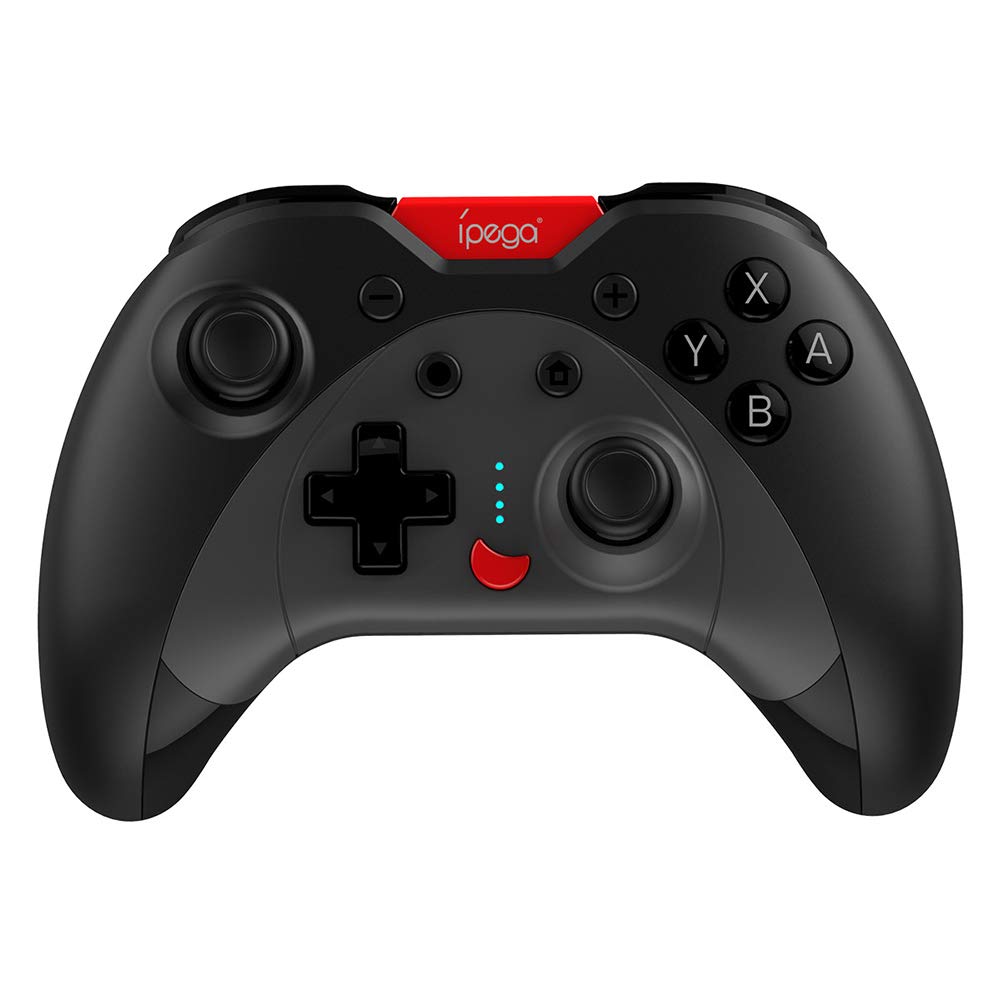
Image: A green IPEGA PG-SW023 controller illustrating its built-in six-axis gyroscope design for improved body feeling and accurate targeting.
3. Pakkens indhold
Kontroller venligst, at alle varer er til stede i pakken:
- 1 x IPEGA PG-SW023 Wireless Game Controller
- 1 x Type-C ladekabel
- 1 x brugermanual
4. Specifikationer
| Feature | Specifikation |
|---|---|
| Mærke | Ipega |
| Model | PG-SW023 |
| Farveindstillinger | Black, Green, Blue, Yellow |
| Operation Voltage | DC 3.7V |
| Driftsstrøm | <30mA |
| Statisk strøm | <20uA |
| Kontinuerlig spilletid | Ca. 15 timer |
| Input bindtage/Strøm | DC 5V/500mA |
| Opladningstid | Ca. 2 timer |
| Bluetooth version | 3.0 |
| Transmissionsafstand | ≤8 meter |
| Batterikapacitet | 400mAh |
| Produktdimensioner | 15 x 10 x 5.5 cm (5.91 x 3.94 x 2.17 tommer) |
| Produktets vægt | Ca. 215 g (7.58 ounces) |
| Kompatible enheder | N-S Console, PS3, Android, PC (Win 7/8/10) |
| Forbindelse | Trådløs (Bluetooth) |
| Strømkilde | Batteridrevet |
5. Opsætning
5.1 Opladning af controlleren
- Connect the provided Type-C charging cable to the controller's charging port.
- Tilslut den anden ende af kablet til en USB-strømkilde (f.eks. pc, USB-vægadapter).
- The indicator lights on the controller will show charging status. Once fully charged (approx. 2 hours), the lights will indicate completion or turn off.
5.2 Parring med enheder
The pairing method varies slightly depending on the device. Ensure the controller is sufficiently charged before attempting to pair.

Image: A blue IPEGA PG-SW023 controller positioned in front of a Nintendo Switch, PlayStation 3, and a laptop, illustrating its multi-platform compatibility.
5.2.1 Pairing with N-S Console
- On your N-S console, go to the HOME Menu.
- Vælg 'Controllere' > 'Skift greb/rækkefølge'.
- Press and hold the pairing button on the IPEGA controller (refer to controller diagram for exact location) until the indicator lights begin to flash rapidly.
- The console will detect the controller. Once paired, the indicator light will become solid.
5.2.2 Pairing with PS3
- Tilslut controlleren til PS3-konsollen med Type-C-kablet.
- Tryk på HOME-knappen på controlleren.
- Once recognized, you can disconnect the cable and the controller should remain paired wirelessly.
5.2.3 Parring med Android-enheder
- Aktiver Bluetooth på din Android-enhed.
- On the controller, press and hold the Android pairing button combination (refer to controller diagram or quick start guide for specific button combination, usually 'A' + HOME or 'X' + HOME) until the indicator lights flash rapidly.
- On your Android device, search for new Bluetooth devices and select 'IPEGA PG-SW023' (or similar name) from the list.
- Når parringen er aktiveret, lyser indikatorlampen på controlleren konstant.
5.2.4 Parring med pc (Windows 7/8/10)
- Sørg for, at din pc har Bluetooth aktiveret.
- Go to 'Settings' > 'Devices' > 'Bluetooth & other devices' and click 'Add Bluetooth or other device'.
- Vælg 'Bluetooth'.
- On the controller, press and hold the PC pairing button combination (refer to controller diagram or quick start guide for specific button combination, usually 'L1' + HOME or 'Y' + HOME) until the indicator lights flash rapidly.
- Select 'IPEGA PG-SW023' (or similar name) from the list of available devices on your PC.
- Når parringen er aktiveret, lyser indikatorlampen på controlleren konstant.
6. Betjeningsvejledning
6.1 Grundlæggende knapfunktioner
The controller features standard gaming buttons including directional pad, analog sticks, action buttons (A, B, X, Y), shoulder buttons (L1, R1), and triggers (L2, R2). Specific button mapping may vary by game and platform.

Image: Hands comfortably gripping a black IPEGA PG-SW023 controller, showcasing its ergonomic design for comfortable and convenient use.
6.2 TURBO Funktion
The TURBO function allows for continuous rapid input of a selected button. This can be useful in games requiring fast, repeated button presses.
- To activate TURBO: Press and hold the desired action button (e.g., A, B, X, Y) and then press the TURBO button simultaneously. The button will now continuously input as long as it's held down.
- To deactivate TURBO: Repeat the same process (press the action button and TURBO button simultaneously).

Image: A yellow IPEGA PG-SW023 controller with its prominent TURBO button, shown with a Nintendo Switch console, illustrating the auto-fire feature.
6.3 Makrofunktion
The macro function allows you to assign a sequence of button presses or a single common button to the programmable rear buttons. This can simplify complex in-game actions.
- Refer to the specific instructions provided in the quick start guide or on the manufacturer's website for detailed steps on programming macro buttons, as this process can vary.
6.4 Vibration and Gyroscope
The controller features dual motors for vibration feedback, providing tactile sensations that correspond to in-game events. The built-in six-axis gyroscope allows for motion control in supported games, offering a more immersive and precise aiming experience.

Image: A blue IPEGA PG-SW023 controller in use, with visual cues indicating its double motor vibrating design for immersive feedback during gameplay.
7. Vedligeholdelse
Korrekt pleje vil forlænge din controllers levetid:
- Rensning: Brug en blød, tør klud til at rengøre controlleren. Ved genstridigt snavs, tør letampRengør kluden med vand eller en mild rengøringsopløsning. Undgå skrappe kemikalier.
- Opbevaring: Opbevar controlleren et køligt, tørt sted væk fra direkte sollys og ekstreme temperaturer.
- Undgå påvirkning: Tab ikke controlleren eller udsæt den for kraftige stød, da dette kan beskadige de interne komponenter.
- Væskeeksponering: Hold controlleren væk fra væsker. Hvis den kommer i kontakt med væske, skal du straks slukke den og lade den tørre helt, før du forsøger at bruge den igen.
8. Fejlfinding
If you encounter issues with your IPEGA PG-SW023 controller, try the following solutions:
- Controlleren forbinder ikke:
- Sørg for, at controlleren er fuldt opladet.
- Bekræft, at Bluetooth er aktiveret på din enhed.
- Try re-pairing the controller by following the setup instructions for your specific device.
- Flyt controlleren tættere på enheden for at sikre, at den er inden for en rækkevidde på 8 meter.
- Genstart både controlleren og din spilleenhed.
- Knapper reagerer ikke:
- Check if the controller is properly connected and paired.
- Test controlleren med et andet spil eller program for at udelukke softwarespecifikke problemer.
- Sørg for, at der ikke sidder snavs fast under knapperne.
- Vibration virker ikke:
- Verify that the game or system settings have vibration enabled.
- Some games may not support vibration feedback.
- Kort batterilevetid:
- Sørg for, at controlleren er fuldt opladet før brug.
- Battery life can vary based on usage intensity (e.g., continuous vibration).
- Undgå opladning i ekstremt varme eller kolde omgivelser.
9. Garanti og support
For warranty information, technical support, or service inquiries regarding your IPEGA PG-SW023 Bluetooth Wireless Game Controller, please refer to the product packaging or contact the manufacturer directly through their official webwebstedet eller kundeservicekanaler. Gem din købskvittering som købsbevis i tilfælde af garantikrav.